SCENERY INSTRUCTIONS DO NOT WORK

FSX including FSX Steam version.

SCENERY INSTRUCTIONS DO NOT WORK

Postby hoverunder » Thu Jan 14, 2010 3:28 am

I saw this here:

[color=#ff0000]When installing Frank's scenery, you will need to set up the folder for it to go into your Addon Scenery directory (or where ever it is you keep your addon scenery files)

After unzipping the package:

- Create a new folder named after the scenery

- inside that folder create a folder named "Scenery"

- place all of the .bgl files from the zip file into that "scenery" folder

- now start FSX and go to Settings/ scenery Library/ add new/ and select the folder you just created.

Allow it to update the scenery files, and then you should be good to go
[/color]

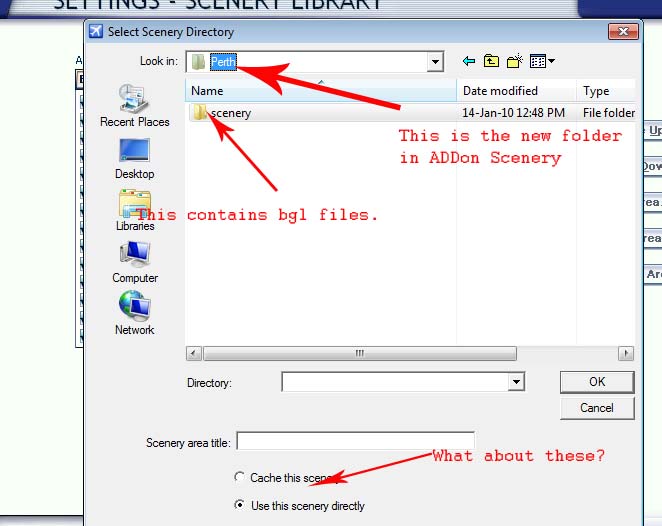
I followed this to the letter, but after selecting the folder, I got this box which leads no place:

[img]http://www.simviation.com/yabbuploads/SceneryFSX.jpg[img]

This scenery thing is driving me crazy.
Can someone help - PLEASE??

hoverunder
Ground hog
Ground hog
 
Posts: 7
Joined: Tue Jan 12, 2010 2:01 am

Re: SCENERY INSTRUCTIONS DO NOT WORK

Postby Hagar » Thu Jan 14, 2010 4:18 am

- now start FSX and go to Settings/ scenery Library/ add new/ and select the folder you just created.

This means select the folder named Perth in your shot.

Image

Don't open the folder. Simply click on it to select it. The name should appear in the [ Scenery area title ] box. Leave everything else as it is.

If you're using Windows 7 please read this. http://aussiex.org/forum/index.php?showtopic=4426
Last edited by Hagar on Thu Jan 14, 2010 4:20 am, edited 1 time in total.
Image

Founder & Sole Member - Grumpy's Over the Hill Club for Veteran Virtual Aviators
Member of the Fox Four Group
My Google Photos albums
My Flickr albums
User avatar
Hagar
Colonel
Colonel
 
Posts: 30868
Joined: Wed Jun 19, 2002 7:15 am
Location: Costa Geriatrica

Re: SCENERY INSTRUCTIONS DO NOT WORK

Postby hoverunder » Thu Jan 14, 2010 10:09 pm

Thanks, Hagar. This issue has had me pulling my hair out.
It has gone on for days and days.
I finally did discover after getting sick of searching, that it's the OS - not me.
it's all working now, but too late....

I'm bald!! :'(
hoverunder
Ground hog
Ground hog
 
Posts: 7
Joined: Tue Jan 12, 2010 2:01 am


Return to Flight Simulator X (FSX) and Steam

Who is online

Users browsing this forum: No registered users and 538 guests