Textures Become Blurry

FSX including FSX Steam version.

Textures Become Blurry

Postby B-Valvs » Sat Nov 14, 2009 11:08 am

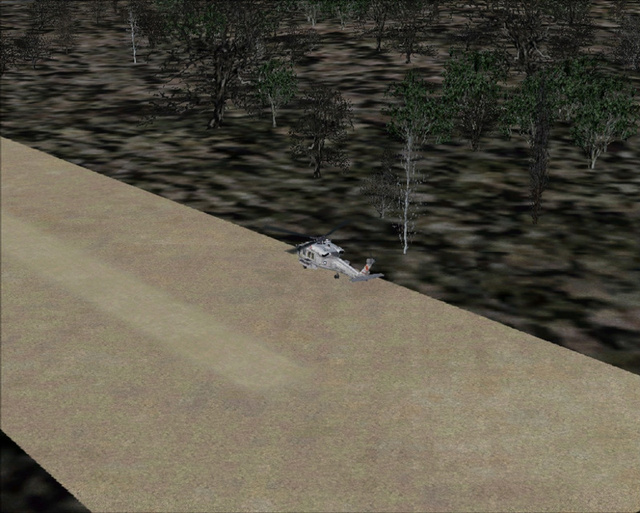
I downloaded the freeware REX grass and it looks great, but it becomes blurry after a few feet. Is there a way to make it appear longer?

Image

Thanks for any help.

8-)
User avatar
B-Valvs
Lieutenant Colonel
Lieutenant Colonel
 
Posts: 5904
Joined: Mon Aug 24, 2009 7:05 pm
Location: 5B2

Re: Textures Become Blurry

Postby Daube » Sat Nov 14, 2009 11:39 am

You have to increase the level of anisotropic filtering in your video card settings (in Windows).
Also, you'll have to make sure that the video card is in "Quality" mode, not in "Performance".
User avatar
Daube
Lieutenant Colonel
Lieutenant Colonel
 
Posts: 6611
Joined: Wed Oct 05, 2005 8:34 am
Location: Nice (FR)

Re: Textures Become Blurry

Postby B-Valvs » Sat Nov 14, 2009 12:01 pm

Thanks, I'll try it out.

8-)
User avatar
B-Valvs
Lieutenant Colonel
Lieutenant Colonel
 
Posts: 5904
Joined: Mon Aug 24, 2009 7:05 pm
Location: 5B2

Re: Textures Become Blurry

Postby B-Valvs » Sat Nov 14, 2009 12:33 pm

That worked. Thanks.

8-)
User avatar
B-Valvs
Lieutenant Colonel
Lieutenant Colonel
 
Posts: 5904
Joined: Mon Aug 24, 2009 7:05 pm
Location: 5B2

Re: Textures Become Blurry

Postby Tai-2 » Sat Nov 14, 2009 1:57 pm

hmm im still having problems

Image

Im using a radeon 4830 HD Sapphire Gpu
In the Catalyts Control Center I have Adaptive AA at quality and anisotropic filtering at 16X(max it can go)
Should I raise the AA, not adpative AA, but AA from 2X? or possible the Catalyst AI to quality settings?
Last edited by Tai-2 on Sat Nov 14, 2009 1:58 pm, edited 1 time in total.
User avatar
Tai-2
Captain
Captain
 
Posts: 699
Joined: Thu Apr 23, 2009 10:57 pm
Location: Georgia

Re: Textures Become Blurry

Postby jwenham » Sat Nov 14, 2009 3:15 pm

Have to tried raising the Texture Bandwidth Multiplier (TBM) Try a setting of 70 the default is 40.
Intel i7 940 2.93 clocked to 4.0ghz Asus P6T Deluxe 6gb OCZ 1600 8-8-8-24 EVGA GTX 260 Superclocked Edition Thermalright 120 CPU Cooler Power PC & Cooling 750w PSU 1 tb Seagate Barracuda HD 500 gb Seagate Barracude HD 22" Viewsonic Widescreen Tra
User avatar
jwenham
2nd Lieutenant
2nd Lieutenant
 
Posts: 266
Joined: Sat Jan 03, 2009 12:40 pm

Re: Textures Become Blurry

Postby Tai-2 » Sat Nov 14, 2009 3:50 pm

Have to tried raising the Texture Bandwidth Multiplier (TBM) Try a setting of 70 the default is 40.


Hmm cannot find that at all


And on other note, i have tried to raise everything to max in CCC and nothing.
User avatar
Tai-2
Captain
Captain
 
Posts: 699
Joined: Thu Apr 23, 2009 10:57 pm
Location: Georgia

Re: Textures Become Blurry

Postby jwenham » Sat Nov 14, 2009 5:37 pm

Its under the display section of the CFG file

[Display]
RUNWAY_LIGHTS_SURFACE_SCALAR=1.0
RUNWAY_LIGHTS_VASI_SCALAR=0.8
RUNWAY_LIGHTS_APPROACH_SCALAR=0.9
RUNWAY_LIGHTS_STROBE_SCALAR=1.2
ChangeTime=4.000000
TransitionTime=4.000000
ActiveWindowTitleTextColor=255,255,255
ActiveWindowTitleBackGroundColor=0,28,140,64
NonActiveWindowTitleTextColor=255,255,255
NonActiveWindowTitleBackGroundColor=24,33,87,64
InfoUpperRightTextColor=255,0,0
InfoUpperRightBackGroundColor=0,0,0,0
InfoLowerLeftTextColor=255,255,255
InfoLowerLeftBackGroundColor=255,0,0,128
InfoLowerRightTextColor=255,255,255
InfoLowerRightBackGroundColor=255,0,0,128
InfoBrakesEnable=True
InfoParkingBrakesEnable=True
InfoPauseEnable=True
InfoSlewEnable=True
InfoStallEnable=True
InfoOverspeedEnable=True
BLOOM_EFFECTS=0
SKINNED_ANIMATIONS=1
[color=#ff0000]TEXTURE_BANDWIDTH_MULT=40
Intel i7 940 2.93 clocked to 4.0ghz Asus P6T Deluxe 6gb OCZ 1600 8-8-8-24 EVGA GTX 260 Superclocked Edition Thermalright 120 CPU Cooler Power PC & Cooling 750w PSU 1 tb Seagate Barracuda HD 500 gb Seagate Barracude HD 22" Viewsonic Widescreen Tra

User avatar
jwenham
2nd Lieutenant
2nd Lieutenant
 
Posts: 266
Joined: Sat Jan 03, 2009 12:40 pm


Return to Flight Simulator X (FSX) and Steam

Who is online

Users browsing this forum: No registered users and 413 guests