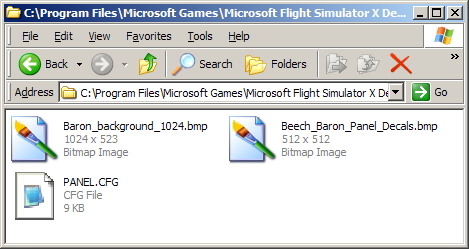
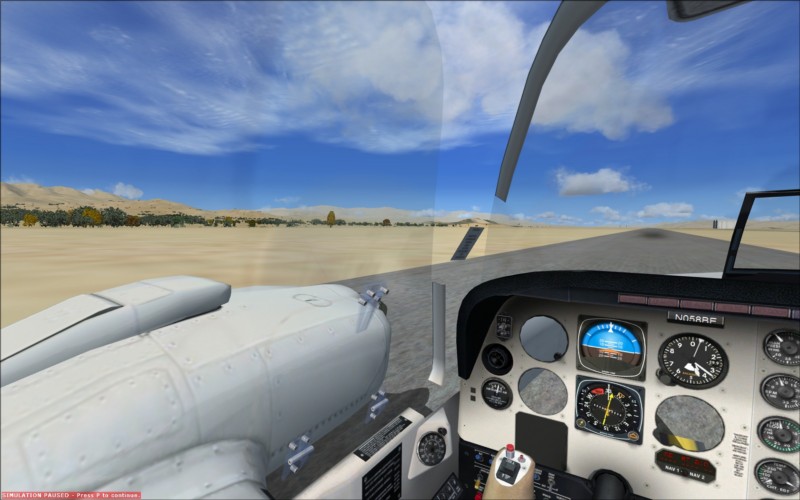
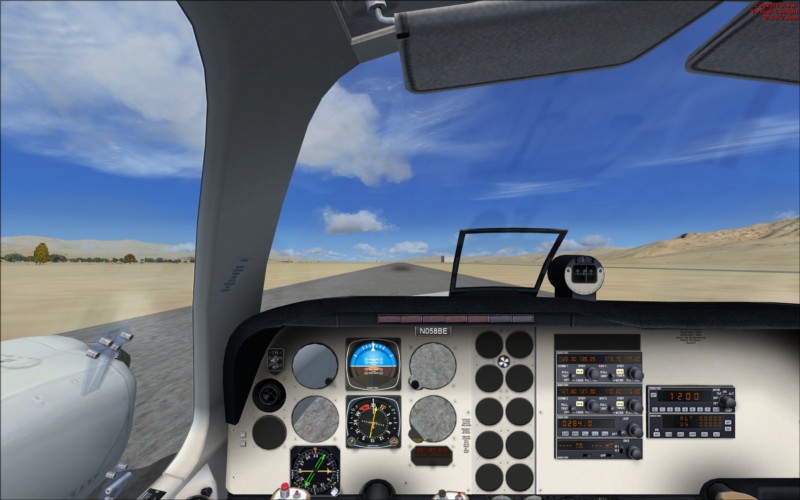
by Dave W » Tue Nov 03, 2009 12:07 am
Ok, this is the best I can do... Here is the code for the Baron .CFG file for my version of FSX (Delux Edition, SP1, SP2 and no Accleration) At your own risk, create a new .cfg file and copy this code into it.
//Start
[fltsim.0]
title=Beech Baron 58 Paint1
sim=Beech_Baron_58
model=
panel=
sound=
texture=1
kb_checklists=Beech_Baron_58_check
kb_reference=Beech_Baron_58_ref
atc_id=N71FS
ui_manufacturer="Beechcraft"
ui_type="Baron 58"
ui_variation="White/Blue Stripes"
ui_typerole="Twin Engine Prop"
ui_createdby="Microsoft Corporation"
description="With the wonderful control harmony that is the hallmark of the Bonanza line, the Beech Baron 58 is considered a classic light twin. The Baron 58 is the spiffed-up version of a time-tested favorite, made more modern by its new Continental Special engines. The Baron combines the attractiveness of Beechcraft design with the reliability of twin engines, resulting in a gorgeous workhorse of an aircraft."
[fltsim.1]
title=Beech Baron 58 Paint2
sim=Beech_Baron_58
model=
panel=
sound=
texture=2
kb_checklists=Beech_Baron_58_check
kb_reference=Beech_Baron_58_ref
atc_id=N71FS
ui_manufacturer="Beechcraft"
ui_type="Baron 58"
ui_variation="White/Red Stripes"
ui_typerole="Twin Engine Prop"
ui_createdby="Microsoft Corporation"
description="With the wonderful control harmony that is the hallmark of the Bonanza line, the Beech Baron 58 is considered a classic light twin. The Baron 58 is the spiffed-up version of a time-tested favorite, made more modern by its new Continental Special engines. The Baron combines the attractiveness of Beechcraft design with the reliability of twin engines, resulting in a gorgeous workhorse of an aircraft."
[fltsim.2]
title=Beech Baron 58 Paint3
sim=Beech_Baron_58
model=
panel=
sound=
texture=3
kb_checklists=Beech_Baron_58_check
kb_reference=Beech_Baron_58_ref
atc_id=N71FS
ui_manufacturer="Beechcraft"
ui_type="Baron 58"
ui_variation="Privately owned aircraft"
ui_typerole="Twin Engine Prop"
ui_createdby="Microsoft Corporation"
description="With the wonderful control harmony that is the hallmark of the Bonanza line, the Beech Baron 58 is considered a classic light twin. The Baron 58 is the spiffed-up version of a time-tested favorite, made more modern by its new Continental Special engines. The Baron combines the attractiveness of Beechcraft design with the reliability of twin engines, resulting in a gorgeous workhorse of an aircraft."
[fltsim.3]
title=Beech Baron 58 w G1000
sim=Beech_Baron_58
model=g1000
panel=g1000
sound=
texture=g1000
kb_checklists=Beech_Baron_58_check
kb_reference=Beech_Baron_58_ref
atc_id=N71FS
ui_manufacturer="Beechcraft"
ui_type="Baron 58 G1000"
ui_variation="Glass Cockpit"
ui_typerole="Twin Engine Prop"
ui_createdby="Microsoft Corporation"
description="With the wonderful control harmony that is the hallmark of the Bonanza line, the Beech Baron 58 is considered a classic light twin. The Baron 58 is the spiffed-up version of a time-tested favorite, made more modern by its new Continental Special engines. The Baron combines the attractiveness of Beechcraft design with the reliability of twin engines, resulting in a gorgeous workhorse of an aircraft."
[fltsim.4]
title=Beech Baron 58
sim=Beech_Baron_58
model=
panel=
sound=
texture=
kb_checklists=Beech_Baron_58_check
kb_reference=Beech_Baron_58_ref
atc_id=N058BE
ui_manufacturer="Beechcraft"
ui_type="Baron 58"
ui_variation="White"
ui_typerole="Twin Engine Prop"
ui_createdby="Microsoft Corporation"
description="With the wonderful control harmony that is the hallmark of the Bonanza line, the Beech Baron 58 is considered a classic light twin. The Baron 58 is the spiffed-up version of a time-tested favorite, made more modern by its new Continental Special engines. The Baron combines the attractiveness of Beechcraft design with the reliability of twin engines, resulting in a gorgeous workhorse of an aircraft."
[General]
atc_type=BEECH
atc_model=BE58
editable=0
performance="Cruise Speed\n200 kts 370 km\/hr\n\nEngine\nTeledyne Continental Motors IO-550-C 300 hp\n\nPropeller\nThree-bladed McCauley constant-speed, variable pitch\n\nMaximum Range\n1,569 nm 2,906 km\n\nService Ceiling\n20,688 ft 6,306 km\n\nFuel Capacity\n142 gal 537 L\n\nMaximum Gross Weight\n5,524 lb 2,509 kg \n\nLength\n29 ft, 10 in 9.09 m\n\nWingspan\n37 ft, 10 in 11.53 m\n\nHeight\n9 ft, 9 in 2.97 m\n\nSeating Up to 6\n\nUseful Load\n1,613 lb 732 kg"
Category = airplane
[CameraDefinition.0]
Title = "Right Wing"
Guid = {C690EAFD-223A-42d0-99E0-681ADF93BB59}
Description = View from the right wing looking at the cockpit
Origin = Center
SnapPbhAdjust = Swivel
SnapPbhReturn = FALSE
PanPbhAdjust = Swivel
PanPbhReturn = FALSE
Track = None
ShowAxis = FALSE
AllowZoom = TRUE
InitialZoom = 1.0
ShowWeather = Yes
InitialXyz = 11.5, 0.7, -0.2
InitialPbh = 5, 0, 275
XyzAdjust = TRUE
Category=Aircraft
ClipMode=Minimum
[CameraDefinition.1]
Title = "Left Wing"
Guid = {3A09FD6C-D406-4d8f-A5CD-FA4F5E0C12ED}
Description = View from the left wing looking at the cockpit
Origin = Center
SnapPbhAdjust = Swivel
SnapPbhReturn = FALSE
PanPbhAdjust = Swivel
PanPbhReturn = FALSE
Track = None
ShowAxis = FALSE
AllowZoom = TRUE
InitialZoom = 1.0
ShowWeather = Yes
InitialXyz = -11.5, 0.6, -0.2
InitialPbh = 5, 0, 85
XyzAdjust = TRUE
Category=Aircraft
ClipMode=Minimum
[CameraDefinition.2]
Title = "Tail"
Guid = {D8D67955-2E9B-4e75-9D8B-8EFFBBFAC64A}
Description = Looking forward from behind the aircraft
Origin = Center
SnapPbhAdjust = Swivel
SnapPbhReturn = FALSE
PanPbhAdjust = Swivel
PanPbhReturn = FALSE
Track = None
ShowAxis = FALSE
AllowZoom = TRUE
InitialZoom = 0.75
ShowWeather = Yes
InitialXyz = 0, 2.0, -15.0
InitialPbh = 7, 0, 0
XyzAdjust = TRUE
Category=Aircraft
MomentumEffect=TRUE
ClipMode=Minimum
[CameraDefinition.001]
Title = "Right Seat"
Guid = {195EAB58-9E4A-1E2A-A34C-A8D9D948F078}
Origin = Virtual Cockpit
MomentumEffect = Yes
SnapPbhAdjust = Swivel
SnapPbhReturn = False
PanPbhAdjust = Swivel
PanPbhReturn = False
Track = None
ShowAxis = YES
AllowZoom = TRUE
InitialZoom = 0.7
SmoothZoomTime = 2.0
ZoomPanScalar = 1.0
ShowWeather = Yes
XyzAdjust = TRUE
ShowLensFlare=FALSE
Category = Cockpit
PitchPanRate=20
HeadingPanRate=60
InitialXyz=0.52, 0.0, 0.0
InitialPbh=3, 0, 0
[CameraDefinition.002]
Title = "Radio Stack"
Guid = {195EAB58-9E4A-2E2A-A34C-A8D9D948F078}
Origin = Virtual Cockpit
MomentumEffect = No
SnapPbhAdjust = None
SnapPbhReturn = False
PanPbhAdjust = None
PanPbhReturn = False
Track = None
ShowAxis = FALSE
AllowZoom = TRUE
InitialZoom = 1.3
SmoothZoomTime = 2.0
ZoomPanScalar = 1.0
ShowWeather = Yes
XyzAdjust = TRUE
ShowLensFlare=FALSE
Category = Cockpit
PitchPanRate=20
HeadingPanRate=60
InitialXyz=0.41, -0.06, 0.0
InitialPbh=15, 0, 0
[CameraDefinition.003]
Title = "Engine Controls"
Guid = {563fdda0-af36-4c28-ab71-b5db7e77e474}
Origin = Virtual Cockpit
MomentumEffect = No
SnapPbhAdjust = None
SnapPbhReturn = False
PanPbhAdjust = None
PanPbhReturn = False
Track = None
ShowAxis = FALSE
AllowZoom = TRUE
InitialZoom = 0.9
SmoothZoomTime = 2.0
ZoomPanScalar = 1.0
ShowWeather = Yes
XyzAdjust = TRUE
ShowLensFlare=FALSE
Category = Cockpit
PitchPanRate=20
HeadingPanRate=60
InitialXyz=0.27, -0.1, 0.18
InitialPbh=45, 0, 0
[CameraDefinition.004]
Title = "Switches"
Guid = {195EAB58-9E4A-3E2A-A34C-A8D9D948F078}
Origin = Virtual Cockpit
MomentumEffect = No
SnapPbhAdjust = None
SnapPbhReturn = False
PanPbhAdjust = None
PanPbhReturn = False
Track = None
ShowAxis = FALSE
AllowZoom = TRUE
InitialZoom = 0.8
SmoothZoomTime = 2.0
ZoomPanScalar = 1.0
ShowWeather = Yes
XyzAdjust = TRUE
ShowLensFlare=FALSE
Category = Cockpit
PitchPanRate=20
HeadingPanRate=60
InitialXyz=0.11, -0.55, 0.18
InitialPbh=-10, 0, -16
[WEIGHT_AND_BALANCE]
max_gross_weight = 5524 // (pounds)
empty_weight = 3911 // (pounds)
reference_datum_position = 6.96, 0, 0 // (feet) distance from FlightSim Reference position: (1/4 chord, centerline, waterline)
empty_weight_CG_position = -6.06, 0, 0 // (feet) longitudinal, lateral, vertical distance from specified datum
max_number_of_stations = 50
station_load.0 = 170, -6.54, -1.20, 0.0 //Weight (lbs), longitudinal, lateral, vertical positions from datum (feet)
station_load.1 = 170, -6.54, 1.20, 0.0 //Weight (lbs), longitudinal, lateral, vertical positions from datum (feet)
station_load.2 = 170, -9.80, -1.20, 0.0 //Weight (lbs), longitudinal, lateral, vertical positions from datum (feet)
station_load.3 = 170, -9.80, 1.20, 0.0 //Weight (lbs), longitudinal, lateral, vertical positions from datum (feet)
station_load.4 = 0, -12.67, -1.1, 0.0 //Weight (lbs), longitudinal, lateral, vertical positions from datum (feet)
station_load.5 = 0, -12.67, 1.1, 0.0 //Weight (lbs), longitudinal, lateral, vertical positions from datum (feet)
station_load.6 = 0, -15.00, 0.0, 0.0 //Weight (lbs), longitudinal, lateral, vertical positions from datum (feet)
station_name.0 = "Pilot"
station_name.1 = "Co-Pilot"
station_name.2 = "Passenger"
station_name.3 = "Passenger"
station_name.4 = "Passenger"
station_name.5 = "Passenger"
station_name.6 = "Baggage"
;Moments of Inertia
empty_weight_pitch_MOI = 3905.65
empty_weight_roll_MOI = 2718.64
empty_weight_yaw_MOI = 5291.04
empty_weight_coupled_MOI= 0.0
[flight_tuning]
cruise_lift_scalar = 1.0
parasite_drag_scalar = 1.0
induced_drag_scalar = 1.0
elevator_effectiveness = 1.0
aileron_effectiveness = 1.0
rudder_effectiveness = 1.0
pitch_stability = 1.0
roll_stability = 1.0
yaw_stability = 1.0
elevator_trim_effectiveness = 1.0
aileron_trim_effectiveness = 1.0
rudder_trim_effectiveness = 1.0
[GeneralEngineData]
engine_type = 0 //0=Piston, 1=Jet, 2=None, 3=Helo-Turbine, 4=Rocket, 5=Turboprop
Engine.0 = -1.4, -5.3, 0.0 //(feet) longitudinal, lateral, vertical distance from reference datum
Engine.1 = -1.4, 5.3, 0.0 //(feet) longitudinal, lateral, vertical distance from reference datum
fuel_flow_scalar= 0.9 //Fuel flow scalar
min_throttle_limit = 0.0; //Minimum percent throttle. Generally negative for turbine reverser
[piston_engine]
power_scalar = 1.0 //Piston power scalar
cylinder_displacement= 91.7 //Cubic inches per cylinder
compression_ratio= 8.0 //Compression ratio
number_of_cylinders= 6 //Number of cylinders
max_rated_rpm= 2700.0 //Max rated RPM
max_rated_hp= 300.0 //Max rated HP
fuel_metering_type= 0 //0=Fuel Injected, 1=Gravity Carburetor, 2=Aerobatic Carburetor
cooling_type= 0 //0=Cooling type Air, 1=Cooling type Liquid
normalized_starter_torque= 0.3 //Starter torque factor
turbocharged= 0 //Is it turbocharged? 0=FALSE, 1=TRUE
max_design_mp= 0.0 //Max design manifold pressure, (inHg)
min_design_mp= 1.0 //Min design manifold pressure, (inHg)
critical_altitude= 0.0 //Altitude to which the turbocharger will provide max design manifold pressure (feet)
emergency_boost_type= 0 //0=None, 1=Water Injection, 2=Methanol/Water injection, 3=War Emergency Power
emergency_boost_mp_offset= 0.0
Flight Simulator Deluxe - SP1 - SP2






 There must be a size limit on this board. Sorry...