I am new and I need help

FSX including FSX Steam version.

I am new and I need help

Postby Artificial_Horizon » Tue Oct 06, 2009 3:14 am

Hello,

I already wrote to the e-mail address of this site. But also here I am in this forum with the hope that somebody can help me. I was thrilled when I saw so many different models and configurations of the airplanes. So I'd just chosen to become a member and I downloaded several files that I am not able to open yet despite ALL the explained procedures! I think that probably I missed something.
For example I downloaded the file "Lockheed SR-71 Blackbird Package for FSX " and I was damn ready to go as fast as 3.5 mach but nothing happened.... well....that's what I did
1- download 2- unzip 3- put the new folder into FSX "airplanes" folder. I also modified as suggested the panel and the sound but still nothing!
Please help me to make this thing work!
Many thanks! :)
Artificial_Horizon
Ground hog
Ground hog
 
Posts: 3
Joined: Tue Oct 06, 2009 3:57 am
Location: Arizona USA

Re: I am new and I need help

Postby Daube » Tue Oct 06, 2009 4:15 am

Hi and welcome to Simviation.

The airplanes that you can download from this site usually have a readme file that sometimes contains precise instructions for the installation of the plane.
Sometimes, putting the plane in the simobjects\airplanes folder of FSX is not enough, and you need to copy some files here, move some files there, etc...

Don't worry, it's never anything complex. You just need to be aware about what is needed for a plane to be really correctly installed. You'll get the experience very soon.

However, could you please post the link of the page where you found your plane ? We need to know exactely which one you downloaded in order to provide explanations. Each plane is different ;)
Last edited by Daube on Tue Oct 06, 2009 4:16 am, edited 1 time in total.
User avatar
Daube
Lieutenant Colonel
Lieutenant Colonel
 
Posts: 6611
Joined: Wed Oct 05, 2005 8:34 am
Location: Nice (FR)

Re: I am new and I need help

Postby Hagar » Tue Oct 06, 2009 8:06 am

Hi there. I suspect you mean the SR-71 posted on this page. http://www.simviation.com/simviation/?ID=64&page=22&mark=4759

All files will vary to some extent but this one is straightforward enough. Providing you install the correct folder it should work "out of the box" with no need for tweaks or modifications.

A lot will depend on the methods you use to extract zipfiles. Everyone has their favourite utilities & method of using them so it's not so easy to give specific instructions. I suspect the "Aircraft Container" folder you need is hidden inside one or more other folders where FSX can't find it.

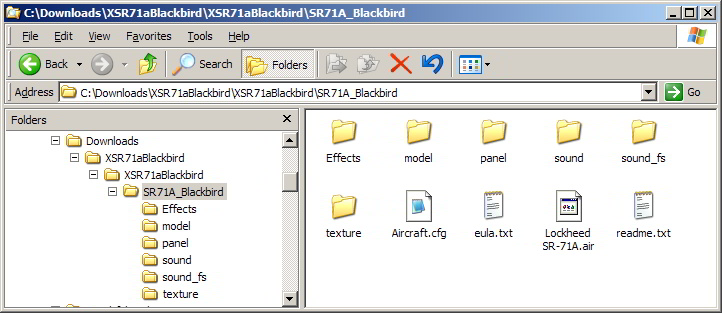
You'll find this easier once you can recognise what you're looking for. In this case it will be a folder named SR71A_Blackbird directly containing the usual Model, Panel, Sound & Texture sub-folders plus files named Aircraft.cfg & Lockheed SR-71A.air. The SR71A_Blackbird folder is the one you paste into your FSX\SimObjects\Airplanes directory. That's the folder highlighted in grey in this shot.
Image

PS. Once you have it appearing on the FSX aircraft selection menu you can paste the contents of the Effects folder into FSX\Effects & the contents of the sound_fs folder into FSX\Sound..
Last edited by Hagar on Tue Oct 06, 2009 8:15 am, edited 1 time in total.
Image

Founder & Sole Member - Grumpy's Over the Hill Club for Veteran Virtual Aviators
Member of the Fox Four Group
My Google Photos albums
My Flickr albums
User avatar
Hagar
Colonel
Colonel
 
Posts: 30868
Joined: Wed Jun 19, 2002 7:15 am
Location: Costa Geriatrica

Re: I am new and I need help

Postby Bumkin » Tue Oct 06, 2009 12:07 pm

Two best places to start for information on installations are "Grumpy's Lair" (see link in Hagar's signature & on the Simviation home page) and FSX FAQ (located at top of page 1 on this forum).  Both have great information.
Don't ask an aviator if he flys fighters.
User avatar
Bumkin
2nd Lieutenant
2nd Lieutenant
 
Posts: 126
Joined: Wed Jun 11, 2008 4:39 pm
Location: Pensacola, FL

Re: I am new and I need help

Postby b108 » Thu Oct 08, 2009 7:48 pm

YEAH! WOOOOO! GO simV! GO simV W00T! W00T! W00T!!!! :D
b108
2nd Lieutenant
2nd Lieutenant
 
Posts: 93
Joined: Wed Feb 13, 2008 5:36 pm

Re: I am new and I need help

Postby Plugpennyshadow » Fri Oct 09, 2009 5:50 pm

Hagar?  You are Grumpy?

I have found your overly detailed how-tos to be quite useful.  Quite useful indeed.

Thankie...
Plugpennyshadow
2nd Lieutenant
2nd Lieutenant
 
Posts: 274
Joined: Sat Mar 15, 2008 1:56 pm

Re: I am new and I need help

Postby Felix/FFDS » Sat Oct 10, 2009 1:45 pm

[quote]Hagar?
Felix/FFDS
User avatar
Felix/FFDS
Administrator
Administrator
 
Posts: 16776435
Joined: Wed Jan 31, 2001 9:42 am
Location: Orlando, FL

Re: I am new and I need help

Postby Plugpennyshadow » Sat Oct 10, 2009 2:18 pm

Forgotten what?  heheheh
Plugpennyshadow
2nd Lieutenant
2nd Lieutenant
 
Posts: 274
Joined: Sat Mar 15, 2008 1:56 pm

Re: I am new and I need help

Postby Hagar » Sat Oct 10, 2009 2:24 pm

He's forgotten .....

Sadly true. My memory is not what it was. :'(
Image

Founder & Sole Member - Grumpy's Over the Hill Club for Veteran Virtual Aviators
Member of the Fox Four Group
My Google Photos albums
My Flickr albums
User avatar
Hagar
Colonel
Colonel
 
Posts: 30868
Joined: Wed Jun 19, 2002 7:15 am
Location: Costa Geriatrica

Re: I am new and I need help

Postby alfonso182 » Mon Oct 12, 2009 12:31 am

Hello,

Probably the problem that I have right now is a common problem but I need your help on this due that start to use the FSX just 3 days ago.  The problem is with al models planes textures.  When I try to choose a plane, the planes appear in the preview images in a grey color.  I don
alfonso182
Ground hog
Ground hog
 
Posts: 1
Joined: Mon Oct 12, 2009 1:11 am

Re: I am new and I need help

Postby Ghostrider114 » Mon Oct 12, 2009 3:20 am

it might take the textures a moment to load if you have a low end system.
Image
User avatar
Ghostrider114
1st Lieutenant
1st Lieutenant
 
Posts: 393
Joined: Sat Jan 08, 2005 4:42 pm
Location: Local Airport: KHIO

Re: I am new and I need help

Postby Daube » Mon Oct 12, 2009 3:52 am

[quote]Hello,

Probably the problem that I have right now is a common problem but I need your help on this due that start to use the FSX just 3 days ago.
User avatar
Daube
Lieutenant Colonel
Lieutenant Colonel
 
Posts: 6611
Joined: Wed Oct 05, 2005 8:34 am
Location: Nice (FR)

Re: I am new and I need help

Postby Artificial_Horizon » Sun Nov 01, 2009 2:34 pm

First of all thank you to everyone that responded! I could solve any issue related with folder right placement and other stuff!
Best Wishes to you all as the great blues sky! ;)
A_H.
Artificial_Horizon
Ground hog
Ground hog
 
Posts: 3
Joined: Tue Oct 06, 2009 3:57 am
Location: Arizona USA

Re: I am new and I need help

Postby DenisH » Mon Nov 02, 2009 8:02 am

Are your very informative guides to FS9 installations applicable to FSX and the new windows 7?
DenisH
2nd Lieutenant
2nd Lieutenant
 
Posts: 287
Joined: Wed Apr 22, 2009 6:28 pm
Location: ca, usa


Return to Flight Simulator X (FSX) and Steam

Who is online

Users browsing this forum: No registered users and 407 guests