Using Posky Planes trying to update them for fsx

FSX including FSX Steam version.

Using Posky Planes trying to update them for fsx

Postby jenningst » Sun Oct 11, 2009 9:57 pm
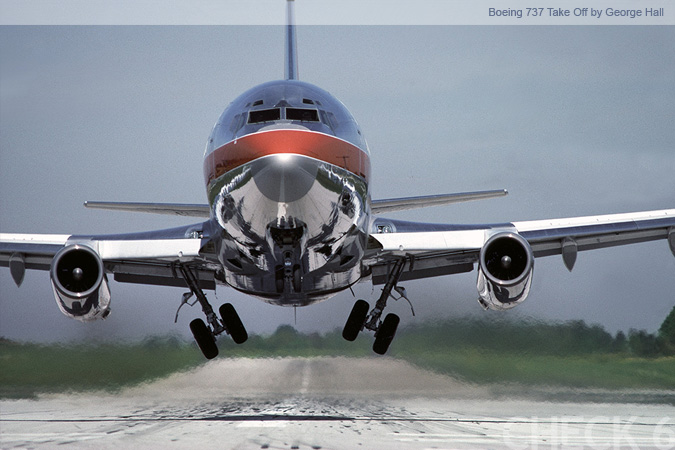
so i downloaded a couple POSKY planes and they are for 2004 and i kno there is a way to update them and have FSX read them, but i tried and i believe i may be doing something wrong. anyone else have a guide or a how to on doing this, also gettin the vc's to work lol ;)
User avatar
jenningst
Ground hog
Ground hog
 
Posts: 16
Joined: Sat Sep 26, 2009 7:54 pm
Location: Indiana

Re: Using Posky Planes trying to update them for fsx

Postby Hagar » Mon Oct 12, 2009 3:34 am

Most of the current versions of Posky aircraft are compatible with FSX so don't need updating. Most of them also have a VC.

With older FS2004 versions of the aircraft it might be a simple case of aliasing Sound.cfg to the FSX default B737_800 & sticking a thumbnail in the Texture folder. Adding the VC is a tad more complicated & will depend on the aircraft. You might need to import some of the FS9 default gauges for the panels to work properly.
Last edited by Hagar on Mon Oct 12, 2009 3:44 am, edited 1 time in total.
Image

Founder & Sole Member - Grumpy's Over the Hill Club for Veteran Virtual Aviators
Member of the Fox Four Group
My Google Photos albums
My Flickr albums
User avatar
Hagar
Colonel
Colonel
 
Posts: 30868
Joined: Wed Jun 19, 2002 7:15 am
Location: Costa Geriatrica

Re: Using Posky Planes trying to update them for fsx

Postby gtirob01 » Mon Oct 12, 2009 7:46 am

Just as Hagar said, you may need to alias the sound and/or panel and create a thumbnail for them to show. What planes are you having trouble with? Thats the best way to try to figure it out. I have atleast 1 of everything made by Posky... so we should be able to figure out whats going on.
My specs... A hard drive, motherboard, graphics card, some memory, a keyboard, mouse, and monitor - in other words, nothing special.

Image

My Posky
User avatar
gtirob01
Major
Major
 
Posts: 3605
Joined: Fri Jul 20, 2007 11:10 pm
Location: Ft. Walton Beach, FL

Re: Using Posky Planes trying to update them for fsx

Postby B-Valvs » Mon Oct 12, 2009 9:37 am

Something like this?

http://forums.overclockers.co.uk/showth ... t=17996209

This shows how to update the model, but yuo only need that if you want to use an FSX VC.

8-)
User avatar
B-Valvs
Lieutenant Colonel
Lieutenant Colonel
 
Posts: 5904
Joined: Mon Aug 24, 2009 7:05 pm
Location: 5B2

Re: Using Posky Planes trying to update them for fsx

Postby Hagar » Mon Oct 12, 2009 9:46 am

Something like this?

http://forums.overclockers.co.uk/showth ... t=17996209

This shows how to update the model, but yuo only need that if you want to use an FSX VC.

8-)

Think we've been here before. To the best of my knowledge all current Posky aircraft have a FS9 visual model so a VC from a true FSX model cannot be merged into it.

Most of the Posky aircraft have their own VC models but these usually have to be downloaded & installed separately. Posky aircraft were never the easiest to install, even to FS9. If I know which aircraft we're talking about I can walk jenningst through it. I need the file name & the exact page it's posted on.

Edit: I just checked out the files from that tute. Seems I was mistaken & some Posky aircraft have been updated with true FSX models.
Last edited by Hagar on Mon Oct 12, 2009 10:38 am, edited 1 time in total.
Image

Founder & Sole Member - Grumpy's Over the Hill Club for Veteran Virtual Aviators
Member of the Fox Four Group
My Google Photos albums
My Flickr albums
User avatar
Hagar
Colonel
Colonel
 
Posts: 30868
Joined: Wed Jun 19, 2002 7:15 am
Location: Costa Geriatrica

Re: Using Posky Planes trying to update them for fsx

Postby N. Chapman » Mon Oct 12, 2009 10:53 am

Only a majority of the 737 series (-600, 700, 800, 900) has been updated for FSX and even then you don't get some of the features that you get on the FS9 model ;)

As for the other models, 747, 757, 767, 777, they are all FS9 and will most likely stay that way :)
Last edited by N. Chapman on Mon Oct 12, 2009 10:54 am, edited 1 time in total.
Image
Click for Computer info overload!
User avatar
N. Chapman
Captain
Captain
 
Posts: 971
Joined: Sat Oct 13, 2007 7:19 pm
Location: Fremont, CA

Re: Using Posky Planes trying to update them for fsx

Postby B-Valvs » Mon Oct 12, 2009 11:13 am

Something like this?

http://forums.overclockers.co.uk/showth ... t=17996209

This shows how to update the model, but yuo only need that if you want to use an FSX VC.

8-)

Think we've been here before. To the best of my knowledge all current Posky aircraft have a FS9 visual model so a VC from a true FSX model cannot be merged into it.

Most of the Posky aircraft have their own VC models but these usually have to be downloaded & installed separately. Posky aircraft were never the easiest to install, even to FS9. If I know which aircraft we're talking about I can walk jenningst through it. I need the file name & the exact page it's posted on.

Edit: I just checked out the files from that tute. Seems I was mistaken & some Posky aircraft have been updated with true FSX models.


There are FSX model updates for a few of the POSKY planes. As said above, mostly the 737 series, and that's it.

8-)
User avatar
B-Valvs
Lieutenant Colonel
Lieutenant Colonel
 
Posts: 5904
Joined: Mon Aug 24, 2009 7:05 pm
Location: 5B2

Re: Using Posky Planes trying to update them for fsx

Postby jenningst » Mon Oct 12, 2009 4:43 pm

yea im using all the 737 series those are the main ones im trying to import and the link to that guide, that is what i went by, but im sure i prolly did somthing wrong, ussually use a visual aid in the guide lol. i downloaded all the 737's basically and the updates and fixes that were in that category. then i guess after that is where i get lost. :'(
User avatar
jenningst
Ground hog
Ground hog
 
Posts: 16
Joined: Sat Sep 26, 2009 7:54 pm
Location: Indiana

Re: Using Posky Planes trying to update them for fsx

Postby B-Valvs » Mon Oct 12, 2009 5:01 pm

Just make sure you're using the correct model update and follow the guide step by step, word for word. After you do it once or twice, you'll get it.

8-)
User avatar
B-Valvs
Lieutenant Colonel
Lieutenant Colonel
 
Posts: 5904
Joined: Mon Aug 24, 2009 7:05 pm
Location: 5B2

Re: Using Posky Planes trying to update them for fsx

Postby jenningst » Mon Oct 12, 2009 5:20 pm

yea i was just reading the guide and noticed that certain updates go with certain planes lol so ima try it and try it and if still not luck, update this thread lols  :D
User avatar
jenningst
Ground hog
Ground hog
 
Posts: 16
Joined: Sat Sep 26, 2009 7:54 pm
Location: Indiana

Re: Using Posky Planes trying to update them for fsx

Postby jenningst » Wed Oct 14, 2009 7:43 pm

ok, im about to start pulling my hair out, lol i cannot get these posky 737's to read into FSX let alone get the VC in.
User avatar
jenningst
Ground hog
Ground hog
 
Posts: 16
Joined: Sat Sep 26, 2009 7:54 pm
Location: Indiana

Re: Using Posky Planes trying to update them for fsx

Postby N. Chapman » Wed Oct 14, 2009 8:07 pm

Are you aliasing the panel and sound folder to the default 737?
Image
Click for Computer info overload!
User avatar
N. Chapman
Captain
Captain
 
Posts: 971
Joined: Sat Oct 13, 2007 7:19 pm
Location: Fremont, CA

Re: Using Posky Planes trying to update them for fsx

Postby Hagar » Thu Oct 15, 2009 2:45 am

ok, im about to start pulling my hair out, lol i cannot get these posky 737's to read into FSX let alone get the VC in.

You need a good basic knowledge of FS aircraft structure before attempting this. I suggest you concentrate on one version of the latest Posky 737 before going any further. Once you have that working in FSX you can try adding the VC.

First you need to download & install one of the Base Packages for your chosen 737. http://www.projectopensky.com/downloads-index.php
Installation should be straightforward enough & no different from any other 3rd party aircraft in FSX.

All you really need is the AIR file & Aircraft.cfg as everything else will be replaced. The easiest way to convert this for FSX is to paste copies of the Panel & Sound folders from the FSX default B737_800 into the main folder of your new 737, overwriting files/folders when prompted. The new aircraft should now be listed on the FSX aircraft selection menu but without a thumbnail image. You can fix this later when you add the VC. The important thing is to get it working in FSX.
Last edited by Hagar on Thu Oct 15, 2009 3:13 am, edited 1 time in total.
Image

Founder & Sole Member - Grumpy's Over the Hill Club for Veteran Virtual Aviators
Member of the Fox Four Group
My Google Photos albums
My Flickr albums
User avatar
Hagar
Colonel
Colonel
 
Posts: 30868
Joined: Wed Jun 19, 2002 7:15 am
Location: Costa Geriatrica

Re: Using Posky Planes trying to update them for fsx

Postby SeanTK » Thu Oct 15, 2009 8:45 am

Here are a few prepackaged, FSX functional, VC-aliased from default, POSKY jets:
http://www.avsimrus.com/f/fsx-aircrafts-79/
SeanTK
 

Re: Using Posky Planes trying to update them for fsx

Postby jenningst » Fri Oct 16, 2009 6:07 pm

yea im still sortive a noob with the installation of POSKY planes but i got some common knowledge on editing FS. to all my luck though im prolly doing a step wrong  :o
User avatar
jenningst
Ground hog
Ground hog
 
Posts: 16
Joined: Sat Sep 26, 2009 7:54 pm
Location: Indiana

Next

Return to Flight Simulator X (FSX) and Steam

Who is online

Users browsing this forum: No registered users and 404 guests