Question In Regards to POSKY 777 Models...

FSX including FSX Steam version.

Re: Question In Regards to POSKY 777 Models...

Postby gtirob01 » Sat Aug 08, 2009 11:26 am

Ok b108, I've got your answer for why the vc on the United 777 doesnt work. Let me just say this was a hack job, that was not done right at all.

To begin with, the model used is NOT a vc model.
 This is what is being used - OS772V2_GE90--L
 It should be something like this - OS772V2_GE90_VC

Next, all the needed vc textures are missing. Its got $vc_01 and $vc_02, but is missing $vc_03, as well as all the actual vc textures. On top of that, they are not in the correct folders.

As for the panel, It's not even the original Posky designed panel. It was designed with FS Panel Studio, which definitely is NOT the Posky version. Also, nearly every gauge used in this panel is from the default 737. Its got gauge packs from the 747, and even the Cessna 208B.

Im not even going to bother installing this one, because from what I see just in the files I can tell it wont work.

This is the exact reason many people do have problems. The original aircraft with just a few minor tweaks will work just fine.... but there are some that try too much, and just screw everything up. This United 777 is a prime example. Did they even bother to test it? Again, sorry to SimV... I love this place..... but maybe we should just get all the correct files from Posky itself.  :-?

My specs... A hard drive, motherboard, graphics card, some memory, a keyboard, mouse, and monitor - in other words, nothing special.

Image

My Posky
User avatar
gtirob01
Major
Major
 
Posts: 3605
Joined: Fri Jul 20, 2007 11:10 pm
Location: Ft. Walton Beach, FL

Re: Question In Regards to POSKY 777 Models...

Postby b108 » Tue Aug 18, 2009 4:58 pm

Priority 1: Tell me how to properly resize using specific software, like paint, Windows photo editor, etc.

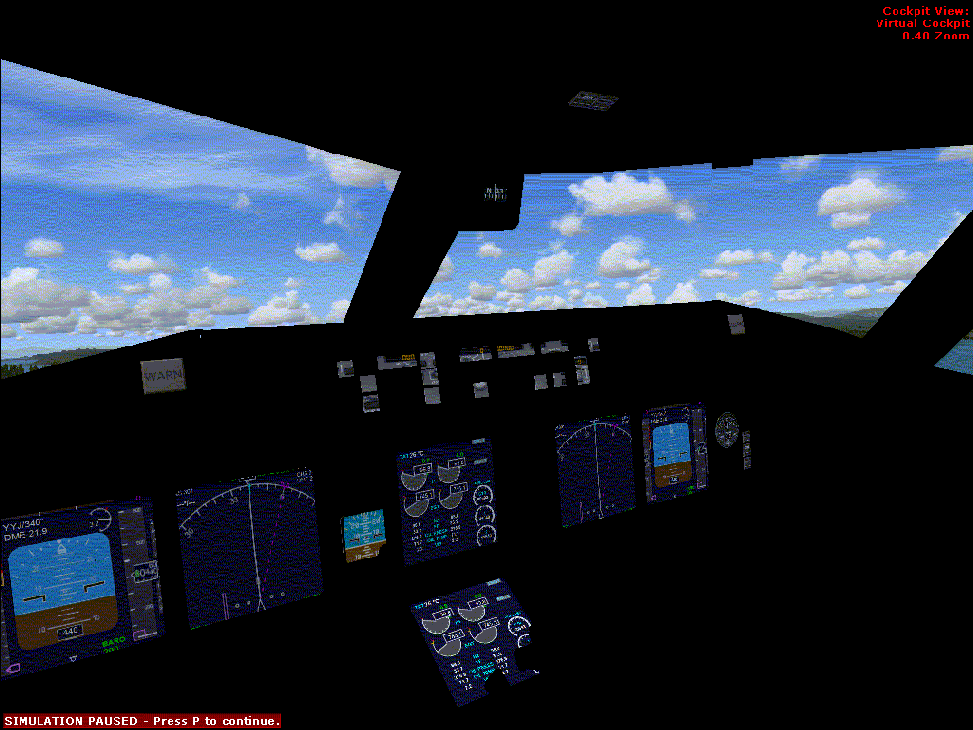
Priority two: Fix this problem. This keeps happening with some of them too. Wy is this possible? Why is every single VC completely different from one another? It doesn't make sense to me. How do I fix this particular problem, as well as the other pciture I posted? Someone said something about "Placing the textures correctly," or along those lines of thought.

I know its fuzzy---I had to resize it in a way that was less than what the requirements are for this site.

Image
Last edited by b108 on Tue Aug 18, 2009 5:01 pm, edited 1 time in total.
b108
2nd Lieutenant
2nd Lieutenant
 
Posts: 93
Joined: Wed Feb 13, 2008 5:36 pm

Re: Question In Regards to POSKY 777 Models...

Postby gtirob01 » Tue Aug 18, 2009 6:03 pm

That vc still has no textures, and the gauges all look to be from the 737. At first before things were figured out... the 737 gauges were the way to go. But now.... they are not at all needed.

If you havent seen it already... that United 777 you were trying to get going... well I uploaded the complete package (model, vc panel, sounds... everything) done so that anyone with FSX can use it. Everything is already in the correct folders. All you have to do is place a few files where they need to go, and transfer the xml gauges if you dont already have them. Out of some 4300 downloads... I've only gotten 2 emails from people with problems. And both were simply because they didnt install the xml gauges.

Here, give this one a go. Kind of in the middle, United 777 New Colors
http://www.simviation.com/simviation/?t ... 60&page=51

Resizing pics.... what software do you use? If you dont have one, try irfanview
My specs... A hard drive, motherboard, graphics card, some memory, a keyboard, mouse, and monitor - in other words, nothing special.

Image

My Posky
User avatar
gtirob01
Major
Major
 
Posts: 3605
Joined: Fri Jul 20, 2007 11:10 pm
Location: Ft. Walton Beach, FL

Re: Question In Regards to POSKY 777 Models...

Postby jp100184 » Tue Aug 18, 2009 7:18 pm

Hello I am having a similar problem but it is with my 2d panel in this file posky 777-306er Aircanada, I downloded it this afternoon and it specifically says it designed for fsx which is what I am attempting to run it in. Everything is fine except that my 2d panel is bare (no instruments, guages) just the skeleton (missing textures??). Would following gtirob's tutorial fix this??

Also please excuse the ignorance but I am a complete newbie and all this talk about VC's is confusing me, when I go to the virtual cockpit view in any of my aircraft in fsx all i get is a better view outside the captains window and a limited view of my panel. Is this because I have to download a 3d panel for all my planes??? Sorry for being a dummy lol
Last edited by jp100184 on Tue Aug 18, 2009 8:59 pm, edited 1 time in total.
jp100184
Ground hog
Ground hog
 
Posts: 15
Joined: Fri Aug 14, 2009 7:18 pm

Re: Question In Regards to POSKY 777 Models...

Postby gtirob01 » Tue Aug 18, 2009 9:38 pm

Sorry but the link to the instructions I had posted are strictly for the vc. I honestly paid no attention to the 2d panel. I fly entirely in vc when available, so those instructions wont really be of any help.

In reality, no Posky 777 was designed for fsx. And they will be the first to tell you that.
My specs... A hard drive, motherboard, graphics card, some memory, a keyboard, mouse, and monitor - in other words, nothing special.

Image

My Posky
User avatar
gtirob01
Major
Major
 
Posts: 3605
Joined: Fri Jul 20, 2007 11:10 pm
Location: Ft. Walton Beach, FL

Re: Question In Regards to POSKY 777 Models...

Postby jp100184 » Tue Aug 18, 2009 10:58 pm

Sorry but the link to the instructions I had posted are strictly for the vc. I honestly paid no attention to the 2d panel. I fly entirely in vc when available, so those instructions wont really be of any help.

In reality, no Posky 777 was designed for fsx. And they will be the first to tell you that.


Well that brings me to my other question. I don't understand the concept of the virtual cockpit. When i go to the virtual cockpit view, I either get an unobstructed view outside the captains window or the same but slightly obstructed by the top of the panel. What do I have to do to get virtual cockpits?? Are there downloads for that?? This is for all aircraft in fsx.
Last edited by jp100184 on Tue Aug 18, 2009 10:59 pm, edited 1 time in total.
jp100184
Ground hog
Ground hog
 
Posts: 15
Joined: Fri Aug 14, 2009 7:18 pm

Re: Question In Regards to POSKY 777 Models...

Postby b108 » Sun Aug 23, 2009 11:11 am

WANT A WORKING 2D 777 PANEL?

Download the Project Opensky 767-400 Delta 2007 Colors. It has no VC, but they aliased the 777 2d panel. IT WORKS. You can use it to help "tinker" with your other 777's, I have used it to get several of mine to work that weren't working before. GOOD LUCK!!! :D
b108
2nd Lieutenant
2nd Lieutenant
 
Posts: 93
Joined: Wed Feb 13, 2008 5:36 pm

Re: Question In Regards to POSKY 777 Models...

Postby b108 » Sun Aug 23, 2009 11:13 am

That vc still has no textures, and the gauges all look to be from the 737. At first before things were figured out... the 737 gauges were the way to go. But now.... they are not at all needed.

If you havent seen it already... that United 777 you were trying to get going... well I uploaded the complete package (model, vc panel, sounds... everything) done so that anyone with FSX can use it. Everything is already in the correct folders. All you have to do is place a few files where they need to go, and transfer the xml gauges if you dont already have them. Out of some 4300 downloads... I've only gotten 2 emails from people with problems. And both were simply because they didnt install the xml gauges.

Here, give this one a go. Kind of in the middle, United 777 New Colors
http://www.simviation.com/simviation/?t ... 60&page=51

Resizing pics.... what software do you use? If you dont have one, try irfanview


So how do I install the Textures? Where do I find them and how do I get them?

I have tried that united-it works, and it's excellent. Thanks for being so totally AWESOME! :D
b108
2nd Lieutenant
2nd Lieutenant
 
Posts: 93
Joined: Wed Feb 13, 2008 5:36 pm

Re: Question In Regards to POSKY 777 Models...

Postby b108 » Thu Sep 03, 2009 3:50 pm

Come on guys, don't abandon me here!!!

How do I fix those textures?

Also: How do I get the regular 777 Autopilot panel to show up, instead of the 737-800 autopilot panel?

I recently had an aircraft work with the 777 AP panel, but when I switched views in the game, it froze, and had a stupid fatal error. Then, whe I re-tested the aircraft, THE AUTOPILOT PANEL HAD BEEN SWITCHED FROM THE OF THE 777 TO THE 737-800. How come this happened? If it was working before, why not now? Why did FSX do this? How does it randomly reconfigure aircraft on its own? I didn't tell it to do this, so why did it?
b108
2nd Lieutenant
2nd Lieutenant
 
Posts: 93
Joined: Wed Feb 13, 2008 5:36 pm

Re: Question In Regards to POSKY 777 Models...

Postby gtirob01 » Fri Sep 04, 2009 7:41 am

just make everything like the united version. it should work then. just browse the files for the united 777 to get a feel of what goes where
My specs... A hard drive, motherboard, graphics card, some memory, a keyboard, mouse, and monitor - in other words, nothing special.

Image

My Posky
User avatar
gtirob01
Major
Major
 
Posts: 3605
Joined: Fri Jul 20, 2007 11:10 pm
Location: Ft. Walton Beach, FL

Re: Question In Regards to POSKY 777 Models...

Postby b108 » Sat Sep 05, 2009 12:59 pm

Ok, so you're saying just to do a bit of digging until I figure it out? But can't somebody tell me how this stuff works?! Please?! I have tried a few things, but I think I have a few that I haven't tried yet so maybe I'll give that stuff a go.

THANKS TO EVERYONE FOR THEIR HELP!!!

PLEASE SEE MY TOPIC REGARDING THE POSKY A330 MODELS AND THE POSKY ERJ1[35/40/45] MODELS. THANKS!
b108
2nd Lieutenant
2nd Lieutenant
 
Posts: 93
Joined: Wed Feb 13, 2008 5:36 pm

Previous

Return to Flight Simulator X (FSX) and Steam

Who is online

Users browsing this forum: No registered users and 479 guests