Heading Indicator Help

FSX including FSX Steam version.

Heading Indicator Help

Postby Sky_Rookie » Sat Aug 29, 2009 6:24 am

Hi there, Im new to FSX and im struggling to graps how the Heading Indicator works.

I have 3 lines within it, Blue, Green and Pink.

Can someone explain exactly what they do because i cant see anything in FSX that explaines this clearly.

I have a fair idea the Pink line is the course i should be taking, but what are the other?

Even when i follow the pink line, my distance from the destination actually increases rather than decreases.

Im really confused here, because on the edge of the compass on the tol left of the screen has a green arrow and when i line up with this my course is fixed, but as i rwach 5nm, it moves and goes yellow im going further away from the destination.

The compass and the Heading Indicator dont seem to correspond at all.

Sky_Rookie

Sky_Rookie
Ground hog
Ground hog
 
Posts: 7
Joined: Sat Aug 29, 2009 7:13 am
Location: Peru

Re: Heading Indicator Help

Postby Fozzer » Sat Aug 29, 2009 6:37 am

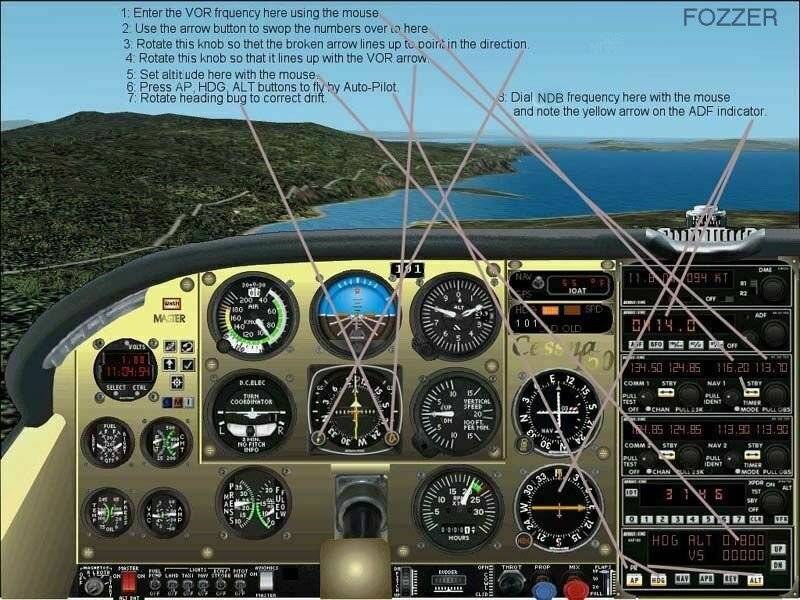
The Heading indicator contains up to three needles, two of which respond depending upon the Radio Beacon Frequency you have selected, VOR Beacon and NDB Beacon.
The course (heading, with the orange arrow) is selected by rotating the Heading Bug to track the selected Radio Beacon.

As you pass the Beacon(s) the needle(s) will swing round...from "TO" to "FROM".

Have a peek at Brett Henderson's Course on Radio Navigation...;)...!

Paul...G-BPLF...FS 2004.... 8-)...!

Image
Last edited by Fozzer on Sat Aug 29, 2009 6:46 am, edited 1 time in total.
Win 8.1 64-bit. DX11. Advent Tower. Intel i7-3770 3.9 GHz 8-core. 8 GB System RAM. AMD Radeon HD 7700 1GB RAM. DVD ROM. 2 Terra Byte SATA Hard Drive. Philips 17" LCD Monitor. Saitek Cyborg X Fly-5 Joystick. ...and a Briggs and Stratton Petrol Lawn Mower.
User avatar
Fozzer
Colonel
Colonel
 
Posts: 27369
Joined: Thu Jan 31, 2002 3:11 pm
Location: Hereford. England. EGBS.

Re: Heading Indicator Help

Postby Sky_Rookie » Sat Aug 29, 2009 7:38 am

Cheers for that, these are term im not even familiar with, so i have plenty of learning to do.

Are there any diagrams that explain this at all?
Sky_Rookie
Ground hog
Ground hog
 
Posts: 7
Joined: Sat Aug 29, 2009 7:13 am
Location: Peru

Re: Heading Indicator Help

Postby Sky_Rookie » Sat Aug 29, 2009 7:47 am

Sorry I just realised you have attached a picture for me!!

Mine is in the MFD and looks very different?

I have tried to attach an image but ive had no joy for some reason.....
Sky_Rookie
Ground hog
Ground hog
 
Posts: 7
Joined: Sat Aug 29, 2009 7:13 am
Location: Peru

Re: Heading Indicator Help

Postby Fozzer » Sat Aug 29, 2009 8:49 am

Sorry I just realised you have attached a picture for me!!

Mine is in the MFD and looks very different?

I have tried to attach an image but ive had no joy for some reason.....


In FS 2004 we have what is called "The Learning Centre" which is where we find all this sort of all information...;)..!

Radio Navigation...

Paul...G-BPLF..FS 2004....FS Navigator.... 8-)...!
Last edited by Fozzer on Sat Aug 29, 2009 8:49 am, edited 1 time in total.
Win 8.1 64-bit. DX11. Advent Tower. Intel i7-3770 3.9 GHz 8-core. 8 GB System RAM. AMD Radeon HD 7700 1GB RAM. DVD ROM. 2 Terra Byte SATA Hard Drive. Philips 17" LCD Monitor. Saitek Cyborg X Fly-5 Joystick. ...and a Briggs and Stratton Petrol Lawn Mower.
User avatar
Fozzer
Colonel
Colonel
 
Posts: 27369
Joined: Thu Jan 31, 2002 3:11 pm
Location: Hereford. England. EGBS.

Re: Heading Indicator Help

Postby Brett_Henderson » Sat Aug 29, 2009 9:10 am

Ok.. slow down. ..

A, multi function display (MFD) is a complex piece of equipment. You aren't gonna make heads-nor-tails out of it, until you understand all the functions, individually
Last edited by Brett_Henderson on Sat Aug 29, 2009 9:16 am, edited 1 time in total.
Brett_Henderson
Major
Major
 
Posts: 3403
Joined: Fri Oct 08, 2004 7:09 am

Re: Heading Indicator Help

Postby Sky_Rookie » Sat Aug 29, 2009 11:38 am

Brett, thanks for that and your right, its too complicated for me at this point!!

Ill go through all the instruments individually and when i grasp how they work, then hopefuly things will make more sense to me.

Do you have any suggestions on a good started plane i could use to get me going?
Sky_Rookie
Ground hog
Ground hog
 
Posts: 7
Joined: Sat Aug 29, 2009 7:13 am
Location: Peru

Re: Heading Indicator Help

Postby Brett_Henderson » Sat Aug 29, 2009 11:48 am

The default Cessna 172, has two VORs, an ADF, and is ILS capable.. More than adequate for learning  :)

(leave that pesky GPS off)  ;)
Brett_Henderson
Major
Major
 
Posts: 3403
Joined: Fri Oct 08, 2004 7:09 am

Re: Heading Indicator Help

Postby Sky_Rookie » Sat Aug 29, 2009 12:35 pm

Brett, cheers for that!!

I have found it in one of the tutorials under Introduction to Mountain Flying, heres hoping thigs become a little clearer!! Im not sure how to turn the GPS off, but ill try and figure it out  :)

Thanks again Brett  :)
Sky_Rookie
Ground hog
Ground hog
 
Posts: 7
Joined: Sat Aug 29, 2009 7:13 am
Location: Peru

Re: Heading Indicator Help

Postby Brett_Henderson » Sat Aug 29, 2009 12:39 pm

You're welcome :)

You don't have to turn the GPS off.. just don't use it at all.
Brett_Henderson
Major
Major
 
Posts: 3403
Joined: Fri Oct 08, 2004 7:09 am

Re: Heading Indicator Help

Postby Sky_Rookie » Sat Aug 29, 2009 12:49 pm

Ill play about with it and see how i do, im sure this will make things a lot easier for me  :)
Sky_Rookie
Ground hog
Ground hog
 
Posts: 7
Joined: Sat Aug 29, 2009 7:13 am
Location: Peru

Re: Heading Indicator Help

Postby jwenham » Sat Aug 29, 2009 12:54 pm

[quote]Ok.. slow down. ..

A, multi function display (MFD) is a complex piece of equipment. You aren't gonna make heads-nor-tails out of it, until you understand all the functions, individually
Intel i7 940 2.93 clocked to 4.0ghz Asus P6T Deluxe 6gb OCZ 1600 8-8-8-24 EVGA GTX 260 Superclocked Edition Thermalright 120 CPU Cooler Power PC & Cooling 750w PSU 1 tb Seagate Barracuda HD 500 gb Seagate Barracude HD 22" Viewsonic Widescreen Tra
User avatar
jwenham
2nd Lieutenant
2nd Lieutenant
 
Posts: 266
Joined: Sat Jan 03, 2009 12:40 pm

Re: Heading Indicator Help

Postby Fozzer » Sat Aug 29, 2009 1:01 pm

Now that you have hired your brand-new Cessna 172 tricycle Trainer, stay with it, and use it to practice for many weeks until you learn everything you need to know about controlling and operating it safely and successfully, and studying the Aircraft Owners Handbook....

...before you move on to anything else!...;)...!

Boeing 747's, etc, are in the far distant future!...;)...!

Paul..G-BPLF...FS 2004...(...and a cute little Cessna 150 Trainer)...;)...!
Win 8.1 64-bit. DX11. Advent Tower. Intel i7-3770 3.9 GHz 8-core. 8 GB System RAM. AMD Radeon HD 7700 1GB RAM. DVD ROM. 2 Terra Byte SATA Hard Drive. Philips 17" LCD Monitor. Saitek Cyborg X Fly-5 Joystick. ...and a Briggs and Stratton Petrol Lawn Mower.
User avatar
Fozzer
Colonel
Colonel
 
Posts: 27369
Joined: Thu Jan 31, 2002 3:11 pm
Location: Hereford. England. EGBS.

Re: Heading Indicator Help

Postby Capt.Propwash » Sat Aug 29, 2009 1:16 pm

here is the correct link that Bretts Signature should be pointing to instead of the forums home page.

just follow the outlined tutorials, and you should be up and flying in no time.

http://205.252.250.26/cgi-bin/yabb2/YaB ... 113107/6#6
The thoughts and expressions contained in the post above are solely my own, and not necessarily those of Simviation.com, its Moderators, its Staff, its Members, or other guests. They can not, are not, and will not be held liable for any thoughts, or expre
User avatar
Capt.Propwash
Major
Major
 
Posts: 1947
Joined: Tue Feb 20, 2007 12:34 am
Location: KCHS, Charleston, SC, USA

Re: Heading Indicator Help

Postby Brett_Henderson » Sat Aug 29, 2009 1:24 pm

Thanks  Capt.  ..  I fixed the link  :)
Brett_Henderson
Major
Major
 
Posts: 3403
Joined: Fri Oct 08, 2004 7:09 am

Next

Return to Flight Simulator X (FSX) and Steam

Who is online

Users browsing this forum: No registered users and 436 guests