Help with the Cessna 310

FSX including FSX Steam version.

Re: Help with the Cessna 310

Postby Alejandro Rhodes » Wed Jul 22, 2009 12:55 pm

I forgot
Last edited by Alejandro Rhodes on Wed Jul 22, 2009 12:56 pm, edited 1 time in total.
Alejandro Rhodes
Ground hog
Ground hog
 
Posts: 0
Joined: Sun Jan 27, 2013 6:33 am

Re: Help with the Cessna 310

Postby SeanH » Wed Jul 22, 2009 12:55 pm

Ah yes i noticed the riv layer is at ) opacity so a little adjustment there! And bolts...
SeanH
Ground hog
Ground hog
 
Posts: 13
Joined: Wed Jul 22, 2009 2:57 am
Location: Midrand; South Africa

Re: Help with the Cessna 310

Postby Brett_Henderson » Wed Jul 22, 2009 2:01 pm

Play with ALL the layers..
Last edited by Brett_Henderson on Wed Jul 22, 2009 2:01 pm, edited 1 time in total.
Brett_Henderson
Major
Major
 
Posts: 3403
Joined: Fri Oct 08, 2004 7:09 am

Re: Help with the Cessna 310

Postby SeanH » Thu Jul 23, 2009 12:30 am

Thanks Brett. So if i understand, create the same layer below so you have 2 rivet layers and then merge down OR create a blank layer and merge down?
SeanH
Ground hog
Ground hog
 
Posts: 13
Joined: Wed Jul 22, 2009 2:57 am
Location: Midrand; South Africa

Re: Help with the Cessna 310

Postby SeanH » Thu Jul 23, 2009 5:34 am

[quote]
I forgot
SeanH
Ground hog
Ground hog
 
Posts: 13
Joined: Wed Jul 22, 2009 2:57 am
Location: Midrand; South Africa

Re: Help with the Cessna 310

Postby Brett_Henderson » Thu Jul 23, 2009 6:21 am

Thanks Brett. So if i understand, create the same layer below so you have 2 rivet layers and then merge down OR create a blank layer and merge down?


No.. just create a blank layer under it.. then with the opacity set where you like it.. merge it into the new layer so that you can leave THAT layer at 100% opacity..

As for bumps and specs.. just use copies of  the existing ones. Edit them if needed.
Brett_Henderson
Major
Major
 
Posts: 3403
Joined: Fri Oct 08, 2004 7:09 am

Re: Help with the Cessna 310

Postby Brett_Henderson » Thu Jul 23, 2009 6:26 am

As for alpha channels .. you'll see them when you open the files with DxtBmp..  You can send them to the editor (and reload after edit), or just import one from there.

I do all my alpha adding/editing from DxtBmp and save them as estended (DXT5) bitmaps.. and then use THOSE (flipped if needed) for loading into ImageTool for saving as a DDS file.

It sounds like you're losing the alpha somewhere..
Brett_Henderson
Major
Major
 
Posts: 3403
Joined: Fri Oct 08, 2004 7:09 am

Re: Help with the Cessna 310

Postby Alejandro Rhodes » Thu Jul 23, 2009 7:15 am

Well i think i am doing something wrong with the Alpha Channel. I can get the repaint done and working in FSX. Now the problem is when i add an alpha channel and edit it the plane is all black but shiny LOL

I am using PSP X and ImageTool and DXTBmp.

Also, how do i create the bump and spec files best?

Thanks again.


No Huh!! seriously you wanna mess with that ,Just grab the two files of the Blue deliver for test then latter Ill post these without the bumping lines.

about the black , (it can't be the alpha) make sure you are using the right name of the main map (the one you painted) also they have to be DDS DXT5 compresssed format USING ONLY IMAGETOOL.EXE of the FSX-SDK
[glow=yellow,2,300] DTXBmp software Does not compress well the dds .[/glow]
If it was it something about the alpha the only thing would be no shining and the reflexion looks weird
Last edited by Alejandro Rhodes on Thu Jul 23, 2009 7:17 am, edited 1 time in total.
Alejandro Rhodes
Ground hog
Ground hog
 
Posts: 0
Joined: Sun Jan 27, 2013 6:33 am

Re: Help with the Cessna 310

Postby Brett_Henderson » Thu Jul 23, 2009 7:26 am

DTXBmp software Does not compress well the dds .


Yeah.. that's why I use DxtBmp to add alphas.. and save as DXT5..  then load that DXT5 into ImageTool and save as DDS

:)
Brett_Henderson
Major
Major
 
Posts: 3403
Joined: Fri Oct 08, 2004 7:09 am

Re: Help with the Cessna 310

Postby ShaneG_old » Thu Jul 23, 2009 8:10 am

A quick and easy tip for Alpha channels:

-open the texture in DXTBMP and under the little window for the Alpha channel is a button that says: Export Alpha Channel.

Click that button, and do the same for ALL textures you will be redoing that have Alphas.

When you are done, load it back into DXTBMP  and Import the Alpha you exported earlier. ;)

I don't know if Image tool does any of  this yet, as I haven't done any repaints since installing it. ;)
ShaneG_old
Lieutenant Colonel
Lieutenant Colonel
 
Posts: 9700
Joined: Tue Mar 11, 2008 11:52 am

Re: Help with the Cessna 310

Postby SeanH » Thu Jul 23, 2009 8:49 am

You Guys are SERIOUSLY helpful let me get back to it and see what i am doing wrong based on your post!!

Thanks for the time you are taking to assist guys!!
SeanH
Ground hog
Ground hog
 
Posts: 13
Joined: Wed Jul 22, 2009 2:57 am
Location: Midrand; South Africa

Re: Help with the Cessna 310

Postby SeanH » Thu Jul 23, 2009 9:13 am

OK i closed Photoshop and used PSP X and my alpha is now working. Another thing i noticed with ImageTool - i don't have to flip it. When i do it is a mess.
SeanH
Ground hog
Ground hog
 
Posts: 13
Joined: Wed Jul 22, 2009 2:57 am
Location: Midrand; South Africa

Re: Help with the Cessna 310

Postby Brett_Henderson » Thu Jul 23, 2009 9:26 am

The flipping is an ImageTool thing.

The way it was explained to me, was that REGULAR bitmaps (and non-DDS bitmaps), need to be flipped by FSX before they're rendered. When you use DDS bitmaps, FSX knows that it is pre-flipped, so it saves itself that step.. it's supposed to be more efficient.

SO, if you're creating a texture from scratch.. you need NOT flip it
Brett_Henderson
Major
Major
 
Posts: 3403
Joined: Fri Oct 08, 2004 7:09 am

Re: Help with the Cessna 310

Postby Brett_Henderson » Thu Jul 23, 2009 9:29 am

Also.. use some other name.. non-FS related for saving the DXT5 step (if you are working within the texture folder), just to be safe.

FSX will look for a DDS file first (I'm pretty sure), but if you have both extended bitmaps AND DDS files of the same name
Brett_Henderson
Major
Major
 
Posts: 3403
Joined: Fri Oct 08, 2004 7:09 am

Re: Help with the Cessna 310

Postby SeanH » Thu Jul 23, 2009 11:23 am

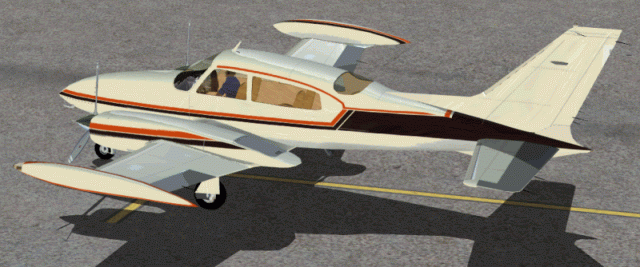
getting there. alpha working too.

Image

Just a first draft!!

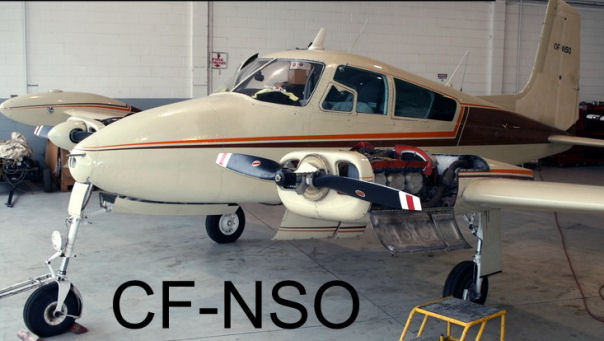
This is the actual Plane. Just a slight variation iin the 2 Cessna 310's but nothing major!

Image
Last edited by SeanH on Fri Jul 24, 2009 5:29 am, edited 1 time in total.
SeanH
Ground hog
Ground hog
 
Posts: 13
Joined: Wed Jul 22, 2009 2:57 am
Location: Midrand; South Africa

PreviousNext

Return to Flight Simulator X (FSX) and Steam

Who is online

Users browsing this forum: No registered users and 287 guests