Help with the Cessna 310

FSX including FSX Steam version.

Help with the Cessna 310

Postby pope.liam » Sat Jul 11, 2009 5:58 pm

Hello,
Im new to the whole world of Add ons for FSX.  Ive flown for a while, but never really downloaded new planes or anything.  I decided to start, and so far its been great.  Im loving the new planes.  I recently downloaded the 310 for FSX, but for some reason, when viewed from the outside of the cockpit and in the preflight menu, the skin of the aircraft is transparent, the doors are shooting through the cabin, and there is a big brown something just floating where the pilots head is.  WTF? Do i need to redownload it?  Or what?

pope.liam
Ground hog
Ground hog
 
Posts: 2
Joined: Sat Jul 11, 2009 6:01 pm

Re: Help with the Cessna 310

Postby ShaneG_old » Sat Jul 11, 2009 6:05 pm

What is your video card? And do you have SP2?

This planes textures do not play well with older video cards and onboard graphics, thus producing the result you see. ;)

There isn't anything wrong with the plane, it's actually one of the better ones out there. 8-)


Please read this thread by the authors concerning this: http://alrot.proboards.com/index.cgi?bo ... &thread=35
Last edited by ShaneG_old on Sat Jul 11, 2009 6:13 pm, edited 1 time in total.
ShaneG_old
Lieutenant Colonel
Lieutenant Colonel
 
Posts: 9700
Joined: Tue Mar 11, 2008 11:52 am

Re: Help with the Cessna 310

Postby pope.liam » Sun Jul 12, 2009 1:17 am

That makes no sense.  My computer is literally brand-new.  The graphics card is a ATI Raedon HD 3600 series with a gig of dedicated ram.  It might be the version of FSX that I have, only got SP1.
pope.liam
Ground hog
Ground hog
 
Posts: 2
Joined: Sat Jul 11, 2009 6:01 pm

Re: Help with the Cessna 310

Postby ShaneG_old » Sun Jul 12, 2009 6:15 am

It might be the version of FSX that I have, only got SP1.


That is ineed it.

And why I asked if you had SP2.

It was made using the FSX SP2 SDK. So you MUST have it to run the plane correctly.
Last edited by ShaneG_old on Sun Jul 12, 2009 6:15 am, edited 1 time in total.
ShaneG_old
Lieutenant Colonel
Lieutenant Colonel
 
Posts: 9700
Joined: Tue Mar 11, 2008 11:52 am

Re: Help with the Cessna 310

Postby SeanH » Wed Jul 22, 2009 2:15 am

Hi ShaneG

I absolutely LOVE the 310. However, I have the Citation X also. There is a repaint kit with the Citation - is it possible to get a paint kit for the 310? I have a real life plane (not mine) that i would like to copy in terms of colour.

I would be SERIOUSLY grateful if i could get this. (PSDs etc)

Thanks in advance!  :)
SeanH
Ground hog
Ground hog
 
Posts: 13
Joined: Wed Jul 22, 2009 2:57 am
Location: Midrand; South Africa

Re: Help with the Cessna 310

Postby Rich H » Wed Jul 22, 2009 6:12 am

Best if you ask the man who made it, Alex.
http://alrot.proboards.com/index.cgi?board=cessna310
Image

"Politics" is made up of two words, "Poli", which is Greek for "many", and "tics", which are blood sucking insects. - Gore Vidal
User avatar
Rich H
Major
Major
 
Posts: 2017
Joined: Mon Jun 02, 2008 11:40 am
Location: Solihull, U.K.

Re: Help with the Cessna 310

Postby Alejandro Rhodes » Wed Jul 22, 2009 7:05 am

OK, we have a small misunderstanding ,Brett Henderson was the primary maker of this airplane ,this is His airplane , My contribution on this was a lot but the whole base model and the base (Fuselage wings wheels , Animation, paint map was made by Brett.

This is his airplane ,I do have the PSP base map ,but has to be HIM who authorize or post the repaint.

In Other words we BOTH work 50/50 only in this airplane ,But was originally made by him.

I'll send him a PM  ;)
Alejandro Rhodes
Ground hog
Ground hog
 
Posts: 0
Joined: Sun Jan 27, 2013 6:33 am

Re: Help with the Cessna 310

Postby Brett_Henderson » Wed Jul 22, 2009 7:27 am

This where I admit to being lazy
Brett_Henderson
Major
Major
 
Posts: 3403
Joined: Fri Oct 08, 2004 7:09 am

Re: Help with the Cessna 310

Postby Alejandro Rhodes » Wed Jul 22, 2009 7:58 am

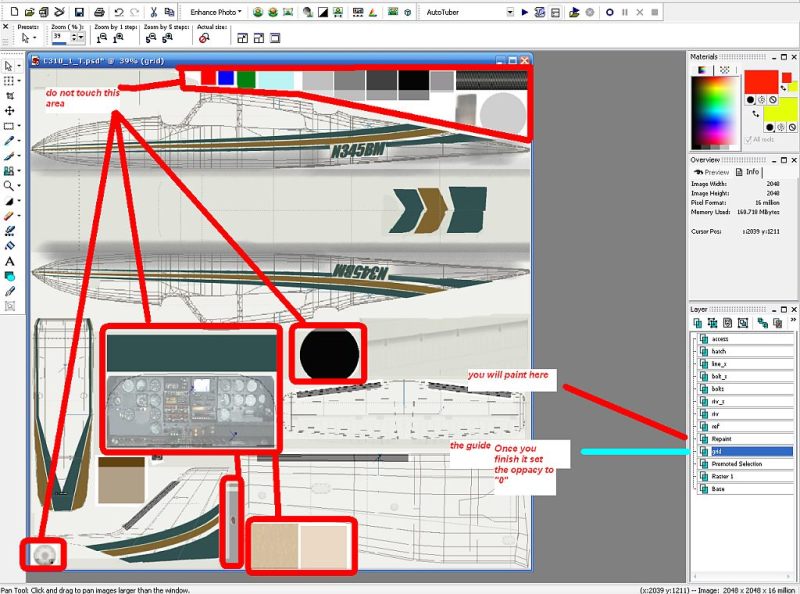
Use Paint Shop Pro

here I include this JPG small guide in the zip (Bigger) ,Is there anything you want to add Brett please  :-/

[glow=yellow,2,300]Use the ALPHA Channel map of any of the current DDS images otherwise you won't have reflexion of the glass neither chrome effect in the spiner, also use Imagetool.exe of the FSX-SDK ONLY to compress into dds[/glow]

Image

download here

http://www.simviation.com/fsnd/c310repaint.zip
Alejandro Rhodes
Ground hog
Ground hog
 
Posts: 0
Joined: Sun Jan 27, 2013 6:33 am

Re: Help with the Cessna 310

Postby Brett_Henderson » Wed Jul 22, 2009 8:28 am

That looks  GOOOOD to me !  :)


I'm gonna download it and do a repaint too..  :D
Brett_Henderson
Major
Major
 
Posts: 3403
Joined: Fri Oct 08, 2004 7:09 am

Re: Help with the Cessna 310

Postby SeanH » Wed Jul 22, 2009 10:51 am

AH MANNNNNNNN!!!!!!! You guys are the BOMBBB!!!

Thanks SO SO much! I really appreciate this a ton! 8-)
SeanH
Ground hog
Ground hog
 
Posts: 13
Joined: Wed Jul 22, 2009 2:57 am
Location: Midrand; South Africa

Re: Help with the Cessna 310

Postby ShaneG_old » Wed Jul 22, 2009 10:53 am

Going to have to give this a try myself!  8-)

Thanks Alex & Brett!  :)
ShaneG_old
Lieutenant Colonel
Lieutenant Colonel
 
Posts: 9700
Joined: Tue Mar 11, 2008 11:52 am

Re: Help with the Cessna 310

Postby Brett_Henderson » Wed Jul 22, 2009 12:01 pm

Be aware.. that details like rivets and seams might need opacity adjusting..

It's a good paintkit, in that if you know what you're doing, you'll be fine.. But if you're just planning to paint your favorites livery.. welll.. I guess it's good for that too.. it will MAKE you learn about layers ..


(please let me approve any repaint if you plan on releasing it)  :)
Brett_Henderson
Major
Major
 
Posts: 3403
Joined: Fri Oct 08, 2004 7:09 am

Re: Help with the Cessna 310

Postby ShaneG_old » Wed Jul 22, 2009 12:22 pm

Usually I have to add the rivets and such.  It will be a neat change already having them there. ;)
ShaneG_old
Lieutenant Colonel
Lieutenant Colonel
 
Posts: 9700
Joined: Tue Mar 11, 2008 11:52 am

Re: Help with the Cessna 310

Postby SeanH » Wed Jul 22, 2009 12:52 pm

[quote]Be aware.. that details like rivets and seams might need opacity adjusting..

(please let me approve any repaint if you plan on releasing it)
SeanH
Ground hog
Ground hog
 
Posts: 13
Joined: Wed Jul 22, 2009 2:57 am
Location: Midrand; South Africa

Next

Return to Flight Simulator X (FSX) and Steam

Who is online

Users browsing this forum: No registered users and 272 guests