
What setting cause this ? How do I fix it ?

FSX including FSX Steam version.

What setting cause this ? How do I fix it ?

Postby FRASSE226 » Mon Jun 15, 2009 2:24 am

Hi,

I have follow NickN document on how to set WindowX and FSX.
I only had to change some of the bars so it works with my system.
I did a test fly at ESGG - Landvetter,Sweden as I live there, then some strange thing pop up and I don't know what it is or call, nor how to edit my setting for a fix.

I also have install the FPS Limiter 0.2 and run FSX from there.
The only two thing I change in FSX.cfg was Texture_Bandwidth _Mult=70 and Bufferpools:Poolsize= 150000000

I hope someone cane come up with a solution for this.
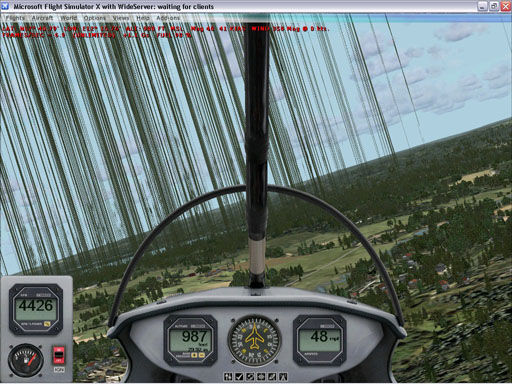
Image

Par
FRASSE226
Ground hog
Ground hog
 
Posts: 31
Joined: Tue Jun 02, 2009 2:00 am

Re: What setting cause this ? How do I fix it ?

Postby Dougal » Mon Jun 15, 2009 2:48 am

It would help if you stated your PC spec, but to me that looks simply like an over stressed video card.

Try removing the Bufferpools entry or just backing off some settings.
Phil 'Dougal' Symonds ------ XP-Pro 64bit - FSX(SP2)
User avatar
Dougal
2nd Lieutenant
2nd Lieutenant
 
Posts: 72
Joined: Wed Dec 08, 2004 8:53 pm

Re: What setting cause this ? How do I fix it ?

Postby motoadve » Mon Jun 15, 2009 7:56 am

I get the same problems, no matter what I do doesnt go away.
Nothing is overclocked, and PC is new.
Intel i7 920
Ati 4870
4Gig Zclock RAM
Gigabyte

Really will help if someone comes up with a soulution.
Havent changed anything in the cfg file
Have REX installled and Tasmania FEX demo.
motoadve
2nd Lieutenant
2nd Lieutenant
 
Posts: 51
Joined: Fri Jul 19, 2002 11:04 am

Re: What setting cause this ? How do I fix it ?

Postby motoadve » Mon Jun 15, 2009 7:57 am

how do I remove Bufferpools entries?
motoadve
2nd Lieutenant
2nd Lieutenant
 
Posts: 51
Joined: Fri Jul 19, 2002 11:04 am

Re: What setting cause this ? How do I fix it ?

Postby vgbaron » Mon Jun 15, 2009 11:23 am

I get the same problems, no matter what I do doesnt go away.
Nothing is overclocked, and PC is new.
Intel i7 920
Ati 4870
4Gig Zclock RAM
Gigabyte

Really will help if someone comes up with a soulution.
Havent changed anything in the cfg file
Have REX installled and Tasmania FEX demo.


It is graphics corruption caused by an overloaded video card. Turn down settings until it stops is the only solution OR get a better video card. Also try changing drivers.
I7 980x 4.43G P6X58D 6G Mushkin 1612 6-8-6-24 1T EVGA GTX480 826/4200
User avatar
vgbaron
1st Lieutenant
1st Lieutenant
 
Posts: 479
Joined: Mon Dec 10, 2007 1:40 pm
Location: Burbank CA USA

Re: What setting cause this ? How do I fix it ?

Postby Daube » Mon Jun 15, 2009 2:11 pm

Hi,

I have follow NickN document on how to set WindowX and FSX.
I only had to change some of the bars so it works with my system.
I did a test fly at ESGG - Landvetter,Sweden as I live there, then some strange thing pop up and I don't know what it is or call, nor how to edit my setting for a fix.

I also have install the FPS Limiter 0.2 and run FSX from there.
The only two thing I change in FSX.cfg was Texture_Bandwidth _Mult=70 and Bufferpools:Poolsize= 150000000

I hope someone cane come up with a solution for this.

Image

Par


This kind of problems are caused by incorrect tweaks.
You probably have chosen values that are not correct for your hardware.
What is your video card ? I think your Bufferpools is way too high and your Texture_bandwith_mult is too high as well.
User avatar
Daube
Lieutenant Colonel
Lieutenant Colonel
 
Posts: 6611
Joined: Wed Oct 05, 2005 8:34 am
Location: Nice (FR)

Re: What setting cause this ? How do I fix it ?

Postby Daube » Mon Jun 15, 2009 2:13 pm

I get the same problems, no matter what I do doesnt go away.
Nothing is overclocked, and PC is new.
Intel i7 920
Ati 4870
4Gig Zclock RAM
Gigabyte

Really will help if someone comes up with a soulution.
Havent changed anything in the cfg file
Have REX installled and Tasmania FEX demo.


You MUST edit the FSX.cfg file to apply the recommendation from NickN.
But you must not apply them blindly. Nick was kind enough to provide explanations and examples about those tweaks, you must understand them and choose values that are suitable for your hardware. If you get graphic problems, then the values you have chosen were incorrect, so you need to try again.
User avatar
Daube
Lieutenant Colonel
Lieutenant Colonel
 
Posts: 6611
Joined: Wed Oct 05, 2005 8:34 am
Location: Nice (FR)

Re: What setting cause this ? How do I fix it ?

Postby NickN » Mon Jun 15, 2009 2:44 pm

Hi,

I have follow NickN document on how to set WindowX and FSX.
I only had to change some of the bars so it works with my system.
I did a test fly at ESGG - Landvetter,Sweden as I live there, then some strange thing pop up and I don't know what it is or call, nor how to edit my setting for a fix.

I also have install the FPS Limiter 0.2 and run FSX from there.
The only two thing I change in FSX.cfg was Texture_Bandwidth _Mult=70 and Bufferpools:Poolsize= 150000000

I hope someone cane come up with a solution for this.

Image

Par


Remove the bufferpool entry from FSX.cfg


and stop using the FPS Limter tool

and you guys have to do is read the tuning thread carefully and you will find the answers to issues like this


Bufferpools added to the fsx.cfg file can cause scenery 'spikes' even if the card has enough video memory. This edit to the configuration file works for some and does not work for others. If you see strange graphics errors that do not clear up by visually panning around the outside of the aircraft then you should REMOVE the bufferpool entry from your config file.

Do note that with SP2 for FSX running high sliders depending on the drivers may bring on visual graphic 'spikes' from autogen when a flight is first loaded. If visually panning around the aircraft does not clear them, the bufferpool entry should be reduced or removed completely.


So although people tell me all the time they followed my guide to a "T" I usually find they are not READING and just nailing 'tweak'
Last edited by NickN on Mon Jun 15, 2009 2:51 pm, edited 1 time in total.
User avatar
NickN
Lieutenant Colonel
Lieutenant Colonel
 
Posts: 6317
Joined: Mon Sep 05, 2005 12:57 pm

Re: What setting cause this ? How do I fix it ?

Postby NickN » Mon Jun 15, 2009 3:00 pm

I get the same problems, no matter what I do doesnt go away.
Nothing is overclocked, and PC is new.
Intel i7 920
Ati 4870
4Gig Zclock RAM
Gigabyte

Really will help if someone comes up with a soulution.
Havent changed anything in the cfg file
Have REX installled and Tasmania FEX demo.


4GB on a i7 processor?

Wonder how that works as i7 is TRI-CHANNEL (3GB, 6GB or 12GB)
Last edited by NickN on Mon Jun 15, 2009 3:00 pm, edited 1 time in total.
User avatar
NickN
Lieutenant Colonel
Lieutenant Colonel
 
Posts: 6317
Joined: Mon Sep 05, 2005 12:57 pm

Re: What setting cause this ? How do I fix it ?

Postby UU » Mon Jun 15, 2009 3:05 pm

It is graphics corruption caused by an overloaded video card.


Indeed

It only happens with too many trees.
Sometimes it may help to update the grafic driver,
best way is the autogen tweak


[TERRAIN]
.
.
TERRAIN_MAX_AUTOGEN_TREES_PER_CELL=XXXX
TERRAIN_MAX_AUTOGEN_BUILDINGS_PER_CELL=XXXX
.
.


Default is
Tree 4500
Building 3000

Happy Modding :)
UU,
Bayern, EDNT
UU
2nd Lieutenant
2nd Lieutenant
 
Posts: 121
Joined: Mon Jun 04, 2007 2:41 pm
Location: Bayern

Re: What setting cause this ? How do I fix it ?

Postby FRASSE226 » Tue Jun 16, 2009 1:55 am

Hi,

I have follow NickN document on how to set WindowX and FSX.
I only had to change some of the bars so it works with my system.
I did a test fly at ESGG - Landvetter,Sweden as I live there, then some strange thing pop up and I don't know what it is or call, nor how to edit my setting for a fix.

I also have install the FPS Limiter 0.2 and run FSX from there.
The only two thing I change in FSX.cfg was Texture_Bandwidth _Mult=70 and Bufferpools:Poolsize= 150000000

I hope someone cane come up with a solution for this.

Image

Par


Remove the bufferpool entry from FSX.cfg


and stop using the FPS Limter tool

and you guys have to do is read the tuning thread carefully and you will find the answers to issues like this


Bufferpools added to the fsx.cfg file can cause scenery 'spikes' even if the card has enough video memory. This edit to the configuration file works for some and does not work for others. If you see strange graphics errors that do not clear up by visually panning around the outside of the aircraft then you should REMOVE the bufferpool entry from your config file.

Do note that with SP2 for FSX running high sliders depending on the drivers may bring on visual graphic 'spikes' from autogen when a flight is first loaded. If visually panning around the aircraft does not clear them, the bufferpool entry should be reduced or removed completely.


So although people tell me all the time they followed my guide to a "T" I usually find they are not READING and just nailing 'tweak'
FRASSE226
Ground hog
Ground hog
 
Posts: 31
Joined: Tue Jun 02, 2009 2:00 am

Re: What setting cause this ? How do I fix it ?

Postby motoadve » Tue Jun 16, 2009 7:38 am

[TERRAIN].
TERRAIN_MAX_AUTOGEN_TREES_PER_CELL=XXXX
TERRAIN_MAX_AUTOGEN_BUILDINGS_PER_CELL=XXXX
Default is
Tree 4500
Building 3000

what numbers do you recommend me to put for my system?
Intel i7 920
Ati 4870
motoadve
2nd Lieutenant
2nd Lieutenant
 
Posts: 51
Joined: Fri Jul 19, 2002 11:04 am

Re: What setting cause this ? How do I fix it ?

Postby Daube » Tue Jun 16, 2009 8:04 am

[TERRAIN].
TERRAIN_MAX_AUTOGEN_TREES_PER_CELL=XXXX
TERRAIN_MAX_AUTOGEN_BUILDINGS_PER_CELL=XXXX
Default is
Tree 4500
Building 3000

what numbers do you recommend me to put for my system?
Intel i7 920
Ati 4870


Try 800 each, then see if you can increase them in further tests.
But FIRST OF ALL, read what we wrote and adapt your other tweaks. This autogen tweak WILL NOT solve you issue, it will just increase the performance.
User avatar
Daube
Lieutenant Colonel
Lieutenant Colonel
 
Posts: 6611
Joined: Wed Oct 05, 2005 8:34 am
Location: Nice (FR)

Re: What setting cause this ? How do I fix it ?

Postby motoadve » Tue Jun 16, 2009 11:33 am

What other tweak I need?
I tried different drivers and same problem
I havent touched my conf file yet.
I reduced the clock speed of the card and was sttutering like crazy unplayable.
Im having this problem at default processor and video card speeds

I read for i7 procesor I dont have to put Bufferpools in the conf file, also not to use the FPS limiter.
motoadve
2nd Lieutenant
2nd Lieutenant
 
Posts: 51
Joined: Fri Jul 19, 2002 11:04 am

Re: What setting cause this ? How do I fix it ?

Postby Daube » Tue Jun 16, 2009 1:43 pm

You need to set the Bufferpools, the texture_bandwith_mult and the autogen tweaks.
Read the post from NickN that is in the sticky topic for the installation of FSX, SP1 and SP2. You will find the details a,d explanations there.
User avatar
Daube
Lieutenant Colonel
Lieutenant Colonel
 
Posts: 6611
Joined: Wed Oct 05, 2005 8:34 am
Location: Nice (FR)

Next

Return to Flight Simulator X (FSX) and Steam

Who is online

Users browsing this forum: No registered users and 320 guests

