POSKY 777 panel doesnt show

FSX including FSX Steam version.

Re: POSKY 777 panel doesnt show

Postby pete » Sun Jun 07, 2009 5:41 pm

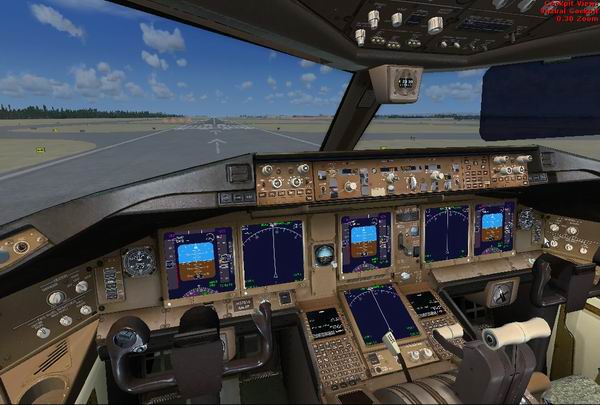
OK - I see the model.cfg was not set to the VC

I set it to the VC (In model.cfg change  OS773ERV2--L to OS773ERV2--L_VC)

This is what it now looks like:
Image

However - I will now upload the corrected file - users should not be expected to mess around with stuff like model.cfg , etc ...

Sorry for the inconvenience.
Simplicity is the ultimate sophistication. – Leonardo da Vinci
User avatar
pete
Administrator
Administrator
 
Posts: 10244
Joined: Mon Jan 01, 2001 2:01 am
Location: Cloud Cuckoo Land

Re: POSKY 777 panel doesnt show

Postby Hagar » Sun Jun 07, 2009 5:43 pm

[quote]The reason I know it should work is I have used this panel in about 5 777-300's all OK ... I will download the file in question & check it out
Last edited by Hagar on Sun Jun 07, 2009 5:45 pm, edited 1 time in total.
Image

Founder & Sole Member - Grumpy's Over the Hill Club for Veteran Virtual Aviators
Member of the Fox Four Group
My Google Photos albums
My Flickr albums
User avatar
Hagar
Colonel
Colonel
 
Posts: 30868
Joined: Wed Jun 19, 2002 7:15 am
Location: Costa Geriatrica

Re: POSKY 777 panel doesnt show

Postby Dougal » Mon Jun 08, 2009 7:35 am

Hi Pete
I cant find any instructions on how to upload/insert pictures here?
Phil 'Dougal' Symonds ------ XP-Pro 64bit - FSX(SP2)
User avatar
Dougal
2nd Lieutenant
2nd Lieutenant
 
Posts: 72
Joined: Wed Dec 08, 2004 8:53 pm

Re: POSKY 777 panel doesnt show

Postby Hagar » Mon Jun 08, 2009 7:39 am

Click the Upload Images link on the forum menu. --> Upload Images
Image

Founder & Sole Member - Grumpy's Over the Hill Club for Veteran Virtual Aviators
Member of the Fox Four Group
My Google Photos albums
My Flickr albums
User avatar
Hagar
Colonel
Colonel
 
Posts: 30868
Joined: Wed Jun 19, 2002 7:15 am
Location: Costa Geriatrica

Re: POSKY 777 panel doesnt show

Postby gtirob01 » Mon Jun 08, 2009 8:07 am

Hmmm, the 2 center panels should be the eicas panels, and not the pfd, mfd panels. easy fix however, just change the cfg to reflect the eicas panels. Better to use the latest xml gauges from posky for realism.
My specs... A hard drive, motherboard, graphics card, some memory, a keyboard, mouse, and monitor - in other words, nothing special.

Image

My Posky
User avatar
gtirob01
Major
Major
 
Posts: 3605
Joined: Fri Jul 20, 2007 11:10 pm
Location: Ft. Walton Beach, FL

Re: POSKY 777 panel doesnt show

Postby Hagar » Mon Jun 08, 2009 8:13 am

Hmmm, the 2 center panels should be the eicas panels, and not the pfd, mfd panels. easy fix however, just change the cfg to reflect the eicas panels. Better to use the latest xml gauges from posky for realism.

I managed to fix it but it's not that easy for a beginner to figure out. No offence to Posky but the whole site is terribly confusing, even for an experienced tweaker like me.

Am I right in thinking that the gauges in the 777-300 VC are not clickable?
Image

Founder & Sole Member - Grumpy's Over the Hill Club for Veteran Virtual Aviators
Member of the Fox Four Group
My Google Photos albums
My Flickr albums
User avatar
Hagar
Colonel
Colonel
 
Posts: 30868
Joined: Wed Jun 19, 2002 7:15 am
Location: Costa Geriatrica

Re: POSKY 777 panel doesnt show

Postby gtirob01 » Mon Jun 08, 2009 8:26 am

Hmmm, the 2 center panels should be the eicas panels, and not the pfd, mfd panels. easy fix however, just change the cfg to reflect the eicas panels. Better to use the latest xml gauges from posky for realism.

I managed to fix it but it's not that easy for a beginner to figure out. No offence to Posky but the whole site is terribly confusing, even for an experienced tweaker like me.

Am I right in thinking that the gauges in the 777-300 VC are not clickable?


I agree, the way they have it setup is very confusing for even an experienced user.

As for the clickable gauges... sure, not all of them are clickable, but a good majority are. The -300 uses all the same vc files as the -200, so there should be no difference on what is clickable and what is not.

I would say that the easiest way is just to start with the latest version of the panel.cfg, and use the 2 files described in my original how-to post, keeping in mind.... the posky 777 was never designed for use in FSX, so we do have to tweak it to work.
Last edited by gtirob01 on Mon Jun 08, 2009 8:27 am, edited 1 time in total.
My specs... A hard drive, motherboard, graphics card, some memory, a keyboard, mouse, and monitor - in other words, nothing special.

Image

My Posky
User avatar
gtirob01
Major
Major
 
Posts: 3605
Joined: Fri Jul 20, 2007 11:10 pm
Location: Ft. Walton Beach, FL

Re: POSKY 777 panel doesnt show

Postby Hagar » Mon Jun 08, 2009 8:33 am

I agree, the way they have it setup is very confusing for even an experienced user.

As for the clickable gauges... sure, not all of them are clickable, but a good majority are. The -300 uses all the same vc files as the -200, so there should be no difference on what is clickable and what is not.

It might be the specific model. I've only tried the Air Canada version of the 777-300. Even though they use the same panels & gauges none of the VC gauges appear to be clickable like those in several versions of the 777-200 I've tried.
Image

Founder & Sole Member - Grumpy's Over the Hill Club for Veteran Virtual Aviators
Member of the Fox Four Group
My Google Photos albums
My Flickr albums
User avatar
Hagar
Colonel
Colonel
 
Posts: 30868
Joined: Wed Jun 19, 2002 7:15 am
Location: Costa Geriatrica

Re: POSKY 777 panel doesnt show

Postby gtirob01 » Mon Jun 08, 2009 9:50 am

Hmmm, which gauges for example? like the eicas panels?
My specs... A hard drive, motherboard, graphics card, some memory, a keyboard, mouse, and monitor - in other words, nothing special.

Image

My Posky
User avatar
gtirob01
Major
Major
 
Posts: 3605
Joined: Fri Jul 20, 2007 11:10 pm
Location: Ft. Walton Beach, FL

Re: POSKY 777 panel doesnt show

Postby Hagar » Mon Jun 08, 2009 10:24 am

All VC gauges including the gear lever. I've tried both current panels. Something very odd here. Another 300 with the same MDL file & panel works fine. I'm totally confused. ::)

I'll start again from scratch when I'm in the mood.
Last edited by Hagar on Mon Jun 08, 2009 10:28 am, edited 1 time in total.
Image

Founder & Sole Member - Grumpy's Over the Hill Club for Veteran Virtual Aviators
Member of the Fox Four Group
My Google Photos albums
My Flickr albums
User avatar
Hagar
Colonel
Colonel
 
Posts: 30868
Joined: Wed Jun 19, 2002 7:15 am
Location: Costa Geriatrica

Re: POSKY 777 panel doesnt show

Postby kagazi » Mon Jun 08, 2009 10:22 pm

I've got the 777-200 working (2d and VC) for the UAL and AAL using the Posky panel and guages.  

I downloaded the xml glass cockpit using the link here and installed it.  Almost perfect; one greyed out VC AP switch though I can still click on it and the pilot side lighting in the VC won't stay lit.  The light comes on for a moment and then goes off.  Co-pilot side is lit.
kagazi
2nd Lieutenant
2nd Lieutenant
 
Posts: 90
Joined: Tue May 29, 2007 5:22 pm

Previous

Return to Flight Simulator X (FSX) and Steam

Who is online

Users browsing this forum: No registered users and 292 guests