Help to install grand teton

FSX including FSX Steam version.

Help to install grand teton

Postby ovahare » Thu Jun 04, 2009 12:41 pm

Hi does anyone know how to install grand teton it just comes with the scenery files and no textures....

thank you

ovahare
Ground hog
Ground hog
 
Posts: 2
Joined: Sat May 16, 2009 5:50 pm

Re: Help to install grand teton

Postby ShaneG_old » Thu Jun 04, 2009 12:48 pm

Create a folder called "Grand Teton" and inside that folder make another folder called 'scenery' and then place the .bgl files from the download in that folder.

You can now add the new 'Grand Teton' folder to your Addon Scenery as normal.  :)
Last edited by ShaneG_old on Thu Jun 04, 2009 12:48 pm, edited 1 time in total.
ShaneG_old
Lieutenant Colonel
Lieutenant Colonel
 
Posts: 9700
Joined: Tue Mar 11, 2008 11:52 am

Re: Help to install grand teton

Postby jimm57 » Fri Jun 05, 2009 9:13 pm

I have the same problem with the Tetons. I made the dir, made a scenery dir, added bgls 1 - 7. When I go to add scenery, I nav to Addon scenery, tetons, scenery, but the bgls dont show up. What gives?

Thanks
Jim
User avatar
jimm57
2nd Lieutenant
2nd Lieutenant
 
Posts: 166
Joined: Thu May 11, 2006 3:03 pm
Location: Apex NC

Re: Help to install grand teton

Postby ShaneG_old » Fri Jun 05, 2009 9:26 pm
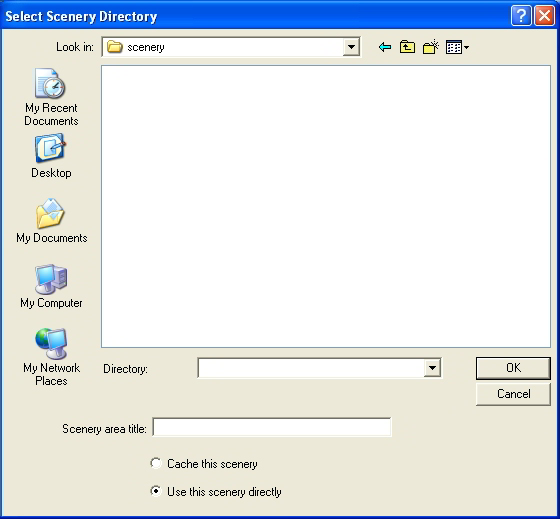
You won't see the .bgl files themselves from the add new area screen.

Image


Is it not letting you add it?

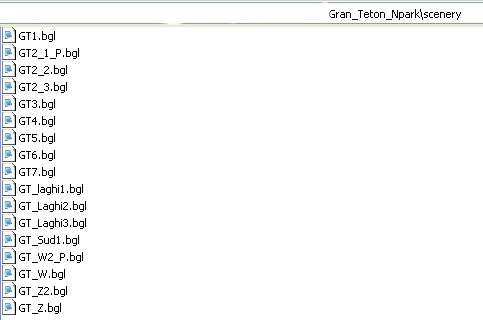
the path should be :/FSX/Addon Scenery/Grand Teton/scenery

and these are all of the bgl files that should be in the 'scenery' folder:

Image


If you were able to add the area, start at Jackson Hole Wyoming, and you will be at the foot of the scenery. ;)
Last edited by ShaneG_old on Fri Jun 05, 2009 9:33 pm, edited 1 time in total.
ShaneG_old
Lieutenant Colonel
Lieutenant Colonel
 
Posts: 9700
Joined: Tue Mar 11, 2008 11:52 am

Re: Help to install grand teton

Postby Hagar » Sat Jun 06, 2009 1:39 am

I have the same problem with the Tetons. I made the dir, made a scenery dir, added bgls 1 - 7. When I go to add scenery, I nav to Addon scenery, tetons, scenery, but the bgls dont show up. What gives?

Thanks
Jim

You've gone a step too far. Select the folder named tetons.
Image

Founder & Sole Member - Grumpy's Over the Hill Club for Veteran Virtual Aviators
Member of the Fox Four Group
My Google Photos albums
My Flickr albums
User avatar
Hagar
Colonel
Colonel
 
Posts: 30868
Joined: Wed Jun 19, 2002 7:15 am
Location: Costa Geriatrica

Re: Help to install grand teton

Postby grizzard » Mon Jun 08, 2009 9:43 am

I too had the same dilemma until I figured out (from ShaneG's jpg) that you NEED to go into the SCENERY LIBRARY in SETTINGS after you have created the proper directories under the Addon Scenery folder, and then click on ADD AREA, and then navigate to the Grand Teton folder you just added. You can then move it to the priority you wish, if you want ....  

This may be common knowledge to some, but I had no idea this was one of the steps needed, and much of the Addon Scenery files available online fail to mention this step.   I went through all kinds of hoops before I finally stumbled onto this.  ;D ;D  Of course I'm sure there are instructions for this ...........  somewhere!!   :-[
Intel i7 920 @ 4 Ghz- Thermalright Ultra-120 Extreme Fan - MSI X58 Platinum- MSI Geforce 285 GTX 1 GB - 6 GB OCZ 1600 DDR3 1600 - WD VelociRaptor 300 GB - OCZ 700 Watt GameXstream - Samsung SyncMaster 2493 HM - Vista Home Premium
User avatar
grizzard
2nd Lieutenant
2nd Lieutenant
 
Posts: 241
Joined: Sun Mar 09, 2008 7:17 pm
Location: Rio Tinto


Return to Flight Simulator X (FSX) and Steam

Who is online

Users browsing this forum: No registered users and 429 guests