Can I make FSX darker at night?

FSX including FSX Steam version.

Can I make FSX darker at night?

Postby eurowing » Wed Jun 03, 2009 6:30 pm

hello,
i have been searching for a solution in this forum but came up with nothing. i am not even sure where to post as this could be software related (windows or FSX settings - more likely) or hardware (video card, monitor...).

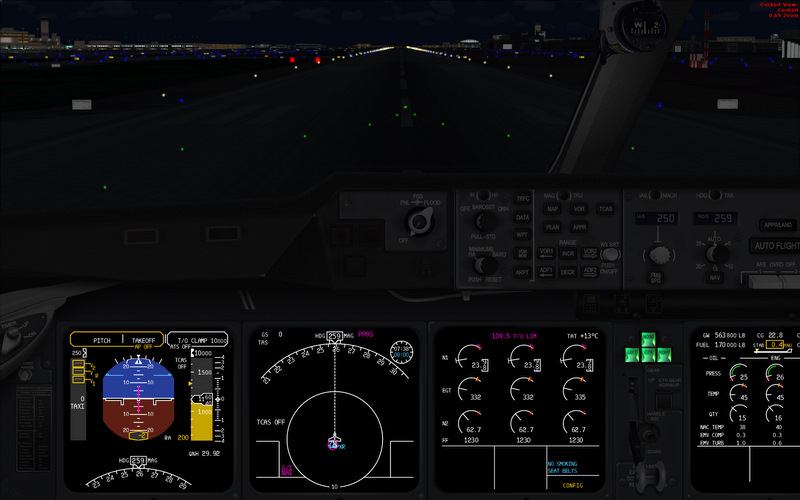
when i fly at night FSX is not as dark as i'd like and as it has been from what i remember. now i haven't flown at night in a while (was still on a different machine with win xp and a 7800GT) but i do remember how when the panel lights where off at night i could not find the switch to turn on the flood light in the cockpit, it was that dark! i had to press "L" to turn on the lights and find my way around.

i must say that i almost only fly PMDG or LD aircraft, not the default ones. when i get in the cockpit at night now i could even fly without any lights because i can read everything just like that. it is dark, but i can still see without problems.

to my knowledge i have tried everything i can - starting of course with the monitor (brightness is down and contrast is good, too), trying the nvidia control panel where i reduced color brightness (seemed to help but problem is the city lights become too dark, L.A. looked like a little town after that).

is there anything else i can do? does everybody have the same picture? can you guys read for example the dials on the PMDG MD-11 control panel with all the lights turned off?

i am curious if that's normal or not. btw when climbing out i could even make out green ground textures (fields) on my last flight.

are there settings in the fsx.cfg that i could change? or ist win7 with the new drivers just still not where it should be?

thanks!

Denis
KPHX

i7 920; ASUS P6T; GTX-280 OC; win7 64 bit; FSX SP2
User avatar
eurowing
Ground hog
Ground hog
 
Posts: 34
Joined: Sun Mar 29, 2009 5:52 pm
Location: Laveen, AZ, USA

Re: Can I make FSX darker at night?

Postby eurowing » Wed Jun 03, 2009 6:41 pm

i thought maybe i should add a screenshot. if it is a software setting then you should see pretty much what i see? the picture shows the panel at night with all the lights turned off.

Image
Last edited by eurowing on Wed Jun 03, 2009 6:42 pm, edited 1 time in total.
Denis
KPHX

i7 920; ASUS P6T; GTX-280 OC; win7 64 bit; FSX SP2
User avatar
eurowing
Ground hog
Ground hog
 
Posts: 34
Joined: Sun Mar 29, 2009 5:52 pm
Location: Laveen, AZ, USA

Re: Can I make FSX darker at night?

Postby Excalibur372 » Wed Jun 03, 2009 9:17 pm

i thought maybe i should add a screenshot. if it is a software setting then you should see pretty much what i see? the picture shows the panel at night with all the lights turned off.

Image


That's usually what I see, except with the lights turned on. If it's the light in the cabin you want brighter, you would have to change the cockpit bitmap. Sorry I couldn't help more. :( :) :( :)
lifes a beach.
not.
User avatar
Excalibur372
2nd Lieutenant
2nd Lieutenant
 
Posts: 173
Joined: Tue Feb 03, 2009 6:52 pm
Location: Baton Rouge, Louisiana KBTR

Re: Can I make FSX darker at night?

Postby BAW0343 » Wed Jun 03, 2009 11:41 pm

I think that's fairly normal for the 2d panel.  The above post suggested a good solution (except they didn't understand what you're asking for) of editing the Panel BMP file. Just open it up in whatever .BMP editor you have and turn the brightness down. I cant give you detailed instructions as I don't know what editing programs you may have.

I doubt this is a software or hardware issue, it may just be your monitor is brighter then the one you remember.
Image Image
User avatar
BAW0343
Major
Major
 
Posts: 3011
Joined: Wed Oct 12, 2005 4:26 am
Location: Mesa, AZ

Re: Can I make FSX darker at night?

Postby EJW » Thu Jun 04, 2009 2:50 am

I think that's pretty normal. My night darkness is similar to tha tof yours.
EJW
Major
Major
 
Posts: 2760
Joined: Sun Apr 12, 2009 7:06 am
Location: Lincolnshire, UK

Re: Can I make FSX darker at night?

Postby Barbr » Thu Jun 04, 2009 9:40 am

What about the panel that allows you to dial down the brightness of each of the 6 cockpit displays? Sometimes I dial those down at night, too. Hope that helps.
Last edited by Barbr on Thu Jun 04, 2009 9:40 am, edited 1 time in total.
User avatar
Barbr
Captain
Captain
 
Posts: 647
Joined: Sun Nov 16, 2008 12:56 pm
Location: California

Re: Can I make FSX darker at night?

Postby Excalibur372 » Thu Jun 04, 2009 12:31 pm

[quote]I think that's fairly normal for the 2d panel.
Last edited by Excalibur372 on Thu Jun 04, 2009 12:32 pm, edited 1 time in total.
lifes a beach.
not.
User avatar
Excalibur372
2nd Lieutenant
2nd Lieutenant
 
Posts: 173
Joined: Tue Feb 03, 2009 6:52 pm
Location: Baton Rouge, Louisiana KBTR

Re: Can I make FSX darker at night?

Postby eurowing » Thu Jun 04, 2009 1:26 pm

thank you all for the input. can you guys also recognize green fields on the ground when flying at night?
Denis
KPHX

i7 920; ASUS P6T; GTX-280 OC; win7 64 bit; FSX SP2
User avatar
eurowing
Ground hog
Ground hog
 
Posts: 34
Joined: Sun Mar 29, 2009 5:52 pm
Location: Laveen, AZ, USA

Re: Can I make FSX darker at night?

Postby EJW » Thu Jun 04, 2009 2:00 pm

I've just tested it out and sadly, no, the ground does not appear to be green at 01:00. It looks charcoal grey, but the areas around illuminated areas such as buildings appears green. That's all sadly.
EJW
Major
Major
 
Posts: 2760
Joined: Sun Apr 12, 2009 7:06 am
Location: Lincolnshire, UK

Re: Can I make FSX darker at night?

Postby UU » Thu Jun 04, 2009 6:30 pm

Aye,

maybe this could help:

http://blogs.msdn.com/ptaylor/archive/2007/05/15/new-tweaks-in-sp1.aspx


[b]"......
For the dusk/dawn textures some people feel, subjectively, the result is too dark or too light. There are 2 items that allow the transition time to be changed:

[GRAPHICS]

DAY_THRESHOLD

NIGHT_THRESHOLD


acceptible values are 0 to 65535.
UU,
Bayern, EDNT
UU
2nd Lieutenant
2nd Lieutenant
 
Posts: 121
Joined: Mon Jun 04, 2007 2:41 pm
Location: Bayern

Re: Can I make FSX darker at night?

Postby eurowing » Fri Jun 05, 2009 12:14 am

that seemd like a good hint and i tried it right away. unfortunately it did not work for the panel.

it seems that this tweak is for dusk and dawn settings rather than night or day. i am pretty sure that there must be a way to fix that with an entry in the fsx.cfg.

thanks anyways!
Denis
KPHX

i7 920; ASUS P6T; GTX-280 OC; win7 64 bit; FSX SP2
User avatar
eurowing
Ground hog
Ground hog
 
Posts: 34
Joined: Sun Mar 29, 2009 5:52 pm
Location: Laveen, AZ, USA


Return to Flight Simulator X (FSX) and Steam

Who is online

Users browsing this forum: No registered users and 299 guests