
Something wrong

FSX including FSX Steam version.

Something wrong

Postby specter177 » Fri May 22, 2009 8:40 pm
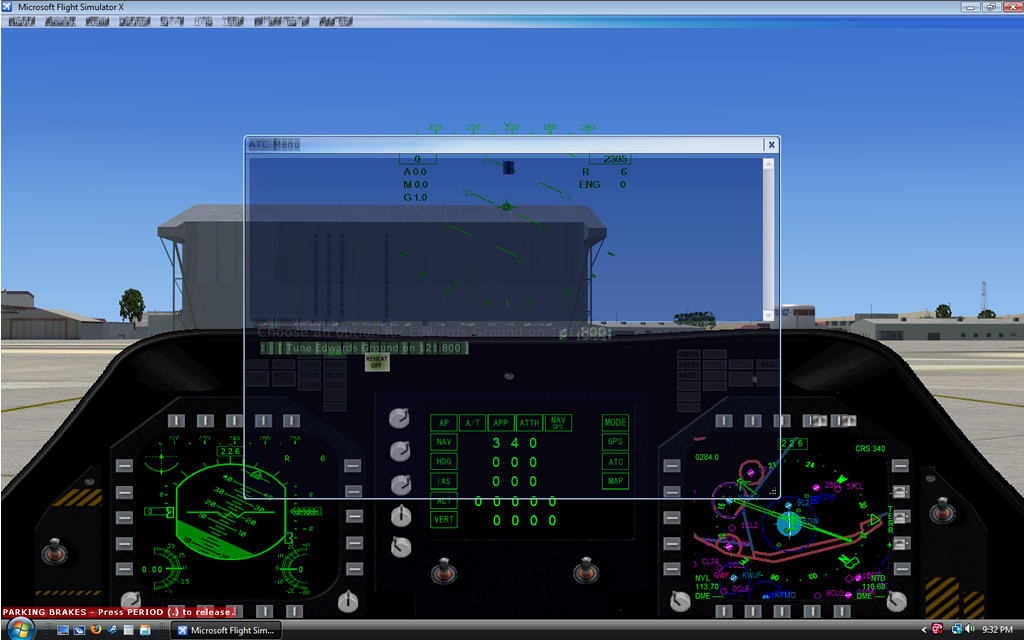
There is something weird going on with my toolbar and ATC menu. Just started a few days ago. Any ideas on what is wrong?

Image
ImageImage
User avatar
specter177
Major
Major
 
Posts: 1369
Joined: Sat Sep 24, 2005 2:33 pm
Location: KDAY

Re: Something wrong

Postby Ang2dogs » Fri May 22, 2009 9:03 pm

That happen to me about 3 times, what I did was let the sim write a new CFG, (don't for get to back up your original first), and that always cleared it up.
User avatar
Ang2dogs
Captain
Captain
 
Posts: 862
Joined: Sun Aug 19, 2007 12:38 am
Location: black mountain hills of Dakota

Re: Something wrong

Postby specter177 » Fri May 22, 2009 9:15 pm

How do I do that?
ImageImage
User avatar
specter177
Major
Major
 
Posts: 1369
Joined: Sat Sep 24, 2005 2:33 pm
Location: KDAY

Re: Something wrong

Postby Ang2dogs » Fri May 22, 2009 9:30 pm

IF your using Windows xp, go to:

My Computer/Local Disk/Documents and Settings/( your Name)/Application Data/Microsoft/FSX: in there you'll find your fsxCFG. file. Move that to a safe place ( My Docs) and then fire up the sim and it will automaticaly write a new one. hope this helps.
User avatar
Ang2dogs
Captain
Captain
 
Posts: 862
Joined: Sun Aug 19, 2007 12:38 am
Location: black mountain hills of Dakota

Re: Something wrong

Postby Capt.Propwash » Fri May 22, 2009 11:51 pm

along with this, once you find your FSX.CFG (or FS9.cfg) i made a shortcut to the desktop so that if i ever needed to change any of the info inside.. or just look at something at a quick glance, i didnt have to go digging for it.
The thoughts and expressions contained in the post above are solely my own, and not necessarily those of Simviation.com, its Moderators, its Staff, its Members, or other guests. They can not, are not, and will not be held liable for any thoughts, or expre
User avatar
Capt.Propwash
Major
Major
 
Posts: 1947
Joined: Tue Feb 20, 2007 12:34 am
Location: KCHS, Charleston, SC, USA

Re: Something wrong

Postby BFMF » Sat May 23, 2009 12:34 am

Also, there's this awsome handy tool included with every copy of windows that is a simple, but powerfull search tool. If you have never used it, or are unsure of where it is, click on Start, and go up to Search, and click on 'For Files Or Folders'. Type in the file you want to search for, and within seconds, you will have results.

Believe it or not, it really works... ;D
Last edited by BFMF on Sat May 23, 2009 12:36 am, edited 1 time in total.
BFMF
Colonel
Colonel
 
Posts: 16266
Joined: Mon Feb 25, 2002 6:06 pm
Location: Pacific Northwest

Re: Something wrong

Postby Fozzer » Sat May 23, 2009 2:54 am

Also, there's this awesome handy tool included with every copy of windows that is a simple, but powerful search tool. If you have never used it, or are unsure of where it is, click on Start, and go up to Search, and click on 'For Files Or Folders'. Type in the file you want to search for, and within seconds, you will have results.

Believe it or not, it really works... ;D


Tee-Hee... ;D...!

It's a bit like "Google"... ;D... ;D...!

Paul...G-BPLF...FS 2004... :)...!
Win 8.1 64-bit. DX11. Advent Tower. Intel i7-3770 3.9 GHz 8-core. 8 GB System RAM. AMD Radeon HD 7700 1GB RAM. DVD ROM. 2 Terra Byte SATA Hard Drive. Philips 17" LCD Monitor. Saitek Cyborg X Fly-5 Joystick. ...and a Briggs and Stratton Petrol Lawn Mower.
User avatar
Fozzer
Colonel
Colonel
 
Posts: 27369
Joined: Thu Jan 31, 2002 3:11 pm
Location: Hereford. England. EGBS.

Re: Something wrong

Postby Alejandro Rhodes » Sat May 23, 2009 7:13 am

I had once that same exact issue

You have VISTA ,Find the entire FSX.CFG folder

Windows Vista : C:\Users\[Your Username]\AppData\Roaming\Microsoft\FSX

Grab the whole folder and put it for a while in the desktop, I mean Move it from there to allow FSX create a new one , start the game and wait until FSX create a new one and see if you STILL have that issue, if
it still there (I doubt it) turn off the game and delete the new FSX.CFG folder
Last edited by Alejandro Rhodes on Sat May 23, 2009 7:14 am, edited 1 time in total.
Alejandro Rhodes
Ground hog
Ground hog
 
Posts: 0
Joined: Sun Jan 27, 2013 6:33 am

Re: Something wrong

Postby basys » Sat May 23, 2009 10:27 am

Hi Folks

specter177 -
This is a known issue, and raised during betas.

Your sliders are set too high
for your PC's available resources,
for the aircraft & scenery loaded within the aircraft locale.

FSX will dither the viewport when this occurs.
Hence the blurry fonts.

Pressing ESC, ESC, will redraw the scenery
and sometimes clear this.

It can also be initiated by overheating.


Please see - FSDeveloper - Wiki - Problem Resolving (FSX) - Assessing Performance in FSX(A)
Apply those fsx.cfg [TextInfo.#] changes,
and you'll be able to see when FSX is struggling, (if FPS variance is > 1%)


HTH
ATB
Paul
Last edited by basys on Sat May 23, 2009 10:29 am, edited 1 time in total.
[url=http://secure.simmarket.com/product_info.php?products_id=2795"]Image[/url]
User avatar
basys
2nd Lieutenant
2nd Lieutenant
 
Posts: 109
Joined: Sat Jan 22, 2005 11:43 am
Location: EGNL, Barrow-in-Furness, Cumbria, UK

Re: Something wrong

Postby specter177 » Sat May 23, 2009 6:32 pm

Okay, I've done all those things and have my settings down to basically nothing, with FSP Variance under 1%, but it still isn't working. :(
ImageImage
User avatar
specter177
Major
Major
 
Posts: 1369
Joined: Sat Sep 24, 2005 2:33 pm
Location: KDAY

Re: Something wrong

Postby basys » Sat May 23, 2009 7:47 pm

Hi Folks

specter177 -
What is that aircraft model ?

It doesn't look like an FSX native,
more like its a port-over from FS7/8.

Whatever,
its GPS gauge will probably be hammering FSX,

Suggest you re-test at that locale
whilst using an FSX native default aircraft.

Do you still have that issue ?
If so,
please post screenie.


Have you tried hiding your toolbar,
and also running in full-screen mode.


HTH
ATB
Paul
Last edited by basys on Sat May 23, 2009 7:51 pm, edited 1 time in total.
[url=http://secure.simmarket.com/product_info.php?products_id=2795"]Image[/url]
User avatar
basys
2nd Lieutenant
2nd Lieutenant
 
Posts: 109
Joined: Sat Jan 22, 2005 11:43 am
Location: EGNL, Barrow-in-Furness, Cumbria, UK

Re: Something wrong

Postby specter177 » Sat May 23, 2009 9:34 pm

It does this for all aircraft, and whether I'm in windowed or not.
ImageImage
User avatar
specter177
Major
Major
 
Posts: 1369
Joined: Sat Sep 24, 2005 2:33 pm
Location: KDAY

Re: Something wrong

Postby basys » Sun May 24, 2009 2:28 am

Hi Folks

specter -
As previousyly -
Your sliders are set too high
for your PC's available resources,
for the aircraft & scenery loaded within the aircraft locale.

On the settings panel,
click the "Reset to Default" button.

That's what YOUR PC is currently capable of.
It's tested every time you fire up FSX.

If you increase any slider,
you'll then have to back off a different one.

HTH
ATB
Paul
Last edited by basys on Sun May 24, 2009 2:29 am, edited 1 time in total.
[url=http://secure.simmarket.com/product_info.php?products_id=2795"]Image[/url]
User avatar
basys
2nd Lieutenant
2nd Lieutenant
 
Posts: 109
Joined: Sat Jan 22, 2005 11:43 am
Location: EGNL, Barrow-in-Furness, Cumbria, UK

Re: Something wrong

Postby specter177 » Sun May 24, 2009 9:11 am

The Reset to Default puts it up to maximum on everything, and like I said before, I put the settings down to almost nil and it was still causing the problem. Could it be a hardware problem, and would reinstalling possibly fix it?
ImageImage
User avatar
specter177
Major
Major
 
Posts: 1369
Joined: Sat Sep 24, 2005 2:33 pm
Location: KDAY

Re: Something wrong

Postby Alejandro Rhodes » Sun May 24, 2009 9:20 am

Specter I swear Buddy ,I had this exact same issue man  :-/ But i can't remember ,Im 100% sure Is not you graphic neither your drivers buddy, Hagar knows ,and Nick also know is something silly my friend ,

did you remove momentary the FSX.CFG entire folder and allow FSX to build a new one as I told you before?
Alejandro Rhodes
Ground hog
Ground hog
 
Posts: 0
Joined: Sun Jan 27, 2013 6:33 am

Next

Return to Flight Simulator X (FSX) and Steam

Who is online

Users browsing this forum: No registered users and 393 guests