
FS Skyworld 2004 clouds in FSX. Thank you ShaneG !

FSX including FSX Steam version.

FS Skyworld 2004 clouds in FSX. Thank you ShaneG !

Postby Daube » Fri May 22, 2009 8:00 am

Hi all,

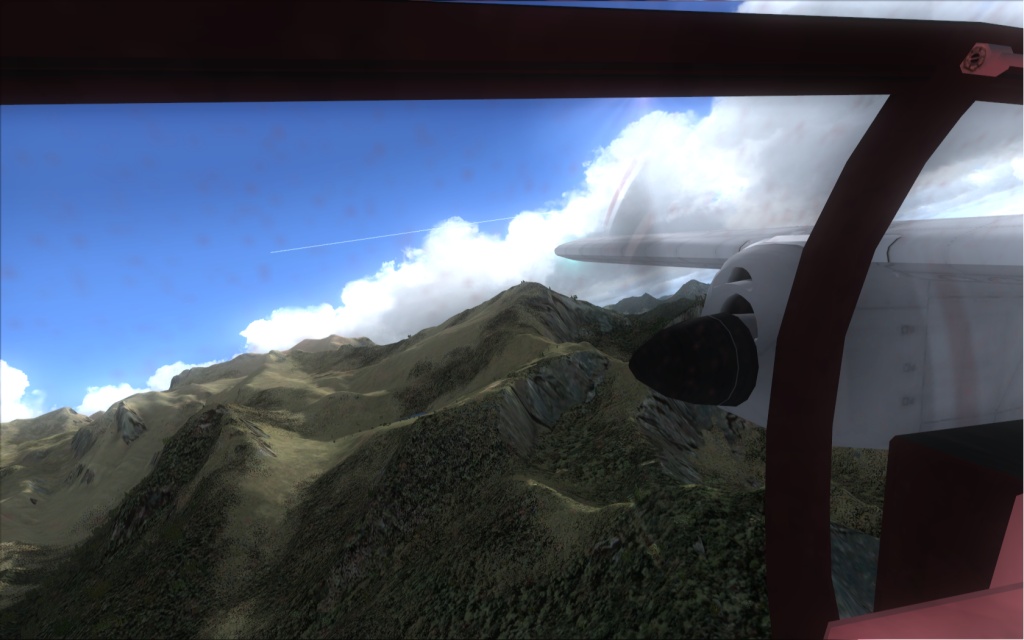
Thanks to the "explanations" from ShaneG if I remember correctly, my FSX has nice cloulds again ! Thank you very much, mister !

FS Skyworld 2004 is one of the most famous freeware addons for FS9, it was providing great cloud textures, as well as new sky colors and lights. I thought the clouds were not compatible with FSX anymore, but ShaneG helped me understand what I was doing wrong.

I was trying to transfer the cloud textures directly from the SkyWorld folder to my FSX folder... and this is wrong, because the textures there are NOT in a correct format yet !! You MUST use the FS Skyworld interface to select a clouds set a install it to a dummy folder. Only then you can transfer those textures from the dummy folder to the texture folder of FSX. And it works beautifully as you can see below :)

[glow=yellow,2,300]WARNING:
- make a backup archive of you FSX\texture folder first (I created a rar file)
- install ONLY the cloud textures. The sky textures seem to be incompatible, they do not show[/glow]

Image
Last edited by Daube on Fri May 22, 2009 8:05 am, edited 1 time in total.
User avatar
Daube
Lieutenant Colonel
Lieutenant Colonel
 
Posts: 6611
Joined: Wed Oct 05, 2005 8:34 am
Location: Nice (FR)

Re: FS Skyworld 2004 clouds in FSX. Thank you ShaneG !

Postby Alejandro Rhodes » Fri May 22, 2009 10:05 am

Ok i got downlaod it and  instaled the FS Skyworld 2004 ,I made an entire back up of the Main TEX folder Steph, But I also have FS2004 in my machine , :-/ It says install and run, obviously it opens FS9
Alejandro Rhodes
Ground hog
Ground hog
 
Posts: 0
Joined: Sun Jan 27, 2013 6:33 am

Re: FS Skyworld 2004 clouds in FSX. Thank you ShaneG !

Postby Daube » Fri May 22, 2009 10:29 am

Alejandro, I think you simply need to take the "cumulus.bmp" file in your FS9\texture folder and transfer it to your FSX\texture folder.
The texture that is in your FS9\texture has the correct format. The only important thing is that you must not try to use the textures files that are in the FS Skyworld folder.

In fact, if you just try to open one of them with DXTBMP, you'll understand the problem: wrong colors, look shifted etc... very strange. BUT if you trigger an install via the FS Skyworld interface, and then try to open the files that were put in the FS folder, they look fine in DXTBMP.

This means that when you choose a cloud set in the FS Skyworld and press the "install" button, the program performs some kind of conversion of the texture to an FS-compatible format.
User avatar
Daube
Lieutenant Colonel
Lieutenant Colonel
 
Posts: 6611
Joined: Wed Oct 05, 2005 8:34 am
Location: Nice (FR)

Re: FS Skyworld 2004 clouds in FSX. Thank you ShaneG !

Postby ShaneG_old » Fri May 22, 2009 2:19 pm

You're very welcome sir. :)

What I did, was to install each set one at a time into FS9 and then copy the textures from there into their own folders. So when I need to switch sets, I just copy/paste in the set I want. ;)

I had no luck with the sky textures either. :( But the clouds sure are nice. :D ;)
ShaneG_old
Lieutenant Colonel
Lieutenant Colonel
 
Posts: 9700
Joined: Tue Mar 11, 2008 11:52 am

Re: FS Skyworld 2004 clouds in FSX. Thank you ShaneG !

Postby Major V » Sat May 23, 2009 11:32 pm

Hello All:

I was hoping to try out these cloud textures myself as my Radeon 4870 X2 has a difficult time rendering the stock clouds without stuttering.
Major V
Ground hog
Ground hog
 
Posts: 8
Joined: Sun May 24, 2009 12:17 am
Location: Buckeyeland, USA

Re: FS Skyworld 2004 clouds in FSX. Thank you ShaneG !

Postby Daube » Sun May 24, 2009 4:13 am

[quote]Hello All:

I was hoping to try out these cloud textures myself as my Radeon 4870 X2 has a difficult time rendering the stock clouds without stuttering.
User avatar
Daube
Lieutenant Colonel
Lieutenant Colonel
 
Posts: 6611
Joined: Wed Oct 05, 2005 8:34 am
Location: Nice (FR)

Re: FS Skyworld 2004 clouds in FSX. Thank you ShaneG !

Postby Major V » Sun May 24, 2009 10:09 am

Daube:

Thanks very much for providing these detailed instructions.
Major V
Ground hog
Ground hog
 
Posts: 8
Joined: Sun May 24, 2009 12:17 am
Location: Buckeyeland, USA

Re: FS Skyworld 2004 clouds in FSX. Thank you ShaneG !

Postby Daube » Sun May 24, 2009 10:35 am

Glad to see you've made it, thanks for detailling the errors that you had, I'm sure some Vista users will be happy to read those explanation ! :)
I recommend you the set "Cumulus F set 2".
And remember, the sky colors (day, dawn and dusk) do NOT work in FSX, not at all !
User avatar
Daube
Lieutenant Colonel
Lieutenant Colonel
 
Posts: 6611
Joined: Wed Oct 05, 2005 8:34 am
Location: Nice (FR)

Re: FS Skyworld 2004 clouds in FSX. Thank you ShaneG !

Postby Major V » Sun May 24, 2009 12:34 pm

Thanks again, Daube.
Major V
Ground hog
Ground hog
 
Posts: 8
Joined: Sun May 24, 2009 12:17 am
Location: Buckeyeland, USA


Return to Flight Simulator X (FSX) and Steam

Who is online

Users browsing this forum: No registered users and 392 guests