Suddenly all my planes are mis-labled

FSX including FSX Steam version.

Suddenly all my planes are mis-labled

Postby twhitemore » Wed Apr 15, 2009 6:13 pm

Hello all...
I didnt see this posted anyplace, so here goes....

After adding a few (freeware) planes, I opened up FSX and discovered that most of the pictures didnt match their plane!  Never had this happen...

The newest add-on plane was a P-51 with drop tanks...not sure if it is the culprit...

It is as though the pics moved over a couple of spaces...so the Piper Cub might have a Mig photo...

If I choose the plane by its description, it works fine...but its still goofy.

I have closed the program, and restarted the computer...no change...

Thank you in advance!

Tom W.

twhitemore
Ground hog
Ground hog
 
Posts: 2
Joined: Wed Apr 15, 2009 6:59 pm
Location: Healdsburg, Ca.

Re: Suddenly all my planes are mis-labled

Postby Daube » Wed Apr 15, 2009 10:50 pm

Hi,

your problem occurs because one or more of the addon planes you added does not have a thumbnail picture in its "texture.*" folders. You must ensure that each plane gets its thumbnail.

This problem does not occur on FSX Acceleration, though...
User avatar
Daube
Lieutenant Colonel
Lieutenant Colonel
 
Posts: 6611
Joined: Wed Oct 05, 2005 8:34 am
Location: Nice (FR)

Re: Suddenly all my planes are mis-labled

Postby U4EA » Wed Apr 15, 2009 10:50 pm

You have a plane or two that lacks a thumbnail.  I have about three dozen or so of these and learned a simple fix.  From here on these forums when I was a lurker....

I made a small-ish avatar using Paint, texted it with "FSX ADD-ON" and dropped it into the texture file of the 'offending' craft.

OOPS!  Almost forgot....label it "thumbnail"!

There are a lot of freewares lacking thumbnails.  Whenever that happens anymore I just c&p from the original drop-in.
U4EA
 

Re: Suddenly all my planes are mis-labled

Postby U4EA » Wed Apr 15, 2009 10:52 pm

JINX!  You owe me a Coke! ;D
U4EA
 

Re: Suddenly all my planes are mis-labled

Postby U4EA » Wed Apr 15, 2009 10:56 pm


This problem does not occur on FSX Acceleration, though...


Dang! My Deluxe, with Acceleration added later, still does.  I hafta check each time after extraction and pop a thumb if it's lacking....what's your secret?
U4EA
 

Re: Suddenly all my planes are mis-labled

Postby twhitemore » Thu Apr 16, 2009 12:56 am

WHEW!   I thought it was gonna be a file problem...I saw other posts on how to add a thumbnail pic...now I can get it fixed, and add all those thumbnails I was missing...

Good call guys, and thank you very much!!

Tom W.
twhitemore
Ground hog
Ground hog
 
Posts: 2
Joined: Wed Apr 15, 2009 6:59 pm
Location: Healdsburg, Ca.

Re: Suddenly all my planes are mis-labled

Postby Meck » Thu Apr 16, 2009 5:43 am

I had several add-on A/c without thumbnails, but they showed up in the selection menu - just had the grey default prop/helo pic, no mess with misslabeld A/c...

So if the above doesn't help: look here - there was another more detailed thread about it but I can't find it atm...
Image

excuse bad grammar; "I' bin Bayer..."
User avatar
Meck
Major
Major
 
Posts: 1656
Joined: Sat Apr 21, 2007 12:07 pm
Location: Bavaria

Re: Suddenly all my planes are mis-labled

Postby EJW » Thu Apr 16, 2009 11:35 am

Do the aircraft have thumbnails?
EJW
Major
Major
 
Posts: 2760
Joined: Sun Apr 12, 2009 7:06 am
Location: Lincolnshire, UK

Re: Suddenly all my planes are mis-labled

Postby Hagar » Thu Apr 16, 2009 11:43 am

Do the aircraft have thumbnails?

As Meck pointed out, missing thumbnails is not the problem. It's usually caused by FS9-style entries in Aircraft.cfg. See reider's reply in this topic ---> http://www.simviation.com/cgi-bin/yabb2/YaBB.pl?num=1197748225/2#2
Image

Founder & Sole Member - Grumpy's Over the Hill Club for Veteran Virtual Aviators
Member of the Fox Four Group
My Google Photos albums
My Flickr albums
User avatar
Hagar
Colonel
Colonel
 
Posts: 30868
Joined: Wed Jun 19, 2002 7:15 am
Location: Costa Geriatrica

Re: Suddenly all my planes are mis-labled

Postby tcco94 » Fri Apr 17, 2009 1:42 am

One of your airplanes is probally missing a thumbnail picture so it switched all the airplane pictures because that one doesn't have one. Go through your texture folder of your recent downloads and look for a thumbnail.JPG.
If you dont have one, go to google, search the aircraft, save the picture as thumbnail, then drag it back into the texture folder. 8-)
User avatar
tcco94
Major
Major
 
Posts: 3946
Joined: Mon Apr 07, 2008 1:41 am
Location: Bay Area, California

Re: Suddenly all my planes are mis-labled

Postby Meck » Fri Apr 17, 2009 5:23 am

additional:

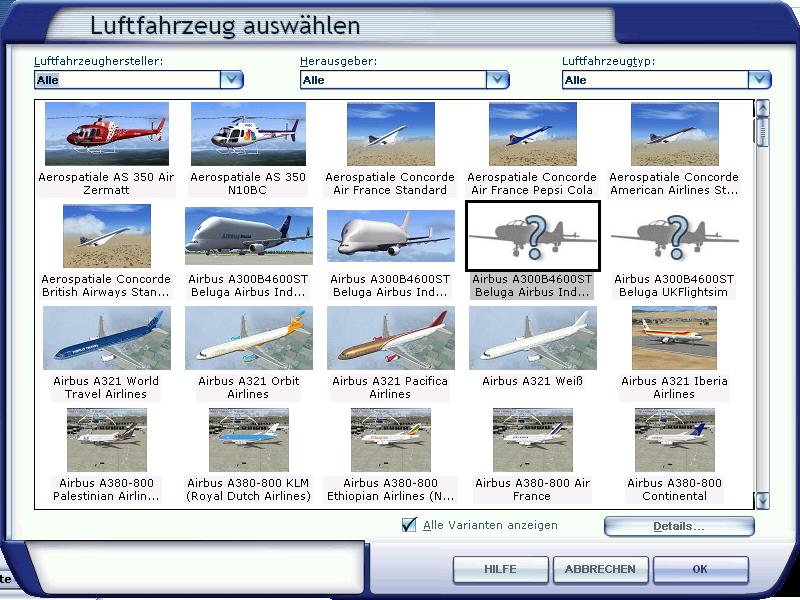
today I added another A/C without thumbnails included (the Airbus A300 Beluga). I took 2 screenshots for the first two liveries, the other two don't have the thumbnail included yet - that's what happens if no thumbnail is in the texture folder (the last 2 Airbus A300 entries):

Image
Last edited by Meck on Fri Apr 17, 2009 5:23 am, edited 1 time in total.
Image

excuse bad grammar; "I' bin Bayer..."
User avatar
Meck
Major
Major
 
Posts: 1656
Joined: Sat Apr 21, 2007 12:07 pm
Location: Bavaria

Re: Suddenly all my planes are mis-labled

Postby Daube » Sat Apr 18, 2009 2:03 am


This problem does not occur on FSX Acceleration, though...


Dang! My Deluxe, with Acceleration added later, still does.
Last edited by Daube on Sat Apr 18, 2009 2:06 am, edited 1 time in total.
User avatar
Daube
Lieutenant Colonel
Lieutenant Colonel
 
Posts: 6611
Joined: Wed Oct 05, 2005 8:34 am
Location: Nice (FR)

Re: Suddenly all my planes are mis-labled

Postby Hagar » Sat Apr 18, 2009 5:08 am


This problem does not occur on FSX Acceleration, though...


Dang! My Deluxe, with Acceleration added later, still does.
Image

Founder & Sole Member - Grumpy's Over the Hill Club for Veteran Virtual Aviators
Member of the Fox Four Group
My Google Photos albums
My Flickr albums
User avatar
Hagar
Colonel
Colonel
 
Posts: 30868
Joined: Wed Jun 19, 2002 7:15 am
Location: Costa Geriatrica

Re: Suddenly all my planes are mis-labled

Postby Daube » Sat Apr 18, 2009 5:17 am

Most of my planes are in FS9 format, an my hangar is quite full.  :-/
User avatar
Daube
Lieutenant Colonel
Lieutenant Colonel
 
Posts: 6611
Joined: Wed Oct 05, 2005 8:34 am
Location: Nice (FR)

Re: Suddenly all my planes are mis-labled

Postby Hagar » Sat Apr 18, 2009 5:42 am

[quote]Most of my planes are in FS9 format, an my hangar is quite full.
Last edited by Hagar on Sat Apr 18, 2009 6:05 am, edited 1 time in total.
Image

Founder & Sole Member - Grumpy's Over the Hill Club for Veteran Virtual Aviators
Member of the Fox Four Group
My Google Photos albums
My Flickr albums
User avatar
Hagar
Colonel
Colonel
 
Posts: 30868
Joined: Wed Jun 19, 2002 7:15 am
Location: Costa Geriatrica

Next

Return to Flight Simulator X (FSX) and Steam

Who is online

Users browsing this forum: No registered users and 338 guests