TROUBLE WITH SEEING THE NEW CESSNA CITATION 500

FSX including FSX Steam version.

TROUBLE WITH SEEING THE NEW CESSNA CITATION 500

Postby amerie » Mon May 12, 2008 3:44 pm

DOES ANYONE HAVE TROUBLE SEEING THE NEW CESSNA CITATION 500 BY ALROT? I HAVE WINDOWS VISTA. WHEN I UNZIP THE FOLDER AND DRAG IT TO AIRPLANE FOLDER, AND THEN BOOT MY FSX TO FLY IT, ITS ALL JUST SEE THROUGH, I CANT SEE THE WHOLE PLANE? IS IT BECAUSE I DONT HAVE DX-10 INSTALLED OR SOMETHING ELSE.. CAN ANYONE PLEASE HELP ME OR EMAIL ME AT ERICYAMILE@YAHOO.COM
amerie
Ground hog
Ground hog
 
Posts: 16
Joined: Mon May 12, 2008 3:39 pm

Re: TROUBLE WITH SEEING THE NEW CESSNA CITATION 500

Postby Alejandro Rhodes » Mon May 12, 2008 4:15 pm
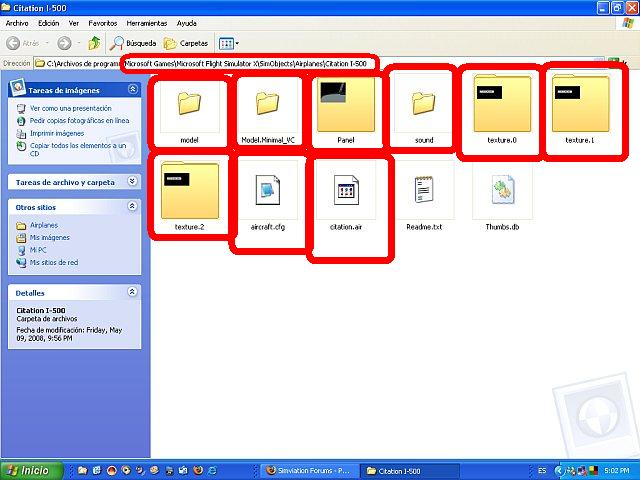
There is no need to , let's try to fix that here

Are these files inside the the citation folder? ..please take a look the location in xp ,in Vista is almost the same,

the ones are Marked in red square MUST be there

If one of these elements are not there that is the problem

Is important the Citation.air file otherwise that's exacly what will happens No visible plane

     Image
Last edited by Alejandro Rhodes on Mon May 12, 2008 4:19 pm, edited 1 time in total.
Alejandro Rhodes
Ground hog
Ground hog
 
Posts: 0
Joined: Sun Jan 27, 2013 6:33 am

Re: TROUBLE WITH SEEING THE NEW CESSNA CITATION 500

Postby Alejandro Rhodes » Mon May 12, 2008 4:27 pm
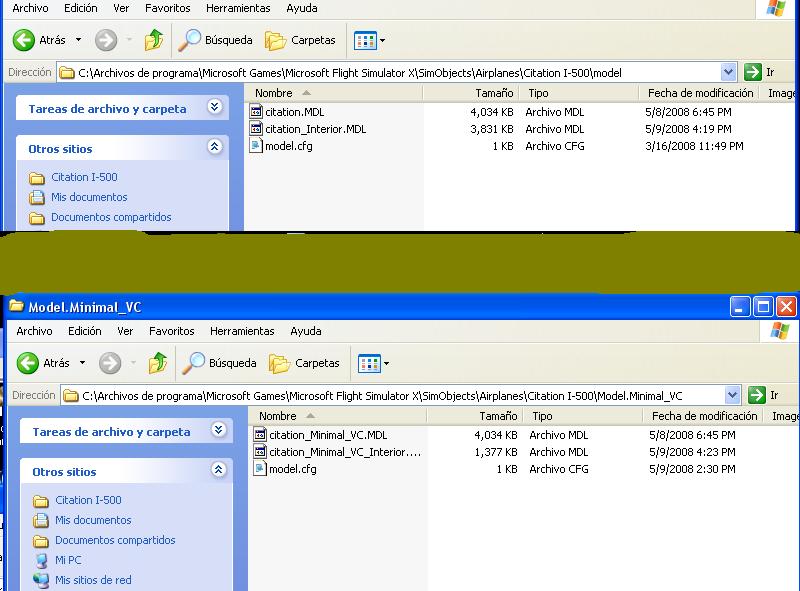
Its very important you see inside these two files model and Model and Model.Minimal_VC

these two has to have INSIDE this files

Image

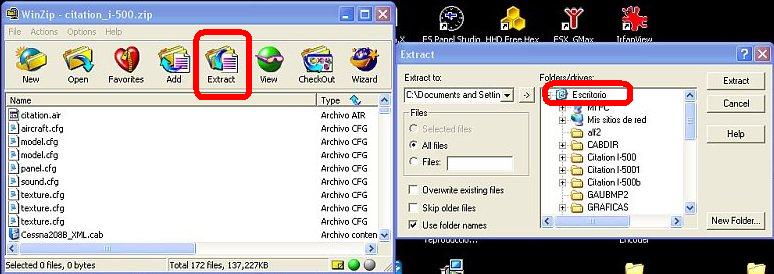
Try to use Winzip ,hit extract to desktop


     Image


I suggest you if all this is correct or NOT  to download the file again from here..

http://www.simviation.com/fsxjets35.htm
Last edited by Alejandro Rhodes on Mon May 12, 2008 4:46 pm, edited 1 time in total.
Alejandro Rhodes
Ground hog
Ground hog
 
Posts: 0
Joined: Sun Jan 27, 2013 6:33 am

Re: TROUBLE WITH SEEING THE NEW CESSNA CITATION 500

Postby Alejandro Rhodes » Mon May 12, 2008 4:44 pm

:-/So Far gentelmens I 've only heard 1 problem and it seems for me that his download was uncompleted or he may be lost one of the files inside the model (the model.cfg), I being dealing with him about his issue since this morning via email ,I told him to Jump with us here ,now he seems he have left :-/
Alejandro Rhodes
Ground hog
Ground hog
 
Posts: 0
Joined: Sun Jan 27, 2013 6:33 am

Re: TROUBLE WITH SEEING THE NEW CESSNA CITATION 500

Postby Hagar » Mon May 12, 2008 4:51 pm

Excuse me butting in Alex. I think you're looking in the wrong place. If the download was incomplete or corrupt he wouldn't be able to open the zipfile. Assuming amerie installed the aircraft correctly this seems more like a display problem to me. There are so many possible variables with FSX that I wouldn't like to guess what's causing it. Vista simply complicates it further.
Last edited by Hagar on Mon May 12, 2008 4:52 pm, edited 1 time in total.
Image

Founder & Sole Member - Grumpy's Over the Hill Club for Veteran Virtual Aviators
Member of the Fox Four Group
My Google Photos albums
My Flickr albums
User avatar
Hagar
Colonel
Colonel
 
Posts: 30868
Joined: Wed Jun 19, 2002 7:15 am
Location: Costa Geriatrica

Re: TROUBLE WITH SEEING THE NEW CESSNA CITATION 500

Postby Alejandro Rhodes » Mon May 12, 2008 4:58 pm

Hi Doug

But the plane was already tested in many machines using VISTA ,and he told me he has instaled other planes without issues ,

in one moment he ask me where should he drag it in Aircraft or in Airplane folder..  ,as fas I know the only thing that has AIRCRAFT folder is fS2004 ,
Probably he did something wrong and lost a file somehow..that's the only explanation I can see
Last edited by Alejandro Rhodes on Mon May 12, 2008 5:15 pm, edited 1 time in total.
Alejandro Rhodes
Ground hog
Ground hog
 
Posts: 0
Joined: Sun Jan 27, 2013 6:33 am

Re: TROUBLE WITH SEEING THE NEW CESSNA CITATION 500

Postby Hagar » Mon May 12, 2008 5:05 pm

Hi Doug

But the plane was already tested in many machines using VISTA ,and he told me he has instaled other planes without issues ,

in one moment he ask me where should he drag it in Aircraft or in Airplane folder..  ,as fas I know the only thing that has airplane folder is fS2004 ,
Probably he did something wrong and lost a file somehow..that's the only explanation I can see

FSX is the only version of FS/CFS that has an airplanes folder. (Flight Simulator X\SimObjects\airplanes.) All other versions have an Aircraft directory. If you drag the complete Citation I-500 folder into another location I really can't see how it's possible to lose a file.

PS. Does he have SP2 installed? Check this out. http://www.simviation.com/cgi-bin/yabb2/YaBB.pl?num=1210626735/1#1
Last edited by Hagar on Mon May 12, 2008 5:10 pm, edited 1 time in total.
Image

Founder & Sole Member - Grumpy's Over the Hill Club for Veteran Virtual Aviators
Member of the Fox Four Group
My Google Photos albums
My Flickr albums
User avatar
Hagar
Colonel
Colonel
 
Posts: 30868
Joined: Wed Jun 19, 2002 7:15 am
Location: Costa Geriatrica

Re: TROUBLE WITH SEEING THE NEW CESSNA CITATION 500

Postby Alejandro Rhodes » Mon May 12, 2008 5:22 pm

Hi Doug

But the plane was already tested in many machines using VISTA ,and he told me he has instaled other planes without issues ,

in one moment he ask me where should he drag it in Aircraft or in Airplane folder..  ,as fas I know the only thing that has airplane folder is fS2004 ,
Probably he did something wrong and lost a file somehow..that's the only explanation I can see

FSX is the only version of FS/CFS that has an airplanes folder. (Flight Simulator X\SimObjects\airplanes.) All other versions have an Aircraft directory.


;D I wrotte it wrong above ,I just fixed LOL

The plane was made entirely for all kinds of FSX ,was made using FSX-SDK is compatible and well checked in FSX-,...FSXsp1, FSX-SP2

In all versions works fine , I have 2 pcs Just for test and non activation  I install FSX in my second machine to see from my main one details and get them fix in gmax

well the boy seems dissapear , Im gonna send him a letter to see if he found the problem

:D One thing agree with you its VISTA and many can come up.. ;D

and I'm not going to break my head if he doesn't show up again
Last edited by Alejandro Rhodes on Mon May 12, 2008 5:24 pm, edited 1 time in total.
Alejandro Rhodes
Ground hog
Ground hog
 
Posts: 0
Joined: Sun Jan 27, 2013 6:33 am

Re: TROUBLE WITH SEEING THE NEW CESSNA CITATION 500

Postby amerie » Mon May 12, 2008 5:32 pm

HEY THATS THE PROBLEM I HAVE ALL YOU SEE IS THE 2 PILOTS FLOATING IN THE AIR. I CHECKED THE FILES THAT NEED TO BE IN THERE AND I HAVE THEM I CHECKED IT LIKE 10 TIMES ALREADY HELP ME OUT...DO I NEED THE SERVICE PACKS. I CANT FIND MY ORIGINAL FSX CD'S BECAUSE IT DOES ASK FOR IT WHEN I TRY TO DOWNLOAD THE SERVICE PACK 1
amerie
Ground hog
Ground hog
 
Posts: 16
Joined: Mon May 12, 2008 3:39 pm

Re: TROUBLE WITH SEEING THE NEW CESSNA CITATION 500

Postby Boikat » Mon May 12, 2008 5:33 pm

Chiming in.
Last edited by Boikat on Mon May 12, 2008 5:49 pm, edited 1 time in total.
Image
"I reject your reality, and substitute my own" Adam Savage, Mythbusters
User avatar
Boikat
Major
Major
 
Posts: 2974
Joined: Thu Mar 20, 2008 8:23 pm
Location: NW Loueezianner

Re: TROUBLE WITH SEEING THE NEW CESSNA CITATION 500

Postby amerie » Mon May 12, 2008 5:37 pm

HEY ALROT I USED THE INFO YOU SENT ABOUT MAKING SURE THE FILES IN THE RED SQUARES ARE THERE. THEY ARE THERE. THE ONLY THING I SAW WAS THE AIRCRAFT.CFG DIDNT SAY THAT. IT SAID AIRCRAFT ONLY WITH A MICROSOFT OUTLOOK LOGO. I HAD WENT TO PROPERTIES TO CHANGE IT IN WORDPAD MODE. I EVEN EXTRACTED THE FILES AND NOTHING. THERE IS ANOTHER PERSON ON HERE WHO SAID THE SAME THING I SAID. WHEN I CLICK ON THE CIT 500 ALL YOU SEE IS THE 2 PILOTS FLOATING IN THE AIR AND THE ENGINES THATS ALL..ALL I NEED TO KNOW IF I HAVE TO DOWNLOAD THE PLANE AGAIN AND THEN EXTRACT FILES BEFORE I DRAG OVER, AND DO I NEED THE SPK1 OR 2 TO MAKE THIS WORK? IM SORRY FOR BOTHERING YOU GUYS BUT THIS IS THE BEXT CIT 500 I HAVE EVER SEEN ON HERE AND IM DOING EVERYTHING I CAN TO DOWNLOAD IT. PLEASE HELP ME SOME MORE
amerie
Ground hog
Ground hog
 
Posts: 16
Joined: Mon May 12, 2008 3:39 pm

Re: TROUBLE WITH SEEING THE NEW CESSNA CITATION 500

Postby Alejandro Rhodes » Mon May 12, 2008 5:45 pm
BTW they are DVD not cds , you will need to reinstall FSX all again, Your FSX is not building

1)Material specular are not working
2)Skinned mesh is not working too
3)GlobalEnv_AC_Chrome.dds is not applying into some surface of the plane ...


I have test that plane in all kind of FSX with and without service pack

reinstall that game again ...

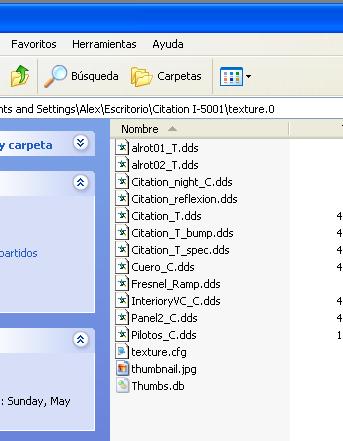
All these files has to be exacly like this in the 3 texture files

Image
Last edited by Alejandro Rhodes on Mon May 12, 2008 5:55 pm, edited 1 time in total.
Alejandro Rhodes
Ground hog
Ground hog
 
Posts: 0
Joined: Sun Jan 27, 2013 6:33 am

Re: TROUBLE WITH SEEING THE NEW CESSNA CITATION 500

Postby amerie » Mon May 12, 2008 5:50 pm

HEY THATS THE THING I CANT FIND THE DVD'S THANKS FOR CORRECTING ME. I KNOW I GOT IN THE GAME LAST TIME AND I PUT THE MESH QUALITY IN THE SETTING TO 0% COULD THAT BE IT
amerie
Ground hog
Ground hog
 
Posts: 16
Joined: Mon May 12, 2008 3:39 pm

Re: TROUBLE WITH SEEING THE NEW CESSNA CITATION 500

Postby amerie » Mon May 12, 2008 5:51 pm

HEY WHEN YOU DOWNLOADED THE CITATION DID YOU HAVE TO EXTRACT THE FILES OR DID YOU JUST UNZIP AND DRAG OVER TO AIRPLANES FOLDER?
amerie
Ground hog
Ground hog
 
Posts: 16
Joined: Mon May 12, 2008 3:39 pm

Re: TROUBLE WITH SEEING THE NEW CESSNA CITATION 500

Postby Alejandro Rhodes » Mon May 12, 2008 6:12 pm

I have to become some sort of detective here ,


Second with your question Eric you have answer this issue , You Don't know how to convert a simple ZIP file into a normal file...

we have to start from the begining Eric...

First Download again the entire Citation 500 here

http://www.simviation.com/fsxjets35.htm

after that once you have a NEW zip file we will continue
Last edited by Alejandro Rhodes on Mon May 12, 2008 6:16 pm, edited 1 time in total.
Alejandro Rhodes
Ground hog
Ground hog
 
Posts: 0
Joined: Sun Jan 27, 2013 6:33 am

Next

Return to Flight Simulator X (FSX) and Steam

Who is online

Users browsing this forum: No registered users and 543 guests