FSX & SLI

FSX including FSX Steam version.

Re: FSX & SLI

Postby justpassingthrough » Wed Apr 04, 2007 12:48 pm

[quote][quote]

What I can tell you right off the bat is that new landclass file enhances the sim in places I can't do without. Buildings in the right place and more green with trees!

Last edited by justpassingthrough on Wed Apr 04, 2007 1:05 pm, edited 1 time in total.
justpassingthrough
Captain
Captain
 
Posts: 651
Joined: Thu Dec 21, 2006 2:43 am

Re: FSX & SLI

Postby justpassingthrough » Wed Apr 04, 2007 12:52 pm

Theres no such thing as a 6700 series video card?


I was going to say the same thing

I dont recall ever seeing one
justpassingthrough
Captain
Captain
 
Posts: 651
Joined: Thu Dec 21, 2006 2:43 am

Re: FSX & SLI

Postby ATI_7500 » Wed Apr 04, 2007 3:11 pm

Nick, none of your settings worked, in fact they were worse than the ones I've had before.

And I've got the problem that I can't get rid of micro stutters and blurry textures, no matter what value the TBM, autogen, traffic and FFTF is.
I feel like something's screwed FSX big time...and I'm suspecting the defrags I did today (2*Complete\Name -> 1*SPACE) as the responsible elements.
ATI_7500
 

Re: FSX & SLI

Postby Nick N » Wed Apr 04, 2007 4:19 pm

Nick, none of your settings worked, in fact they were worse than the ones I've had before.

And I've got the problem that I can't get rid of micro stutters and blurry textures, no matter what value the TBM, autogen, traffic and FFTF is.
I feel like something's screwed FSX big time...and I'm suspecting the defrags I did today (2*Complete\Name -> 1*SPACE) as the responsible elements.


This defrags will not cause stutters they repair stutters. Don't even go there I can assure you the defrag passes optimize the sim because it optimizes the entire MFT and file catalog.

I am suspecting something else.

What values have you set in the config file that work
Last edited by Nick N on Wed Apr 04, 2007 4:24 pm, edited 1 time in total.
Nick N
Ground hog
Ground hog
 
Posts: 0
Joined: Thu Sep 20, 2007 2:12 pm

Re: FSX & SLI

Postby Nick N » Wed Apr 04, 2007 4:23 pm

[quote][quote][quote]

What I can tell you right off the bat is that new landclass file enhances the sim in places I can't do without. Buildings in the right place and more green with trees!
Last edited by Nick N on Wed Apr 04, 2007 4:44 pm, edited 1 time in total.
Nick N
Ground hog
Ground hog
 
Posts: 0
Joined: Thu Sep 20, 2007 2:12 pm

Re: FSX & SLI

Postby Nick N » Wed Apr 04, 2007 4:37 pm

Nick, none of your settings worked, in fact they were worse than the ones I've had before.

And I've got the problem that I can't get rid of micro stutters and blurry textures, no matter what value the TBM, autogen, traffic and FFTF is.
I feel like something's screwed FSX big time...and I'm suspecting the defrags I did today (2*Complete\Name -> 1*SPACE) as the responsible elements.


It sounds like one of three things, either something is running in the background, a service or program, something in the hardware is out of whack, or something in the sim that was installed as an addon is wreaking havock.

Have you fighting the micro stutter issue for a while even before you reset the system BIOS and optimized?

Question: Do you have the MS Auto-update feature for Windows Update -or- System Restore enabled?

Check the startup system using the Start System feature in Spybots Search and Destroy.. what is booting with the system?

Have you checked the drivers for Threaded Optimization? Conroe tends to want that disabled or it causes stutters.

Did you install FSUIPC4?  Its having serious problems with simconnect. If you did, get rid of it
Last edited by Nick N on Wed Apr 04, 2007 4:38 pm, edited 1 time in total.
Nick N
Ground hog
Ground hog
 
Posts: 0
Joined: Thu Sep 20, 2007 2:12 pm

Re: FSX & SLI

Postby ATI_7500 » Wed Apr 04, 2007 5:04 pm

or something in the sim that was installed as an addon is wreaking havock.


Things I installed prior to defragging and applying your settings:

- Original "Texture" folder
- Original "Traffic" file

Have you fighting the micro stutter issue for a while even before you reset the system BIOS and optimized?


No. In fact, before I defragged, everything ran almost fine...without any micro stutters!

Question: Do you have the MS Auto-update feature for Windows Update -or- System Restore enabled?


System Restore, yes for my C: drive only (FSX is on D:). Updates no.

Check the startup system using the Start System feature in Spybots Search and Destroy.. what is booting with the system?


Nothing much. Antivir, which I disable prior to running FSX, Nv Tray, a WLAN connection tool.

Have you checked the drivers for Threaded Optimization? Conroe tends to want that disabled or it causes stutters.


Got it on "Auto".

Did you install FSUIPC4?  Its having serious problems with simconnect. If you did, get rid of it


Some programs I occasionally need for flying (AISMooth) are relying on it.

And as I said: Prior to preparing FSX for the way you wanted it for testing (no accusation there!), everything worked.
ATI_7500
 

Re: FSX & SLI

Postby Nick N » Wed Apr 04, 2007 6:36 pm

I do have a question that does involve the defrag

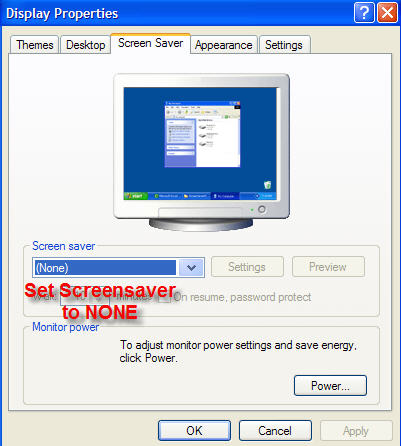
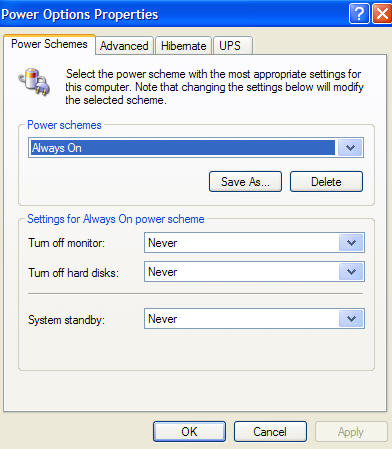
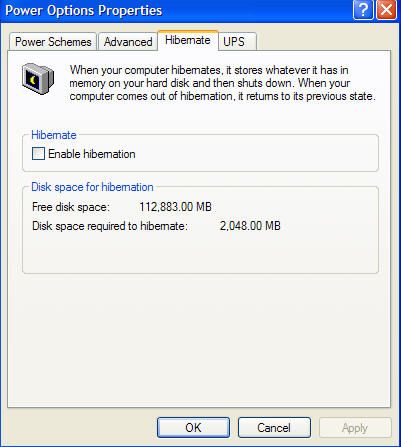
Is your system set up to power down for any reason.. check the POWER PROPERTIES and see if the system is set for any type of disk or monitor power down

If it is, then the defrag may be the source of the problem. O&O Defrag uses the TCP/IP stack to communicate with the system. If it goes into any power down state during the defrag run, especially with screensaver junk running, it can cause the defrag files to become scrambled. That happened with someone who used it on a laptop with power features enabled. I posted a warning about that in this thread and in the one that has the setup information.

Make sure the system is set to ALWAYS ON with ALL power management features disabled


Check that and let me know how it is currently set up
Last edited by Nick N on Wed Apr 04, 2007 6:41 pm, edited 1 time in total.
Nick N
Ground hog
Ground hog
 
Posts: 0
Joined: Thu Sep 20, 2007 2:12 pm

Re: FSX & SLI

Postby Black ZR-1 » Wed Apr 04, 2007 11:04 pm

I will tell you this: it is not caused by O&O. Go back several pages where I started my defragging process to where I ended it and notice my gain.

Next to OC'ing my system, O&O was the second best thing.

EDIT: Unless its the power feature like Nick said.
Last edited by Black ZR-1 on Wed Apr 04, 2007 11:11 pm, edited 1 time in total.
i7 920
evga x58
6 gigs ddr3 1600 tripple channel
hd 5870 xfire
pcp@c silencer quad 750
3x dell u2410
User avatar
Black ZR-1
Captain
Captain
 
Posts: 651
Joined: Thu Jan 31, 2002 5:49 pm
Location: Chicago, IL USA

Re: FSX & SLI

Postby Nick N » Wed Apr 04, 2007 11:13 pm


And as I said: Prior to preparing FSX for the way you wanted it for testing (no accusation there!), everything worked.


I'm not taking anything as an accusation.. Lets work backwards and see if there is something not right with the system.

Since you said this happened after running the defrag I need to verify some things. As I mentioned above there is a possibility the defrag software lost communication with the system if the right conditions were present. It uses the systems network adapter to communicate and if power properties or the BIOS allowed the system to go into some type of sleep or standby, or HDD power down it could have caused the defrag to loose communication with the system.

First, before you did the defrag did you fly with the replacement AI traffic bgl's removed and the original put back?

Second, since you ran O&O Defrag, can I assume it is the full version and not the trial or some other form of activation?

Third, did you follow that list from the setup thread http://www.simviation.com/cgi-bin/yabb2 ... 3;start=#5
Last edited by Nick N on Wed Apr 04, 2007 11:59 pm, edited 1 time in total.
Nick N
Ground hog
Ground hog
 
Posts: 0
Joined: Thu Sep 20, 2007 2:12 pm

Re: FSX & SLI

Postby macca22au » Wed Apr 04, 2007 11:18 pm

Back further in the discussion there is an argument that hacked autogen should not be used.  Also a comparative screenshot is supplied and I found that most helpful.  In my case I have no interest in helicopter flying:  I was a real world Navajo driver so I still tend to fly as if I must maintain legal ground clearance and the like, for instance I find it hard to get out of the habit of staying 1500AGL, although I have taken a 747 under the Sydney Harbour Bridge as we all have I hope(or a similar bridge near you).  But the loss in quality of the autogen I find unnoticeable in regular flying.  However I have read that SP1 will need to be installed over a clean copy of FSX.  I will go along with the reinstall so that I can assess just what performance gains have been made.  Curiously I suspect that Aces will resize some of the autogen, so in part I expect no nett gain.
macca22au
Captain
Captain
 
Posts: 889
Joined: Sat Oct 11, 2003 8:00 am
Location: Melbourne, Australia

Re: FSX & SLI

Postby justpassingthrough » Wed Apr 04, 2007 11:29 pm

[quote]Back further in the discussion there is an argument that hacked autogen should not be used.
Last edited by justpassingthrough on Wed Apr 04, 2007 11:34 pm, edited 1 time in total.
justpassingthrough
Captain
Captain
 
Posts: 651
Joined: Thu Dec 21, 2006 2:43 am

Re: FSX & SLI

Postby Nick N » Wed Apr 04, 2007 11:35 pm

[quote][quote]Back further in the discussion there is an argument that hacked autogen should not be used.
Nick N
Ground hog
Ground hog
 
Posts: 0
Joined: Thu Sep 20, 2007 2:12 pm

Re: FSX & SLI

Postby justpassingthrough » Wed Apr 04, 2007 11:39 pm

[quote]


......
Last edited by justpassingthrough on Wed Apr 04, 2007 11:42 pm, edited 1 time in total.
justpassingthrough
Captain
Captain
 
Posts: 651
Joined: Thu Dec 21, 2006 2:43 am

Re: FSX & SLI

Postby ATI_7500 » Thu Apr 05, 2007 8:02 am

First, before you did the defrag did you fly with the replacement AI traffic bgl's removed and the original put back?


The last time I used FSX before the defrag, I had my add-on traffic in. Then I put in the default traffic file and defragged.

Also, I made my add-on traffic FSX conform by adding the light maps to every repaint (Hours of work! Hours!). But since this traffic is disabled, I shouldn't be responsible for the FSX stutters.

Second, since you ran O&O Defrag, can I assume it is the full version and not the trial or some other form of activation?


Nope, full.

Third, did you follow that list from the setup thread http://www.simviation.com/cgi-bin/yabb2 ... 3;start=#5   very carefully and not skip any steps?


Yes, I did. Excellent list, btw.

On the third item, I want to make sure there were no errors made in shutting down the wrong service or possibly a typo when editing the registry for the boot system change.


Forth, did you follow the steps in the setup thread and fly prior to running the defrag or was that all done at once?


I can answer both of those with an "everything ran fine".

The defrag I did was not the crucial one from your list (did that ~3 weeks ago), it was just an in-between "Let's have a good defrag prior to applying Nick's settings" kind of defrag.
Get the idea? ;)


Veryfied and applied.


And if you would please, grab a snag of the O&O Defrag Windows for both the C and D drives (OS Drive and FSX drive) and post them. Please uncheck the two items listed below and set to 8 pixels, then run the analysis feature and grab a snag.


Okay.

Since I'll probably have to wait for your answer for a while, I'm gonna try the following:

- Get that O&O snap for you
- Run "checkdisk" on my D: drive
(- Have a google search on that topic)
- Run the whole defrag procedure once more for D:
- Get another O&O snap for you
- See how it works
- Maybe defrag C: after that

There's a 50/50 chance that I'm not gonna be cursing my computing skillz after that. ;D
Last edited by ATI_7500 on Thu Apr 05, 2007 8:05 am, edited 1 time in total.
ATI_7500
 

PreviousNext

Return to Flight Simulator X (FSX) and Steam

Who is online

Users browsing this forum: No registered users and 1194 guests