FSX & SLI

FSX including FSX Steam version.

Re: FSX & SLI

Postby justpassingthrough » Sat Mar 17, 2007 6:24 pm

Lets leave it for a day or so. I will start looking into the video card. As I recall you are running a PNY 8800GTS 640.

The next numbers we are going to try for are 1320/660 and that may require a mem change to 5-7-7-19-31 and possibly a Vcore bump. If it wont do it at all, then we have hit the wall on the memory and may need to settle for what you are at now or just a touch higher @ 1312/328 until such time as you get DDR2 800 memory. Even with that, you must remember the FSB limit is always going to be there on the PN5SLI and the best you may do is 1550/775 but with tight and low memory timing which also makes a big difference.

You will need to be careful about a memory upgrade. If your BIOS only goes up to 2.1v the better memory may be a problem. You will have to shop for DDR2 800 designed for use at 1.9-2.1v and not need higher to maintain full speed/low latency stable. Usually if the advertised voltage is 2.1v, it needs 2.2-2.3 to run stable at high speed so be careful about that.

As we approach the wall on the northbridge it will heat up rather quickly with very small changes as compared to past settings. Right now you are just entering that ultra-hot zone. I dont want to cook that compound unit it has a bit longer to cure.


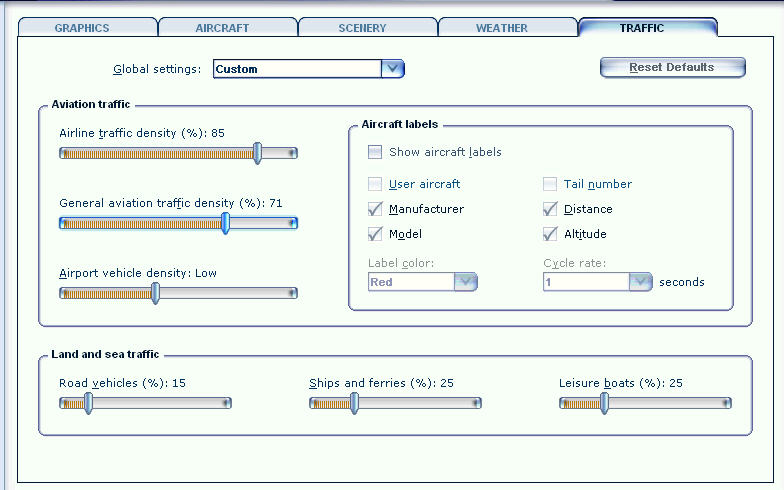
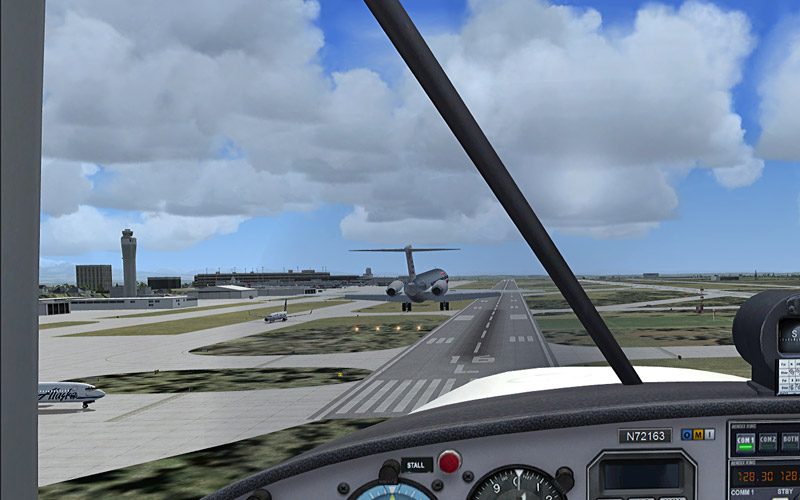
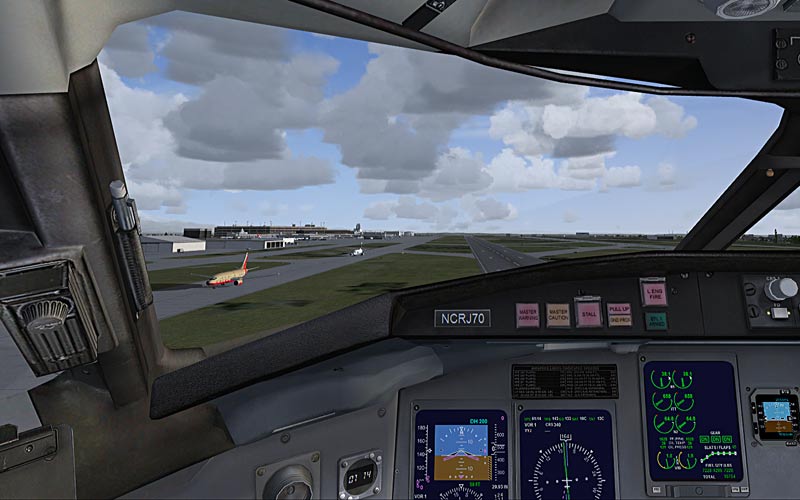
I was thinkin (I know, danger-danger-danger) Since he seems to be stable and the sim has improved again perhaps we can try a test now to see how bad the traffic is changing the load. If it is pulling the life out of it at airports then the test would indicate the need for a replacement AI set. I know it worked great for me because I can't live without the traffic.. it was too dull
Image

Image
Last edited by justpassingthrough on Sat Mar 17, 2007 6:25 pm, edited 1 time in total.
justpassingthrough
Captain
Captain
 
Posts: 651
Joined: Thu Dec 21, 2006 2:43 am

Re: FSX & SLI

Postby Nick N » Sat Mar 17, 2007 6:37 pm

Lets leave it for a day or so. I will start looking into the video card. As I recall you are running a PNY 8800GTS 640.

The next numbers we are going to try for are 1320/660 and that may require a mem change to 5-7-7-19-31 and possibly a Vcore bump. If it wont do it at all, then we have hit the wall on the memory and may need to settle for what you are at now or just a touch higher @ 1312/328 until such time as you get DDR2 800 memory. Even with that, you must remember the FSB limit is always going to be there on the PN5SLI and the best you may do is 1550/775 but with tight and low memory timing which also makes a big difference.

You will need to be careful about a memory upgrade. If your BIOS only goes up to 2.1v the better memory may be a problem. You will have to shop for DDR2 800 designed for use at 1.9-2.1v and not need higher to maintain full speed/low latency stable. Usually if the advertised voltage is 2.1v, it needs 2.2-2.3 to run stable at high speed so be careful about that.

As we approach the wall on the northbridge it will heat up rather quickly with very small changes as compared to past settings. Right now you are just entering that ultra-hot zone. I dont want to cook that compound unit it has a bit longer to cure.


I was thinkin (I know, danger-danger-danger) Since he seems to be stable and the sim has improved again perhaps we can try a test now to see how bad the traffic is changing the load. If it is pulling the life out of it at airports then the test would indicate the need for a replacement AI set. I know it worked great for me because I can't live without the traffic.. it was too dull

Image

Image


I do not see any problem with that. As a matter of fact it may not be a bad idea to do it now before another attempt is made to increase the OC
Last edited by Nick N on Sat Mar 17, 2007 6:38 pm, edited 1 time in total.
Nick N
Ground hog
Ground hog
 
Posts: 0
Joined: Thu Sep 20, 2007 2:12 pm

Re: FSX & SLI

Postby Black ZR-1 » Sat Mar 17, 2007 6:46 pm

You want me to replace my AI? I thought they're not out yet for FSX?
i7 920
evga x58
6 gigs ddr3 1600 tripple channel
hd 5870 xfire
pcp@c silencer quad 750
3x dell u2410
User avatar
Black ZR-1
Captain
Captain
 
Posts: 651
Joined: Thu Jan 31, 2002 5:49 pm
Location: Chicago, IL USA

Re: FSX & SLI

Postby justpassingthrough » Sat Mar 17, 2007 6:49 pm

Alrighty.. Black ZR-1 Let
justpassingthrough
Captain
Captain
 
Posts: 651
Joined: Thu Dec 21, 2006 2:43 am

Re: FSX & SLI

Postby justpassingthrough » Sat Mar 17, 2007 6:52 pm

You want me to replace my AI? I thought they're not out yet for FSX?


No, no... just a test and see how the AI in the sim works with your hardware. If its draging it down a replacement may be a good idea and its not hard to do, just a bit time consuming to download the fleet and then defrag again after its all installed.


If you dont care about traffic we can just skip this. It doesnt look right to me when the world is baron of traffic.. but its a personal choice.


It would still be good to know how bad the default traffic is effecting things even if you dont replace it.
justpassingthrough
Captain
Captain
 
Posts: 651
Joined: Thu Dec 21, 2006 2:43 am

Re: FSX & SLI

Postby Black ZR-1 » Sat Mar 17, 2007 7:32 pm

Test 1

Image

Image

Image


Test 2

Image

Image

Image
i7 920
evga x58
6 gigs ddr3 1600 tripple channel
hd 5870 xfire
pcp@c silencer quad 750
3x dell u2410
User avatar
Black ZR-1
Captain
Captain
 
Posts: 651
Joined: Thu Jan 31, 2002 5:49 pm
Location: Chicago, IL USA

Re: FSX & SLI

Postby justpassingthrough » Sat Mar 17, 2007 8:02 pm

Test 1

Image

Image

Image


Test 2

Image

Image

Image


Ok so what we now know is that at the current clock and speed of the system and the traffic settings of 20/35 you loose an average of about 2 frames.

That is good information as we go along here because if we raise you to 40/70 we can easily expect a loss of about 4+ frames in order for you to see any decent traffic in the sim.

At this point I do not know if the SP1 update will have an impact on traffic and its use. Since it is only a month away perhaps it would be best to leave it alone. To replace AI requires some hours of downloading the aircraft from a few different places. It can easily be 200+ megs of downloads. The airliners come with installers and since they were designed for FS9 the light maps dont work quite right. You see that at night because there are no landing lights on the ground. I think there is a way to change that by copying the night light map from the aircraft's texture folder to the main texture folder in FSX but I have not experimented with that yet.

For GA, its the same routine except what is available does not come with an installer and you have to drop the files into the right place manually.

It can be a real pain to get it all set up but with that I am flying the following settings with about a 2 frame total loss...


Image


That is something we can leave till last and if you decide you would like some traffic I will post the process in detail


Its good to know how those slider will change the system so as we finish we can tweak it better
justpassingthrough
Captain
Captain
 
Posts: 651
Joined: Thu Dec 21, 2006 2:43 am

Re: FSX & SLI

Postby Black ZR-1 » Sat Mar 17, 2007 8:21 pm

Yeah I should wait 'til SP1 and see what happens. Plus that's a lot of work, I'd rather wait for PAI or something. I can live with the 2 FPS drop.
i7 920
evga x58
6 gigs ddr3 1600 tripple channel
hd 5870 xfire
pcp@c silencer quad 750
3x dell u2410
User avatar
Black ZR-1
Captain
Captain
 
Posts: 651
Joined: Thu Jan 31, 2002 5:49 pm
Location: Chicago, IL USA

Re: FSX & SLI

Postby Nick N » Sun Mar 18, 2007 2:42 am

Yeah I should wait 'til SP1 and see what happens. Plus that's a lot of work, I'd rather wait for PAI or something. I can live with the 2 FPS drop.


PAI is what you can use for FSX when it comes to the airlines. That and World of AI Airliners. With WoAI it comes with an installer for FSX and the aircraft work fine in FSX. With PAI you use their installer and tell it the FSX directory is the FS9 directory. When PAI installs all you need to do is go to the FSX directory, rename the AIRCRAFT folder to AIRPLANES and move that into the SimObjects folder which will merge with the aircraft that are already there.

Both install the flight plans automatically. The only problem is PAI aircraft are not made for FSX which wants the nightime lightmaps located in the main Texture folder. As John said he has not tested moving them manually and neither have I but it takes a chunk of work to manually go into every PAI aircraft folder and move a copy of the lightmap file to the texture folder in FSX.


You must remove the trafficAircraft.bgl file (the one you moved earlier) to install PAI and WoAI planes or any other AI that come with their own flight plans.


I have played with it and it works well for me too but i have not had time to sit down and play with fixing the little items that may not work quite right in FSX. I also like a bit of traffic and its nice to be able to have that without the rediculous load the default planes put on the system.

SP1 is suppose to remove a portion of the CPU bound calls which should make traffic a bit less probematical but one of the issues with FSX default planes is the shading and alpha along with the fact that they are not mip-mapped, meaning the load being applied is just as hard on the video card as it is the CPU.

I am hoping Ultimate Traffic will come out with an FSX version soon. They had some problems with thier planes in FS9 being a bit of a drag on the system due to alpha channel errors but from what I hear that is being corrected for FSX. UT was the best and easiest traffic program for FS9 in my opinion. It was packed with aircraft and was very easy to design custom traffic such as float plane airports, etc which is what I liked about it.
Last edited by Nick N on Sun Mar 18, 2007 2:44 am, edited 1 time in total.
Nick N
Ground hog
Ground hog
 
Posts: 0
Joined: Thu Sep 20, 2007 2:12 pm

Re: FSX & SLI

Postby Black ZR-1 » Mon Mar 19, 2007 12:57 pm

Just a heads up

I've been workin' on the perf holes. Got one of them opened up.

Image

Image

Workin' on the other..
i7 920
evga x58
6 gigs ddr3 1600 tripple channel
hd 5870 xfire
pcp@c silencer quad 750
3x dell u2410
User avatar
Black ZR-1
Captain
Captain
 
Posts: 651
Joined: Thu Jan 31, 2002 5:49 pm
Location: Chicago, IL USA

Re: FSX & SLI

Postby Nick N » Mon Mar 19, 2007 1:24 pm

Just a heads up

I've been workin' on the perf holes. Got one of them opened up.

Image

Image

Workin' on the other..


I would bet the temps will drop again after you do that...

And the noise level will be soooooooooo much less

Dont forget the one on the side door too. If it is mounted in perf, blow it out as well.
Nick N
Ground hog
Ground hog
 
Posts: 0
Joined: Thu Sep 20, 2007 2:12 pm

Re: FSX & SLI

Postby Black ZR-1 » Mon Mar 19, 2007 1:30 pm


I would bet the temps will drop again after you do that...

And the noise level will be soooooooooo much less

Dont forget the one on the side door too. If it is mounted in perf, blow it out as well.


Came blown out with the case  8-)
i7 920
evga x58
6 gigs ddr3 1600 tripple channel
hd 5870 xfire
pcp@c silencer quad 750
3x dell u2410
User avatar
Black ZR-1
Captain
Captain
 
Posts: 651
Joined: Thu Jan 31, 2002 5:49 pm
Location: Chicago, IL USA

Re: FSX & SLI

Postby Nick N » Mon Mar 19, 2007 1:33 pm

Duty calls.. I have to run but will be back later this evening. Keep going and post the temps and let me know how the tower sounds after you do that mod. It will be interesting to see how much of a difference it will make. It always did when I made that change.

We will start playing with numbers again and finish up the clock work if you remain stable through tomorrow.
Nick N
Ground hog
Ground hog
 
Posts: 0
Joined: Thu Sep 20, 2007 2:12 pm

Re: FSX & SLI

Postby justpassingthrough » Mon Mar 19, 2007 2:13 pm

Just a heads up

I've been workin' on the perf holes. Got one of them opened up.

Image

Image

Workin' on the other..


[smiley=tekst-toppie.gif]
justpassingthrough
Captain
Captain
 
Posts: 651
Joined: Thu Dec 21, 2006 2:43 am

Re: FSX & SLI

Postby Black ZR-1 » Mon Mar 19, 2007 2:36 pm

Finished cutting out the last perf hole.

Image

Image

Fired her up and read my idle temps.

Before perf hole cut out at idle

CPU - 36C
MB - 35C

After perf hole cut out at idle

CPU - 34C
MB - 30C
i7 920
evga x58
6 gigs ddr3 1600 tripple channel
hd 5870 xfire
pcp@c silencer quad 750
3x dell u2410
User avatar
Black ZR-1
Captain
Captain
 
Posts: 651
Joined: Thu Jan 31, 2002 5:49 pm
Location: Chicago, IL USA

PreviousNext

Return to Flight Simulator X (FSX) and Steam

Who is online

Users browsing this forum: No registered users and 939 guests