FSX & SLI

FSX including FSX Steam version.

Re: FSX & SLI

Postby justpassingthrough » Sun Mar 04, 2007 2:14 am

The reason I wanted you to run the weather pattern was so the humidity would contrast the trees and buildings being rendered and make it easier to see if it was bare. If you ran it during the spring/summer without weather and haze the loss of the scenery would not be as noticeable and less blank spots would be apparent. Also, the extra load of the weather is what caused the frame drop, which I expected you would check, however FSX was designed with good low poly clouds so they will not kill a system like the default FS9 clouds do.

Fly the settings as see if things do not change a bit.

You are fairly maxed out so there is not much more I can suggest.


Well, I have flown many different areas and I must say that I LIKE the improvements but I can
justpassingthrough
Captain
Captain
 
Posts: 651
Joined: Thu Dec 21, 2006 2:43 am

Re: FSX & SLI

Postby justpassingthrough » Sun Mar 04, 2007 7:10 am

I'm sold...


Image


and it fixed everything else too    THANK YOU
justpassingthrough
Captain
Captain
 
Posts: 651
Joined: Thu Dec 21, 2006 2:43 am

Re: FSX & SLI

Postby Black ZR-1 » Sun Mar 04, 2007 11:44 am

^ Lookin' good!

O&O process complete. What a ride it's been..

Image

Image

After over 30+ hours of defragging, my boots are faster, my applications start up at lightning speeds, and most importantly the screenshots explain it all.

No over-clocking, no sliders have been touched & no changes in my FSX config file since last changes!
Last edited by Black ZR-1 on Sun Mar 04, 2007 1:57 pm, edited 1 time in total.
i7 920
evga x58
6 gigs ddr3 1600 tripple channel
hd 5870 xfire
pcp@c silencer quad 750
3x dell u2410
User avatar
Black ZR-1
Captain
Captain
 
Posts: 651
Joined: Thu Jan 31, 2002 5:49 pm
Location: Chicago, IL USA

Re: FSX & SLI

Postby justpassingthrough » Sun Mar 04, 2007 2:59 pm

^ Lookin' good!

O&O process complete. What a ride it's been..

Image

Image

After over 30+ hours of defragging, my boots are faster, my applications start up at lightning speeds, and most importantly the screenshots explain it all.

No over-clocking, no sliders have been touched & no changes in my FSX config file since last changes!


Hey there... looks like you are back from the dark side!

Compression really did a number on that snag. It was great before i resied it!

I have not seen NickN post and he has not responded to an email I sent this morning so he is probably out and about. I don't know if he wants something else specific done but I do not think it would hurt to go back to where we left of andf try some test flights.


============================================

FIBER_FRAME_TIME_FRACTION=0.25
Last edited by justpassingthrough on Sun Mar 04, 2007 3:04 pm, edited 1 time in total.
justpassingthrough
Captain
Captain
 
Posts: 651
Joined: Thu Dec 21, 2006 2:43 am

Re: FSX & SLI

Postby justpassingthrough » Sun Mar 04, 2007 3:34 pm

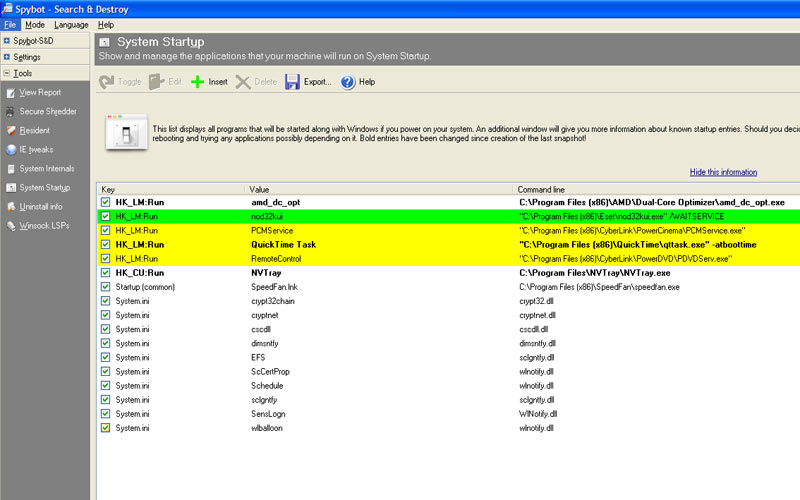
As I go back through this thread it looks like NickN mentioned posting a list of the Windows startup registry. He showed me how to use Spybots S&D to display that list. Did you by any chance install Spybots?

http://fileforum.betanews.com/download/ ... 43809773/1  click download now

When you install the program, set it to work with Internet Explorer (which it checked by default) but do not enable the Tea Timer (I think that is what it is called). It will also ask if you wish to download any update during the install, select that. Once it is installed it will run a Wizard, do not back up the registry but do have it download and install all updates. Once the wizard is finished, close the program and reopen it.

Have it search for updates again. If it finds any, select them all and download/install them

it sometimes takes 2 times to get them all the first time you run the program

Also, if updating hangs, change the server in the server selection drop down at the top in the update window.

Once it is updated, select Immunize and then click the green PLUS sign +
Last edited by justpassingthrough on Sun Mar 04, 2007 3:37 pm, edited 1 time in total.
justpassingthrough
Captain
Captain
 
Posts: 651
Joined: Thu Dec 21, 2006 2:43 am

Re: FSX & SLI

Postby Black ZR-1 » Sun Mar 04, 2007 3:48 pm

I've only done the Maule testing so far. I saw no difference in the TERRAIN_MAX_AUTOGEN_TREES_PER_CELL=1400 & TERRAIN_MAX_AUTOGEN_BUILDINGS_PER_CELL=700 changes so I put them back to 1600/900. I aslo lowered the FIBER_FRAME_TIME_FRACTION to .25.
Last edited by Black ZR-1 on Sun Mar 04, 2007 3:52 pm, edited 1 time in total.
i7 920
evga x58
6 gigs ddr3 1600 tripple channel
hd 5870 xfire
pcp@c silencer quad 750
3x dell u2410
User avatar
Black ZR-1
Captain
Captain
 
Posts: 651
Joined: Thu Jan 31, 2002 5:49 pm
Location: Chicago, IL USA

Re: FSX & SLI

Postby Black ZR-1 » Sun Mar 04, 2007 4:02 pm

Pretty neat little program. Only thing it found were a couple spyware.

http://djtaso.com/fsx/SanD.jpg

Have it as link so you can read it better.
Last edited by Black ZR-1 on Sun Mar 04, 2007 4:03 pm, edited 1 time in total.
i7 920
evga x58
6 gigs ddr3 1600 tripple channel
hd 5870 xfire
pcp@c silencer quad 750
3x dell u2410
User avatar
Black ZR-1
Captain
Captain
 
Posts: 651
Joined: Thu Jan 31, 2002 5:49 pm
Location: Chicago, IL USA

Re: FSX & SLI

Postby justpassingthrough » Sun Mar 04, 2007 4:23 pm


Black ZR-1:

I would like to add something to what mil posted above for the next set of tests. If you notice ground textures are not sharp or are blurred, then tend to sharpen, please drop the frame lock to 22 and leave it there. If things remain sharp and smooth during the tests, leave at 24. I also wish to point out that when changes are made to the config file in FSX it can take a bit of flight time for things to stabilize which is why it is important to fly out, circle around and come back to land in the pattern he has suggested. You are not looking for instant perfection after a configuration file edit or slider change but a change for the better as the flight progresses. Returning and landing in the same area while looking for improvements or degenerated perfomance is where the suggestions come for changes to the settings.

I also want to point out that FSX has the ability to make subtle changes as you use it, as long as the configuration file and settings remains untouched. This is something you will notice more after some time of flying with the final settings. If any change is made to the settings it takes flight time for things to stabilize again.


NickN said if you see ground textures blur then sharpen back up, drop the frame lock to 22 and retest with the same fiber frame lock. See if ground textures are still a bit blured and if they are, if they sharpen faster. Or if it is the same. You may find they are no longer blured.

You said 'so far so good', I assume with the exception of the minor ground blur that means everything flew smooth? and looked good with the texture bandwidth now at 400 and the autogen numbers where we originally had them?

I think we are getting close to the point where hardware will need to be looked at but for the next test with the reduced frame lock of 22, drop the traffic. Set GA to 20 and Airline to 30 for this test.

If the ground textures have returned to a better state without being blured and everyhting looks and feels really good, raise the Airline traffic slider to 50, leave GA at 20 and retest.

If that checks out the same then I think we may be ready for some hardware analysis


One thing I noticed in the screen shots you posted. I see an autogen house and trees that looks like they inside the airfield at KSEA. That is strange and does not look right. I do not show a autogen house or trees in my KSEA, runway 34L. I am wondering why that is in the scene on your system.

justpassingthrough
Captain
Captain
 
Posts: 651
Joined: Thu Dec 21, 2006 2:43 am

Re: FSX & SLI

Postby justpassingthrough » Sun Mar 04, 2007 4:31 pm

Pretty neat little program. Only thing it found were a couple spyware.

http://djtaso.com/fsx/SanD.jpg

Have it as link so you can read it better.


Yowzers! Thats a big list.. here is mine


Image

NickN will have to look at your list. I do not know whats ok and what is not or if there is something in your list that may be pulling resources


EDIT: I just noticed that dang QTask is in my list again. I keep deleting that and it keeps coming back. That one I know is not needed.
Last edited by justpassingthrough on Sun Mar 04, 2007 4:43 pm, edited 1 time in total.
justpassingthrough
Captain
Captain
 
Posts: 651
Joined: Thu Dec 21, 2006 2:43 am

Re: FSX & SLI

Postby Black ZR-1 » Sun Mar 04, 2007 4:46 pm


Black ZR-1:

I would like to add something to what mil posted above for the next set of tests. If you notice ground textures are not sharp or are blurred, then tend to sharpen, please drop the frame lock to 22 and leave it there. If things remain sharp and smooth during the tests, leave at 24. I also wish to point out that when changes are made to the config file in FSX it can take a bit of flight time for things to stabilize which is why it is important to fly out, circle around and come back to land in the pattern he has suggested. You are not looking for instant perfection after a configuration file edit or slider change but a change for the better as the flight progresses. Returning and landing in the same area while looking for improvements or degenerated perfomance is where the suggestions come for changes to the settings.

I also want to point out that FSX has the ability to make subtle changes as you use it, as long as the configuration file and settings remains untouched. This is something you will notice more after some time of flying with the final settings. If any change is made to the settings it takes flight time for things to stabilize again.


NickN said if you see ground textures blur then sharpen back up, drop the frame lock to 22 and retest with the same fiber frame lock. See if ground textures are still a bit blured and if they are, if they sharpen faster. Or if it is the same. You may find they are no longer blured.

You said 'so far so good', I assume with the exception of the minor ground blur that means everything flew smooth? and looked good with the texture bandwidth now at 400 and the autogen numbers where we originally had them?

I think we are getting close to the point where hardware will need to be looked at but for the next test with the reduced frame lock of 22, drop the traffic. Set GA to 20 and Airline to 30 for this test.

If the ground textures have returned to a better state without being blured and everyhting looks and feels really good, raise the Airline traffic slider to 50, leave GA at 20 and retest.

If that checks out the same then I think we may be ready for some hardware analysis


One thing I noticed in the screen shots you posted. I see an autogen house and trees that looks like they inside the airfield at KSEA. That is strange and does not look right. I do not show a autogen house or trees in my KSEA, runway 34L. I am wondering why that is in the scene on your system.


I dropped the frame counter to 22, reduced GA to 20 & Jets to 30. So far I've gained 2 - 3 FPS by that but still haven't seen any differences in blurry textures. They don't last long, they quickly sharpen up before I can reach them while I'm in the air. I understand it takes time for the sim to recoginze the changes so I will continue flying patterns.

Image

About the autogen house & trees: I have not touched my sliders & I'm not using any pay/freeware scenery programs.

Image

Image

Image

Please note my fellow simviators: I have purposely paused the sim to take those screenshots. Those are NOT my ingame frames
i7 920
evga x58
6 gigs ddr3 1600 tripple channel
hd 5870 xfire
pcp@c silencer quad 750
3x dell u2410
User avatar
Black ZR-1
Captain
Captain
 
Posts: 651
Joined: Thu Jan 31, 2002 5:49 pm
Location: Chicago, IL USA

Re: FSX & SLI

Postby justpassingthrough » Sun Mar 04, 2007 4:53 pm


Black ZR-1:

I would like to add something to what mil posted above for the next set of tests. If you notice ground textures are not sharp or are blurred, then tend to sharpen, please drop the frame lock to 22 and leave it there. If things remain sharp and smooth during the tests, leave at 24. I also wish to point out that when changes are made to the config file in FSX it can take a bit of flight time for things to stabilize which is why it is important to fly out, circle around and come back to land in the pattern he has suggested. You are not looking for instant perfection after a configuration file edit or slider change but a change for the better as the flight progresses. Returning and landing in the same area while looking for improvements or degenerated perfomance is where the suggestions come for changes to the settings.

I also want to point out that FSX has the ability to make subtle changes as you use it, as long as the configuration file and settings remains untouched. This is something you will notice more after some time of flying with the final settings. If any change is made to the settings it takes flight time for things to stabilize again.


NickN said if you see ground textures blur then sharpen back up, drop the frame lock to 22 and retest with the same fiber frame lock. See if ground textures are still a bit blured and if they are, if they sharpen faster. Or if it is the same. You may find they are no longer blured.

You said 'so far so good', I assume with the exception of the minor ground blur that means everything flew smooth? and looked good with the texture bandwidth now at 400 and the autogen numbers where we originally had them?

I think we are getting close to the point where hardware will need to be looked at but for the next test with the reduced frame lock of 22, drop the traffic. Set GA to 20 and Airline to 30 for this test.

If the ground textures have returned to a better state without being blured and everyhting looks and feels really good, raise the Airline traffic slider to 50, leave GA at 20 and retest.

If that checks out the same then I think we may be ready for some hardware analysis


One thing I noticed in the screen shots you posted. I see an autogen house and trees that looks like they inside the airfield at KSEA. That is strange and does not look right. I do not show a autogen house or trees in my KSEA, runway 34L. I am wondering why that is in the scene on your system.


I dropped the frame counter to 22, reduced GA to 20 & Jets to 30. So far I've gained 2 - 3 FPS by that but still haven't seen any differences in blurry textures. They don't last long, they quickly sharpen up before I can reach them while I'm in the air. I understand it takes time for the sim to recoginze the changes so I will continue flying patterns.

Image

About the autogen house & trees: I have not touched my sliders & I'm not using any pay/freeware scenery programs.

Image

Image

Image

Please note my fellow simviators: I have purposely paused the sim to take those screenshots. Those are NOT my ingame frames


The building location may be because I am running FSGenesis 10m mesh and a different landclass file.

Raise the FFTF to .28 and see how those textures look. Leave frmes lock at 22 and traffic at 20 - 30 for now. Lets work on the gound textures

How is the flying? other than the blurs, is it smooth?
Last edited by justpassingthrough on Sun Mar 04, 2007 4:56 pm, edited 1 time in total.
justpassingthrough
Captain
Captain
 
Posts: 651
Joined: Thu Dec 21, 2006 2:43 am

Re: FSX & SLI

Postby Nick N » Sun Mar 04, 2007 5:03 pm

I just got home guys so give me a bit of time to unpack some things and I will review what has been posted.

Just briefing what I see in the shots above, I would also like the Texture Bandwidth Multiplier dropped to 320. Drop the Frame lock to 20 and raise the FFTF to .28 as John said. Test for blurred textures and raise the FFTF in increments of .02 until they sharpen with little or no delay

Leave frame lock at 20. There is a reason for that which has to do with the processor and FSB current settings. We -may- and probably will raise the frame lock later.

The idea is to set the FFTF as low as possible without loosing sharp textures but still have nice visuals and smooth flight.

Once we have all the primary elements in place, we will start the hardware tweaking and go from there

If the TBM of 320 produces texture pops, raise it to 360 and retest

Only work with one element at a time. Do not change TBM and FFTF at the same time.
Last edited by Nick N on Sun Mar 04, 2007 5:09 pm, edited 1 time in total.
Nick N
Ground hog
Ground hog
 
Posts: 0
Joined: Thu Sep 20, 2007 2:12 pm

Re: FSX & SLI

Postby Black ZR-1 » Sun Mar 04, 2007 5:08 pm

[quote][

The building location may be because I am running FSGenesis 10m mesh and a different landclass file.

Raise the FFTF to .28 and see how those textures look. Leave frmes lock at 22 and traffic at 20 - 30 for now. Lets work on the gound textures

How is the flying? other than the blurs, is it smooth?
Last edited by Black ZR-1 on Sun Mar 04, 2007 5:09 pm, edited 1 time in total.
i7 920
evga x58
6 gigs ddr3 1600 tripple channel
hd 5870 xfire
pcp@c silencer quad 750
3x dell u2410
User avatar
Black ZR-1
Captain
Captain
 
Posts: 651
Joined: Thu Jan 31, 2002 5:49 pm
Location: Chicago, IL USA

Re: FSX & SLI

Postby Nick N » Sun Mar 04, 2007 5:10 pm

[quote][quote][

The building location may be because I am running FSGenesis 10m mesh and a different landclass file.

Raise the FFTF to .28 and see how those textures look. Leave frmes lock at 22 and traffic at 20 - 30 for now. Lets work on the gound textures

How is the flying? other than the blurs, is it smooth?
Last edited by Nick N on Sun Mar 04, 2007 5:12 pm, edited 1 time in total.
Nick N
Ground hog
Ground hog
 
Posts: 0
Joined: Thu Sep 20, 2007 2:12 pm

Re: FSX & SLI

Postby Nick N » Sun Mar 04, 2007 5:17 pm

[quote]

I'm sold...


Image


and it fixed everything else too
Nick N
Ground hog
Ground hog
 
Posts: 0
Joined: Thu Sep 20, 2007 2:12 pm

PreviousNext

Return to Flight Simulator X (FSX) and Steam

Who is online

Users browsing this forum: No registered users and 669 guests