Kai Tak doesn't show.

Forum dedicated to Microsoft FS2004 - "A Century of Flight".

Kai Tak doesn't show.

Postby gypsymoth » Thu Sep 20, 2007 3:35 pm

I followed these instructions
INSTALLATION:
1.      Unzip these into a temporary folder.
2.      You will then have, a "Kaitak" folder, with 3 sub-folders :"docs", "scenery" and "texture"
3.      Copy the "Kaitak" folder complete, into your "Flight Sumulator 9\Addon Scenery" folder.
4.      Activate "Kaitak" in the usual manner.

& it shows in Settings/Scenery Library but not when flying in to it - it looks like the default VHHX.
What's up Doc...?

Thanks,
TW

When the c**p hits the fan, get a tent.
gypsymoth
Captain
Captain
 
Posts: 759
Joined: Tue Dec 05, 2006 7:50 pm
Location: EGHH

Re: Kai Tak doesn't show.

Postby dave3cu » Thu Sep 20, 2007 5:37 pm

Terry,

Trying to guess what might be wrong is really just a crap shoot unless you can provide a download link or download (.zip) filename so we can have a look at it.
Last edited by dave3cu on Thu Sep 20, 2007 5:42 pm, edited 1 time in total.
At that time [1909] the chief engineer was almost always the chief test pilot as well. That had the fortunate result of eliminating poor engineering early in aviation.
dave3cu
Major
Major
 
Posts: 3141
Joined: Sun May 19, 2002 9:55 am
Location: 3CU, Northern Wisconsin, USA

Re: Kai Tak doesn't show.

Postby Wii » Thu Sep 20, 2007 7:35 pm

I had the same problem only it was for FSX...sorry, I don't have a solution, but it said to contact the maker.
User avatar
Wii
Major
Major
 
Posts: 2727
Joined: Wed Jun 13, 2007 2:33 pm
Location: Space

Re: Kai Tak doesn't show.

Postby gypsymoth » Fri Sep 21, 2007 11:06 am

Sorry Dave - I should have posted back - there wasn't a scenery.dat file in the folder & when KT showed up this afternoon & I checked the folder it's there now.    
Last edited by gypsymoth on Sat Sep 22, 2007 4:01 am, edited 1 time in total.
When the c**p hits the fan, get a tent.
gypsymoth
Captain
Captain
 
Posts: 759
Joined: Tue Dec 05, 2006 7:50 pm
Location: EGHH

Re: Kai Tak doesn't show.

Postby gypsymoth » Sat Sep 22, 2007 4:03 am

Had to delete this - there was a lamp standard in the middle of the runway!!   After all that - what a bummer!
When the c**p hits the fan, get a tent.
gypsymoth
Captain
Captain
 
Posts: 759
Joined: Tue Dec 05, 2006 7:50 pm
Location: EGHH

Re: Kai Tak doesn't show.

Postby dave3cu » Sat Sep 22, 2007 12:10 pm

Jim Vile has a nice Kai Tak add-on. Couldn't find it a SimV so search the Avsim library for 'kaitak98.zip'.

Besides being a nice scenery it configures the checkerboard approach so that ai can get in and out without flying through the mountain.

Before installing make sure you have no remnants of previous Kai Tak installs. In Explorer, search the FS2004 main folder and subfolders for file and folder names containing 'vhhx',
Last edited by dave3cu on Sun Sep 23, 2007 11:50 am, edited 1 time in total.
At that time [1909] the chief engineer was almost always the chief test pilot as well. That had the fortunate result of eliminating poor engineering early in aviation.
dave3cu
Major
Major
 
Posts: 3141
Joined: Sun May 19, 2002 9:55 am
Location: 3CU, Northern Wisconsin, USA

Re: Kai Tak doesn't show.

Postby gypsymoth » Sun Sep 23, 2007 9:04 am

Hi Dave.
I am NOT one but they say that great minds think alike.   I got the Jim Vile VHHX this morning & then the Eddie Chan HKAuotgen BuildingsV2 for a friend, so tried it myself & what a difference they both make!!    Apart from the lack of runway lights (only taxiway markers are lit) I am very pleased with it.  Mind you it's completely mucked up my usual approach over the hill but what the heck!!
Thank you for your help,
Cheers,
TW
When the c**p hits the fan, get a tent.
gypsymoth
Captain
Captain
 
Posts: 759
Joined: Tue Dec 05, 2006 7:50 pm
Location: EGHH

Re: Kai Tak doesn't show.

Postby Clutch_Cargo » Sun Sep 23, 2007 10:31 am

" Apart from the lack of runway lights (only taxiway markers are lit) "

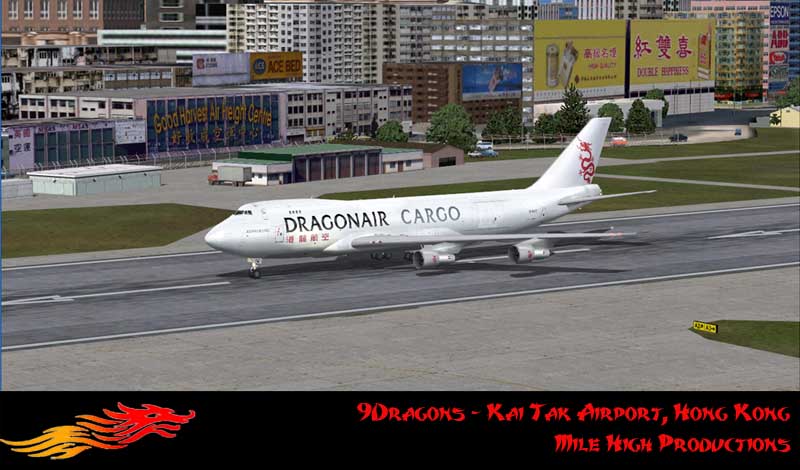
Well, if I can get this darn scenery out of Alpha into Beta you'll soon have ALL the runway markings you can handle as well as a bit more!   ;)

Image

Clutch
Project 9Dragons
Prepar3D v2.0 = FS[i]Next[/i]
Clutch_Cargo
Ground hog
Ground hog
 
Posts: 43
Joined: Fri Feb 03, 2006 8:56 pm
Location: San Diego, California, USA

Re: Kai Tak doesn't show.

Postby gypsymoth » Sun Sep 23, 2007 11:11 am

Thanks Clutch - my mouth is watering as I type!!
When the c**p hits the fan, get a tent.
gypsymoth
Captain
Captain
 
Posts: 759
Joined: Tue Dec 05, 2006 7:50 pm
Location: EGHH

Re: Kai Tak doesn't show.

Postby dave3cu » Sun Sep 23, 2007 11:41 am

TW,

I'm still curious about your runway lights problem....Vile's scenery is fully lit.

Do you have runway lights at all your other airports?

Dave

Looks nice, Clutch...
Last edited by dave3cu on Sun Sep 23, 2007 11:51 am, edited 1 time in total.
At that time [1909] the chief engineer was almost always the chief test pilot as well. That had the fortunate result of eliminating poor engineering early in aviation.
dave3cu
Major
Major
 
Posts: 3141
Joined: Sun May 19, 2002 9:55 am
Location: 3CU, Northern Wisconsin, USA

Re: Kai Tak doesn't show.

Postby gypsymoth » Mon Sep 24, 2007 4:55 am

Yes Dave - no lights missing elsewhere.    I'm in a rush right now so will post later about my laptop addition, except to say that the curved approach lights are there in the JimV setup but no runway lights.

TW
When the c**p hits the fan, get a tent.
gypsymoth
Captain
Captain
 
Posts: 759
Joined: Tue Dec 05, 2006 7:50 pm
Location: EGHH

Re: Kai Tak doesn't show.

Postby gypsymoth » Tue Sep 25, 2007 2:18 pm

Apologies for tardy reply but I have been BUSY BUSY.

Right - desktop comp.   I have Jim Vile's KT98 in Addon Scenery which is enabled in Scenery library.   I put the af2_VHHX_ils_jv.bgl in scenery.    The curved approach lights are there as is the checkerboard.  The runway has taxiway signs that are lit but no runway lights.  I have lights at all other airports.    I have added Eddie Chan's HKautogen Buildings 2 which show up well along with Jim Vile's HK98.  There were no lights before I added the autogen stuff.    

I'd be grateful if you will tell me where the default VHHX files are kept.    I've searched here for a tutorial or somewhere for this info but cannot find it.   I'd like to make a copy & replace it from a friend's FS9 to see if that might help.  

I hope this helps?
TerryW
RE yesterdays post & ref to laptop.  I'll come to that later - don't want to muddy the waters & I want to get the desktop lr/w ightsfixed first.
 
Last edited by gypsymoth on Tue Sep 25, 2007 2:20 pm, edited 1 time in total.
When the c**p hits the fan, get a tent.
gypsymoth
Captain
Captain
 
Posts: 759
Joined: Tue Dec 05, 2006 7:50 pm
Location: EGHH

Re: Kai Tak doesn't show.

Postby dave3cu » Tue Sep 25, 2007 8:42 pm

Terry,

There is no default VHHX file(s) per se. All default airports are in files that define multiple airports within an area. The default VHHX has only the visible runways, taxiways and aprons, nothing else, no lights.
For reference-the default VHHX airport is in the file '....\\Scenery\Asia\scenery\AP978240.bgl'.
It's unlikely that this file has been modified. Even if it was it should be over ridden by any Afcad file higher in the Scenery Library list.

From your description it sounds like all the Kai Tak 98 .bgl files are being read except for the Afcad file, 'af2_VHHX_ils_jv.bgl'.
Last edited by dave3cu on Wed Sep 26, 2007 7:45 am, edited 1 time in total.
At that time [1909] the chief engineer was almost always the chief test pilot as well. That had the fortunate result of eliminating poor engineering early in aviation.
dave3cu
Major
Major
 
Posts: 3141
Joined: Sun May 19, 2002 9:55 am
Location: 3CU, Northern Wisconsin, USA

Re: Kai Tak doesn't show.

Postby gypsymoth » Wed Sep 26, 2007 3:07 am

Thanks Dave.   I'll play around & post results.  

Ah - back in time to modify - just been to VHHX  & there is only an Active Runway option which placed my PC21 on the grass between the runway & taxiway.

10.00hrs - Blimey - your Add VHHXafcad suggestion works a treat.   I now have all the runway lights a sim-pilot could want  :D      Thank You seems inadequate but THANK YOU!

One last thing though - I'd love to know how the priority position works?  I assumed it was the order in which they were introduced!

Cheers for now,
TerryW
Last edited by gypsymoth on Wed Sep 26, 2007 4:06 am, edited 1 time in total.
When the c**p hits the fan, get a tent.
gypsymoth
Captain
Captain
 
Posts: 759
Joined: Tue Dec 05, 2006 7:50 pm
Location: EGHH

Re: Kai Tak doesn't show.

Postby dave3cu » Wed Sep 26, 2007 7:06 am

That's great Terry,
Last edited by dave3cu on Wed Sep 26, 2007 7:54 am, edited 1 time in total.
At that time [1909] the chief engineer was almost always the chief test pilot as well. That had the fortunate result of eliminating poor engineering early in aviation.
dave3cu
Major
Major
 
Posts: 3141
Joined: Sun May 19, 2002 9:55 am
Location: 3CU, Northern Wisconsin, USA

Next

Return to FS 2004 - A Century of Flight

Who is online

Users browsing this forum: No registered users and 183 guests