Switching panels

Forum dedicated to Microsoft FS2004 - "A Century of Flight".

Switching panels

Postby aussiewannabe » Sun Aug 26, 2007 7:53 pm

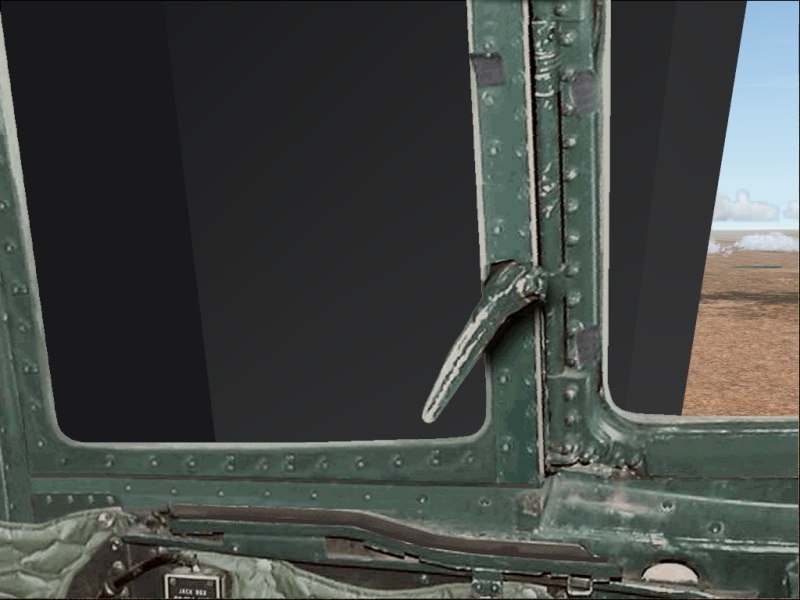
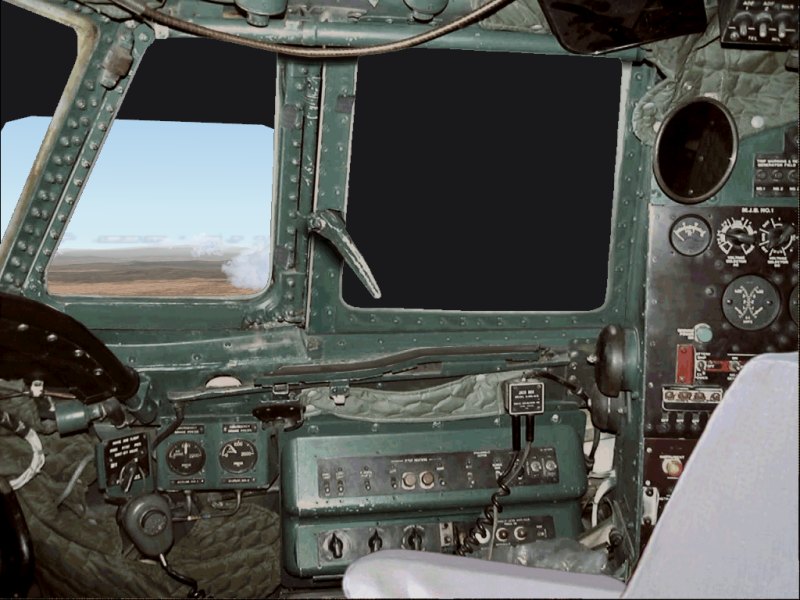
I'm doing a panel switch and it looks like I have two different views placed side by side. I cleaned out the panel folder before inserting the new one. Even checked the panel.cfg file and texture folders.

Any ideas to correct this?
Image
Image
HP Media Center Photosmart m7260n | 3.0GHz Intel Pentium D 830 | 2 GB RAM | 320 GB HD | Sapphire X1950 GT 512MB | Silencer 610 Watt PSU

[center][img]
http://www.simviation.com/yabbuploads/aussie_sig1.jpg
User avatar
aussiewannabe
Major
Major
 
Posts: 2530
Joined: Thu May 17, 2007 11:33 am

Re: Switching panels

Postby simonmd » Sun Aug 26, 2007 8:00 pm

It looks like you are looking through the side of the VC. Open the panel.cfg and look for the views section, there should be some reference to the VC. Delete that (after making a copy of the panel.cfg first) and see if that works.
Image
This months's screenshot contest entry> http://www.simviation.com/cgi-bin/yabb2 ... 1197692798
User avatar
simonmd
Major
Major
 
Posts: 1847
Joined: Sun Nov 06, 2005 4:47 pm
Location: s wales, UK

Re: Switching panels

Postby aussiewannabe » Sun Aug 26, 2007 10:54 pm
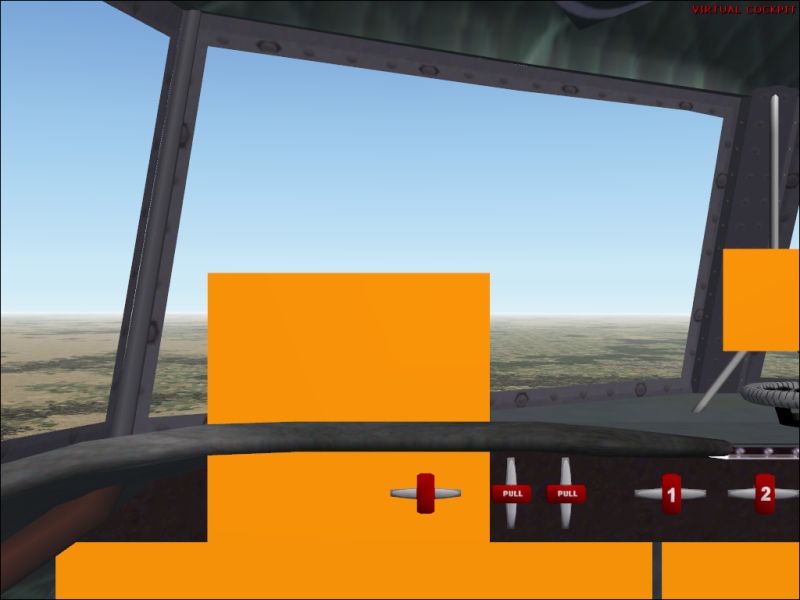
I could find no reference to VC in the panel.cfg file. This is what's listed:

[Views]

VIEW_FORWARD_RIGHT_ZOOM=1.0
VIEW_FORWARD_RIGHT_WINDOWS=30
VIEW_FORWARD_RIGHT_DIR=6.0, 0.0, 45.0

VIEW_RIGHT_ZOOM=1.0
VIEW_RIGHT_WINDOWS=31
VIEW_RIGHT_DIR=4.0, 0.0, 90.0

VIEW_REAR_RIGHT_ZOOM=1.0
VIEW_REAR_RIGHT_WINDOWS=32
VIEW_REAR_RIGHT_DIR=0.0, 0.0, 135.0

VIEW_REAR_ZOOM=1.0
VIEW_REAR_WINDOWS=33
VIEW_REAR_DIR=0.0, 0.0, 180.0

VIEW_REAR_LEFT_ZOOM=1.0
VIEW_REAR_LEFT_WINDOWS=34
VIEW_REAR_LEFT_DIR=0.0, 0.0, 225.0

VIEW_LEFT_ZOOM=1.0
VIEW_LEFT_WINDOWS=35
VIEW_LEFT_DIR=5.0, 0.0, 270.0

VIEW_FORWARD_LEFT_ZOOM=1.0
VIEW_FORWARD_LEFT_WINDOWS=36
VIEW_FORWARD_LEFT_DIR=5.0, 0.0, 315.0

VIEW_FORWARD_DIR=0.0, 0.0, 0.0

I check some other AC panels and they don't have it. If I delete it then I will see the olive green view (outer view, which I don't want). What's strange is that I also have this view:

Image
HP Media Center Photosmart m7260n | 3.0GHz Intel Pentium D 830 | 2 GB RAM | 320 GB HD | Sapphire X1950 GT 512MB | Silencer 610 Watt PSU

[center][img]
http://www.simviation.com/yabbuploads/aussie_sig1.jpg
User avatar
aussiewannabe
Major
Major
 
Posts: 2530
Joined: Thu May 17, 2007 11:33 am

Re: Switching panels

Postby Groundbound1 » Sun Aug 26, 2007 11:58 pm

If that's a freeware plane and panel, would you mind posting a link. I have an idea, but I'd like to try it on mine machine first. ( I'd rather not give you advise if I'm not CERTAIN it will work)
User avatar
Groundbound1
Major
Major
 
Posts: 1670
Joined: Fri Nov 09, 2007 10:59 am
Location: Michigan, USA

Re: Switching panels

Postby aussiewannabe » Mon Aug 27, 2007 12:55 am

If that's a freeware plane and panel, would you mind posting a link. I have an idea, but I'd like to try it on mine machine first. ( I'd rather not give you advise if I'm not CERTAIN it will work)


Panel:

vncon20.zip - http://www.fscorner.com/best/best_93.htm

Aircraft:

dc4_v10.zip - www.avsim.net , or

SimV: http://www.simviation.com/fs2004props88.htm


Sounds like a strange combination, DC-4 with a Connie panel (but I like it). I don't recall what the original panel was. It may be the olive green one.
Last edited by aussiewannabe on Mon Aug 27, 2007 12:56 am, edited 1 time in total.
HP Media Center Photosmart m7260n | 3.0GHz Intel Pentium D 830 | 2 GB RAM | 320 GB HD | Sapphire X1950 GT 512MB | Silencer 610 Watt PSU

[center][img]
http://www.simviation.com/yabbuploads/aussie_sig1.jpg
User avatar
aussiewannabe
Major
Major
 
Posts: 2530
Joined: Thu May 17, 2007 11:33 am

Re: Switching panels

Postby Groundbound1 » Mon Aug 27, 2007 8:29 am

Ok, I just wanted to be sure. Those"blank" areas must be in the .mdl file. (I guess Jens B. Kristensen didn't count on anyone wanting to change his panel!) What I did was deleted ALL the textures in both the panel folder and in the plane's folder too, then loaded the plane in the sim. This gave me a clear veiw of the model itself. Unfortunately, and I could be wrong, but I don't think there is anything you can do to get rid of the "trouble areas" without modifying the original model.
Last edited by Groundbound1 on Mon Aug 27, 2007 8:34 am, edited 1 time in total.
User avatar
Groundbound1
Major
Major
 
Posts: 1670
Joined: Fri Nov 09, 2007 10:59 am
Location: Michigan, USA

Re: Switching panels

Postby garymbuska » Mon Aug 27, 2007 8:37 am

[quote] Ok, I just wanted to be sure. Those"blank" areas must be in the .mdl file. (I guess Jens B. Kristensen didn't count on anyone wanting to change his panel!) What I did was deleted ALL the textures in both the panel folder and in the plane's folder too, then loaded the plane in the sim. This gave me a clear veiw of the model itself. Unfortunately, and I could be wrong, but I don't think there is anything you can do to get rid of the "trouble areas" without modifying the original model.
Gary M Buska
SYSTEM Specs ASUS P8Z68 V/GEN 3 mother board: INTELL I7 2600k 3.48 ghz Quad core CPU with Sandy bridge: 12 Gigs of 1800hz ram:
GTX 950 OVER CLOCKED: 2 Gigs Ram Windows 10 Home 64 bit Operating system. 750W Dedicated modular power supply. Two Internal 1TB hard drives 1 External 1TB 3.2 USB hard drive. SAITEK Cessna flight Yoke with throttles.
CH Rudder Peddles 27 inch Wide screen Monitor
User avatar
garymbuska
Major
Major
 
Posts: 4415
Joined: Tue Dec 30, 2003 11:10 am
Location: Jacksonville, Florida

Re: Switching panels

Postby Groundbound1 » Mon Aug 27, 2007 8:52 am

Yup. Sorry mate. :(
Last edited by Groundbound1 on Mon Aug 27, 2007 8:57 am, edited 1 time in total.
User avatar
Groundbound1
Major
Major
 
Posts: 1670
Joined: Fri Nov 09, 2007 10:59 am
Location: Michigan, USA

Re: Switching panels

Postby aussiewannabe » Mon Aug 27, 2007 9:25 am

[quote] Ok, I just wanted to be sure. Those"blank" areas must be in the .mdl file. (I guess Jens B. Kristensen didn't count on anyone wanting to change his panel!) What I did was deleted ALL the textures in both the panel folder and in the plane's folder too, then loaded the plane in the sim. This gave me a clear veiw of the model itself. Unfortunately, and I could be wrong, but I don't think there is anything you can do to get rid of the "trouble areas" without modifying the original model.
HP Media Center Photosmart m7260n | 3.0GHz Intel Pentium D 830 | 2 GB RAM | 320 GB HD | Sapphire X1950 GT 512MB | Silencer 610 Watt PSU

[center][img]
http://www.simviation.com/yabbuploads/aussie_sig1.jpg
User avatar
aussiewannabe
Major
Major
 
Posts: 2530
Joined: Thu May 17, 2007 11:33 am

Re: Switching panels

Postby aussiewannabe » Mon Aug 27, 2007 10:03 pm

Hey guys,

I reloaded the AC. Turns out the original panel really wasn't that bad, although it's missing the NAV/GPS button. That's one of the reasons I wanted to change panels. Also got back my virtual cockpit without the orange rectangles that were showing.
HP Media Center Photosmart m7260n | 3.0GHz Intel Pentium D 830 | 2 GB RAM | 320 GB HD | Sapphire X1950 GT 512MB | Silencer 610 Watt PSU

[center][img]
http://www.simviation.com/yabbuploads/aussie_sig1.jpg
User avatar
aussiewannabe
Major
Major
 
Posts: 2530
Joined: Thu May 17, 2007 11:33 am


Return to FS 2004 - A Century of Flight

Who is online

Users browsing this forum: No registered users and 340 guests