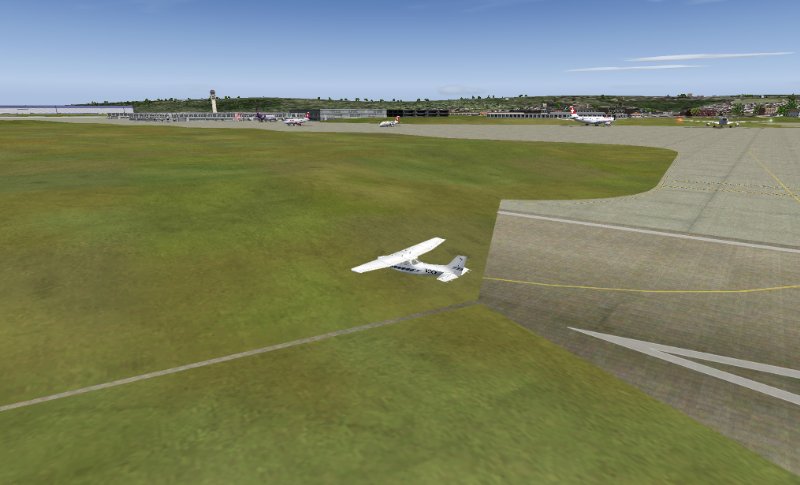
Help with Zurich scenery. Runways disappear!

Forum dedicated to Microsoft FS2004 - "A Century of Flight".

Help with Zurich scenery. Runways disappear!

Postby simonmd » Mon Feb 05, 2007 4:33 pm

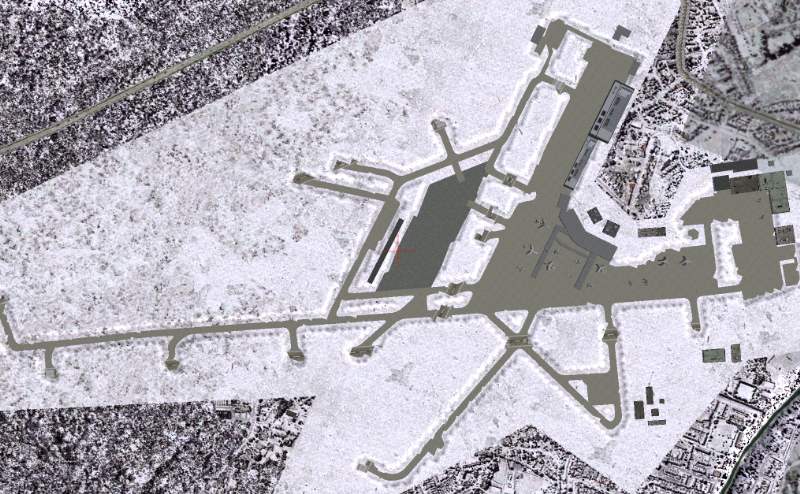
OK, a previous LSZR Zurich scenery has mucked up my default scenery. As soon as I am about to land, the runway disappears into a snow bank!

All the taxiways and apron are fine but the runways are burried beneath snow. I tried installing the FreeZ scenery to see if this would 'overwrite' it but have the same problem.

How can I render the whole area in the airport flat again?

Here's a pic to demonstrate,
Image

As you can see, the taxiways look as if they've been dug out of the snow but the runways are covered.

Image
This months's screenshot contest entry> http://www.simviation.com/cgi-bin/yabb2 ... 1197692798
User avatar
simonmd
Major
Major
 
Posts: 1847
Joined: Sun Nov 06, 2005 4:47 pm
Location: s wales, UK

Re: Help with Zurich scenery. Runways disappear!

Postby Conan Edogawa » Tue Feb 06, 2007 1:20 am

Check your Afcad-file and set the whole airport a few feet higher (check if the runways are higher too). I got a similar problem and solved it with that. Try it out! :)

BTW: That looks funny! ;D
Last edited by Conan Edogawa on Tue Feb 06, 2007 1:21 am, edited 1 time in total.
Image

Specs: Intel Core2Quad Q6600 2,4GHz; 3,25GB RAM; nVidia EN8800GTS 512MB; Flight Simulator 9.1.
User avatar
Conan Edogawa
1st Lieutenant
1st Lieutenant
 
Posts: 488
Joined: Tue Dec 26, 2006 5:14 pm
Location: Hamburg, Germany

Re: Help with Zurich scenery. Runways disappear!

Postby simonmd » Tue Aug 21, 2007 1:35 pm

This has still not been solved. I've removed all trace of Zurich addons and still get the same. Then, I installed a new Zurich scenery and the runways are too HIGH!

I'm assuming that the default mesh has been tampered with somehow, can someone tell me how to find the original one on one of the disks?
Image
This months's screenshot contest entry> http://www.simviation.com/cgi-bin/yabb2 ... 1197692798
User avatar
simonmd
Major
Major
 
Posts: 1847
Joined: Sun Nov 06, 2005 4:47 pm
Location: s wales, UK

Re: Help with Zurich scenery. Runways disappear!

Postby wolfipilot » Wed Aug 22, 2007 6:42 am

I know the problem, actually both problems: disappearing of RWY as well as too low/high RWYs. I fully deleted the Add-on-Scenery and re-installed, the problem was to my understanding the AFCAD. So take care to remove all (!) respective AFCAD-files for LSZH.

Btw.: which Scenery do you use? I highly recommend the FreeZ, and it runs very well with my FS9.

BR
WP
wolfipilot
2nd Lieutenant
2nd Lieutenant
 
Posts: 52
Joined: Mon Apr 30, 2007 7:21 am

Re: Help with Zurich scenery. Runways disappear!

Postby simonmd » Thu Aug 23, 2007 2:26 pm

I'd be happy to be able to use the default scenery!! Have deleted all trace of Zurich and LSZR. Still got 'hills' in the main runways!

Can someone please tell me what file the local mesh is for this area? I'm not willing to do a complete re install for one airport!
Image
This months's screenshot contest entry> http://www.simviation.com/cgi-bin/yabb2 ... 1197692798
User avatar
simonmd
Major
Major
 
Posts: 1847
Joined: Sun Nov 06, 2005 4:47 pm
Location: s wales, UK

Re: Help with Zurich scenery. Runways disappear!

Postby born_2_fly » Fri Aug 24, 2007 5:44 am

Do you have any addon mesh in the Europe Area atall?

Try moving it as far down the scenery library as you can.

See if that helps.
born_2_fly
 

Re: Help with Zurich scenery. Runways disappear!

Postby garymbuska » Fri Aug 24, 2007 9:05 am

If you check out disk two of the install cds I think this is where you will find the default scenery.
To solve your problem I would suggest you to do three things.
1) Backup all of your scenery and addon scenery first put the files outside of FS
2) Cut the entire ADDON scenery folder and place it out side of fs Make sure the entire folder is no longer inside of FS
3) Locate the SCENERY.cfg file it is in the main root folder of FS and either rename it or cut and paste the file outside of FS
When you restart FS it will build a new SCENERY.cfg file then you can check out the same area to see if the problem has dissapered if not then the problem is in the default file and you will need the one off of the install cd. If the problem goes away then add your files in the ADDON SCENERY folder one at a time then recheck. This should find the culprit file 8-)
Gary M Buska
SYSTEM Specs ASUS P8Z68 V/GEN 3 mother board: INTELL I7 2600k 3.48 ghz Quad core CPU with Sandy bridge: 12 Gigs of 1800hz ram:
GTX 950 OVER CLOCKED: 2 Gigs Ram Windows 10 Home 64 bit Operating system. 750W Dedicated modular power supply. Two Internal 1TB hard drives 1 External 1TB 3.2 USB hard drive. SAITEK Cessna flight Yoke with throttles.
CH Rudder Peddles 27 inch Wide screen Monitor
User avatar
garymbuska
Major
Major
 
Posts: 4415
Joined: Tue Dec 30, 2003 11:10 am
Location: Jacksonville, Florida

Re: Help with Zurich scenery. Runways disappear!

Postby simonmd » Fri Aug 24, 2007 2:08 pm

Ok, I've removed the Addon Scenery folder to the desktop and deleted all the addon scenery entries from the scenery.cfg file leaving just the default stuff.

Problem still there!
Image
Must be in the default main scenery file then.
Image
This months's screenshot contest entry> http://www.simviation.com/cgi-bin/yabb2 ... 1197692798
User avatar
simonmd
Major
Major
 
Posts: 1847
Joined: Sun Nov 06, 2005 4:47 pm
Location: s wales, UK

Re: Help with Zurich scenery. Runways disappear!

Postby simonmd » Fri Aug 24, 2007 2:59 pm

FIXED! The problem was in the default 'Eurw' folder. I had a flash of inspiration and remembered that I have a basicaly default FS9 installed on my laptop. I've not added anything to it because it can basically only just run FS9 as it is, addon stuff would melt it!

So, cut the Eurw (western Europe) folder to my desktop to be safe and than copied the one from my laptop, result FLAT runways at Zurich!!!
Last edited by simonmd on Fri Aug 24, 2007 3:03 pm, edited 1 time in total.
Image
This months's screenshot contest entry> http://www.simviation.com/cgi-bin/yabb2 ... 1197692798
User avatar
simonmd
Major
Major
 
Posts: 1847
Joined: Sun Nov 06, 2005 4:47 pm
Location: s wales, UK


Return to FS 2004 - A Century of Flight

Who is online

Users browsing this forum: No registered users and 152 guests