Adding Aircraft In FS2004

Forum dedicated to Microsoft FS2004 - "A Century of Flight".

Adding Aircraft In FS2004

Postby lakevue » Fri Aug 10, 2007 3:19 pm

I have recently had a problem with aircraft not appearing in my aircraft listing after being added.
I.E.  I just downloaded and and installed the OPensky NwA 757-300....but it does not appear when i
go to select aircraft.  I have compared the aircraft config file to other OPensky aircraft and I can
see no differences.  What do not all aircraft appear after installing?  I have isntalled numerous aircraft without problem, but sometimes this problem exists for me.  What is the cause, and I can I correct it?
Thank You
ewolf@lakevuehome.com
lakevue
Ground hog
Ground hog
 
Posts: 3
Joined: Mon Feb 05, 2007 10:46 am

Re: Adding Aircraft In FS2004

Postby Jakemaster » Fri Aug 10, 2007 5:45 pm

Are you looking at the right manufacturer?  POSKY planes sometimes go under Boeing but sometimes they show up under Project Opensky.  If you don't know, select 'ALL' on manufacturer and look for it.  If that doesn't work, then you'll need to show us the [fltsim.x] entry from the aircraft.cfg and we can discuss it further from there
Jakemaster
 

Re: Adding Aircraft In FS2004

Postby lakevue » Fri Aug 10, 2007 7:03 pm

Yes..checked both "posky" and "All"...no-show.  Here is the file you requested....let me know what you think the problem is.

[fltsim.0]
title=Project Opensky Boeing 757-300 Northwest NC Skyteam
sim=B757-300-PW-PW2040
model=
//ADD THE TW0 LETTERS VC AFTER THE MODEL= FOR VC MODEL
panel=
sound=
texture=nwa_nc

kb_checklists=
kb_reference=

atc_id=N597NW
atc_airline=Northwest
atc_flight_number=22
atc_parking_codes=NWA
atc_parking_types=GATE

ui_manufacturer=Project Opensky
ui_type=757-300
ui_variation=Northwest NC w/ Skyteam

description=Project Opensky \nBoeing 757-300\nVersion 2004.8.1\n\nFS2004 Only\n\nEngine Type: PW2040\n\nModel Designers\n   Lee Rosario\n   Albert Bouwman\n   C. Vincent Cho\n   Hiroshi Igami\n\nFlight Dynamics Designer\n   Warren C. Daniel\n\nMaster Texture Designers\n   Jaco du Preez\n   Ben Hewitt\n\nTechnical Resource-QC\n   Nick Peterson\n   Simon Ng\n\nFor proper operation: See B757 manual at: \n  www.projectopensky.com
atc_heavy=0

[General]
atc_type=BOEING AIRCRAFT
atc_model=B753
visual_damage=1
editable=0

performance=Passengers\n2-class conf: 243 \n     12 - First\n     231 - Economy\n\nCargo\nFwd lower hold volume: 1,790 cu ft \nAft lower hold volume:  1,312 cu ft\n\nDimensions\nSpan 124 ft 10 in\nLength 178 ft 7 in\nHeight 44 ft 3 in (min)\n            45 ft 1 in (max)\n\nEngines: PW2040\nTO Thrust Rating: 40,900 lb\n\nMax Fuel Cap.: 11,276 gal\nMaxTOW: 272,500 lb\nZFW: 188,000 lb\n\nMax Range: 3,395 nm (6,287 km) \nTypical Cruise Speed \n  @ FL350: M.80
TBAirCraftFolderUId=147
Category=airplane

[pitot_static]
vertical_speed_time_constant = 999                //Increasing this value will cause a more instantaneous reaction in the VSI
pitot_heat=1.000000

[airplane_geometry]
wing_area               = 1994.000
wing_span               = 124.830
wing_root_chord         = 26.902
wing_dihedral           =  5.000
wing_incidence          =  0.500
wing_twist              =  1.000
oswald_efficiency_factor=  0.750
wing_winglets_flag      =  0
wing_sweep              = 24.500
wing_pos_apex_lon       =  0.000
wing_pos_apex_vert      =  0.000
htail_area              =541.949
htail_span              = 49.930
htail_pos_lon           =-65.000
htail_pos_vert          =  0.000
htail_incidence         =  0.000
htail_sweep             = 30.000
vtail_area              =369.940
vtail_span              = 45.078
vtail_sweep             = 35.000
vtail_pos_lon           =-58.000
vtail_pos_vert          = 5.800
elevator_area           =136.000
aileron_area            = 48.000
rudder_area             =123.000
elevator_up_limit       = 24.000
elevator_down_limit     = 18.000
aileron_up_limit        = 24.000
aileron_down_limit      = 18.000
rudder_limit            = 32.000
elevator_trim_limit     = 16.000
spoiler_limit           = 45.000
spoilerons_available    = 0
aileron_to_spoileron_gain = 0.000
min_ailerons_for_spoilerons = 0.000
min_flaps_for_spoilerons = 0.000
auto_spoiler_available=1
spoiler_extension_time=2.000000
positive_g_limit_flaps_up=4.000000
positive_g_limit_flaps_down=3.000000
negative_g_limit_flaps_up=-3.000000
negative_g_limit_flaps_down=-2.000000

[WEIGHT_AND_BALANCE]
max_gross_weight = 272500.000
empty_weight = 188000.000

reference_datum_position     = 0.000, 0.000, 0.000
empty_weight_CG_position     = 0.000, 0.000, 0.000

max_number_of_stations =50

station_load.0 =0.000000,0.000000,0.000000,0.000000

;Moments of Inertia
empty_weight_pitch_MOI  = 2995645.000
empty_weight_roll_MOI   = 1873855.000
empty_weight_yaw_MOI    = 5171429.000
empty_weight_coupled_MOI = 0.000
CG_forward_limit= 0.000
CG_aft_limit= 1.000

[flight_tuning]
cruise_lift_scalar     =1.000
parasite_drag_scalar   =1.000
induced_drag_scalar    =1.500
elevator_effectiveness =1.000
aileron_effectiveness  =1.875
rudder_effectiveness   =1.000
pitch_stability        =1.000
roll_stability         =1.000
yaw_stability          =1.000
elevator_trim_effectiveness =1.000
aileron_trim_effectiveness  =1.000
rudder_trim_effectiveness   =1.000

[GeneralEngineData]
engine_type = 1
Engine.0 = 10.200, -21.250, -3.290
Engine.1 = 10.200, 21.350, -3.290
fuel_flow_scalar = 0.835
min_throttle_limit=-0.319946

[TurbineEngineData]
fuel_flow_gain = 0.002
bypass_ratio=6.00
inlet_area = 33.5757
rated_N2_rpm = 29920.000
static_thrust = 40900.000
afterburner_available = 0
reverser_available = 1

[jet_engine]
thrust_scalar =1.000

[electrical]
//                ;BusType, MaxAmpLoad, MinVoltage       BusTypes:0=MainBus,1=AvionicsBus,2=BatteryBus,3=HotBatteryBus,4-7=Generator/AlternatorBus(1-4)
flap_motor         = 1, 0 ,  1.0
gear_motor         = 0, 5 , 17.0
autopilot          = 0, 5 , 17.0
avionics_bus       = 0, 0 ,  1.0
avionics           = 1, 5 , 17.0
pitot_heat         = 0, 0 ,  1.0
additional_system  = 0, 0 ,  1.0
marker_beacon      = 1, 2 , 17.0
gear_warning       = 7, 0 , 99.0
gear_motor         = 4, 0 ,  1.0
fuel_pump          = 0, 0 ,  1.0
fuel_transfer_pump = 0, 0 ,  1.0
starter1           = 0, 20, 17.0
starter2           = 0, 0 ,  1.0
light_nav          = 0, 0 ,  1.0
light_beacon       = 0, 0 ,  1.0
light_landing      = 0, 0 ,  1.0
light_taxi         = 0, 0 ,  1.0
light_strobe       = 0, 0 ,  1.0
light_panel        = 0, 7 , 99.0
light_recognition  = 0, 0 ,  1.0
light_wing         = 0, 0 ,  1.0
marker_beacon      = 0, 0 ,  1.0
standby_vacuum     = 0, 0 ,  1.0
auto_brakes

lakevue
Ground hog
Ground hog
 
Posts: 3
Joined: Mon Feb 05, 2007 10:46 am

Re: Adding Aircraft In FS2004

Postby Jakemaster » Fri Aug 10, 2007 8:41 pm

As is it should show up listed under "Project Opensky"

What I can suggest is make sure that the .air file is called B757-300-PW-PW2040.air.  Also be sure that there is a folder called Model.  
Jakemaster
 

Re: Adding Aircraft In FS2004

Postby commoner » Sat Aug 11, 2007 1:07 am

...also make sure you have put the right folder into the aircraft folder...it isn't always the first one out of the .zip with the name of the aircraft that you need........it's the one which when opened shows the model, panel, texture folders etc inside...a simple mistake........otherwise tell us the .zip file name and where you got it so someone can check it out properly....commoner ;)

...the bit that matters is this line'''

ui_manufacturer=Project Opensky

you could change it and see what happens...to whatever you want.........Boeing    maybe?

CHECK THAT THERE IS AN .AIR FILE INCLUDED IN THE .ZIP ..IT HAS BEEN KNOWN WITH POSKY AIRCRAFT FOR THIS TO BE MISSING

This is the most likely cause of your problem as all the other stuff looks fine...commoner ;)
Last edited by commoner on Sat Aug 11, 2007 7:10 am, edited 1 time in total.
Image"In theory, there is no difference between theory and practice. But, in practice, there is."
User avatar
commoner
Major
Major
 
Posts: 3221
Joined: Sat Aug 28, 2004 2:26 am
Location: Yorkshire. England. UK.

Re: Adding Aircraft In FS2004

Postby lakevue » Sat Aug 11, 2007 9:09 am

OK!  You were right!  The ".air" file was not included!  I went to the Project Opensky and found the
original version of the 757-300 NWA file and got the file.  I included it in FS2004 and the aircraft
name comes up fine and I can load the aircraft.  BUT....the gauges do not appear .  I downloaded
the file from flightsim.com  (NWA_7573.zip).  The original file from POSKY uses the default 777-300 panel from FS2004.  The person who supplied this file to flightsim.com looks like they changed it to a 737-800.  How do I get the gauges into the panel.  I belive they should load automatically but they are not.  I have d/loaded and installed numerous aircraft over the years but his one is a stumper.  What's the secret?

ewolf@lakevuehome.com
lakevue
Ground hog
Ground hog
 
Posts: 3
Joined: Mon Feb 05, 2007 10:46 am

Re: Adding Aircraft In FS2004

Postby commoner » Sun Aug 12, 2007 4:41 am

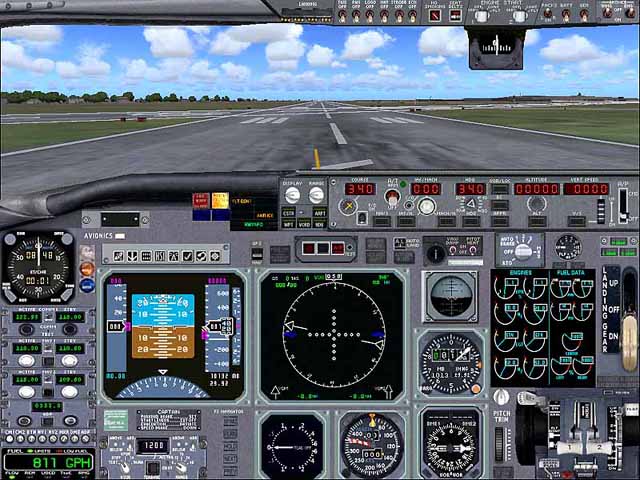
...mmm...as you have already noticed..the 757 doesn't come with a custom panel. There are many suitable ones about and the one I like is theultimateboeingpanel_v31.zip which is suitable for the posky 757.

 I'm not familiar with your original download so can't advise on the panel you got with it. Methods of installing can vary some and there should be some readme files to help you somewhere in the download........commoner ;)

Here's theultimateboeingpanel.........lots of bells and   whistles. ;) A simple clear installation readme is iincluded.

     Image
Last edited by commoner on Sun Aug 12, 2007 7:05 am, edited 1 time in total.
Image"In theory, there is no difference between theory and practice. But, in practice, there is."
User avatar
commoner
Major
Major
 
Posts: 3221
Joined: Sat Aug 28, 2004 2:26 am
Location: Yorkshire. England. UK.


Return to FS 2004 - A Century of Flight

Who is online

Users browsing this forum: No registered users and 351 guests
