Terrain_default_radius

Forum dedicated to Microsoft FS2004 - "A Century of Flight".

Terrain_default_radius

Postby Jakemaster » Tue Jul 17, 2007 10:37 pm

What's the highest that TERRAIN_DEFAULT_RADIUS can be set to?  I know this defines the distance that textures are drawn (at least I think it is if memory serves me right) and it seems like my blurries show waaaay too close to the aircraft.  I have it at 3.500000 right now
Jakemaster
 

Re: Terrain_default_radius

Postby justpassingthrough » Tue Jul 17, 2007 11:54 pm

[quote]What's the highest that TERRAIN_DEFAULT_RADIUS can be set to?
Last edited by justpassingthrough on Tue Jul 17, 2007 11:56 pm, edited 1 time in total.
justpassingthrough
Captain
Captain
 
Posts: 651
Joined: Thu Dec 21, 2006 2:43 am

Re: Terrain_default_radius

Postby justpassingthrough » Tue Jul 17, 2007 11:59 pm

your card and system should have no problem setting as follows:


Save a copy of your current FS9.cfg file in a safe place. Then DELETE the FS9.cfg file being used by the sim.

Start Flight Simulator. You will be starting clean with a new FS9.cfg file Let the sim boot and go to the SETTINGS area. Make the following changes:

DISPLAY BUTTON:
Last edited by justpassingthrough on Wed Jul 18, 2007 12:04 am, edited 1 time in total.
justpassingthrough
Captain
Captain
 
Posts: 651
Joined: Thu Dec 21, 2006 2:43 am

Re: Terrain_default_radius

Postby justpassingthrough » Wed Jul 18, 2007 12:06 am
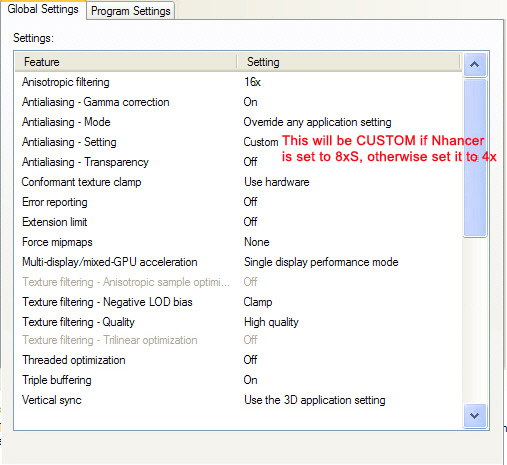
NVIDIA DRIVER SETTINGS

Image


It is important for LCD the scaling in the Nivida control panel is set to:

'Use my displays built in scaling" or "Monitor Scaling"

If you use as CRT monitor
Last edited by justpassingthrough on Wed Jul 18, 2007 12:10 am, edited 1 time in total.
justpassingthrough
Captain
Captain
 
Posts: 651
Joined: Thu Dec 21, 2006 2:43 am

Re: Terrain_default_radius

Postby Jakemaster » Wed Jul 18, 2007 11:03 am

My laptop isn't plugged in right now and its got very little life left so I will do what you advised later, thanks!  I'm using nHancer with the settings suggested by NickN in the FSX forum.  Basically FS9 runs very well as is, but looks less than spectacular because of blurries in the distance.  Clouds drag me down but there was one setting suggested in another forum that you can move the 2d cloud radius out (I'll find the line when I save and go through the CFG) and then set 3D cloud percentage to 50.  It looks the same but gets 3, 4, or even 5 more FPS in heavy clouds.
Jakemaster
 

Re: Terrain_default_radius

Postby Jakemaster » Wed Jul 18, 2007 11:14 am

Here is the line that somebody mentioned on another forum somewhere:

CloudsImpostorRingRadius=24000.000000

Whatever it is it DOES work
Jakemaster
 

Re: Terrain_default_radius

Postby justpassingthrough » Wed Jul 18, 2007 12:22 pm

Clouds are the number one killer in FS9

Your best be with clouds, which were not made right, is to replace them

The software FLIGHT ENVIRONEMNT is the best replacement out there. With those clouds and using their special Dxt3 versions, you will remove close to 50% of the load without loosing visual quality.


Suggestion for Cloud Set:

Solid Cumulus = Majestic
Stratus = Strong Opposition
Wispy Edges = Scene One
Cirrus = First Choice

On the main screen place a check in the following:

Create Lower Resolution Clouds
Create DXT3 Clouds
Extended Contrails

Save and Install

If you dont want Flight Environment to replace the water, sun and sky.. some people just want the clouds.. do the following

Right after you install the program browse to:

C:\Program Files\Microsoft Games\Flight Simulator 9\Flight One Software\Flight Environment\Data

Inside the data folder RENAME the following folders:

SKY
justpassingthrough
Captain
Captain
 
Posts: 651
Joined: Thu Dec 21, 2006 2:43 am

Re: Terrain_default_radius

Postby Jakemaster » Wed Jul 18, 2007 2:33 pm

I have ActiveSky (although the weather engine doesn't really work with my installation) for clouds, I'll try a lower cloud setting (I have medium quality now).  I'll look into FSUIPC payware too...

Clouds were apparently killing performance earlier, I just finished a flight to Chicago and I was descending on the outskirt of a big area of clouds, basically looking to one side with a few clouds my FPS were easily hitting 24, looking the other way they were below 15.
Jakemaster
 

Re: Terrain_default_radius

Postby justpassingthrough » Wed Jul 18, 2007 2:55 pm

[quote]I have ActiveSky (although the weather engine doesn't really work with my installation) for clouds, I'll try a lower cloud setting (I have medium quality now).
Last edited by justpassingthrough on Wed Jul 18, 2007 2:56 pm, edited 1 time in total.
justpassingthrough
Captain
Captain
 
Posts: 651
Joined: Thu Dec 21, 2006 2:43 am

Re: Terrain_default_radius

Postby Jakemaster » Wed Jul 18, 2007 3:48 pm

For some reason I think its a Vista issue with AS, it just doesn't connect to the sim.  I haven't messed with it for a while but I can try again at some point.  I might try to get FE and FSUIPC at some point, but both cost a little more than I want to spend right now.
Jakemaster
 

Re: Terrain_default_radius

Postby JBaymore » Thu Jul 19, 2007 1:54 pm

milltestpilot,

In the "credit where credit is due" department,  you might want to use the YABB "quote" function when you are sharing someone else's detailed instructions from other postings.  Otherwise it gets confusing as to WHO is saying what.  

I beleive that a lot of what you posted above are from NickN's very informative threads, aren't they?  Please correct me if I am wrong.

I hate to see Nick not get credit when he deserves it.  He FREELY contributes SO much of hjis vast knowledge to the people on SimV.

best,

..................john
Image ImageIntel i7 960 quad 3.2G LGA 1366, Asus P6X58D Premium, 750W Corsair, 6 gig 1600 DDR3, Spinpoint 1TB 720

User avatar
JBaymore
Global Moderator
Global Moderator
 
Posts: 10020
Joined: Sat May 24, 2003 9:15 am
Location: New Hampshire

Re: Terrain_default_radius

Postby justpassingthrough » Thu Jul 19, 2007 2:14 pm

[quote]milltestpilot,

In the "credit where credit is due" department,
justpassingthrough
Captain
Captain
 
Posts: 651
Joined: Thu Dec 21, 2006 2:43 am

Re: Terrain_default_radius

Postby JBaymore » Thu Jul 19, 2007 6:20 pm

I have posted that so many times I forgot to add the credit! NickN knows I wouldnt do that on purpose (he knows where I live LOL!! )


miltestpilot,

No biggie!   I apologize if my comments seemed a bity "hard"...I was trying NOT to sound that way.   :)  I probably should not have picked YOUR thread to be the one in which to make the above posting.  I know you are normally not one to "lift" such stuff and attempt to take credit for it.  

It is just that lately I have seen so many of Nick's recommendations floating around SimV quoted (or paraphrased) by others who do NOT attribute the actual source of the wisdom as Nick.  Nick is such a great person to freely share all that he does with SO many people.

Anyway....... it was intended more as a "general" comment ....not one really targeted AT you.  Again... apologies for not making that as clear as I might have.   :-[

best,

.....................john
Image ImageIntel i7 960 quad 3.2G LGA 1366, Asus P6X58D Premium, 750W Corsair, 6 gig 1600 DDR3, Spinpoint 1TB 720
User avatar
JBaymore
Global Moderator
Global Moderator
 
Posts: 10020
Joined: Sat May 24, 2003 9:15 am
Location: New Hampshire

Re: Terrain_default_radius

Postby born_2_fly » Fri Jul 20, 2007 9:14 am

Here is the line that somebody mentioned on another forum somewhere:

CloudsImpostorRingRadius=24000.000000

Whatever it is it DOES work


What part of the .cfg do you put this in?
born_2_fly
 

Re: Terrain_default_radius

Postby aussiewannabe » Fri Jul 20, 2007 10:38 am

your card and system should have no problem setting as follows:

Save a copy of your current FS9.cfg file in a safe place. Then DELETE the FS9.cfg file being used by the sim.

Start Flight Simulator. You will be starting clean with a new FS9.cfg file Let the sim boot and go to the SETTINGS area. Make the following changes:


Attention: miltestpilot. Any chance those settings you gave Jayhawk Jake will work for me? I have FS9 now and want to tweak it as well.
HP Media Center Photosmart m7260n | 3.0GHz Intel Pentium D 830 | 2 GB RAM | 320 GB HD | Sapphire X1950 GT 512MB | Silencer 610 Watt PSU

[center][img]
http://www.simviation.com/yabbuploads/aussie_sig1.jpg
User avatar
aussiewannabe
Major
Major
 
Posts: 2530
Joined: Thu May 17, 2007 11:33 am

Next

Return to FS 2004 - A Century of Flight

Who is online

Users browsing this forum: No registered users and 146 guests