Need help with the Language in FS2004

Forum dedicated to Microsoft FS2004 - "A Century of Flight".

Need help with the Language in FS2004

Postby Andriy242 » Sun Jun 10, 2007 7:11 pm

Ok, so I hope someone can fix this for me.
So I have FS2004 fully installed and working ;D
and it works fine, but here is the thing
the language is all FUCKED Up
like its all question marks, can someone help me
here is a screenshot.
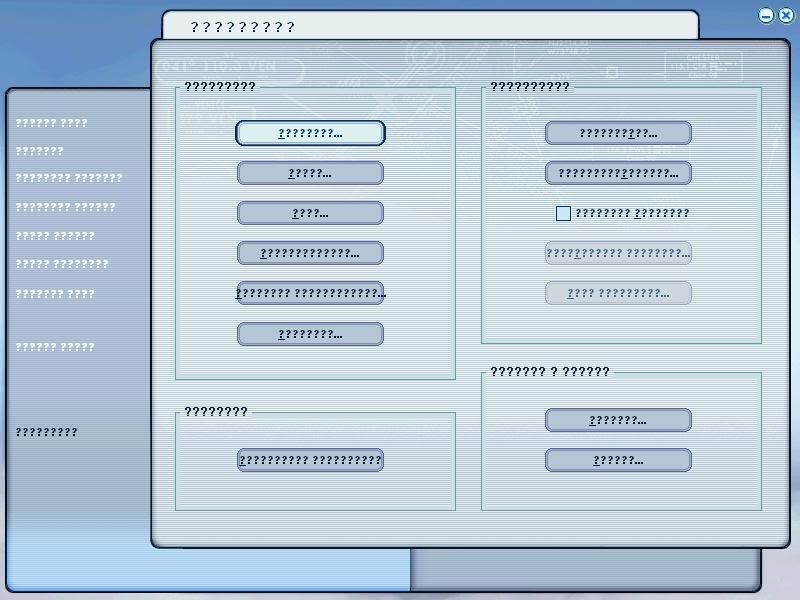
Image

>:( >:( >:(
Andriy242
Ground hog
Ground hog
 
Posts: 1
Joined: Sun Jun 10, 2007 8:04 pm

Re: Need help with the Language in FS2004

Postby a1 » Sun Jun 10, 2007 8:48 pm

You are kidding right? :o :o Well I'll don't think there is anything to fix the language for FS. I think you have a really bad copy of FS9. Are you sure it is authentic?  ;)


Image
790i : QX9650 : 4Gb DDR3 : GeForce 8800 GTX : 1 WD Raptor : 1 WD VelociRaptor 150
User avatar
a1
Lieutenant Colonel
Lieutenant Colonel
 
Posts: 7608
Joined: Thu Jan 04, 2007 9:16 pm

Re: Need help with the Language in FS2004

Postby garymbuska » Sun Jun 10, 2007 9:40 pm

I would suggest you try to replace a file called USEnglishBig.gvp The file is found in the sound folder of FS9. You can find the original file on disk 1 I believe. It looks like your copy has gotten messed up.

[glow=yellow,2,300] Do not get confused with any of the sound folders within the aircraft folder[/glow]   8-)
Last edited by garymbuska on Sun Jun 10, 2007 9:41 pm, edited 1 time in total.
Gary M Buska
SYSTEM Specs ASUS P8Z68 V/GEN 3 mother board: INTELL I7 2600k 3.48 ghz Quad core CPU with Sandy bridge: 12 Gigs of 1800hz ram:
GTX 950 OVER CLOCKED: 2 Gigs Ram Windows 10 Home 64 bit Operating system. 750W Dedicated modular power supply. Two Internal 1TB hard drives 1 External 1TB 3.2 USB hard drive. SAITEK Cessna flight Yoke with throttles.
CH Rudder Peddles 27 inch Wide screen Monitor
User avatar
garymbuska
Major
Major
 
Posts: 4415
Joined: Tue Dec 30, 2003 11:10 am
Location: Jacksonville, Florida

Re: Need help with the Language in FS2004

Postby commoner » Mon Jun 11, 2007 2:10 am

I would suggest you try to replace a file called USEnglishBig.gvp The file is found in the sound folder of FS9. You can find the original file on disk 1 I believe. It looks like your copy has gotten messed up.

[glow=yellow,2,300] Do not get confused with any of the sound folders within the aircraft folder[/glow]   8-)


...mmm not sure that will help ...in my experience that file is connected with the ATC speech. At least if it is not present then you can't talk and listen to ATC.........not sure what the problem is though.......commoner ;)
Image"In theory, there is no difference between theory and practice. But, in practice, there is."
User avatar
commoner
Major
Major
 
Posts: 3221
Joined: Sat Aug 28, 2004 2:26 am
Location: Yorkshire. England. UK.

Re: Need help with the Language in FS2004

Postby born_2_fly » Mon Jun 11, 2007 3:08 am

Bloody hell  :o  :-?

Don't know if there is a fix for that, has this happened with other installs of FS9?
born_2_fly
 

Re: Need help with the Language in FS2004

Postby Hagar » Mon Jun 11, 2007 3:20 am

Don't know if this will help. --> Font-related issues in Microsoft games
Image

Founder & Sole Member - Grumpy's Over the Hill Club for Veteran Virtual Aviators
Member of the Fox Four Group
My Google Photos albums
My Flickr albums
User avatar
Hagar
Colonel
Colonel
 
Posts: 30868
Joined: Wed Jun 19, 2002 7:15 am
Location: Costa Geriatrica

Re: Need help with the Language in FS2004

Postby murjax » Tue Jun 12, 2007 8:46 am

I would suggest calling Microsoft right away. :)
Image
I am just a train fan who happens to like flying and attempting to get the better of the mods especially those with 20/20 vision ;D ;D
User avatar
murjax
Major
Major
 
Posts: 1152
Joined: Sun Nov 26, 2006 12:18 am
Location: Jacksonville,FL

Re: Need help with the Language in FS2004

Postby Boca » Tue Jun 12, 2007 2:18 pm

Not being funny, but are you an English speaker/writer... because if I go on a forum with...say,Japanese font, ( which I haven't downloaded ), the text all comes up like that.  So maybe if you're Russian, Japanese or Chinese or something...you should download the appropriate Language capability that is appropriate for you.
User avatar
Boca
Captain
Captain
 
Posts: 622
Joined: Mon Jul 10, 2006 8:33 am
Location: Scotland

Re: Need help with the Language in FS2004

Postby JBaymore » Tue Jun 12, 2007 8:35 pm

Aha.... where did you buy the copy of fs2004 that you have installed?  What coiuntry are you in?  It is possible thjat the cversion you have is the XXXXXXXXXXXXX language version, and your are using a computer with the YYYYYYYYYYYYYYYYYYY language operating system on it...... andt he necessary characters are not loaded into Windows.

Is that a possibility?

best,

.......................john
Image ImageIntel i7 960 quad 3.2G LGA 1366, Asus P6X58D Premium, 750W Corsair, 6 gig 1600 DDR3, Spinpoint 1TB 720

User avatar
JBaymore
Global Moderator
Global Moderator
 
Posts: 10020
Joined: Sat May 24, 2003 9:15 am
Location: New Hampshire


Return to FS 2004 - A Century of Flight

Who is online

Users browsing this forum: No registered users and 310 guests

