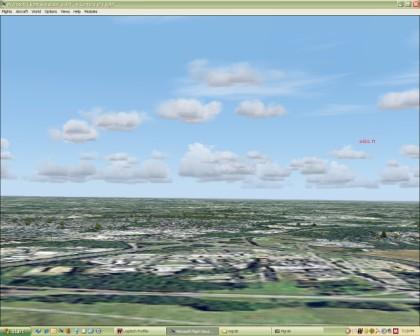
Blurry screen

Forum dedicated to Microsoft FS2004 - "A Century of Flight".

Blurry screen

Postby Falcon Fixer » Mon Apr 02, 2007 2:19 pm

I'm running an HP dual core with Nvidia 7600 video. I have my FS9 display settings maxed. The view is very blurry/fuzzy at all altitudes. It is no fun sightseeing!  Should I change something in my FS9 system cfg to make the video work better? Thanx
Love is a '68 Dodge Dart 340.
User avatar
Falcon Fixer
Ground hog
Ground hog
 
Posts: 47
Joined: Tue Dec 05, 2006 10:22 pm
Location: Tallahassee, FL

Re: Blurry screen

Postby ozzy72 » Mon Apr 02, 2007 2:26 pm

What is your visibility set to? Also what is your target FPS?
Image
There are two types of aeroplane, Spitfires and everything else that wishes it was a Spitfire!
User avatar
ozzy72
Administrator
Administrator
 
Posts: 33284
Joined: Fri May 24, 2002 4:45 am
Location: Madsville

Re: Blurry screen

Postby Kaworu » Tue Apr 03, 2007 7:11 pm

A screen shot, maybe? I have seen many different types of blurries. Is it textures, or is the screen itself blurry? Does my sig make a visit? ;)
AMD Phenom II X4 965 BE 3.6ghz, 4gb RAM, Palit GTX 460 1 gb, OCZ 750W, Windows 7 64bit
Image
User avatar
Kaworu
Captain
Captain
 
Posts: 795
Joined: Tue Feb 21, 2006 12:02 pm
Location: Powell, Ohio

Re: Blurry screen

Postby Falcon Fixer » Wed Apr 04, 2007 10:14 am

OK - can't do a print screen & paste (I tried).  Terrain mesh-20; Terrain texture-Med; Detail-land only; scenery complex-dense; autogen-dense; water effects-none; global scenery-custom; special effects-low; sight distance-60; cloud draw-40; MIP-4; Hardware lights-5; traffic 99%. FPS runs between 40 and 110 depending on what/where I'm flying. I have Megascenery USA installed for the Mid-Atlantic region. FPS is 30-50 flying out of standard scenery in Seattle and 15-30 in the high texture Mid-Atlantic. Fargo, ND is 80-110 FPS. Pls tell me how to do a print screen on this post site. Tom
Love is a '68 Dodge Dart 340.
User avatar
Falcon Fixer
Ground hog
Ground hog
 
Posts: 47
Joined: Tue Dec 05, 2006 10:22 pm
Location: Tallahassee, FL

Re: Blurry screen

Postby ozzy72 » Thu Apr 05, 2007 1:50 pm

Hi Tom, well to print a screen I'd suggest using a screenshot program such as MGrab http://www.mnwright.btinternet.co.uk/programs/mgrab.htm you can then take screenies to your hearts content. Then all you have to do is upload them to the SimV server (using the Upload Image option near the top of the page) and away you go ;)
Image
There are two types of aeroplane, Spitfires and everything else that wishes it was a Spitfire!
User avatar
ozzy72
Administrator
Administrator
 
Posts: 33284
Joined: Fri May 24, 2002 4:45 am
Location: Madsville

Re: Blurry screen

Postby Falcon Fixer » Thu Apr 05, 2007 6:32 pm

 Can't get image to insert. I have it captured in my folder but when I click the insert image icon all I get is that crap on the left.
Love is a '68 Dodge Dart 340.
User avatar
Falcon Fixer
Ground hog
Ground hog
 
Posts: 47
Joined: Tue Dec 05, 2006 10:22 pm
Location: Tallahassee, FL

Re: Blurry screen

Postby MadWings » Sun Apr 08, 2007 3:45 pm

Yes, that's normal. First you must upload the image. At the Simviation top menu, click on "Upload Images", then follow the instructions. When the upload is complete, a list will be displayed with the URLs of the images you uploaded. You need to enter (or copy & paste) the image URL (like http://www.simviation.com/pageimages/SIMV10ex.GIF) between the [] tags. Then, the image will display:
Image
Give it a try, it should work. I wonder what your blurry error looks like. A screenshot would really, really help us helping you.
Last edited by MadWings on Sun Apr 08, 2007 3:48 pm, edited 1 time in total.
I am serious, and don't call me Shirley!
User avatar
MadWings
Ground hog
Ground hog
 
Posts: 36
Joined: Thu Feb 15, 2007 11:55 am
Location: South Germany

Re: Blurry screen

Postby JLCGull » Sun Apr 08, 2007 4:57 pm

Check out my response to the thread "Very Dissapointed."

JLCGull
JLCGull
Ground hog
Ground hog
 
Posts: 47
Joined: Wed Feb 07, 2007 11:22 am
Location: North Eastern US

Re: Blurry screen

Postby Dispatchcode » Sun Apr 08, 2007 9:50 pm

i got the same problem pal!
My Proud Malaysian Airlines "Visit Malaysia 2006" Livery

Image
User avatar
Dispatchcode
2nd Lieutenant
2nd Lieutenant
 
Posts: 106
Joined: Fri Feb 09, 2007 11:27 pm
Location: Australia

Re: Blurry screen

Postby Falcon Fixer » Mon Apr 09, 2007 12:59 pm

Ok, I'll try again....here is my blurry image


[img][img]http://www.simviation.com/yabbuploads/blur5.jpg[/img][/img]
Love is a '68 Dodge Dart 340.
User avatar
Falcon Fixer
Ground hog
Ground hog
 
Posts: 47
Joined: Tue Dec 05, 2006 10:22 pm
Location: Tallahassee, FL

Re: Blurry screen

Postby Falcon Fixer » Mon Apr 09, 2007 1:29 pm

Image

Gee, I finally got my blurry image! No wonder I have gray hair.....
Love is a '68 Dodge Dart 340.
User avatar
Falcon Fixer
Ground hog
Ground hog
 
Posts: 47
Joined: Tue Dec 05, 2006 10:22 pm
Location: Tallahassee, FL

Re: Blurry screen

Postby FsNovice » Tue Apr 10, 2007 3:14 pm

so what are you saying is blurry as from that screenshot it looks perfectly normal Fs2004 to me.
When once you have tasted flight, you will forever walk the earth with your eyes turned skyward, for there you have been, and there you will always long to return – Leonardo da Vinci.
User avatar
FsNovice
Captain
Captain
 
Posts: 890
Joined: Sat Jan 28, 2006 5:46 am
Location: Portishead

Re: Blurry screen

Postby justpassingthrough » Tue Apr 10, 2007 3:58 pm

That snag looks horrible


Here is something that worked for me in FS9

I assume your video card is 256MB. If it is 128, these may not work but you can try them.


FS9 CONFIGURATION FILE REBUILD


Save a copy of your current FS9.cfg file in a safe place. Then DELETE the FS9.cfg file being used by the sim. You MUST do this first.

Once complete:

Start Flight Simulator. You will be starting clean with a new FS9.cfg file Let the sim boot and go to the SETTINGS area. Make the following changes:

DISPLAY BUTTON:
Last edited by justpassingthrough on Tue Apr 10, 2007 4:02 pm, edited 1 time in total.
justpassingthrough
Captain
Captain
 
Posts: 651
Joined: Thu Dec 21, 2006 2:43 am

Re: Blurry screen

Postby Falcon Fixer » Tue Apr 10, 2007 6:39 pm

Got it. Many thanks. I may still play with my Windows settings. Also an online thanx to Dave Mergen for helping me figure out the world of AI. I don't know why I had such a hard time figuring out that stuff. Tom F.
Love is a '68 Dodge Dart 340.
User avatar
Falcon Fixer
Ground hog
Ground hog
 
Posts: 47
Joined: Tue Dec 05, 2006 10:22 pm
Location: Tallahassee, FL

Re: Blurry screen

Postby justpassingthrough » Tue Apr 10, 2007 7:32 pm

Got it. Many thanks. I may still play with my Windows settings. Also an online thanx to Dave Mergen for helping me figure out the world of AI. I don't know why I had such a hard time figuring out that stuff. Tom F.


On last thing you need to attend to is the Windows Startup

This area can be very dangerous if you do not know what you are doing but the bottom line is you need to see what is starting with Windows and kill it unless it must boot for game and system support. It can be done perminantly by getting rid of start programs like they did here:

http://www.simviation.com/cgi-bin/yabb2 ... 09/285#299

don't do that yourself without someone guiding you who know what they are doing!!!

Or you can use MSCONFIG in the RUN box and under the startup tab, uncheck everything that is not needed for the system to boot which allows you to recheck it to enable later if you make a mistake or want something to start when you are not using it for games. You do not want to disable sound driver and other critical support. After you uncheck items in MSCONFIG will get a warning on Windows boot the system is running in a different mode, just select to not see the message again.

My list was huge (12-15 items) before I learned what I could get rid of and what had to stay, now it boots only 4 things.

AV and firewalls like Norton will crush a system even when its disabled. If you use Norton products, you will be fighting an uphill battle in getting the system free for game use.

AVG - Avast for freeware or NOD32 for payware AV are the best and if you are running WindowsXP SP2, dont use any firewall products, just the Windows firewall properly configured. With SP2 those 3rd party wirefalls do nothing but suck the life out of your system and provide little or no upgrade in protection for the type of use a typical user does. Unless you are a bank or some type of secrect agent running a 3rd party firewall is nonsense. Those security companies worked the public over real good years ago to scare them into using the junk firewalls. Many of them monitor you, like Norton, and send a report home so they are really spyware.

A good AV and the Windows firewall is all you need with a spyware program like Spybots Search and Destroy installed. Windows defender and a few others like spysweeper are ok, but those boot with Windows where spybots uses a simple browser plugin and does not kill your CPU cycles like the other programs.

You cant just unistall norton, it never goes away without a Windows reistall.

good luck

EDIT:

almost forgot!

If you are running a dual core AMD With XP SP2, you need to do this:


http://www.simviation.com/cgi-bin/yabb2 ... 795837/0#0


good luck!

Last edited by justpassingthrough on Tue Apr 10, 2007 8:00 pm, edited 1 time in total.
justpassingthrough
Captain
Captain
 
Posts: 651
Joined: Thu Dec 21, 2006 2:43 am

Next

Return to FS 2004 - A Century of Flight

Who is online

Users browsing this forum: No registered users and 331 guests