VERY DISAPOINTED

Forum dedicated to Microsoft FS2004 - "A Century of Flight".

VERY DISAPOINTED

Postby Dispatchcode » Thu Apr 05, 2007 8:56 am

Im very disappointed with my fs2004, i read all the fs2004 and even asked all the question about fs2004 to run my system. ok, my system very compatible to run fs2004, my system is
AMD Athlon 64 +3000
1GB ram
600gb Hard Disk
nVidia GeForce 7600 GS

the problem i got is, i went to settings to change the settings for my graphics, here's the list of problem i hate:!!
a) can't adjust any slider to max its wont move but can set the option to ultra high.
b) There's no option to change the pixel. its default to 800x600 (can't change any of these pixels) so the graphics blurry
c) MY GRAPHICS SHI****T but run smoothly.

if nothing change im really dissapointed to buy FS2004 and waste my AUD$50.
so, can someone help me to figure this out? why? thanks in advance.

and one more thing, is there any traffic for FS2004? not to me
and can i look around in the 3d cockpit like fsx have? i mean in fsx we always press shift + O. and move around the mouse..

Last edited by Dispatchcode on Thu Apr 05, 2007 9:22 am, edited 1 time in total.
My Proud Malaysian Airlines "Visit Malaysia 2006" Livery

Image
User avatar
Dispatchcode
2nd Lieutenant
2nd Lieutenant
 
Posts: 106
Joined: Fri Feb 09, 2007 11:27 pm
Location: Australia

Re: VERY DISAPOINTED

Postby pepper_airborne » Thu Apr 05, 2007 9:03 am

Firstly, what version of flightsimulator do you have, maby this could be causing it.

2. Did you recently update your graphic drivers? If not, then try to update them.

3. Any otherdrivers you can update you should do so too now your at it.

4. Any other software recently installed? Maby there is something between it that could also be causing this.

So, your saying you cant max out the sliders and cant change the resolution? I would almost say that FS doesnt detect the right video card, or it is wrongly installed. At the screen in wich you can change the resolution you should check what graphic driver it says, maby it is using onboard acceleration.
User avatar
pepper_airborne
Major
Major
 
Posts: 2268
Joined: Thu Mar 23, 2006 6:42 am

Re: VERY DISAPOINTED

Postby Dispatchcode » Thu Apr 05, 2007 9:31 am

well i havent update my graphic cards yet. but impossible i got good grapic cards how come its not compatible with fs2004,
and what you saying

"So, your saying you cant max out the sliders and cant change the resolution? I would almost say that FS doesnt detect the right video card, or it is wrongly installed. At the screen in wich you can change the resolution you should check what graphic driver it says, maby it is using onboard acceleration"

and i read in troubleshooting sect. saying that fs2004 does set automatically once it detect my graphic cards. if i wanna adjust it i have to change it from global setting which is Minimal, medium, high, ultra high... etc that's all. the rest?? nope cant adjust the slider. plus there's no vehicle traffic, in airport, only aircraft...
My Proud Malaysian Airlines "Visit Malaysia 2006" Livery

Image
User avatar
Dispatchcode
2nd Lieutenant
2nd Lieutenant
 
Posts: 106
Joined: Fri Feb 09, 2007 11:27 pm
Location: Australia

Re: VERY DISAPOINTED

Postby Dispatchcode » Thu Apr 05, 2007 9:44 am

plus i just checked i got the latest update for my graphic cards.. hmmm
My Proud Malaysian Airlines "Visit Malaysia 2006" Livery

Image
User avatar
Dispatchcode
2nd Lieutenant
2nd Lieutenant
 
Posts: 106
Joined: Fri Feb 09, 2007 11:27 pm
Location: Australia

Re: VERY DISAPOINTED

Postby Sir_Crashalot » Thu Apr 05, 2007 9:45 am

First of all, FS9 doesn't have vehicle traffic like FSX. We only have aircraft traffic (unless you have some payware scenery). Second of all, it sounds to me that your graphics card is not installed properly in Windows. As long as that is not done, FS9 will not detect it and you can't make any changes. Your specs are good enough to run FS9 (almost) maxed out.

Crash ;)
Last edited by Sir_Crashalot on Thu Apr 05, 2007 9:45 am, edited 1 time in total.
Sir_Crashalot
 

Re: VERY DISAPOINTED

Postby FSFLYER2 » Thu Apr 05, 2007 10:59 am

Virtual cockpit panning> http:\\www.flight1.com
Get F1View.zip It has the View Module you asked about. Payware
FSFLYER2
2nd Lieutenant
2nd Lieutenant
 
Posts: 129
Joined: Wed Jan 31, 2007 4:57 pm
Location: UK Sth Lancs

Re: VERY DISAPOINTED

Postby JBaymore » Thu Apr 05, 2007 11:10 am

dispatchcode,

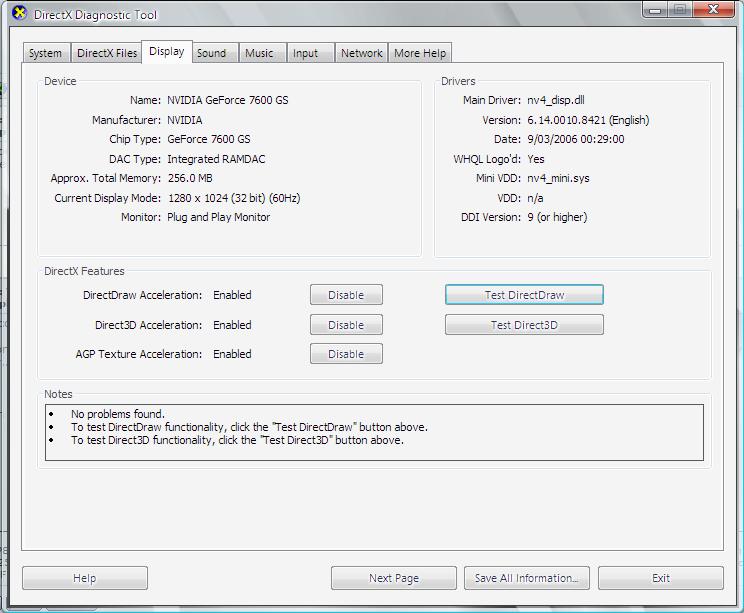
At the command prompt (START-RUN) type and run DXdiag and look at the results you get for all parts of the system.  if you don't see everything working absolutely correctly....... it is hardware setup issue.

best,

.......john
Image ImageIntel i7 960 quad 3.2G LGA 1366, Asus P6X58D Premium, 750W Corsair, 6 gig 1600 DDR3, Spinpoint 1TB 720

User avatar
JBaymore
Global Moderator
Global Moderator
 
Posts: 10020
Joined: Sat May 24, 2003 9:15 am
Location: New Hampshire

Re: VERY DISAPOINTED

Postby Dispatchcode » Thu Apr 05, 2007 11:30 am

This is the results......
Image
My Proud Malaysian Airlines "Visit Malaysia 2006" Livery

Image
User avatar
Dispatchcode
2nd Lieutenant
2nd Lieutenant
 
Posts: 106
Joined: Fri Feb 09, 2007 11:27 pm
Location: Australia

Re: VERY DISAPOINTED

Postby Dispatchcode » Thu Apr 05, 2007 12:09 pm

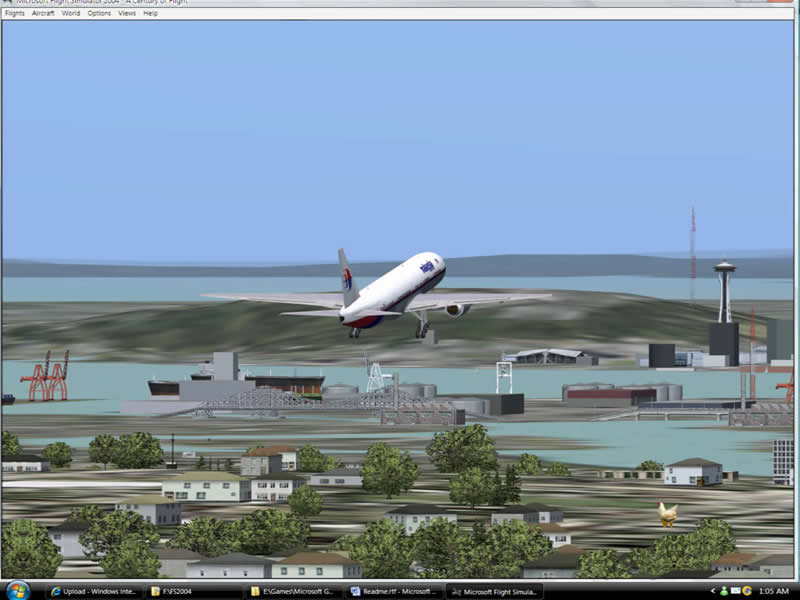
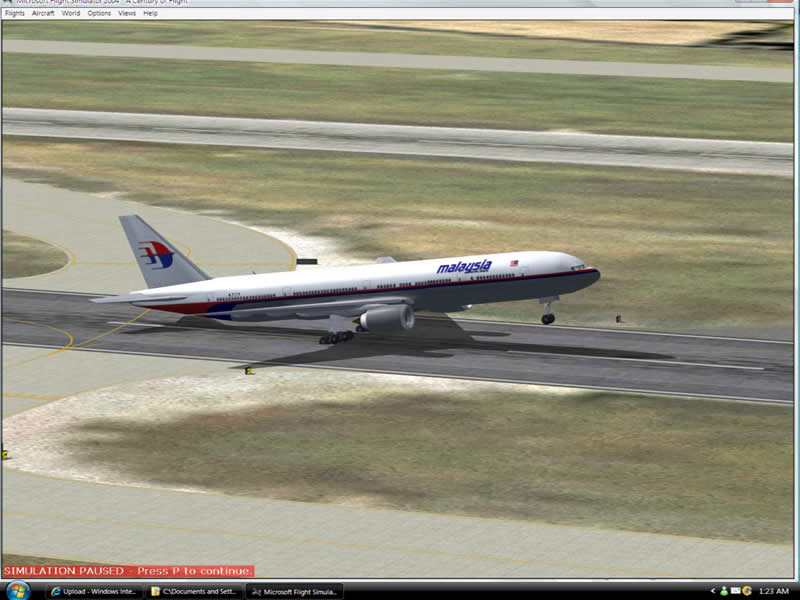
OK,  here's some screenshots i took when you not in alt+tab window, which means in window screen as shown below, if go to full screen the graphics is not as good as window screen view. like i said its blurry like 800 x 600 pixel. i can see everything but the not as sharp as window non full screen view. why i dont put the blurry one into this screen shot. because once i print screen, paste into Macromedia fireworks, there's no difference. so, i think this fs 2004 not compatible with my system according to my uneducated knowledge.. hmmm

Image
Image
My Proud Malaysian Airlines "Visit Malaysia 2006" Livery

Image
User avatar
Dispatchcode
2nd Lieutenant
2nd Lieutenant
 
Posts: 106
Joined: Fri Feb 09, 2007 11:27 pm
Location: Australia

Re: VERY DISAPOINTED

Postby JBaymore » Thu Apr 05, 2007 12:28 pm

OK... that's weird.

best,

...................john
Image ImageIntel i7 960 quad 3.2G LGA 1366, Asus P6X58D Premium, 750W Corsair, 6 gig 1600 DDR3, Spinpoint 1TB 720
User avatar
JBaymore
Global Moderator
Global Moderator
 
Posts: 10020
Joined: Sat May 24, 2003 9:15 am
Location: New Hampshire

Re: VERY DISAPOINTED

Postby Dispatchcode » Thu Apr 05, 2007 12:45 pm

ok, i found this problem...
any of the fs2004 slider include sound, display, anything with slider, is not working at all. so now i found the probs.
none of the slider will move..
but..
when click on the slider, and i press the cursor button either left or right, its moving, apply it, and load
but when you go back to adjust the same thing again, its all sliders back to the end left. when i try to go to joystick sensitivity slider, i tryna adjust the "sensitivity" and "null zone" the slider is moving perfectly. on the top of the slider theres another slider for both "sensitivity-all axes" and "null zone-all axes" when i move one of em, ofcourse the bottom slider will effect and move all three aileron, elevator, throttle.

this is weird, the top slider still in same position but when move it, its actually moving without showing the sliders are moving

WHAT THE F**K IS GOING ON IN HERE!! my fs2004 not pirate, its original, and my pc neva have any problem with any game except this fs2004
My Proud Malaysian Airlines "Visit Malaysia 2006" Livery

Image
User avatar
Dispatchcode
2nd Lieutenant
2nd Lieutenant
 
Posts: 106
Joined: Fri Feb 09, 2007 11:27 pm
Location: Australia

Re: VERY DISAPOINTED

Postby Clutch_Cargo » Thu Apr 05, 2007 1:25 pm

Dispatchcode, that's a great looking Malaysia paint you got on your banner.  Is that your design?  Is that availalbe somewhere?

thx,

Clutch
Prepar3D v2.0 = FS[i]Next[/i]
Clutch_Cargo
Ground hog
Ground hog
 
Posts: 43
Joined: Fri Feb 03, 2006 8:56 pm
Location: San Diego, California, USA

Re: VERY DISAPOINTED

Postby Tweek » Thu Apr 05, 2007 1:37 pm

well i havent update my graphic cards yet. but impossible i got good grapic cards how come its not compatible with fs2004,


Well if you haven't downloaded the latest drivers, then don't rule that possibility out.

http://www.nvidia.com/content/drivers/drivers.asp
Tweek
 

Re: VERY DISAPOINTED

Postby ashaman » Thu Apr 05, 2007 1:46 pm

Your system is better than mine (well, beside the videocard) and I have everything Maxed Out with no secondary problems, only I have my FS9 on a PC that has NO windoze service that is not more than necessary for it to run. This means no antivirus nor firewall (it's a home-net PC that connects to the internet by the use of a proxy program on the server activated only when needed), nor M$ instant message services not any other instant messenger or any other crappy or unnecessary program/service in background.

Now, I don't really know your software installation, but I'm ready to bet that you have a clogged system. Try making a little order inside the resident programs and while you use FS don't keep any messengers nor antivirus running (you don't need an antivirus if you don't download mails of programs nor a firewall if you're not connected to the net while you simulfly). For last use FSautostart or another similar program that shuts down every unnecessary program rerouting all the CPU power and memory to FS9, then try using FS again.

For the sliders not working, try once again installing the newest video drivers and DirectX.

WARNING: if your videocard is an AGP one, you MUST install the mainboard drivers as well or things like the ones happening to you... happen alright. If you have an AGP card and are in the doubt, try reinstalling the mainboard drivers again and see if it works now.
Last edited by ashaman on Thu Apr 05, 2007 1:52 pm, edited 1 time in total.
There's but one real cure for human stupidity. It's called DEATH.

At the moment mourning the assassination of sarcasm and irony for the good of the "higher".

Proud FSIX user. Active user of FS98, X-plane and novic
User avatar
ashaman
Major
Major
 
Posts: 1741
Joined: Thu Nov 27, 2003 9:08 am
Location: LIRN

Re: VERY DISAPOINTED

Postby pepper_airborne » Thu Apr 05, 2007 4:30 pm

It looks like VISTA can detec the card, DirectX does, somerwhere along the line it go's wrong and FS9 says bye bye.

did you tryed reinstalling FS9? And did it give you any error messages when installing?

I tryed googling for known problems with this card and FS, but there doesnt seems to be any, wich is a good and bad thing because it doesnt help us a bit further.

Is the LCD screen installed correctly? I doubt this could cause the problem, but you can never know.

Just a simple request, would you mind typing in full sentences? Because it is rather hard making out your meanings for non-english persons.
User avatar
pepper_airborne
Major
Major
 
Posts: 2268
Joined: Thu Mar 23, 2006 6:42 am

Next

Return to FS 2004 - A Century of Flight

Who is online

Users browsing this forum: No registered users and 385 guests