Alain capt MD-11 panel............HELP!!!!

Forum dedicated to Microsoft FS2004 - "A Century of Flight".

Alain capt MD-11 panel............HELP!!!!

Postby GreaseMonkey » Fri Mar 23, 2007 12:09 pm

Image

i have recently downloaded this MD-11 panel by Alain capt.

650W
Windows 7 Ultimate
4870 1GB
4GB Ram
3.15GHz x 2
GreaseMonkey
2nd Lieutenant
2nd Lieutenant
 
Posts: 176
Joined: Thu Jan 18, 2007 1:22 pm
Location: Manchester, England

Re: Alain capt MD-11 panel............HELP!!!!

Postby Hagar » Fri Mar 23, 2007 1:24 pm

I'm not familiar with the panel or the aircraft so I had a look round. I found the readme instructions posted here ---> http://www.acsoft.ch/md11v2/readme_FS2K4.txt
This saves downloading a lot of files. From the instructions it looks a lot more complicated than installing a conventional panel & is intended for specific aircraft. Please note what it says about the Overland MD-11.
INSTALLATION
------------

PLEASE RESPECT THESE INSTRUCTIONS TO THE LETTER !!! THIS IS NOT A STANDARD
PANEL AND THEREFORE, YOU MAY ENCOUNTER PROBLEMS IF YOU TRY TO INSTALL IT
MANUALLY FROM A TEMPORARY "UNZIP" DIRECTORY, LIKE A COMMON PANEL.

[quote]This package allow to install/uninstall the ACS MD-11 2d panel for FS2004
automatically, with the help of a powerful custom "Install.exe" program,
on the following specific MD-11 models:

- Mike Stone MD-11 model(s)
Last edited by Hagar on Fri Mar 23, 2007 1:28 pm, edited 1 time in total.
Image

Founder & Sole Member - Grumpy's Over the Hill Club for Veteran Virtual Aviators
Member of the Fox Four Group
My Google Photos albums
My Flickr albums
User avatar
Hagar
Colonel
Colonel
 
Posts: 30868
Joined: Wed Jun 19, 2002 7:15 am
Location: Costa Geriatrica

Re: Alain capt MD-11 panel............HELP!!!!

Postby ashaman » Fri Mar 23, 2007 3:34 pm

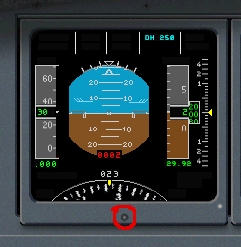
A thing that I myself tend to forget (up to the point of having made a personal checklist to remember myself of it) about that MD11 panel, and that might be your problem, is that when starting from a cold&dark situation the main gauges must be switched on, because normally on a off mode.

First you click on the overhead button for the battery (disregard the APU button, it's a dummy device), then click on the small round "knobs" under and at the center of the single instrumentation (circled in red in the pic below as an example) to switch on the single screen (you must switch on all four of them yourself or they will remain blank).


Image


Then you start the engines, and so on.

Always a good idea is to read the manual though. ;)
Last edited by ashaman on Fri Mar 23, 2007 3:39 pm, edited 1 time in total.
There's but one real cure for human stupidity. It's called DEATH.

At the moment mourning the assassination of sarcasm and irony for the good of the "higher".

Proud FSIX user. Active user of FS98, X-plane and novic
User avatar
ashaman
Major
Major
 
Posts: 1741
Joined: Thu Nov 27, 2003 9:08 am
Location: LIRN

Re: Alain capt MD-11 panel............HELP!!!!

Postby GreaseMonkey » Sun Mar 25, 2007 12:44 pm

Thanks a lot guys you were a realy help!!!  ive got the panel working and its great!!          

now happy flying across america in ma'heavy metal.......thanks!
650W
Windows 7 Ultimate
4870 1GB
4GB Ram
3.15GHz x 2
GreaseMonkey
2nd Lieutenant
2nd Lieutenant
 
Posts: 176
Joined: Thu Jan 18, 2007 1:22 pm
Location: Manchester, England

Re: Alain capt MD-11 panel............HELP!!!!

Postby simonmd » Tue Mar 27, 2007 10:18 am

Glad you got it working, it is a wonderfull panel once you get to grips with it. A tip now that you've got it running, don't forget that many function use the 'right click' function as well, such as hdg and nav selec knobs. Happy flying!
Image
This months's screenshot contest entry> http://www.simviation.com/cgi-bin/yabb2 ... 1197692798
User avatar
simonmd
Major
Major
 
Posts: 1847
Joined: Sun Nov 06, 2005 4:47 pm
Location: s wales, UK


Return to FS 2004 - A Century of Flight

Who is online

Users browsing this forum: No registered users and 438 guests