
Help - TeamFS KT P-Orion

Forum dedicated to Microsoft FS2004 - "A Century of Flight".

Help - TeamFS KT P-Orion

Postby crocker » Sun Mar 18, 2007 5:18 pm

I seem to have made a real mess of installing the Orion. Autopilot switches not engaging, radios not switching over to active freq, no vc,no atc sound etc. Download was not problem but I unzipped and extracted to a temp folder and found the aircraft folder and copied this into the FS9 aircraft folder. I then noticed that in the panel folder I had about three zip files! Should I have just opened the original downloaded zip file and selected all the files and extracted them to the root FS 9 folder? Has anyone had a similar problem. I couldn't find any specific install instructions in the readme first file. Any help would be much appreciated. Tx Crocker

crocker
2nd Lieutenant
2nd Lieutenant
 
Posts: 131
Joined: Mon Aug 11, 2003 9:45 am

Re: Help - TeamFS KT P-Orion

Postby Hagar » Sun Mar 18, 2007 5:23 pm

I seem to have made a real mess of installing the Orion. Autopilot switches not engaging, radios not switching over to active freq, no vc,no atc sound etc. Download was not problem but I unzipped and extracted to a temp folder and found the aircraft folder and copied this into the FS9 aircraft folder.  

If you tell me exactly where I can download the file maybe I can check it out for you.

I then noticed that in the panel folder I had about three zip files! Should I have just opened the original downloaded zip file and selected all the files and extracted them to the root FS 9 folder? Has anyone had a similar problem. I couldn't find any specific install instructions in the readme first file. Any help would be much appreciated. Tx Crocker

I suspect these zipfiles are actually XML gauges in CAB format. If I'm correct they're fine right where they are.
Image

Founder & Sole Member - Grumpy's Over the Hill Club for Veteran Virtual Aviators
Member of the Fox Four Group
My Google Photos albums
My Flickr albums
User avatar
Hagar
Colonel
Colonel
 
Posts: 30868
Joined: Wed Jun 19, 2002 7:15 am
Location: Costa Geriatrica

Re: Help - TeamFS KT P-Orion

Postby crocker » Sun Mar 18, 2007 5:26 pm

Hagar, thanks. I downloaded it from here, Simviation! Typo error should have been 'KBT' not KT.
crocker
2nd Lieutenant
2nd Lieutenant
 
Posts: 131
Joined: Mon Aug 11, 2003 9:45 am

Re: Help - TeamFS KT P-Orion

Postby Hagar » Sun Mar 18, 2007 5:54 pm

Hagar, thanks. I downloaded it from here, Simviation! Typo error should have been 'KBT' not KT.

Any chance of a page number or a link?
Image

Founder & Sole Member - Grumpy's Over the Hill Club for Veteran Virtual Aviators
Member of the Fox Four Group
My Google Photos albums
My Flickr albums
User avatar
Hagar
Colonel
Colonel
 
Posts: 30868
Joined: Wed Jun 19, 2002 7:15 am
Location: Costa Geriatrica

Re: Help - TeamFS KT P-Orion

Postby Isak922 » Sun Mar 18, 2007 8:08 pm

4GB DDR2 PC5300; 3.2GHz Pentium D 940, Nvidia 9800GT 1024MB DDR3, Windows XP Pro SP3
User avatar
Isak922
Major
Major
 
Posts: 1484
Joined: Tue Jun 27, 2006 9:09 pm
Location: Connecticut

Re: Help - TeamFS KT P-Orion

Postby Hagar » Mon Mar 19, 2007 3:29 am

http://www.simviation.com/fs2004military64.htm

Thanks but I want to make sure it's the same file that Crocker is talking about. It would be a complete waste of everyone's time for me to check out the wrong one.
Last edited by Hagar on Mon Mar 19, 2007 3:43 am, edited 1 time in total.
Image

Founder & Sole Member - Grumpy's Over the Hill Club for Veteran Virtual Aviators
Member of the Fox Four Group
My Google Photos albums
My Flickr albums
User avatar
Hagar
Colonel
Colonel
 
Posts: 30868
Joined: Wed Jun 19, 2002 7:15 am
Location: Costa Geriatrica

Re: Help - TeamFS KT P-Orion

Postby Isak922 » Mon Mar 19, 2007 4:15 am

Hagar, thanks. I downloaded it from here, Simviation! Typo error should have been 'KBT' not KT.


http://www.simviation.com/fs2004military64.htm

Thanks but I want to make sure it's the same file that Crocker is talking about. It would be a complete waste of everyone's time for me to check out the wrong one.


Chances are, that's what he's talking about.

Unless he accidentally downloaded the FSX version and tried to install that into FS9, or mistakenly just downloaded an update.

Reading his post again, I think he may have accidentally unzipped the files in the Gauges folder, something I don't think he should have done.
4GB DDR2 PC5300; 3.2GHz Pentium D 940, Nvidia 9800GT 1024MB DDR3, Windows XP Pro SP3
User avatar
Isak922
Major
Major
 
Posts: 1484
Joined: Tue Jun 27, 2006 9:09 pm
Location: Connecticut

Re: Help - TeamFS KT P-Orion

Postby Hagar » Mon Mar 19, 2007 4:26 am

http://www.simviation.com/fs2004military64.htm

Thanks but I want to make sure it's the same file that Crocker is talking about. It would be a complete waste of everyone's time for me to check out the wrong one.


Chances are, that's what he's talking about.

Unless he accidentally downloaded the FSX version and tried to install that into FS9, or mistakenly just downloaded an update.

Reading his post again, I think he may have accidentally unzipped the files in the Gauges folder, something I don't think he should have done.

It involves big files (71 Mb + an 18.7 mb update) which would take a while to download even on broadband & I have no use for the aircraft myself. No point in guesswork. I'd rather wait for Crocker to confirm exactly which files he's talking about. I waste quite enough time chasing red herrings as it is.
Last edited by Hagar on Mon Mar 19, 2007 4:29 am, edited 1 time in total.
Image

Founder & Sole Member - Grumpy's Over the Hill Club for Veteran Virtual Aviators
Member of the Fox Four Group
My Google Photos albums
My Flickr albums
User avatar
Hagar
Colonel
Colonel
 
Posts: 30868
Joined: Wed Jun 19, 2002 7:15 am
Location: Costa Geriatrica

Re: Help - TeamFS KT P-Orion

Postby crocker » Mon Mar 19, 2007 9:36 am

Hagar, I think I may have installed an update. But I sort of interpreted the file description as being the full package. It sits on page 3 of Military Aircraft and also appears on Simviation's home page under 'News/Hot Picks. It suggest that it's compatible for FS9 but also says it will work with FSX!
I didn't unzip any cab zip as I know from past experience they are where they should be. I may I suppose have a corrupted download, unlikely as I have broadband, but possible. The other thing which may or may not have an effect is that when I installed FSX I had real difficulty with ATC static. I posted this previously. I solved this by lowering the hardware accelaration through dxdiag and it worked. I have both FS9 and FSX on the same HD. It may be that I have to raise accelaration back up to high for FS9. Or it may be that I am missing something so obvious and I can't see it. Appreciate your help. Crocker
crocker
2nd Lieutenant
2nd Lieutenant
 
Posts: 131
Joined: Mon Aug 11, 2003 9:45 am

Re: Help - TeamFS KT P-Orion

Postby Hagar » Mon Mar 19, 2007 12:00 pm

Hagar, I think I may have installed an update. But I sort of interpreted the file description as being the full package. It sits on page 3 of Military Aircraft and also appears on Simviation's home page under 'News/Hot Picks. It suggest that it's compatible for FS9 but also says it will work with FSX!

Right. Just as well I asked for confirmatiom. I downloaded P-3C_V29.zip posted HERE to check it out. I wouldn't normally try an FSX addon in FS9 but, as you point out, the file description suggests it's suitable for both. It's not clear how it's been updated for FSX.

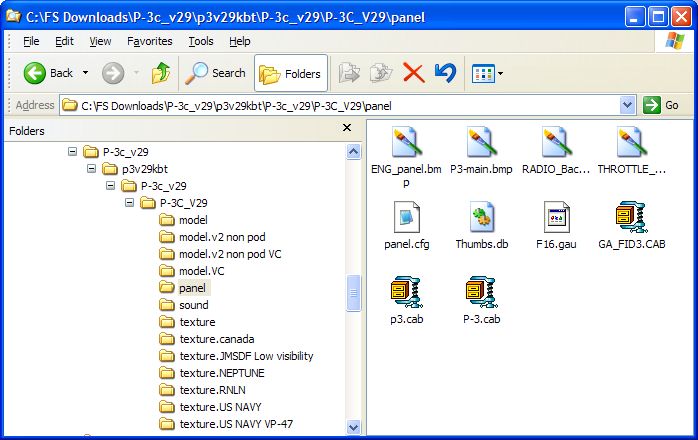
On extracting the file I found another zipfile inside it. Extracting this one revealed a folder named P-3C_V29 containing the complete aircraft & not the auto-install file I was half-expecting to find. I opened the Panel subfolder to look for those zipfiles you mentioned. These are gauges in CAB format as I suspected & mentioned in my first reply. They will function just fine left right where they are. Alternatively you can paste them along with F16.gau into the FS9\Gauges folder.
CAB files will look different depending on your software & which program they're associated with. As I have WinZip installed they look just like zipfiles. (See my shot).

Image

I installed the P-3 to FS9 by pasting the P-3C_V29 folder to FS9\Aircraft. I don't know a lot about autopilots or radio but everything seems to work as advertised. In fact it's a very nice aircraft & I enjoyed testing it. It also has a very nice DVC. I suspect the reason you didn't see it is that there is at least one variation of each model without a DVC.

I then tried it in the FSX Demo. I note from the Readme that it's not fully FSX-compatible & has some known issues. It's not clear exactly what these are as half of it is in Japanese. I was expecting problems with the F16.gau on the panel as this hasn't worked on other FSX updates I've tried but this version seems OK. The DVC also appears to work fine. (Make sure the "Show all variations" option is checked on the FSX selection menu so you can select the versions with a DVC.)

I have no idea why you should be having problems with this aircraft. It's possible the gauges won't display properly on certain video cards or graphics settings. Make sure you have no earlier versions of this aircraft installed that could cause a conflict.
Last edited by Hagar on Mon Mar 19, 2007 12:10 pm, edited 1 time in total.
Image

Founder & Sole Member - Grumpy's Over the Hill Club for Veteran Virtual Aviators
Member of the Fox Four Group
My Google Photos albums
My Flickr albums
User avatar
Hagar
Colonel
Colonel
 
Posts: 30868
Joined: Wed Jun 19, 2002 7:15 am
Location: Costa Geriatrica

Re: Help - TeamFS KT P-Orion

Postby crocker » Mon Mar 19, 2007 2:16 pm

Hagar, thanks for your help. You downloaded the file from the same location as I did and your method for installing exactly matches my own so does your file structure. A mystery indeed. I see no reason why I can't get the damn autopilot or radios to work. I'm running a GE Force 7900GT card. I may just try another install and see what happens. It is a nice aeroplane. Crocker    
crocker
2nd Lieutenant
2nd Lieutenant
 
Posts: 131
Joined: Mon Aug 11, 2003 9:45 am

Re: Help - TeamFS KT P-Orion

Postby crocker » Mon Mar 19, 2007 4:46 pm

Well don't ask me how but I have radios and autopilot. I seem to make the connection when I Ctrl+E for start engines then into the VC and turn autopilot on and also radios. Then back to panel and hey presto radios and autopilot can now be switched on. I also have GPS which was also part of the problem. I thought at first I hadn't switched on the 4 generators but I was making sure they were on when I first identified the problem. Just one last point if I attempt a manual start engines the problem returns. I just can't see any logic in what I have done - but it works. Crocker   [smiley=thumbsup.gif]
crocker
2nd Lieutenant
2nd Lieutenant
 
Posts: 131
Joined: Mon Aug 11, 2003 9:45 am

Re: Help - TeamFS KT P-Orion

Postby Hagar » Mon Mar 19, 2007 5:13 pm

Glad you fixed it. I'm not the best person to give advice on autopilots or radios but the default GPS works fine on every aircraft I've tried it on. The one thing lacking from this fantastic piece of work seems to be a decent instruction manual or even a checklist.
Last edited by Hagar on Mon Mar 19, 2007 5:14 pm, edited 1 time in total.
Image

Founder & Sole Member - Grumpy's Over the Hill Club for Veteran Virtual Aviators
Member of the Fox Four Group
My Google Photos albums
My Flickr albums
User avatar
Hagar
Colonel
Colonel
 
Posts: 30868
Joined: Wed Jun 19, 2002 7:15 am
Location: Costa Geriatrica


Return to FS 2004 - A Century of Flight

Who is online

Users browsing this forum: No registered users and 423 guests