 Does anyone know why that happened? And how can I remove them?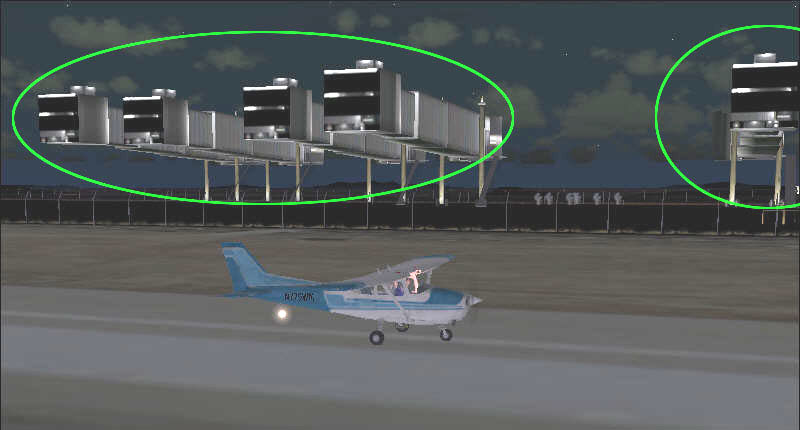

Flight Simulator and other chat
 by gpktm » Tue Feb 27, 2007 9:18 am
Does anyone know why that happened? And how can I remove them?


by ashaman » Tue Feb 27, 2007 9:21 am


by gpktm » Tue Feb 27, 2007 10:00 am
by eno » Tue Feb 27, 2007 10:32 am


by dave3cu » Tue Feb 27, 2007 11:20 am
by gpktm » Tue Feb 27, 2007 4:37 pm
What were you doin' during your one hour 'brake'?

I'd still look for an add-on scenery issue. The jetways look like S. Ansari's-Jetways for Rwy12. (from the terminal end)
Why they would 'suddenly' show, I haven't a clue.
Are the jetways 'replacing' other objects that are supposed to be there?
Did you change your 'Scenery Density' slider or make change to the 'Scenery Library'?
What airport in your screenshot? What add-on scenery are you using (or have used) for that airport?
Edit: just an after-thought. Looks like you might be looking from 'inside' the terminal the jetways serve. If you rotate or move your view do you see additional scenery that doesn't belong?
by NDSP » Wed Feb 28, 2007 6:36 am
by gpktm » Fri Mar 02, 2007 4:11 pm
Are the jetways 'replacing' other objects that are supposed to be there?
Did you change your 'Scenery Density' slider or make change to the 'Scenery Library'?
What airport in your screenshot? What add-on scenery are you using (or have used) for that airport?
by gpktm » Fri Mar 02, 2007 4:38 pm


by ashaman » Fri Mar 02, 2007 8:50 pm
ITS THE GATES TO HELL!!! ;D
I wouldnt drop off any passengers there :o


by gpktm » Sat Mar 03, 2007 12:19 am
by gpktm » Sat Mar 03, 2007 10:27 am

by Hagar » Sat Mar 03, 2007 10:33 am



by ashaman » Sat Mar 03, 2007 10:40 am
Return to FS 2004 - A Century of Flight
Users browsing this forum: No registered users and 331 guests