Loading Problem

Forum dedicated to Microsoft FS2004 - "A Century of Flight".

Loading Problem

Postby Conan Edogawa » Wed Jan 31, 2007 1:36 pm

...of textures. I got following problem:

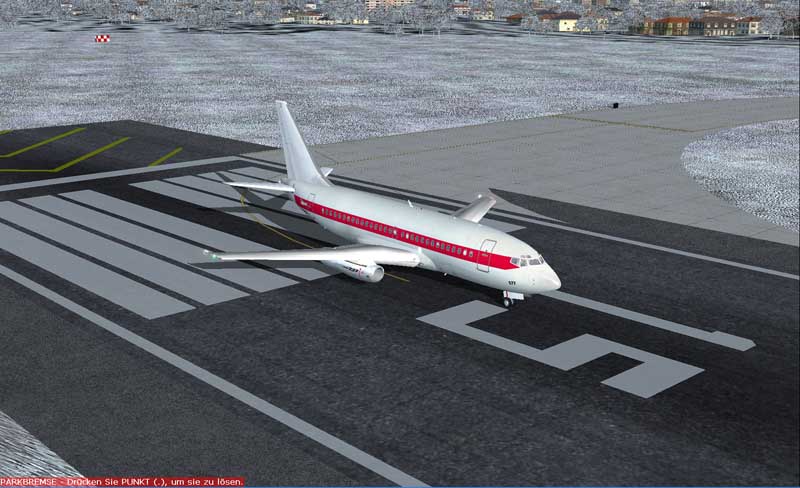
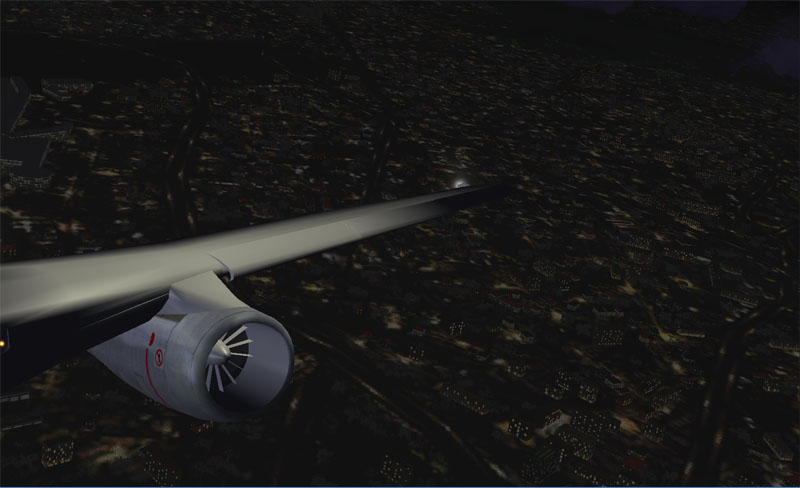
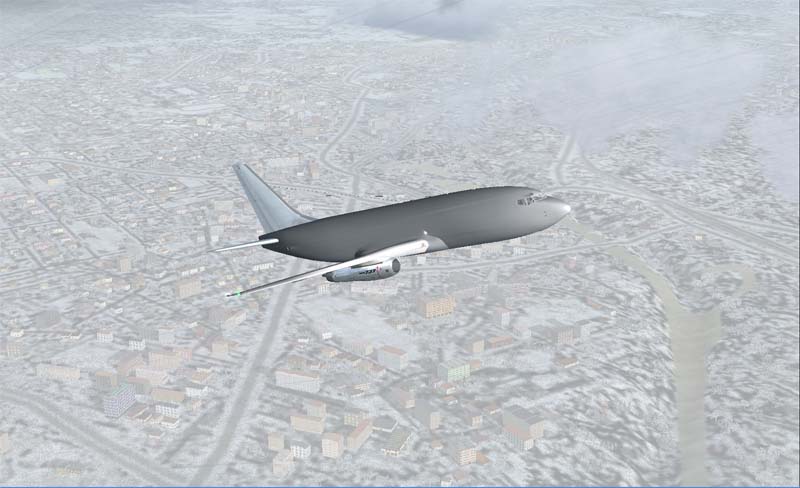
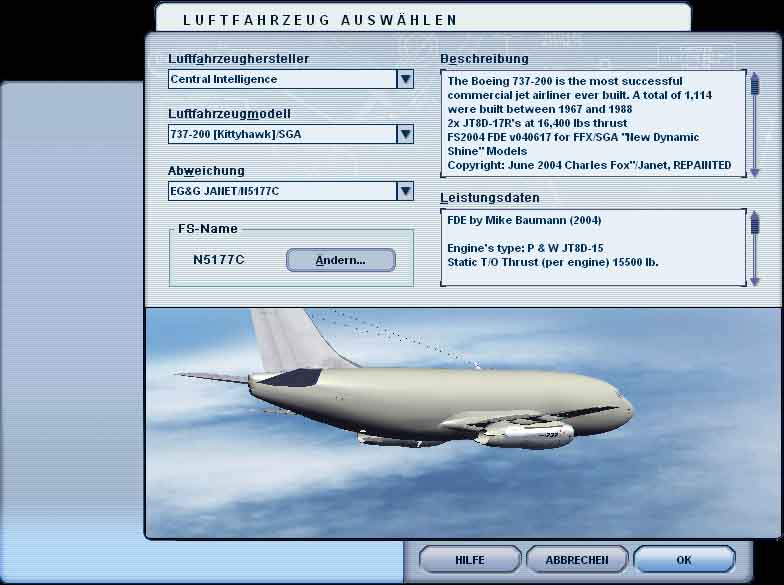
My FlightSim doesn't load all the textures for the plane. He loads only several parts of it, sometimes only enginges, sometimes only the rudders...

It looks like this:

Example plane without wing texture.
Image

Closer look of the "naked" wings; there's no texture inside, but outside the engines.
Image

Most of all he doesn't load the main texture.
Image

And it even happens in the prewiev window!
Image

I can't understand this problem; I took a look after the files, they are all right in place! :o

Last time I defragged my whole Hard Disc. My FlightSim is on an extra partition on the HDD and has been defragged too, could that be the problem? But how to solve?

I (really really really) hope, that I'm not the first or the only one with this problem (this happens to be often with me... :-[), because I often realised that when it's the first time the problem appears, no-one has an answer to solve his problem. :-/ :-/ :-/

And... (I forgot) it doesn't happen only on this very aircraft I showed you, it also happens on other aircrafts, AI, default................ :-[ :-[ :-[

Thanks for help!  ;)
Last edited by Conan Edogawa on Wed Jan 31, 2007 2:00 pm, edited 1 time in total.
Image

Specs: Intel Core2Quad Q6600 2,4GHz; 3,25GB RAM; nVidia EN8800GTS 512MB; Flight Simulator 9.1.
User avatar
Conan Edogawa
1st Lieutenant
1st Lieutenant
 
Posts: 488
Joined: Tue Dec 26, 2006 5:14 pm
Location: Hamburg, Germany

Re: Loading Problem

Postby ashaman » Wed Jan 31, 2007 2:41 pm

Only THIS plane or is a problem that carries over to all the other planes?

If the problem is exclusive with that plane, probably there's something wrong with it. Erase it and try and find another similar plane on the net.

If it's a problem of ALL the planes my suggestion is to remove your existing videocard drivers with their uninstall utility and then install newer ones. This resolves the problems you've been having nine times out of ten.
Last edited by ashaman on Wed Jan 31, 2007 2:44 pm, edited 1 time in total.
There's but one real cure for human stupidity. It's called DEATH.

At the moment mourning the assassination of sarcasm and irony for the good of the "higher".

Proud FSIX user. Active user of FS98, X-plane and novic
User avatar
ashaman
Major
Major
 
Posts: 1741
Joined: Thu Nov 27, 2003 9:08 am
Location: LIRN

Re: Loading Problem

Postby Conan Edogawa » Wed Jan 31, 2007 2:46 pm

Quote:

           "And... (I forgot) it doesn't happen only on this very aircraft I showed you, it also happens on other aircrafts, AI, default................ :( :( :("

Not every, but some planes! Well, sometimes it works, and sometimes not...

I only used this plane as an example.

By the way, I already tried to reinstall the drivers... :-/
Image

Specs: Intel Core2Quad Q6600 2,4GHz; 3,25GB RAM; nVidia EN8800GTS 512MB; Flight Simulator 9.1.
User avatar
Conan Edogawa
1st Lieutenant
1st Lieutenant
 
Posts: 488
Joined: Tue Dec 26, 2006 5:14 pm
Location: Hamburg, Germany

Re: Loading Problem

Postby kilotango » Wed Jan 31, 2007 2:56 pm

Conan, have you tried to mess around with your AA and AF.
kilotango
1st Lieutenant
1st Lieutenant
 
Posts: 306
Joined: Mon Dec 04, 2006 6:46 pm

Re: Loading Problem

Postby born_2_fly » Wed Jan 31, 2007 3:42 pm

The simple answer:

Your Graphics card has no way near enough resources to render the textures correctly. It's being seriously overworked, and so you textures are not showing up properly.

I had the same problem with my 64mb old GPU, only answer: Upgrade.

This problem would be better answered in the hardware forum, start a post in there.
born_2_fly
 

Re: Loading Problem

Postby ashaman » Wed Jan 31, 2007 7:02 pm

Yeah, sorry about that. Was in a hurry to go out when I answered you. :-[


Had I read it all I would have told you pretty much what Alex told you. Your videocard is near redline, and seen that, as I can read from your signature, you simfly on a laptop and can't really upgrade it. :-/


Try reducing graphics complexity in the simulator and see how it goes.
Last edited by ashaman on Wed Jan 31, 2007 7:03 pm, edited 1 time in total.
There's but one real cure for human stupidity. It's called DEATH.

At the moment mourning the assassination of sarcasm and irony for the good of the "higher".

Proud FSIX user. Active user of FS98, X-plane and novic
User avatar
ashaman
Major
Major
 
Posts: 1741
Joined: Thu Nov 27, 2003 9:08 am
Location: LIRN

Re: Loading Problem

Postby Conan Edogawa » Thu Feb 01, 2007 1:14 am

That is bad news... :-[

Why can something be near redline? I mean, my notebook isn't that old, only about 2 year or something...
Last edited by Conan Edogawa on Thu Feb 01, 2007 1:15 am, edited 1 time in total.
Image

Specs: Intel Core2Quad Q6600 2,4GHz; 3,25GB RAM; nVidia EN8800GTS 512MB; Flight Simulator 9.1.
User avatar
Conan Edogawa
1st Lieutenant
1st Lieutenant
 
Posts: 488
Joined: Tue Dec 26, 2006 5:14 pm
Location: Hamburg, Germany

Re: Loading Problem

Postby Zaphod » Thu Feb 01, 2007 5:42 am

Conan, I sympathise. But 2 years in computing time is an eternity.
Good luck.
Zaph0d :)
What doesn't kill you makes you stronger. But why take the risk?
Windows 10
Intel i7 950 3.06Ghz (8mb Cache)
MSI X58 Pro-E MoBo
MSI GeForce GTX 1050ti oc
Corsair MXS
User avatar
Zaphod
Captain
Captain
 
Posts: 850
Joined: Mon Oct 13, 2003 4:05 pm
Location: U.K.

Re: Loading Problem

Postby ashaman » Thu Feb 01, 2007 7:55 am

Perhaps it will make you feel better to know that your laptop is WAY better than mine (a Pentium II 233Mhz with no 3D acceleration). 8-)

I sympathize with your problem, but really there isn't a lot we can do about it. The Rad 9700 isn't bad a videocard (by the way, is it a 128Mb or less? If it's less, like 64Mb, no wonder you're having this kind of problems) simply it's not the best videocard around for FS9 (and I'm not going to try and make suppositions about the workings on it of FS2000 V1.5 [called the X, because unless you have a computer the likes that will be available in 10 years or so from now, you better put a cross on it]).

Again, try and throttle back a little the graphic details and see how it goes.
Last edited by ashaman on Thu Feb 01, 2007 7:59 am, edited 1 time in total.
There's but one real cure for human stupidity. It's called DEATH.

At the moment mourning the assassination of sarcasm and irony for the good of the "higher".

Proud FSIX user. Active user of FS98, X-plane and novic
User avatar
ashaman
Major
Major
 
Posts: 1741
Joined: Thu Nov 27, 2003 9:08 am
Location: LIRN

Re: Loading Problem

Postby Conan Edogawa » Thu Feb 01, 2007 11:51 am

Ouh, I don't get it! Now I finally got my laptop (got it from my dad last year), everything worked fine (almost, but for windows xp and the hyper intelligent cobination with ati it's "everything" >:() , and again I got one technical problem with FS9 or the laptop itself. And why do I always get the errors no-one can solve (or why do they appear on my notebook first?)... Why?! :'( :'( :'(

Another laptop or PC would be very expensive and would need money, I don't have.

But I really respect how other virtual pilots come here to help other virtual people. Thanks for that!! And currently only the textures are (partly) not shown as long as it isn't the FilghtSim itself it's okay (because I need the practise of flying for the coming future). :D

And ashaman, it's a 128 MB card ;) and everthing works good, game is almost fluid, only the textures are the problem now. :)

I think if the graphic card has one problem with the resources, it wouldn't be a fluid game now. But it is... :o Well, bygones. ::) I'll keep on flying and (sometimes) searching for the error... :)
Last edited by Conan Edogawa on Thu Feb 01, 2007 11:57 am, edited 1 time in total.
Image

Specs: Intel Core2Quad Q6600 2,4GHz; 3,25GB RAM; nVidia EN8800GTS 512MB; Flight Simulator 9.1.
User avatar
Conan Edogawa
1st Lieutenant
1st Lieutenant
 
Posts: 488
Joined: Tue Dec 26, 2006 5:14 pm
Location: Hamburg, Germany

Re: Loading Problem

Postby ashaman » Thu Feb 01, 2007 12:12 pm

Could be... but take what I say with the proper cautions... if you have problems only with textures, could be a problem of overheating of the GPU.

If this is the problem... well, notebooks/laptops are small, powerful and comfy to have around, but they're children of a series of compromises.

In this case I can only point you toward what could be the problem, the solution is not so easy to find like in a common built PC. :(
Last edited by ashaman on Thu Feb 01, 2007 12:12 pm, edited 1 time in total.
There's but one real cure for human stupidity. It's called DEATH.

At the moment mourning the assassination of sarcasm and irony for the good of the "higher".

Proud FSIX user. Active user of FS98, X-plane and novic
User avatar
ashaman
Major
Major
 
Posts: 1741
Joined: Thu Nov 27, 2003 9:08 am
Location: LIRN

Re: Loading Problem

Postby Conan Edogawa » Sat Feb 03, 2007 10:18 am

LOL

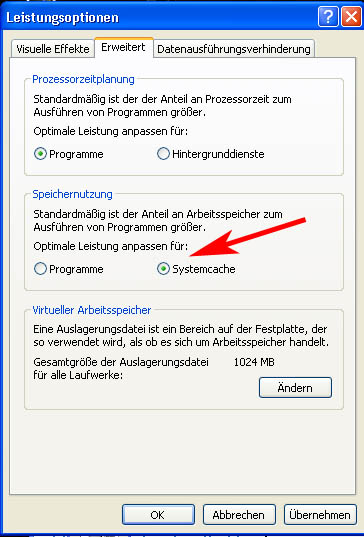
You won't believe it! I found the fatal error which resulted in not (or partly) showing the textures:

A few days ago, I switched this...
Image


...into this...

Image


I switched it back and now everything works how it has to work...

I'm not arguing myself about it, I'm glad I found the error now!
Last edited by Conan Edogawa on Sat Feb 03, 2007 10:19 am, edited 1 time in total.
Image

Specs: Intel Core2Quad Q6600 2,4GHz; 3,25GB RAM; nVidia EN8800GTS 512MB; Flight Simulator 9.1.
User avatar
Conan Edogawa
1st Lieutenant
1st Lieutenant
 
Posts: 488
Joined: Tue Dec 26, 2006 5:14 pm
Location: Hamburg, Germany


Return to FS 2004 - A Century of Flight

Who is online

Users browsing this forum: No registered users and 360 guests