Buying FS9 today, do I still need 9.1 patch?

Forum dedicated to Microsoft FS2004 - "A Century of Flight".

Buying FS9 today, do I still need 9.1 patch?

Postby Variable » Tue Dec 12, 2006 2:19 pm

I ask because sometimes they include the fixes/patches in later productions of the game...

Just a note, I just ordered a new PC:
Intel Dual Core E6600 4MB 2.4GHz 1066FSB
2GB 667MHz Memory
256MB nVidia GeForce 7900GS

...and I realize today :( that that still may not cut it for the new FSX. But since I'm currently on FS2002 anyway (never got to play it with full settings), I figure I settle for FS9 @ $20 and enjoy having no problem with gameplay with graphics maxed out.

Anyways, my main question is in the above subject but feel free to confirm my assumption in regards to FSX, about not really having the system for it.

Thanks for your help!
Variable
Ground hog
Ground hog
 
Posts: 17
Joined: Tue Dec 12, 2006 3:00 pm

Re: Buying FS9 today, do I still need 9.1 patch?

Postby Hagar » Tue Dec 12, 2006 2:30 pm

Buying FS9 today, do I still need 9.1 patch?

I ask because sometimes they include the fixes/patches in later productions of the game...

Quite possibly not. Depends on how old the stock is. The only way to find out is after you installed it & have it running. Click Help/About on the in flight menu bar.

I have one of the original batch & never bothered with the FS9.1 patch anyway.

Welcome to Simviation. :)
Last edited by Hagar on Tue Dec 12, 2006 2:31 pm, edited 1 time in total.
Image

Founder & Sole Member - Grumpy's Over the Hill Club for Veteran Virtual Aviators
Member of the Fox Four Group
My Google Photos albums
My Flickr albums
User avatar
Hagar
Colonel
Colonel
 
Posts: 30868
Joined: Wed Jun 19, 2002 7:15 am
Location: Costa Geriatrica

Re: Buying FS9 today, do I still need 9.1 patch?

Postby Variable » Tue Dec 12, 2006 2:38 pm

Quite possibly not. Depends on how old the stock is.The only way to find out is after you installed it & have it running. Click Help/About on the in flight menu bar.

I have one of the original batch & never bothered with the FS9.1 patch anyway.

Welcome to Simvation. :)


Hmm...good idea. I'll check that out. It'll be nice if the one I get is already revised.
Although, I've read the fixes from the patch and wondered if it was worth messing with it, and based on your comment it may not be.

Thanks for the welcome...
Variable
Ground hog
Ground hog
 
Posts: 17
Joined: Tue Dec 12, 2006 3:00 pm

Re: Buying FS9 today, do I still need 9.1 patch?

Postby Variable » Tue Dec 12, 2006 3:33 pm

OK, I just found the hardware forum that addresses my system note for FSX...

Based on what I read, I may
Variable
Ground hog
Ground hog
 
Posts: 17
Joined: Tue Dec 12, 2006 3:00 pm

Re: Buying FS9 today, do I still need 9.1 patch?

Postby NicksFXHouse » Tue Dec 12, 2006 8:59 pm

Word of warning.. that system will run FS9 just about flat out @100% no problem.. but it WONT run FSX at much over medium low settings and have frames to work with.

Not even a 7900GTX, 8800GT will do that

It will be another 3 months before video card hardware will be available and in the range of running FSX with decent eye candy and  (24FPS) frames.
NicksFXHouse
 

Re: Buying FS9 today, do I still need 9.1 patch?

Postby Falcon Fixer » Wed Dec 13, 2006 10:41 pm

It is nice to have the missing bridges installed. I use the Woodrow Wilson bridge (which was missing) as a quick visual for the south approach to DC/Reagan airport.
Love is a '68 Dodge Dart 340.
User avatar
Falcon Fixer
Ground hog
Ground hog
 
Posts: 47
Joined: Tue Dec 05, 2006 10:22 pm
Location: Tallahassee, FL

Re: Buying FS9 today, do I still need 9.1 patch?

Postby JBaymore » Thu Dec 14, 2006 11:12 am

It is also nice to have the autogen memory leak problem fixed.... unless you like slowly deteriorating framerates and increasing stutters.   :)


best,

......john
Image ImageIntel i7 960 quad 3.2G LGA 1366, Asus P6X58D Premium, 750W Corsair, 6 gig 1600 DDR3, Spinpoint 1TB 720

User avatar
JBaymore
Global Moderator
Global Moderator
 
Posts: 10020
Joined: Sat May 24, 2003 9:15 am
Location: New Hampshire

Re: Buying FS9 today, do I still need 9.1 patch?

Postby FS_Pilot » Sat Dec 16, 2006 10:53 am

THe simple answer seems to be "Check for Bridges". Install your latest copy then go and find the bridges. If they are included you don't need the patch, if they are missing you do need the patch.
FS_Pilot
Pentium 4, 2.4 GHZ Processor
Gigabyte GA-8SR533 Motherboard
1280mb DDR Ram
256 GeFORCE 7600GS Video Card 17 MagView monitor. Saitek X45 Joystick
User avatar
FS_Pilot
1st Lieutenant
1st Lieutenant
 
Posts: 328
Joined: Fri Aug 23, 2002 4:02 am
Location: Victoria, Australia

Re: Buying FS9 today, do I still need 9.1 patch?

Postby Hagar » Sat Dec 16, 2006 11:01 am

THe simple answer seems to be "Check for Bridges". Install your latest copy then go and find the bridges. If they are included you don't need the patch, if they are missing you do need the patch.
FS_Pilot

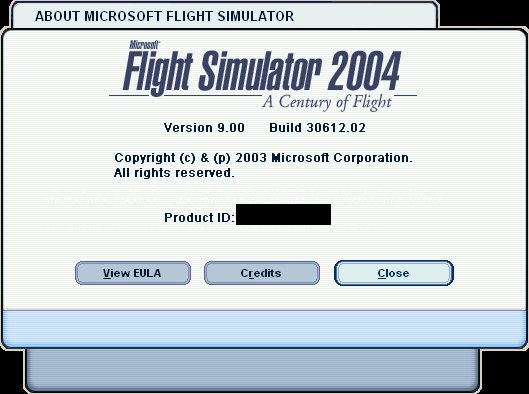
Save all that messing about & click Help/About on the menu bar.

This is mine which is the original version without the update installed. Note that it is Version 9.00
Image
Last edited by Hagar on Sat Dec 16, 2006 11:03 am, edited 1 time in total.
Image

Founder & Sole Member - Grumpy's Over the Hill Club for Veteran Virtual Aviators
Member of the Fox Four Group
My Google Photos albums
My Flickr albums
User avatar
Hagar
Colonel
Colonel
 
Posts: 30868
Joined: Wed Jun 19, 2002 7:15 am
Location: Costa Geriatrica

Re: Buying FS9 today, do I still need 9.1 patch?

Postby microlight » Sat Dec 16, 2006 4:14 pm

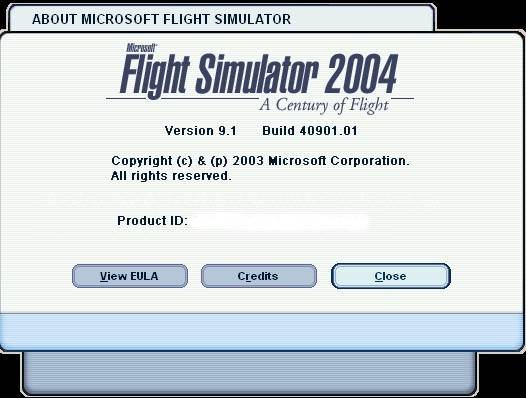
...and here's what the 9.1 screen will look like.

Image

;)
Last edited by microlight on Sat Dec 16, 2006 4:15 pm, edited 1 time in total.
User avatar
microlight
Major
Major
 
Posts: 2076
Joined: Mon Aug 19, 2002 6:24 pm
Location: Southern UK

Re: Buying FS9 today, do I still need 9.1 patch?

Postby Variable » Sat Dec 16, 2006 6:33 pm

Thanks everyone,

I will check the version after I install and will definitely add the update if needed...
Variable
Ground hog
Ground hog
 
Posts: 17
Joined: Tue Dec 12, 2006 3:00 pm

Re: Buying FS9 today, do I still need 9.1 patch?

Postby NicksFXHouse » Sun Dec 17, 2006 3:00 am

Thanks everyone,

I will check the version after I install and will definitely add the update if needed...


Make sure you put the FS9.1 updater INSIDE the Flight Simulator 9 folder... the same place FS9.exe is located BEFORE you run it

If you run it outside the folder it will most likely corrupt the modules during the update process

It works best if SP2 is also properly installed in Windows
Last edited by NicksFXHouse on Sun Dec 17, 2006 3:01 am, edited 1 time in total.
NicksFXHouse
 

Re: Buying FS9 today, do I still need 9.1 patch?

Postby ashaman » Sun Dec 17, 2006 6:52 am

Make sure you put the FS9.1 updater INSIDE the Flight Simulator 9 folder... the same place FS9.exe is located BEFORE you run it

If you run it outside the folder it will most likely corrupt the modules during the update process

It works best if SP2 is also properly installed in Windows


These are things I've already heard and really can't understand. :-/

Not joking here guys, I did patch FS9 to 9.1, and when I did I remember that the updater I started from the desktop, and can clearly remember that at the times I had not yet installed the SP2, and FS did not corrupt itself.

Note that I'm not telling to do differently, I'm simply curious. If starting the updater from any other site and under any other SO version, corrupts FS9, why didn't mine? :-?

As for the SP2, and those who have FS9 installed under, say, Win Me, or Win2K? What should they do? :-?
There's but one real cure for human stupidity. It's called DEATH.

At the moment mourning the assassination of sarcasm and irony for the good of the "higher".

Proud FSIX user. Active user of FS98, X-plane and novic
User avatar
ashaman
Major
Major
 
Posts: 1741
Joined: Thu Nov 27, 2003 9:08 am
Location: LIRN

Re: Buying FS9 today, do I still need 9.1 patch?

Postby Variable » Sun Dec 17, 2006 10:40 am

Make sure you put the FS9.1 updater INSIDE the Flight Simulator 9 folder... the same place FS9.exe is located BEFORE you run it

If you run it outside the folder it will most likely corrupt the modules during the update process

It works best if SP2 is also properly installed in Windows

Thanks Nick...I read something about that yesterday...Is putting the updater inside the FS9 folder the only concern before installing?

My system will have Windows XP Media Center 2005, I shouldn't have to worry about that needing updates/service packs, right?

It's already been shipped, can't believe it
Variable
Ground hog
Ground hog
 
Posts: 17
Joined: Tue Dec 12, 2006 3:00 pm

Re: Buying FS9 today, do I still need 9.1 patch?

Postby kilotango » Sun Dec 17, 2006 11:27 am

Read you 5/5 ashaman. I've, just like you, never had problems installing patch 9.1 from anywhere on my pc.
Are wee having something others dont have??
kilotango
1st Lieutenant
1st Lieutenant
 
Posts: 306
Joined: Mon Dec 04, 2006 6:46 pm

Next

Return to FS 2004 - A Century of Flight

Who is online

Users browsing this forum: No registered users and 322 guests