Its there's a way to fix this?

Forum dedicated to Microsoft FS2004 - "A Century of Flight".

Its there's a way to fix this?

Postby alrot » Sat Nov 25, 2006 9:47 am

I use to work on 1024x768bits but now seems like my video card Not only supports 1280x 1024 32bits It runs wells as if I wouln't even change it 15-20 fps....

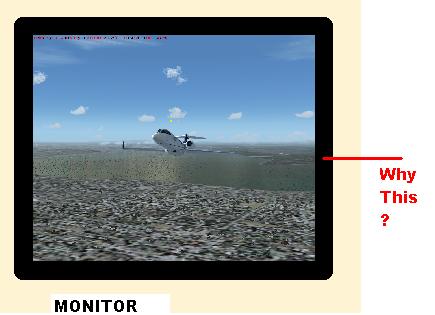
BUT this thing ,this black thing around the image,Why?? can it be fixed ,I need some help
Here an ilustration of what Im talking about
Image


any suggestion I'll apresiate it

Thanks

Alex

Image

Venezuela
User avatar
alrot
Lieutenant Colonel
Lieutenant Colonel
 
Posts: 8961
Joined: Wed Oct 08, 2003 10:47 am

Re: Its there's a way to fix this?

Postby Jakemaster » Sat Nov 25, 2006 10:06 am

Youve got to adjust your monitor.  Use the buttons on the monitor to adjust it.  
Jakemaster
 

Re: Its there's a way to fix this?

Postby alrot » Sat Nov 25, 2006 10:12 am

OK I know what you mean ,I think of that too ,but lets just say I have to set all my desk into 1280x1024 (everything) and adjust my monitor, :( I can't even see the Icons, Everything become so small,I just wonder if this screen resolution can only be for FSX and 9 ? :( that  Fits well in FS9-X but once I leave the game ,all my view in winxp stays at 1024x768..
Last edited by alrot on Sat Nov 25, 2006 10:15 am, edited 1 time in total.
Image

Venezuela
User avatar
alrot
Lieutenant Colonel
Lieutenant Colonel
 
Posts: 8961
Joined: Wed Oct 08, 2003 10:47 am

Re: Its there's a way to fix this?

Postby Brett_Henderson » Sat Nov 25, 2006 10:33 am

Set your  desktop resolution to match FSX resolution...  Then, right-click on your desk-top..  take  "properties/settings/advanced" ..  there you can change your DPI and make the icons and stuff bigger..
Brett_Henderson
Major
Major
 
Posts: 3403
Joined: Fri Oct 08, 2004 7:09 am

Re: Its there's a way to fix this?

Postby alrot » Sat Nov 25, 2006 10:49 am

:D Don't ask me How does happend ,because I have no idea, I always reluctant about TOUCHING my size and monitor buttoms ,colours ,size, position,dimension,etc ,,...Well after reading Jake's advise I THOUGHT after I adjust my monitor size ,once I leave the games the Icons will be out of the screen and hudge, IT DIDN'T :D It appears that It holds the size adjust of the game Somehow I don't know ,but once I leave BOTH games after I adjust my screen ,everything goes back as I was 1024x768 ...I don't know how It does ,But It works for me  :D,

Thanks so much Brett and Jake

Alex  
Image

Venezuela
User avatar
alrot
Lieutenant Colonel
Lieutenant Colonel
 
Posts: 8961
Joined: Wed Oct 08, 2003 10:47 am

Re: Its there's a way to fix this?

Postby Hagar » Sat Nov 25, 2006 10:56 am

[quote]Somehow I don't know ,but once I leave BOTH games after I adjust my screen ,everything goes back as I was 1024x768 ...I don't know how It does ,But It works for me
Last edited by Hagar on Sat Nov 25, 2006 10:57 am, edited 1 time in total.
Image

Founder & Sole Member - Grumpy's Over the Hill Club for Veteran Virtual Aviators
Member of the Fox Four Group
My Google Photos albums
My Flickr albums
User avatar
Hagar
Colonel
Colonel
 
Posts: 30868
Joined: Wed Jun 19, 2002 7:15 am
Location: Costa Geriatrica

Re: Its there's a way to fix this?

Postby wji » Sat Nov 25, 2006 11:20 am

Unless you're running with WIN3.1 (or older) IMO, you still have video-card issues; this should not happen with WIN-XP.

When I take my computer into the shop -- computer tech-head place -- they can plug it into any monitor in the shop and everything runs the same.

I submit you still have vide-card issues.
Image PhotoShop 7 user
User avatar
wji
Major
Major
 
Posts: 1644
Joined: Tue May 04, 2004 11:27 am

Re: Its there's a way to fix this?

Postby beaky » Sat Nov 25, 2006 11:21 am

I tried to fun FS9 at 1280x1040 and found that the FS9 text and icons were too small to read comfortably on my 19" CRT, regardless of any settings...
So I keep it at that res for everything else, and use 1024x768 for FS9... looks damn good enough, IMHO.
Image
User avatar
beaky
Global Moderator
Global Moderator
 
Posts: 12877
Joined: Thu Dec 16, 2004 8:00 am
Location: Shenandoah, PA USA

Re: Its there's a way to fix this?

Postby alrot » Sat Nov 25, 2006 11:23 am

I don't know much about WinXP but that's how it always used to work. FS in Full Screen mode displays in Direct3D which is completely different from your desktop display settings.


Doug there's something more strange
Last edited by alrot on Sat Nov 25, 2006 11:31 am, edited 1 time in total.
Image

Venezuela
User avatar
alrot
Lieutenant Colonel
Lieutenant Colonel
 
Posts: 8961
Joined: Wed Oct 08, 2003 10:47 am

Re: Its there's a way to fix this?

Postby Hagar » Sat Nov 25, 2006 11:43 am

I must be missing something. I've always set my desktop resolution at 1024 x 768 as it suits me & the way I work on my 17" monitor. Depending on the circumstances I can run different versions of CFS/FS on any resolution my video card supports, in 16 or 32 bit. It doesn't matter whether it's 640 x 480 x 16 or 1280 x1024 x 32 the image fills the screen in Full Screen mode as it's running in Direct3D. The resolution has always returned to my desktop setting on exiting FS.
Last edited by Hagar on Sat Nov 25, 2006 11:44 am, edited 1 time in total.
Image

Founder & Sole Member - Grumpy's Over the Hill Club for Veteran Virtual Aviators
Member of the Fox Four Group
My Google Photos albums
My Flickr albums
User avatar
Hagar
Colonel
Colonel
 
Posts: 30868
Joined: Wed Jun 19, 2002 7:15 am
Location: Costa Geriatrica

Re: Its there's a way to fix this?

Postby alrot » Sat Nov 25, 2006 12:54 pm

You know? I think It has to be with my old video card an MX nvidia I didn't format my HDD I just unistal the old video card to set the new one, maybe I has nothing to do with a failiure..It has to be perhaps an information data base from my old drivers ..

When I had the other card ,I have to set in 1024X 768 at 16 for fs9 other wise the frames would turn very slow ,Now I think I get it ,Its not all by the main CPU is have to be with the Video Card prosesing other wise how can you explain a Pentium 3 running at this
It seems like its doesn't bother what resolution I set ,the result are the same
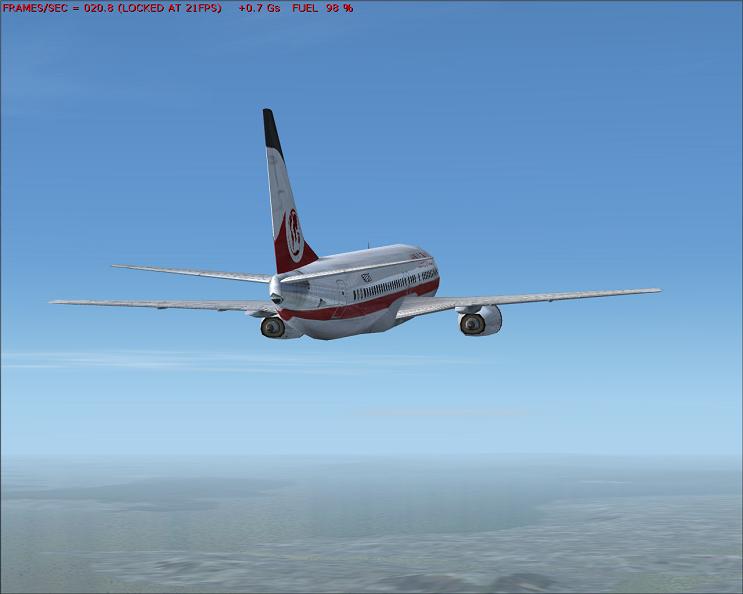
This is FS9 I already seen this 20 FRPS and gets Higer in 1280x1024 32bits

Image

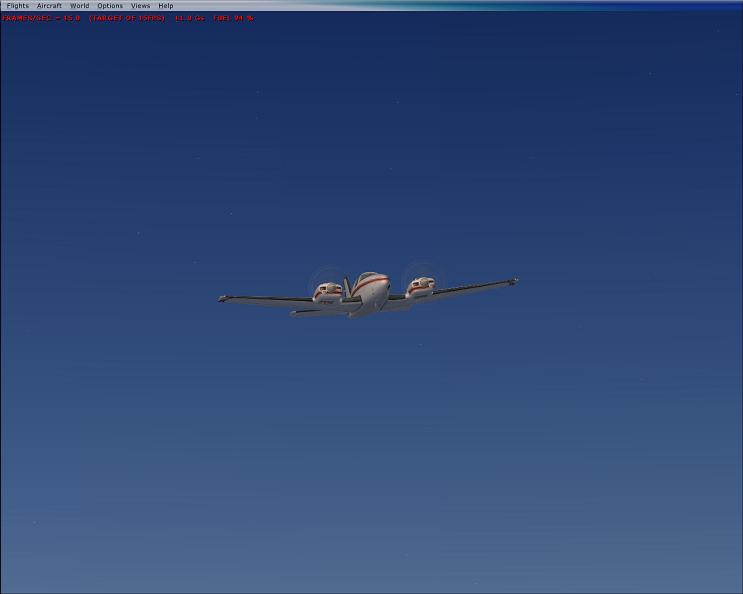
IN FSX 15 FPS at 1280X1024 32Bits


Image

There are people here sain that they can't run FSX But Why I can? ,and make good flight ,enough to say ,It has a better Dynamics..
People Don't believe me ,I know why,The stupic Hispanic :-/.......This is not arrogancy,I BEING CALL A TROLL!! cause of this ,And I swear I wish I could give you details of what I did ,to having this performances in a POS,I wish I could help you,and Not hearing more complaints ,I wish I could have The half of your PCs power like any P4 of you has it and  the many of you who are complaining about FSX that wont run,YES I enjoy FSX and FS9 better..with a simple PIECE OF S...

 all I can say that after setting this into 1024X1280 its running better than ever also YESTERDAY, Chessegrater Gave me some good advises I didn't know that disconecting the option of restore ,I would have better performance
read this It may help you many of you as it did with me

http://www.simviation.com/cgi-bin/yabb/ ... 1164403885
Image

Venezuela
User avatar
alrot
Lieutenant Colonel
Lieutenant Colonel
 
Posts: 8961
Joined: Wed Oct 08, 2003 10:47 am

Re: Its there's a way to fix this?

Postby Hagar » Sat Nov 25, 2006 1:10 pm

I'm afraid you've lost me Alex. I see nothing strange about this at all. I forget exactly which video card you're using but seem to recall you haven't had it long. You're bound to notice the difference between that & your old one. I notice the shots you posted are all against a clear sky & wonder what happens when you're near the ground, especially near graphics intensive airports.

Frame rates don't tell the whole story. In the end it all comes down to how smoothly FS runs & whether you're happy with it. This is relative to what you've been used to & what suits you might not please everyone. ;)
Image

Founder & Sole Member - Grumpy's Over the Hill Club for Veteran Virtual Aviators
Member of the Fox Four Group
My Google Photos albums
My Flickr albums
User avatar
Hagar
Colonel
Colonel
 
Posts: 30868
Joined: Wed Jun 19, 2002 7:15 am
Location: Costa Geriatrica

Re: Its there's a way to fix this?

Postby wji » Sun Nov 26, 2006 10:01 am

I don't see why I can't be as confused as everyone else in this thread  :D

My understanding from the first post was that FS9 was NOT filling the monitor to the edges -- hence the screenshot:

Image

It seems since then, the thread had sugued into every video-card-screen-resolution-issue, known to man.

Anyway, good luck
Image PhotoShop 7 user
User avatar
wji
Major
Major
 
Posts: 1644
Joined: Tue May 04, 2004 11:27 am

Re: Its there's a way to fix this?

Postby Hagar » Sun Nov 26, 2006 10:18 am

[quote]I don't see why I can't be as confused as everyone else in this thread
Image

Founder & Sole Member - Grumpy's Over the Hill Club for Veteran Virtual Aviators
Member of the Fox Four Group
My Google Photos albums
My Flickr albums
User avatar
Hagar
Colonel
Colonel
 
Posts: 30868
Joined: Wed Jun 19, 2002 7:15 am
Location: Costa Geriatrica


Return to FS 2004 - A Century of Flight

Who is online

Users browsing this forum: No registered users and 225 guests