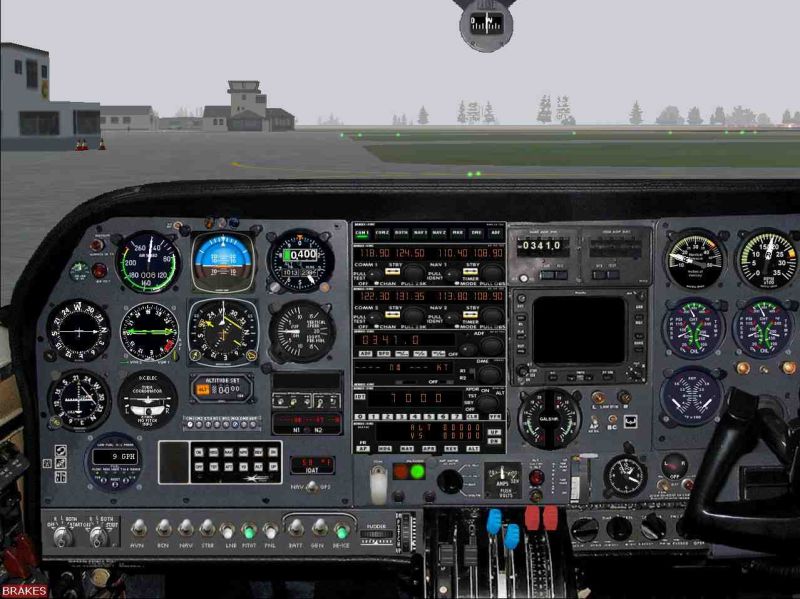
C310 - default nav/com stack?

Forum dedicated to Microsoft FS2004 - "A Century of Flight".

Re: C310 - default nav/com stack?

Postby commoner » Sat Nov 18, 2006 12:48 pm

WOW! dir...far too big those pics.....800X600 X 100k PLEEEEASE ............commoner ;D ;D ;D
Last edited by commoner on Sun Nov 19, 2006 4:35 am, edited 1 time in total.
Image"In theory, there is no difference between theory and practice. But, in practice, there is."
User avatar
commoner
Major
Major
 
Posts: 3221
Joined: Sat Aug 28, 2004 2:26 am
Location: Yorkshire. England. UK.

Re: C310 - default nav/com stack?

Postby dir » Sat Nov 18, 2006 6:03 pm

One out of three will have to do... the 100k limit was  was quite 'nuff effort thanks ;D

I tried editing with PSP. The copy/paste tooltip won't work on the panel bitmap, unless it's "24color or greyscale". So, I converted it to jpg and back, but some edges became too rough :-[. What proggy do you use, does it work without converting commoner?

Any way I can increase the size of the artificail horizon to match the HSI just below it?

dir
dir
2nd Lieutenant
2nd Lieutenant
 
Posts: 51
Joined: Mon Sep 19, 2005 6:57 pm

Re: C310 - default nav/com stack?

Postby commoner » Sun Nov 19, 2006 2:37 am

...mm...marks out of ten for pics is NOT the point old son......your pics cock up the display of the page..means we have to scroll about to see em........apart from that it is against the rules and the pics will be most likely be removed..........

.......I use PhotoShop for all my stuff.......cost an arm and a leg but well worth it........there are other good programs but I like this as I use it for work that I do....

You can easily change the size of gauges........the third and fourth numbers after the gauge are the size, if  it is a square gauge there may be just three numbers, that means the height and width are the same.......

.........this only changes the size of the actual gauge, the background to it is on the .bmp and would have to be done in your graphics editor...........

.............good luck...and resize the pics ............commoner ;)

..BTW......I found the reason for the reversal effect on the stack.........to revert to setting the standby frequency as we normally do...........change this part of the aircraft.cfg..........(not the panel.cfg)........

[Radios]
// Radio Type = availiable, standby frequency, has glide slope
Audio.1  = 1
Com.1    = 1, 1
Com.2    = 1, 1
Nav.1    = 1, 1, 1
Nav.2    = 1, 1, 0
Adf.1    = 1
Transponder.1 = 1
Marker.1 = 1

........you'll find it has different numbers.........commoner ;)
Last edited by commoner on Sun Nov 19, 2006 4:08 am, edited 1 time in total.
Image"In theory, there is no difference between theory and practice. But, in practice, there is."
User avatar
commoner
Major
Major
 
Posts: 3221
Joined: Sat Aug 28, 2004 2:26 am
Location: Yorkshire. England. UK.

Re: C310 - default nav/com stack?

Postby Hagar » Sun Nov 19, 2006 4:28 am

[quote]One out of three will have to do... the 100k limit was
Image

Founder & Sole Member - Grumpy's Over the Hill Club for Veteran Virtual Aviators
Member of the Fox Four Group
My Google Photos albums
My Flickr albums
User avatar
Hagar
Colonel
Colonel
 
Posts: 30868
Joined: Wed Jun 19, 2002 7:15 am
Location: Costa Geriatrica

Re: C310 - default nav/com stack?

Postby commoner » Sun Nov 19, 2006 4:36 am

...sorry Hagar...thoughtless of me....now corrected........commoner ;D
Image"In theory, there is no difference between theory and practice. But, in practice, there is."
User avatar
commoner
Major
Major
 
Posts: 3221
Joined: Sat Aug 28, 2004 2:26 am
Location: Yorkshire. England. UK.

Re: C310 - default nav/com stack?

Postby Hagar » Sun Nov 19, 2006 4:40 am

...sorry Hagar...thoughtless of me....now corrected........commoner ;D

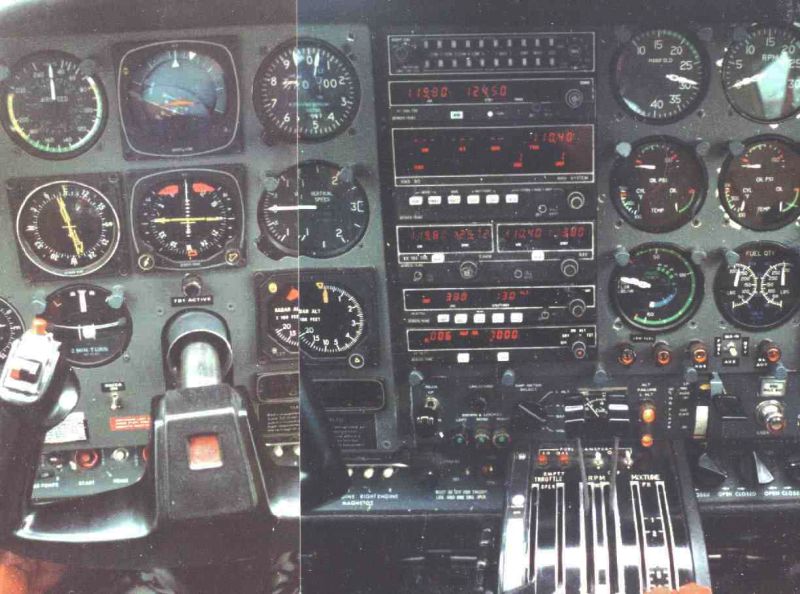
That's better. ;) I quickly rehashed these in IrfanView.
Image

Image
Image

Founder & Sole Member - Grumpy's Over the Hill Club for Veteran Virtual Aviators
Member of the Fox Four Group
My Google Photos albums
My Flickr albums
User avatar
Hagar
Colonel
Colonel
 
Posts: 30868
Joined: Wed Jun 19, 2002 7:15 am
Location: Costa Geriatrica

Re: C310 - default nav/com stack?

Postby dir » Sun Nov 19, 2006 8:29 am

"Marks out of ten" wasn't my point either ;)

I noticed the reversal only occurred on Comm1 and Nav2. Comm2 and Nav1 operate normally. I'm away from my PC for a few days so will drop in your numbers later. If you assumed all four controls were reversed we may still have the problem but on the other two originally ok controls... Huge thank you for sorting that commoner, a small bug but big gain, to me anyway.

I found a fuel gauge that'd be pretty close (simply ignore/substitute "gallons" for lbs), to the template, in the Cessna 182s, in the FS2K4 library. After applying the same logic to the Baron AI, namely "gaugexx=cessna182s! x, x,x etc" it didn't work. Closer inspection reveals lots of .gau's all named the same! Perplexing ???

Thanks for resizing my pic's Hagar.

I've removed my originals, hope this reduces the bandwidth and improves aesthetics for others.

dir.
dir
2nd Lieutenant
2nd Lieutenant
 
Posts: 51
Joined: Mon Sep 19, 2005 6:57 pm

Re: C310 - default nav/com stack?

Postby BFMF » Sun Nov 19, 2006 8:43 am

There is a line in the Aircraft.cfg file that you can change so that the radios have the secondary/backup frequency that he's referring to.
Last edited by BFMF on Sun Nov 19, 2006 1:36 pm, edited 1 time in total.
BFMF
Colonel
Colonel
 
Posts: 16266
Joined: Mon Feb 25, 2002 6:06 pm
Location: Pacific Northwest

Re: C310 - default nav/com stack?

Postby commoner » Sun Nov 19, 2006 9:05 am

I noticed the reversal only occurred on Comm1 and Nav2. Comm2 and Nav1 operate normally. I'm away from my PC for a few days so will drop in your numbers later. If you assumed all four controls were reversed we may still have the problem but on the other two originally ok controls... Huge thank you for sorting that commoner, a small bug but big gain, to me anyway.
.

dir.


...with the numbers I gave all four positions will be working normally..at least they are on mine............

.........making the stack fit the position without constantly resizing is a fiddly job.....till I get round to that I just did it the once then saved the flight, now when I select that flight (could make it default) it starts with the stack open and in place...........aren't we just havin' fun...............commoner ;D

...thanks Ess..I'll look into that one..........commoner ;)

BTW I noticed the tyres are half buried in the concrete so tickled the contact points a tad.
Last edited by commoner on Sun Nov 19, 2006 9:08 am, edited 1 time in total.
Image"In theory, there is no difference between theory and practice. But, in practice, there is."
User avatar
commoner
Major
Major
 
Posts: 3221
Joined: Sat Aug 28, 2004 2:26 am
Location: Yorkshire. England. UK.

Re: C310 - default nav/com stack?

Postby dir » Mon Nov 20, 2006 12:56 pm

Found that dual control audio panel... its a Bendix King KMA 24 (unfortunately it's payware, here).
http://www.friendlypanels.arrakis.es/ht ... panels.htm

Anyone seen one like it on a freewware panel anywhere?

Think I've found the ASI, Fuel Flow and Fuel gauges, I'll know when I get back to my PC...

The five far right gauges ideally need to come adjacent to the right of the stack (& mixture to join them). Do I assume the numbers after command lines in the cfg panel are to position as well as size the gauges?

Eventually hoping to modify the air file and ASI gauge bmp to accurately reflect Vmca, Vno, Vne and Vyse...

Fun, sure! :D

dir.
Last edited by dir on Mon Nov 20, 2006 12:59 pm, edited 1 time in total.
dir
2nd Lieutenant
2nd Lieutenant
 
Posts: 51
Joined: Mon Sep 19, 2005 6:57 pm

Re: C310 - default nav/com stack?

Postby commoner » Mon Nov 20, 2006 4:04 pm

...glad you are enjoying yourself......of the four numbers...the first two are the screen coordinates and the other two the size...if only three numbers then the third is the size, it being a square...commoner ;)
Image"In theory, there is no difference between theory and practice. But, in practice, there is."
User avatar
commoner
Major
Major
 
Posts: 3221
Joined: Sat Aug 28, 2004 2:26 am
Location: Yorkshire. England. UK.

Re: C310 - default nav/com stack?

Postby dir » Wed Nov 22, 2006 8:15 am

Thanks for the explanation re co-ordinates/sizes... very useful.

I got Photoshop and have completely redone the panel. Just trying to fit a few gauge upgrades.

Is there a way to alter the OBI default feed from Nav1 to Nav2? (OBI w/RMI usually configures OBI this way as it's useful for fixes/cross-cuts.)

Also, can the flap be converted from 2-stage to three?

I will post up the finished panel in a screenshot soon :D

Cheers for now,

dir.
Last edited by dir on Wed Nov 22, 2006 8:18 am, edited 1 time in total.
dir
2nd Lieutenant
2nd Lieutenant
 
Posts: 51
Joined: Mon Sep 19, 2005 6:57 pm

Re: C310 - default nav/com stack?

Postby commoner » Wed Nov 22, 2006 11:03 am
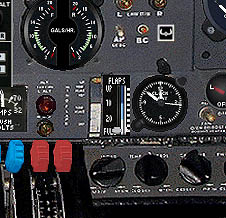
....Hi dir..........can't help with the OBI but you can get another notch on the flaps...just a few things to do.........here's my way someone may know better..

First  Rem out the gauge for flaps in the panel.cfg this removes the lever from the panel....

Then copy and paste the flaps gauge from the c172 into the c310 and renumbered it as necessary. Put it where the other one was and a slight resizing and positioning will be needed...See my pic it is just what you wanted I think.

 In the c310 aircraft.cfg, add another position in the [flaps.0] section and change the increments to suit.

 You will need The utility AirEd (here on SimV)to change the Flaps Positions to 4......(3 plus off) to do this open the air.file and click on Flaps positions to edit it, change to 4 then press enter to do the change and then close the file and yes to SAVE the change..........

.....that's it...........commoner;)

Image
Last edited by commoner on Wed Nov 22, 2006 12:33 pm, edited 1 time in total.
Image"In theory, there is no difference between theory and practice. But, in practice, there is."
User avatar
commoner
Major
Major
 
Posts: 3221
Joined: Sat Aug 28, 2004 2:26 am
Location: Yorkshire. England. UK.

Re: C310 - default nav/com stack?

Postby beaky » Wed Nov 22, 2006 12:05 pm

Very interesting, but I'd rather fly than do all that work, so I bought the Flight One C310. ;D

http://www.flight1.com/products.asp?product=FL1-310-001

the panel layout is a bit odd, but not very much, and I've gotten used to it. Excellent sound, and the 2D interior is very nice. Excellent overlays for the 2D panel (allowing you to look at gauges on the right side without switching to that view); superb sound, etc.

Radio stack and AP work very well once you figure it all out.

http://www.simviation.com/cgi-bin/yabb/ ... 69;start=0


Only flaw is the odd tendency for the nose to start hunting a little for no apparent reason... but otherwise well worth the little bit of money.
Image
User avatar
beaky
Global Moderator
Global Moderator
 
Posts: 12877
Joined: Thu Dec 16, 2004 8:00 am
Location: Shenandoah, PA USA

Re: C310 - default nav/com stack?

Postby commoner » Wed Nov 22, 2006 12:37 pm

lol...to each his own rotty.......I agree it's a nice plane but I just like a bit of DIY........It's like my old brain needs it to keep me going...............commoner ;)
Image"In theory, there is no difference between theory and practice. But, in practice, there is."
User avatar
commoner
Major
Major
 
Posts: 3221
Joined: Sat Aug 28, 2004 2:26 am
Location: Yorkshire. England. UK.

PreviousNext

Return to FS 2004 - A Century of Flight

Who is online

Users browsing this forum: No registered users and 319 guests