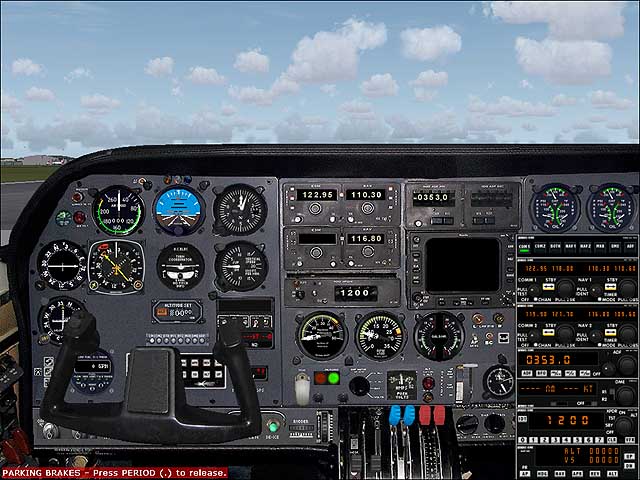
C310 - default nav/com stack?

Forum dedicated to Microsoft FS2004 - "A Century of Flight".

Re: C310 - default nav/com stack?

Postby commoner » Thu Nov 16, 2006 9:14 am

It automatically retracts with the undercarriage.


...cheers Hagar......just had me there ....commoner ;)
Image"In theory, there is no difference between theory and practice. But, in practice, there is."
User avatar
commoner
Major
Major
 
Posts: 3221
Joined: Sat Aug 28, 2004 2:26 am
Location: Yorkshire. England. UK.

Re: C310 - default nav/com stack?

Postby dir » Fri Nov 17, 2006 11:45 am

Hi again,

I have been for a trip now, and although the stack looks very good it is in fact rather awkward to use, partly due to the 'reversal' I mentioned earlier, but also
the frequency selector knob oddly alters the frequency before and after the decimal point--separately. The RL aircraft 'can' alter the active freq', but most prefer to alter the 'standby' and then use the cross-over switch when needed.

I've seen other variations of the M$ stack around, is there somewhere you know of to look for the code,
so I could experiment/find one better configured?

Also, I found this stack arrangement (on the Archer)
http://www.simviation.com/cgi-bin/yabb/ ... 4;start=12
which has the dual row (ie speaker/headphones) audio controls at the top, which would be really nice to have too.

commoner: I tried out the toggle switch, works a treat thanks! And the ladder is in RL geared to the starboard gear.

Hagar: Im running 1280x1024, and the stack looks ok, fully adjustable. I'm making a note of your setting though... I'm just a little nervous to play about with the resolution whilst 'all is well'. Maybe you are running a lower resolution?

I'm wondering if I dare think that with you guys' help I could significantly improve this wonderful panel futher to look and feel even more like the RL aircraft. The Dreamfleet C310 has gauges which could transform this panel, anyone recognise any of these gauges as available freeware, or would I have to buy the CD to get the files? Would it be fairly straight forward to transplant these gauges if I did buy them? (Gauges list below as I can't seem to upload pic's.)

A proper digital-analogue combination altimeter would be icing on the cake too!

dir.

http://www.flightsim.com/cgi/kds?$=main ... /cp310.htm
Gauges List.
1. ASI (left panel)
2. Mixtures (right panel)
3. RPMs
4. Main Fuel
5. Oil PSI/Temp/Cyl
6. Suction Gauge
Last edited by dir on Sat Nov 18, 2006 5:52 am, edited 1 time in total.
dir
2nd Lieutenant
2nd Lieutenant
 
Posts: 51
Joined: Mon Sep 19, 2005 6:57 pm

Re: C310 - default nav/com stack?

Postby Hagar » Fri Nov 17, 2006 11:52 am

Now you have it working all you need to do is replace the example Radio Stack entry Commoner posted with the one you want to use.

The Dreamfleet C310 has gauges which could transform this panel, anyone recognise any of these gauges as available freeware, or would I have to buy the CD to get the files? Would it be fairly straight forward to transplant these gauges if I did buy them? (Gauges list below as I can't seem to upload pic's.)

I expect these are Dreamfleet gauges. You would either have to purchase the aircraft or look round for freeware alternatives. It's not difficult to swap gauges once you get the hang of panel editing.
Last edited by Hagar on Fri Nov 17, 2006 11:52 am, edited 1 time in total.
Image

Founder & Sole Member - Grumpy's Over the Hill Club for Veteran Virtual Aviators
Member of the Fox Four Group
My Google Photos albums
My Flickr albums
User avatar
Hagar
Colonel
Colonel
 
Posts: 30868
Joined: Wed Jun 19, 2002 7:15 am
Location: Costa Geriatrica

Re: C310 - default nav/com stack?

Postby commoner » Fri Nov 17, 2006 1:08 pm

..mmm...you could simply set the frequency then click the Standby switch to move your required frequency into the standby position until you require it then move it back across again by clicking the Standby switch again........or is that too fussy for you?..........commoner ;)
Image"In theory, there is no difference between theory and practice. But, in practice, there is."
User avatar
commoner
Major
Major
 
Posts: 3221
Joined: Sat Aug 28, 2004 2:26 am
Location: Yorkshire. England. UK.

Re: C310 - default nav/com stack?

Postby dir » Fri Nov 17, 2006 3:14 pm

I'll have to do some panel searching till I find the stack  I want I guess...

Same with the panel gauges.

What? Me? Fussy? Nahhhh!! ;D  :D
dir
2nd Lieutenant
2nd Lieutenant
 
Posts: 51
Joined: Mon Sep 19, 2005 6:57 pm

Re: C310 - default nav/com stack?

Postby dir » Fri Nov 17, 2006 6:38 pm

...Spent hours looking, to no avail :-[. Nevermind.

The radio stack is easier to use when larger, but it then obscures the two engine gauges below. Any idea how I can move these manifold pressure and rpm gauges to the (unnecessary) 2nd ASI and 2nd artificial horizon positions, respectively?

Thks,

dir.
dir
2nd Lieutenant
2nd Lieutenant
 
Posts: 51
Joined: Mon Sep 19, 2005 6:57 pm

Re: C310 - default nav/com stack?

Postby commoner » Sat Nov 18, 2006 2:41 am

dir ..it was always going to be a compromise or "Make do" as I call it.........the panel wasn't designed for this stack........so my advice would be to just use it and look round for a more suitable panel.

..as for moving the gauges ....well that part would be easy . just reposition them by changing the numbers in the panel cfg main panel area.........look for the required gauge and fiddle with the first two numbers till the gauge appears where you want.... Then you will have to open the main panel bmp file and copy and paste the area you want to where you want it and blank out the parts you don't want ..in other yes it is a simple job but fiddly............commoner. ;)

...not sure if the originator of the panel would approve though without asking :P
Image"In theory, there is no difference between theory and practice. But, in practice, there is."
User avatar
commoner
Major
Major
 
Posts: 3221
Joined: Sat Aug 28, 2004 2:26 am
Location: Yorkshire. England. UK.

Re: C310 - default nav/com stack?

Postby Hagar » Sat Nov 18, 2006 4:10 am

...not sure if the originator of the panel would approve though without asking :P

Doesn't really matter if it's for your own use.
Image

Founder & Sole Member - Grumpy's Over the Hill Club for Veteran Virtual Aviators
Member of the Fox Four Group
My Google Photos albums
My Flickr albums
User avatar
Hagar
Colonel
Colonel
 
Posts: 30868
Joined: Wed Jun 19, 2002 7:15 am
Location: Costa Geriatrica

Re: C310 - default nav/com stack?

Postby commoner » Sat Nov 18, 2006 4:41 am

Doesn't really matter if it's for your own use.


...well no maybe not but I have seen readme files forbidding" panels/aircraft etc being altered without permission..........Me?..I'd go ahead and do it..............commoner ;D

.....I'm developing quite a liking for this aircraft so might even do it myself............ :P
Image"In theory, there is no difference between theory and practice. But, in practice, there is."
User avatar
commoner
Major
Major
 
Posts: 3221
Joined: Sat Aug 28, 2004 2:26 am
Location: Yorkshire. England. UK.

Re: C310 - default nav/com stack?

Postby dir » Sat Nov 18, 2006 5:09 am

Done some more searching and found some of the gauges that would be more appropriate ... I'll return to that subject later if I can succeed at moving the current gauges first ... I'm surprised I can't seem to find a 'simulator parts' type freeware site to make searching easier.

Will have a go at moving the two gauges now, so'll be back later with the result :)

By the way, just to confirm the panel is for my own use. It is based on a C310RII which was the final and by far the best version of the RL aircraft. I could show a pic of the real panel, if I could see how to upload it.

dir.
dir
2nd Lieutenant
2nd Lieutenant
 
Posts: 51
Joined: Mon Sep 19, 2005 6:57 pm

Re: C310 - default nav/com stack?

Postby commoner » Sat Nov 18, 2006 6:00 am

Hi dir.......I did this to mine .....

Image

.....I changed gauges 20 and 21 in the main panel to put them where they wanted to be....

gauge20=RCS-CESSNA310-OIL-CHT-E1-2K-V1S,  848,293,80
gauge21=RCS-CESSNA310-OIL-CHT-E2-2K-V1S,  939,293,80

then took out the other two (49 and 49) like this....

rem//gauge48=aeroasi_0001,  847,297,80
rem//gauge49=HP-CES_ATT_0001,  939,294,83

...Resized the stack that we changed earlier to 1.28 so it fitted better and finally in photoshop tidied up the bitmap to get rid of remains of the old gauges.

........you could of course just change the top two gauges over with the others instead of taking them out by swapping the coordinates..............like to see what you made of it..............commoner ;)
Last edited by commoner on Sat Nov 18, 2006 6:26 am, edited 1 time in total.
Image"In theory, there is no difference between theory and practice. But, in practice, there is."
User avatar
commoner
Major
Major
 
Posts: 3221
Joined: Sat Aug 28, 2004 2:26 am
Location: Yorkshire. England. UK.

Re: C310 - default nav/com stack?

Postby Hagar » Sat Nov 18, 2006 6:03 am

...well no maybe not but I have seen readme files forbidding" panels/aircraft etc being altered without permission..........Me?..I'd go ahead and do it..............commoner ;D

That would only apply if you intend uploading the modified files. If you do it for your own use nobody can possibly know or object.
Image

Founder & Sole Member - Grumpy's Over the Hill Club for Veteran Virtual Aviators
Member of the Fox Four Group
My Google Photos albums
My Flickr albums
User avatar
Hagar
Colonel
Colonel
 
Posts: 30868
Joined: Wed Jun 19, 2002 7:15 am
Location: Costa Geriatrica

Re: C310 - default nav/com stack?

Postby dir » Sat Nov 18, 2006 7:58 am

Hi commoner,

I have moved the MP & RPM to where they are more normally positioned and in accordance with my template real aircraft.

Can you tell me how to upload and I can show you what I've done?

I have found the combination swanky altimeter now too ... I'm just attempting to install it...

Back soon, cheers for now,

dir
dir
2nd Lieutenant
2nd Lieutenant
 
Posts: 51
Joined: Mon Sep 19, 2005 6:57 pm

Re: C310 - default nav/com stack?

Postby commoner » Sat Nov 18, 2006 9:07 am

Click the upload imagea button at the top of the page then browse to your pic (keep within the limit 800x600 100k.) click open and then the Submit Form at bottom left. This will give you a URL to copy and paste into your post...........commoner. ;)
Image"In theory, there is no difference between theory and practice. But, in practice, there is."
User avatar
commoner
Major
Major
 
Posts: 3221
Joined: Sat Aug 28, 2004 2:26 am
Location: Yorkshire. England. UK.

Re: C310 - default nav/com stack?

Postby dir » Sat Nov 18, 2006 11:46 am

It didn't occur to me to look all the way up there
Last edited by dir on Sun Nov 19, 2006 8:07 am, edited 1 time in total.
dir
2nd Lieutenant
2nd Lieutenant
 
Posts: 51
Joined: Mon Sep 19, 2005 6:57 pm

PreviousNext

Return to FS 2004 - A Century of Flight

Who is online

Users browsing this forum: No registered users and 319 guests