C310 - default nav/com stack?

Forum dedicated to Microsoft FS2004 - "A Century of Flight".

C310 - default nav/com stack?

Postby dir » Wed Nov 15, 2006 7:28 am

Hi,

I have installed Rey Lopez' original C310 aircraft (rlc310q.zip), and then Horst Paetzold's panel (hpc310c.zip) to that, in FS2004.

This gives a very realistic IFR aircraft. However, the nav/com is much too basic. Is there any way I could bring up the M$ default nav/com stack (keyboard command?) do you think?

That'd really be great!

Thks,

dir
dir
2nd Lieutenant
2nd Lieutenant
 
Posts: 51
Joined: Mon Sep 19, 2005 6:57 pm

Re: C310 - default nav/com stack?

Postby commoner » Wed Nov 15, 2006 8:31 am

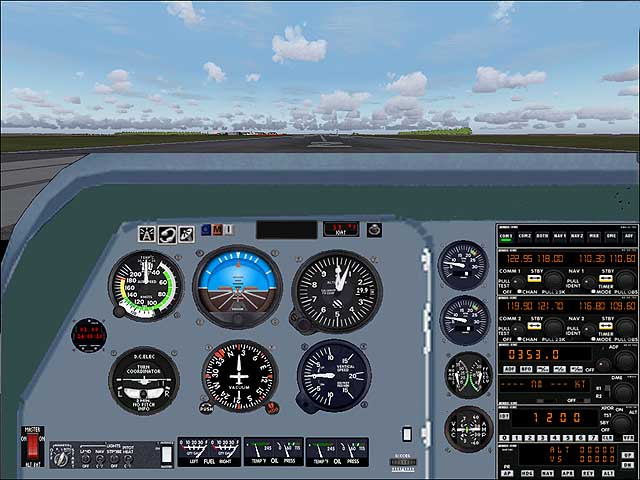
should be simple enough at least to get it by clicking the icon but can't seem to find the panel from your post....give a link if you can...commoner ;)

..I'm assuming this what you want to do......it's the panel that came with the plane you gave the link to.Shift+3 toggles the stack.

Image
Last edited by commoner on Wed Nov 15, 2006 9:21 am, edited 1 time in total.
Image"In theory, there is no difference between theory and practice. But, in practice, there is."
User avatar
commoner
Major
Major
 
Posts: 3221
Joined: Sat Aug 28, 2004 2:26 am
Location: Yorkshire. England. UK.

Re: C310 - default nav/com stack?

Postby wji » Wed Nov 15, 2006 9:43 am

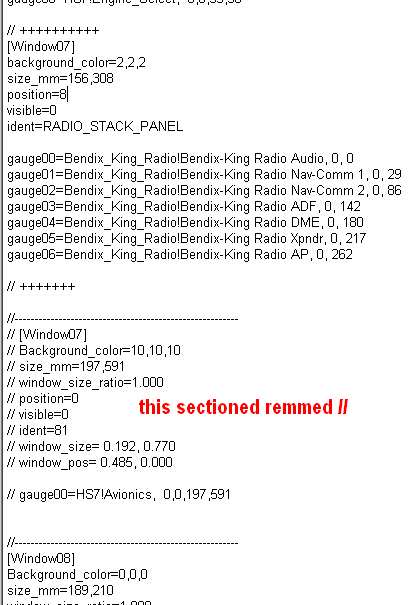
" should be simple enough" . . . you got that right!

     Image

This shows Rick Piper's HS.748 which had -- as I recall -- an authentic (read that: old-fashioned) radio stack.
Last edited by wji on Wed Nov 15, 2006 9:45 am, edited 1 time in total.
Image PhotoShop 7 user
User avatar
wji
Major
Major
 
Posts: 1644
Joined: Tue May 04, 2004 11:27 am

Re: C310 - default nav/com stack?

Postby commoner » Wed Nov 15, 2006 10:31 am

...mmm.... I assume that maybe dir wants to know how to change the panel he is using which will be different t to Piper's one............everyone isn't as clued up on these things as you wji...or they wouldn't have to ask in the first place now would they?...........commoner ;)
Last edited by commoner on Wed Nov 15, 2006 10:33 am, edited 1 time in total.
Image"In theory, there is no difference between theory and practice. But, in practice, there is."
User avatar
commoner
Major
Major
 
Posts: 3221
Joined: Sat Aug 28, 2004 2:26 am
Location: Yorkshire. England. UK.

Re: C310 - default nav/com stack?

Postby dir » Wed Nov 15, 2006 11:12 am

Thank you both for your swift replies.

Commoner: Yes, that's exactly what I want to achieve--but with Horst Paetzold's panel. What you have shown there is (I think) the original Rey Lopez aircraft and panel. Since this panel is poor for IFR work, I added Horst Paetzold's panel, which gives an HSI, RMI etc. Unfortunately, the little radio icon (present in Rey's panel) disappears in Horst's. Hence the problem. I don't want to alter the panel as such, just bypass it for the M$ one. By the way, a very nice GT Junior/2000?, I had one just like it, same colour, a Guilia too :).

I downloaded these sometime ago, so I'm unable to recall where I got them from exactly, but maybe Avsim &/or Flightsim?

wji: I'm no programmer, but have an idea what all that code is. On my screen unfortunately the top an dbottom lines aren't quite visible. Are you saying that if I somehow transplant the code into my C310 it'll give me what I need?

dir
Last edited by dir on Wed Nov 15, 2006 11:13 am, edited 1 time in total.
dir
2nd Lieutenant
2nd Lieutenant
 
Posts: 51
Joined: Mon Sep 19, 2005 6:57 pm

Re: C310 - default nav/com stack?

Postby commoner » Wed Nov 15, 2006 12:49 pm

..mm...well if you don't know where the file is maybe we can try to go another way........

Make a backup copy of the panel.cfg file just in case you mess up...........then open the panel.cfg and at the top will be a list of windows for various parts of the panel......look for  one which says Radio stack or Radios and scroll down till you find the text  and replace it with this by copying and pasting........

[Window01]
BACKGROUND_COLOR=2,2,2
size_mm=156,308
windowsize_ratio=1.0
position=8
visible=0
ident=RADIO_STACK_PANEL

gauge00=Bendix_King_Radio!Bendix-King Radio Audio, 0, 0
gauge01=Bendix_King_Radio!Bendix-King Radio Nav-Comm 1, 0, 29
gauge02=Bendix_King_Radio!Bendix-King Radio Nav-Comm 2, 0, 86
gauge03=Bendix_King_Radio!Bendix-King Radio ADF, 0, 142
gauge04=Bendix_King_Radio!Bendix-King Radio DME, 0, 180
gauge05=Bendix_King_Radio!Bendix-King Radio Xpndr, 0, 217
gauge06=Bendix_King_Radio!Bendix-King Radio AP, 0, 262

..then change the window number to the same as the one you removed .............

......close the file and YES to save the changes....should do it.

To toggle the stack use SHIFT+whatever the window number is...............best I can describe it without the actual panel..............commoner. ;)

If you can't figure it out then post a screenie of the part of your panel.cfg that seems relevant and we'll try again :)
Last edited by commoner on Wed Nov 15, 2006 1:05 pm, edited 1 time in total.
Image"In theory, there is no difference between theory and practice. But, in practice, there is."
User avatar
commoner
Major
Major
 
Posts: 3221
Joined: Sat Aug 28, 2004 2:26 am
Location: Yorkshire. England. UK.

Re: C310 - default nav/com stack?

Postby dir » Wed Nov 15, 2006 1:57 pm

commoner:

Thanks for your last, I was just going to try that out ... then unexpectedly re-located the original files (last on page)->

http://www.simviation.com/fs2004panels17.htm

Does what you posted still apply d'ya think?

dir
Last edited by dir on Wed Nov 15, 2006 2:11 pm, edited 1 time in total.
dir
2nd Lieutenant
2nd Lieutenant
 
Posts: 51
Joined: Mon Sep 19, 2005 6:57 pm

Re: C310 - default nav/com stack?

Postby Hagar » Wed Nov 15, 2006 2:21 pm

commoner:

Thanks for your last, I was just going to try that out ... then unexpectedly re-located the original files (last on page)->

http://www.simviation.com/fs2004panels17.htm

Does what you poeted still apply d'ya think?

dir

I found that panel earlier & checked it out. It's configured slightly differently to most panels I've seen. It has no radio stack pop-up but you can add one from a default panel if you wish. This is how I did it.

Open Panel.cfg in Notepad. First add a new Radio Stack entry under [Window Titles] like this. Make sure you renumber the VC-panel line to Window05.

[Window Titles]
Window00=Mainpanel
Window01=GPS
Window02=Yoke
Window03=Compass
Window04=Radio Stack
Window05=VC-panel

Now scroll down & add the complete window entry Commoner posted just above the existing [Window04] header. Copy/paste it from his post. (This is the radio stack entry from a default panel.) Renumber your new Radio Stack window to Window04 & the existing VC-panel window to 05. Exit Notepad saving changes & try it. The new Radio Stack can be toggled with Shift + 5. If the radio stack window is too small I'll show you how to resize it.
Last edited by Hagar on Wed Nov 15, 2006 2:23 pm, edited 1 time in total.
Image

Founder & Sole Member - Grumpy's Over the Hill Club for Veteran Virtual Aviators
Member of the Fox Four Group
My Google Photos albums
My Flickr albums
User avatar
Hagar
Colonel
Colonel
 
Posts: 30868
Joined: Wed Jun 19, 2002 7:15 am
Location: Costa Geriatrica

Re: C310 - default nav/com stack?

Postby commoner » Wed Nov 15, 2006 3:06 pm

...lol..well talk about a team effort....hope it works for you dir.........good luck....commoner ;D
Image"In theory, there is no difference between theory and practice. But, in practice, there is."
User avatar
commoner
Major
Major
 
Posts: 3221
Joined: Sat Aug 28, 2004 2:26 am
Location: Yorkshire. England. UK.

Re: C310 - default nav/com stack?

Postby dir » Wed Nov 15, 2006 3:34 pm

I'm tickled-pink -- success! :)

It works a treat, looks good, and able to resize any way I like it too!

For some odd reason, the active com/nav windows have reversed so the tuner knobs now control the 'active' freq' (no longer the 'standby' one), which feels a bit odd, but hey, it's no great bother.

Can't thank all you guys enough, Hagar you kindly helped me once before too, I recall.

I'll give the new stack a whirl tommorow, getting time to settle down for the night here in the UK...

Cheers for now  :),

dir
dir
2nd Lieutenant
2nd Lieutenant
 
Posts: 51
Joined: Mon Sep 19, 2005 6:57 pm

Re: C310 - default nav/com stack?

Postby Hagar » Wed Nov 15, 2006 3:41 pm

I'm tickled-pink -- success! :)

It works a treat, looks good, and able to resize any way I like it too!

For some odd reason, the active com/nav windows have reversed so the tuner knobs now control the 'active' freq' (no longer the 'standby' one), which feels a bit odd, but hey, it's no great bother.

Can't thank all you guys enough, Hagar you kindly helped me once before too, I recall.

Glad it worked
Last edited by Hagar on Wed Nov 15, 2006 3:44 pm, edited 1 time in total.
Image

Founder & Sole Member - Grumpy's Over the Hill Club for Veteran Virtual Aviators
Member of the Fox Four Group
My Google Photos albums
My Flickr albums
User avatar
Hagar
Colonel
Colonel
 
Posts: 30868
Joined: Wed Jun 19, 2002 7:15 am
Location: Costa Geriatrica

Re: C310 - default nav/com stack?

Postby commoner » Thu Nov 16, 2006 4:55 am

'''nice to see you happy with the mod.........I added a toggle switch like this........

Image

.........if you would like to have it then add this line to the bottom of the gauges list in the main panel window of the panel.cfg..just check it is the next number in the sequence..

    gauge59=SimIcons!Avionics Icon, 55,589,17    

 Cheers...commoner ;)
Image"In theory, there is no difference between theory and practice. But, in practice, there is."

User avatar
commoner
Major
Major
 
Posts: 3221
Joined: Sat Aug 28, 2004 2:26 am
Location: Yorkshire. England. UK.

Re: C310 - default nav/com stack?

Postby Hagar » Thu Nov 16, 2006 6:27 am

To resize the new pop-up window & make it easier to read change this line:

windowsize_ratio=1.0

to this:

windowsize_ratio=1.5
Image

Founder & Sole Member - Grumpy's Over the Hill Club for Veteran Virtual Aviators
Member of the Fox Four Group
My Google Photos albums
My Flickr albums
User avatar
Hagar
Colonel
Colonel
 
Posts: 30868
Joined: Wed Jun 19, 2002 7:15 am
Location: Costa Geriatrica

Re: C310 - default nav/com stack?

Postby commoner » Thu Nov 16, 2006 8:37 am

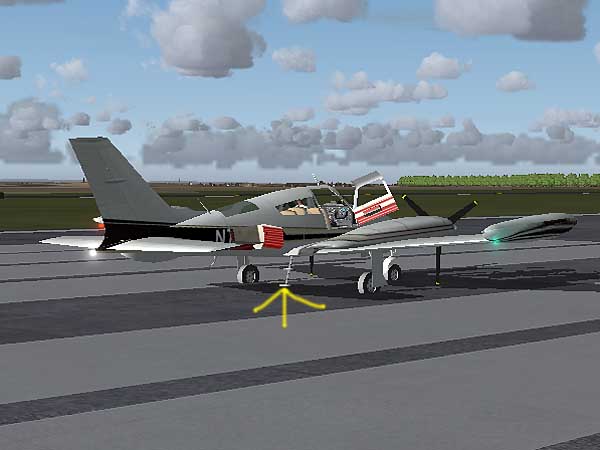
....any idea how if this little step ladder will raise or not? The doors are the usual key presses but what about the ladder?....commoner ;)

Image
Image"In theory, there is no difference between theory and practice. But, in practice, there is."
User avatar
commoner
Major
Major
 
Posts: 3221
Joined: Sat Aug 28, 2004 2:26 am
Location: Yorkshire. England. UK.

Re: C310 - default nav/com stack?

Postby Hagar » Thu Nov 16, 2006 8:41 am

It automatically retracts with the undercarriage.
Image

Founder & Sole Member - Grumpy's Over the Hill Club for Veteran Virtual Aviators
Member of the Fox Four Group
My Google Photos albums
My Flickr albums
User avatar
Hagar
Colonel
Colonel
 
Posts: 30868
Joined: Wed Jun 19, 2002 7:15 am
Location: Costa Geriatrica

Next

Return to FS 2004 - A Century of Flight

Who is online

Users browsing this forum: No registered users and 354 guests