how to turn off the radio beacon

Forum dedicated to Microsoft FS2004 - "A Century of Flight".

how to turn off the radio beacon

Postby speed_monkey » Wed Nov 01, 2006 5:58 pm

Hi Folks.

Could some one explain to me how to turn off the radio beacon

speed_monkey
Ground hog
Ground hog
 
Posts: 30
Joined: Thu Aug 03, 2006 1:05 am

Re:  how to turn off the radio beacon

Postby Nav » Wed Nov 01, 2006 6:54 pm

There is probably a switch somewhere on the panel - though they're often difficult to find. Try running the mouse pointer over likely switches with tooltips turned on.

If that doesn't solve the problem, call up the menu, go to Aircraft/Kneeboard/Keys, and you should find a key combination (Ctrl/something?) to turn the audio signal off.
Nav
Captain
Captain
 
Posts: 717
Joined: Thu Sep 30, 2004 11:29 pm

Re:  how to turn off the radio beacon

Postby Nexus » Wed Nov 01, 2006 7:04 pm

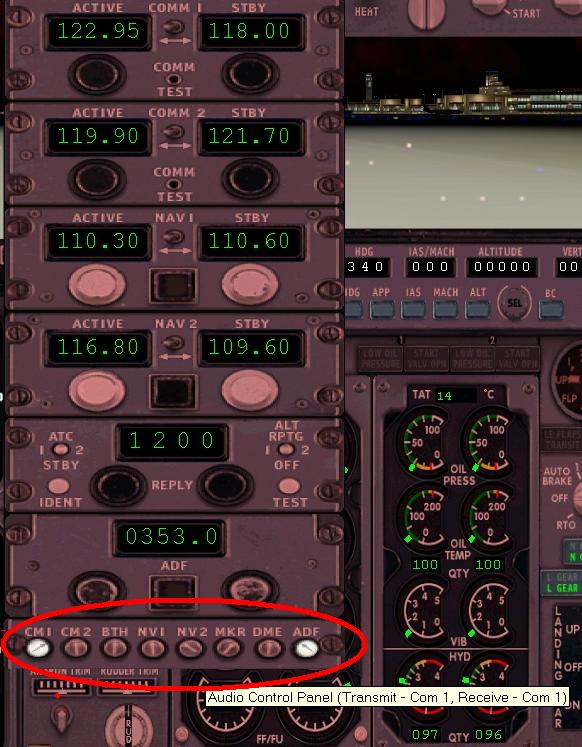
if it uses the default radiostack you have those buttons on the bottom.
To switch off ANY eventual morse code ident simply extinguish the lights on the "Nv1", "NV2" and "ADF" buttons.

Thats how I do it, at least  :)
Nexus
Major
Major
 
Posts: 3240
Joined: Fri Jul 18, 2003 4:18 pm

Re:  how to turn off the radio beacon

Postby speed_monkey » Thu Nov 02, 2006 4:34 pm

Thank you Nav and Nexus.

I did find that the beeping stopped when I turned off NAV 1 or 2 but I was worried that doing that would disable the nav info to the auto pilot and such. Is this true or does it just turn off the becon?.. J

I`m with stupid---> Speed Monkey

speed_monkey
Ground hog
Ground hog
 
Posts: 30
Joined: Thu Aug 03, 2006 1:05 am

Re:  how to turn off the radio beacon

Postby beaky » Thu Nov 02, 2006 5:30 pm

Thank you Nav and Nexus.

I did find that the beeping stopped when I turned off NAV 1 or 2 but I was worried that doing that would disable the nav info to the auto pilot and such. Is this true or does it just turn off the becon?.. J

I`m with stupid---> Speed Monkey


You need to find the annunciator panel. In most of the default stacks it's at the very top, with white buttons marked "Com 1", "Com 2", "Both", etc. Not sure about the 737... I'd have to look.
If you turn off the radio, the AP will not get any info from it. Just turn off the correct button on the annunciator panel.
Image
User avatar
beaky
Global Moderator
Global Moderator
 
Posts: 12877
Joined: Thu Dec 16, 2004 8:00 am
Location: Shenandoah, PA USA

Re:  How to turn off the radio beacon sounds..?

Postby Fozzer » Thu Nov 02, 2006 6:03 pm

I remember asking the very same question regarding the annoying Morse code sounds on the Bendix-King radio stack.....

Just switching off the lights on the "Audio Panel" at the top of the stack just stops the sound but does not affect any of the Autopilot radio frequencies which you have selected....all is safe!...;)...!

(Note: I don't think the Com 1 light can be switched off).

Sorted... ;D...!

Paul.... 8)...!
Win 8.1 64-bit. DX11. Advent Tower. Intel i7-3770 3.9 GHz 8-core. 8 GB System RAM. AMD Radeon HD 7700 1GB RAM. DVD ROM. 2 Terra Byte SATA Hard Drive. Philips 17" LCD Monitor. Saitek Cyborg X Fly-5 Joystick. ...and a Briggs and Stratton Petrol Lawn Mower.
User avatar
Fozzer
Colonel
Colonel
 
Posts: 27369
Joined: Thu Jan 31, 2002 3:11 pm
Location: Hereford. England. EGBS.

Re:  how to turn off the radio beacon

Postby beaky » Thu Nov 02, 2006 6:12 pm

Seek and ye shall find...

Image

The one for the "NDB" is really "ADF"...
Reason: an NDB (non-directional beacon) is the actual beacon, on the ground somewhere.
The ADF, or automatic direction finder, is the device in the airplane that picks up the signal from the NDB. Here you see that the ADF to the intercom is on, so it's lit up. This does not affect the use of the ADF at all; it just turns the beeping on or off.
all of the buttons on the annunciator panel, or audio control panel, simply allow the various radio devices to be heard... if they are turned on and tuned to a station that's within receiving range.
Last edited by beaky on Thu Nov 02, 2006 6:14 pm, edited 1 time in total.
Image
User avatar
beaky
Global Moderator
Global Moderator
 
Posts: 12877
Joined: Thu Dec 16, 2004 8:00 am
Location: Shenandoah, PA USA

Re:  how to turn off the radio beacon

Postby speed_monkey » Mon Nov 06, 2006 10:19 pm

You guys and gals are the best. Sorry for my late post.
For some reason when I posted a responce on this site it takes several days for it to be displayed, it appears to be fixed now. I think I will find a joystick button to deactivate/activate it and I will be good to go. I guess I should start learning how to use the NDB`s.
Cheers to all.

I`m with stupid---> Speed Monkey
speed_monkey
Ground hog
Ground hog
 
Posts: 30
Joined: Thu Aug 03, 2006 1:05 am

Re:

Postby speed_monkey » Mon Nov 06, 2006 10:19 pm

You guys and gals are the best. Sorry for my late post.
For some reason when I posted a responce on this site it takes several days for it to be displayed, it appears to be fixed now. I think I will find a joystick button to deactivate/activate it and I will be good to go. I guess I should start learning how to use the NDB`s.
Cheers to all.

I`m with stupid---> Speed Monkey
speed_monkey
Ground hog
Ground hog
 
Posts: 30
Joined: Thu Aug 03, 2006 1:05 am


Return to FS 2004 - A Century of Flight

Who is online

Users browsing this forum: No registered users and 338 guests