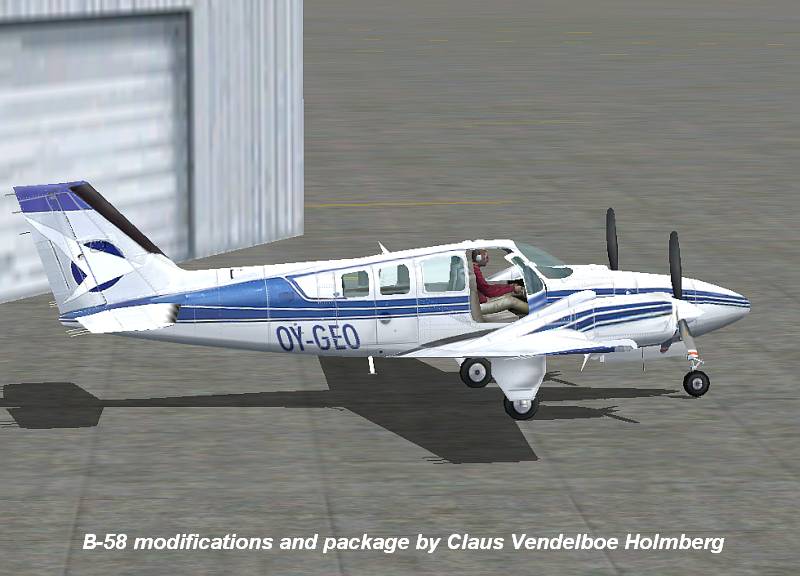
Beechcraft Baron 58

Forum dedicated to Microsoft FS2004 - "A Century of Flight".

Beechcraft Baron 58

Postby FLYING_TRUCKER » Sat Nov 04, 2006 11:04 am

Hi folks:  :)

Have tried to download this aircraft from FS 2004 Downloads on page 133 "Props".

This is the FS 2004 Default Beech Baron 58 by Claus Venedelboc Holmberg 7.5MB.

I have done everything it says (I hope) and I still do not see the new aircraft livery or the yokes and radar.

Any help will be much appreciated. ;)

Cheers...Happy Landings...Doug
FLYING_TRUCKER
 

Re: Beechcraft Baron 58

Postby wji » Sat Nov 04, 2006 11:11 am

The most common reason for this is forgetting to sequence the {fltsim.#} after adding the new code to the aircraft.cfg file

The next reason is not giving the new aircraft a unique name in the aircraft.cfg file. FS will not recognize aircraft using duplicate names in title=.
Image PhotoShop 7 user
User avatar
wji
Major
Major
 
Posts: 1644
Joined: Tue May 04, 2004 11:27 am

Re: Beechcraft Baron 58

Postby FLYING_TRUCKER » Sat Nov 04, 2006 11:34 am

Thanks Wji.  :)

Cheers...Happy Landings...Doug
FLYING_TRUCKER
 

Re: Beechcraft Baron 58

Postby FLYING_TRUCKER » Sun Nov 05, 2006 10:49 am

Well so much for that idea...still will not show up yet it is in Aircraft Folder.

I know I must be doing something wrong but do not know what it is.  ::)

Cheers...Happy Landings...Doug
FLYING_TRUCKER
 

Re: Beechcraft Baron 58

Postby ozzy72 » Sun Nov 05, 2006 11:02 am

Doug have you checked that there aren't effects or gauges that need taking to the relevant folders?
Image
There are two types of aeroplane, Spitfires and everything else that wishes it was a Spitfire!
User avatar
ozzy72
Administrator
Administrator
 
Posts: 33284
Joined: Fri May 24, 2002 4:45 am
Location: Madsville

Re: Beechcraft Baron 58

Postby FLYING_TRUCKER » Sun Nov 05, 2006 11:57 am

Yes I did the aircraft to aircraft, the guages to guages and the modules to modules twice and still nothing.

Wonder if I should redownload and try again?

I wonder if I am the only one haveing a problem with this one?

Cheers...Happy Landings...Doug
FLYING_TRUCKER
 

Re: Beechcraft Baron 58

Postby Hagar » Sun Nov 05, 2006 12:01 pm

I just downloaded the file to check it out. Make sure you paste the baron_58 folder to FS9\Aircraft. It will be listed on the selection menu under Beechcraft > Baron 58 > White with blue.

I didn't install the gauges or the modules but the aircraft works fine.
Last edited by Hagar on Sun Nov 05, 2006 12:02 pm, edited 1 time in total.
Image

Founder & Sole Member - Grumpy's Over the Hill Club for Veteran Virtual Aviators
Member of the Fox Four Group
My Google Photos albums
My Flickr albums
User avatar
Hagar
Colonel
Colonel
 
Posts: 30868
Joined: Wed Jun 19, 2002 7:15 am
Location: Costa Geriatrica

Re: Beechcraft Baron 58

Postby FLYING_TRUCKER » Sun Nov 05, 2006 12:19 pm

Okay shall have another go at it.  ;)

Thanks all!

Cheers...Happy Landings...Doug
FLYING_TRUCKER
 

Re: Beechcraft Baron 58

Postby FLYING_TRUCKER » Sun Nov 05, 2006 1:56 pm

Okay I have the aircraft listed separately as Beechcraft Baron 58 white and blue in FS2004.

However the picture is still the same as the white blue and gold default aircraft.

I typed in the changes in the configuration file but left the number the same [.0] and when that did not work I changed it to [.1] and that did not work.

As the original default aircraft in the configuration file should be [.0] I thought  this one should be [.1] but like I said it does not work.

The aircraft does not show the yoke and radar but is essentially the same as the default aircraft even in colour.

I transferred the guages to the main guages folder and the modules to the main module folder.

I had no trouble in downloading the little Piper at the top of the same page but this one is giving me trouble.

When I open the zipped file with the Wizzard it does say they are read only files....not sure what that means but I say ok and I get the Baron 58 file with aircraft, guages and modules in it along with read me files, pictures of the aircraft, picture of cockpit showing yoke etc.

Now I wonder what I am doing wrong besides playing with this computer? ???   ::)   ;D

Cheers...Happy Landings...Doug
FLYING_TRUCKER
 

Re: Beechcraft Baron 58

Postby wji » Sun Nov 05, 2006 2:33 pm

I d/l said B-58 and copied the baron_58 folder to my FS9/Aircraft folder and went flying . . .

Image

Perhaps you're not treating this download as a complete aircraft. The only action required to install and fly it is to copy baron_58 folder to one's FS9/Aircraft; everything else is optional; I did not install any modules or gauges and was able to fly from Klamath Falls over Crater Lake and take in the views  :D

Repainted in K-Falls by Bill Irvine

Image
Last edited by wji on Sun Nov 05, 2006 4:18 pm, edited 1 time in total.
Image PhotoShop 7 user
User avatar
wji
Major
Major
 
Posts: 1644
Joined: Tue May 04, 2004 11:27 am

Re: Beechcraft Baron 58

Postby Hagar » Sun Nov 05, 2006 2:34 pm

Doug. This one is configured as a separate aircraft. To install it simply paste the baron_58 folder into FS9\Aircraft as I told you. You don't need to modify anything or mess around editing CFG files.
Image

Founder & Sole Member - Grumpy's Over the Hill Club for Veteran Virtual Aviators
Member of the Fox Four Group
My Google Photos albums
My Flickr albums
User avatar
Hagar
Colonel
Colonel
 
Posts: 30868
Joined: Wed Jun 19, 2002 7:15 am
Location: Costa Geriatrica

Re: Beechcraft Baron 58

Postby FLYING_TRUCKER » Sun Nov 05, 2006 6:23 pm

Okay shall try again.  ;)

Cheers...Happy Landings...Doug
FLYING_TRUCKER
 

Re: Beechcraft Baron 58

Postby FLYING_TRUCKER » Sun Nov 05, 2006 7:00 pm

By gosh it works... :o   ::)   ;DLOL

Thanks one and all.  ;)

Cheers...Happy Landings...Doug
FLYING_TRUCKER
 

Re: Beechcraft Baron 58

Postby Hagar » Sun Nov 05, 2006 7:08 pm

Hurrah...........! :D
Image

Founder & Sole Member - Grumpy's Over the Hill Club for Veteran Virtual Aviators
Member of the Fox Four Group
My Google Photos albums
My Flickr albums
User avatar
Hagar
Colonel
Colonel
 
Posts: 30868
Joined: Wed Jun 19, 2002 7:15 am
Location: Costa Geriatrica


Return to FS 2004 - A Century of Flight

Who is online

Users browsing this forum: No registered users and 397 guests