autopilot question

Forum dedicated to Microsoft FS2004 - "A Century of Flight".

autopilot question

Postby VVM » Sun Sep 24, 2006 7:14 am

hi all.  after a lot of practice, i have finally mastered landing whilts manually adjusting the throttle and pitch/altitude of my a/c.  however, when on approach using the approach function, i am finding that the autopilot is continually triming the elevator up until i turn the autopilot off, even when i am not using the altitude hold.  does anyone know why this is happening.  if i have not explained this very well say so and ill try to re-word it   :D

cheers   8)
User avatar
VVM
2nd Lieutenant
2nd Lieutenant
 
Posts: 88
Joined: Sun Aug 05, 2007 7:14 pm

Re: autopilot question

Postby commoner » Sun Sep 24, 2006 7:44 am

...not too clear what you are trying to do here vav..........are you attempting an ILS approach, if so have you tuned in to the ILS frequency of the runway and are you approaching the runway from the right end..........and do you have the Nav/GPS switch to nav..........??????

..........or are you expecting something else from simply having the Appr. button selected?

 ..............more precise explanation would be helpful............commoner.

There are some great tutes on ILS approaches around and if that is what you want then we could probably find you one........... ;)
Image"In theory, there is no difference between theory and practice. But, in practice, there is."
User avatar
commoner
Major
Major
 
Posts: 3221
Joined: Sat Aug 28, 2004 2:26 am
Location: Yorkshire. England. UK.

Re: autopilot question

Postby VVM » Sun Sep 24, 2006 8:13 am

yeh i read it through after typing it and it is a bit difficult to understand.  so here i go again   ;D

Image

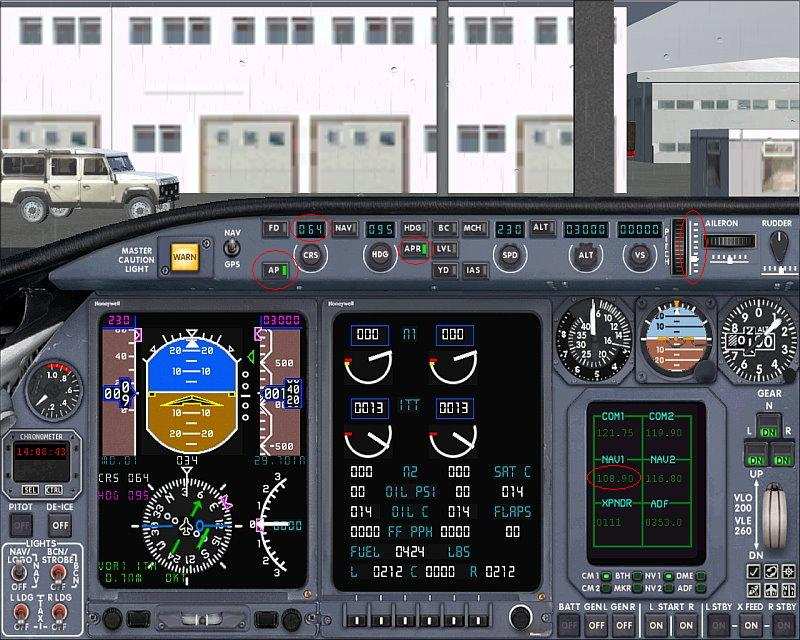
right, assume that i am on an ils approach in the pic, i have the 'auto pilot' master switch on and the 'approach hold' switch on.  i have the runway heading in the course selctor and the ils frequency in the nav 1 radio.  

now, what is happening is that the auto pilot is continually triming the elevator up, and i am continually having too trim down so i dont stall.  (making sence so far?)  the auto pilot only stops trimming up when i turn it off about as i get close enough too land fully manual.

should i have the flight director switch selected instead of the auto pilot master switch?
User avatar
VVM
2nd Lieutenant
2nd Lieutenant
 
Posts: 88
Joined: Sun Aug 05, 2007 7:14 pm

Re: autopilot question

Postby TSC. » Sun Sep 24, 2006 8:33 am

What plane are you sing Vav?

Assuming that you have intercepted the glide-slope & the AP has taken control of the approach for you - what speed are you approaching at & what flaps settings are you using? - if your KIAS is too slow to retain altitude then the AP will be constantly trimming up in order to stay with the glide-slope - which will result in a stall.

Cheers,

TSC.
Last edited by TSC. on Sun Sep 24, 2006 10:19 am, edited 1 time in total.
Image

'Only two things are infinite.......The Universe and Human stupidity........and I'm not too sure about the Universe' - Einstein
User avatar
TSC.
Major
Major
 
Posts: 4273
Joined: Wed Nov 03, 2004 11:11 am
Location: Torquay, Devon, England.

Re: autopilot question

Postby VVM » Sun Sep 24, 2006 8:49 am

aircraft:  erj-145
approach speed: 140-145kts
flap setting:  full (on this occasion)

it happens with all the aircraft, not just this one.  the other example i can think of is:
aircraft: 757-200
approach speed: 155-160kts
flap setting: 1 notch off full
User avatar
VVM
2nd Lieutenant
2nd Lieutenant
 
Posts: 88
Joined: Sun Aug 05, 2007 7:14 pm

Re: autopilot question

Postby TSC. » Sun Sep 24, 2006 9:01 am

Don't suppose you've got teamspeak Vav? This might be easier to solve with a bit of an MP at the airport your using.

Cheers,

TSC.
Image

'Only two things are infinite.......The Universe and Human stupidity........and I'm not too sure about the Universe' - Einstein
User avatar
TSC.
Major
Major
 
Posts: 4273
Joined: Wed Nov 03, 2004 11:11 am
Location: Torquay, Devon, England.

Re: autopilot question

Postby VVM » Sun Sep 24, 2006 9:12 am

nah i dont have it.  im going just going too fly from edinburgh to london ciyt and see what happens on my approach this time.
User avatar
VVM
2nd Lieutenant
2nd Lieutenant
 
Posts: 88
Joined: Sun Aug 05, 2007 7:14 pm

Re: autopilot question

Postby Brett_Henderson » Sun Sep 24, 2006 10:02 am

The approach-hold, is a 2-axis deal. The A/P will trim the elevator to keep you on the glide-scope (unless it's a localizer only ILS)..

I don't fly jets often, but I've found that if you let the A/P fly the approach; it's best to fly it a little faster than you would manually. The A/P will trim your airspeed away before you know it.. lol

I've never tried flying an ILS using only the nav-hold. If it works.. that would leave pitch/airspeed completely up to you.
Brett_Henderson
Major
Major
 
Posts: 3403
Joined: Fri Oct 08, 2004 7:09 am

Re: autopilot question

Postby Nav » Sun Sep 24, 2006 11:49 pm

vavavoom, as in a real aeroplane, you can TEMPORARILY override the autopilot with the manual controls. But if you leave the A/P switched on (especially if it's in 'Approach Mode'), as soon as you stop making a given manual input, it will set to work to bring the aeroplane back to the normal approach path.

Trick is progressively to turn off the auto controls as you close in - first the 'Speed Hold,' then the 'Approach Mode' - and take full manual comtrol for the final landing phase. Explained in here, with screenshots:-

http://www.simviation.com/cgi-bin/yabb/YaBB.cgi?board=COF;action=display;num=1111322151
Nav
Captain
Captain
 
Posts: 717
Joined: Thu Sep 30, 2004 11:29 pm

Re: autopilot question

Postby eno » Mon Sep 25, 2006 1:57 am

Sounds like you're too heavy and too slow..... the heavier your aircraft (fuel wise) the faster the approach speed. If not then you'll stall.
[align=center][img]http://www.simviation.com/yabbuploads/imaginsigeno.jpg[/img][/align]
User avatar
eno
Lieutenant Colonel
Lieutenant Colonel
 
Posts: 6708
Joined: Sun Jan 18, 2004 12:30 pm
Location: Derbyshire UK

Re: autopilot question

Postby commoner » Mon Sep 25, 2006 2:24 am

...mmmm...Yes..........overloaded with fuel spoiled my enjoyment of FS for years ..........don't know why it took me so long to realise it, but when I did it changed my life...........it's a real killer especially taking off and landings with the "biggies".............commoner ;)
Image"In theory, there is no difference between theory and practice. But, in practice, there is."
User avatar
commoner
Major
Major
 
Posts: 3221
Joined: Sat Aug 28, 2004 2:26 am
Location: Yorkshire. England. UK.

Re: autopilot question

Postby vololiberista » Mon Sep 25, 2006 6:43 am
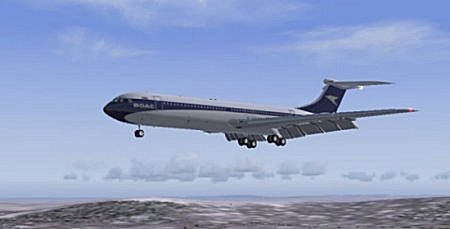
The only reason your AP is continually trimming nose up is that it is trying to increase the angle of attack in order to increase lift as your airspeed falls off! Your problem is a combination of too low an airspeed and incorrect use of flaps.
Your scenario is that you under IFR -  ATC will call you to give you a heading and descent to an altitude at which you can intercept the localiser. Let's say you are at FL70 you are doing 210kts IAS ATC says "Turn left heading 335 degrees, descend to 2,500ft call established 27 left"
So now you reduce your speed to 180 IAS and select first stage flaps. DO NOT allow the a/c to run away (if necessary use the speed brakes until you arrive at your interception altitude). When you reach 2,500ft  you should select your AP to follow the localiser and glide slope.  You will intercept the glide slope at about 8nm from the threshhold  so at this point - gear down, second stage flaps, drop the speed back to 160 IAS (if your a/c has 4 flap settings select 3rd stage flaps when the a/c arrives at 160 IAS) As you pass the outer marker or 4nm out select full flaps speed down to 140 IAS as you cross the threshhold at screen height your speed should be 130 IAS  now you can throttle back and land. Add 5kts to all your airspeed settings below 180 IAS to account for turbulence or crosswinds.
These speed settings will be accepted by all jets and most turbo props. Correct use of flaps and airspeed will ensure your problem goes away.
Buoni Atterraggi
Vololiberista
Andiamo in Italia
Image
User avatar
vololiberista
Major
Major
 
Posts: 1042
Joined: Thu Feb 16, 2006 5:43 pm

Re: autopilot question

Postby garymbuska » Mon Sep 25, 2006 2:40 pm

I hardly ever use the approach button as I all ways turn off the auto pilot once I get a visual of the airport. If you watch your nav1 gauge it will let you know when you get close to the glide slope and which way it is. But you have to watch your airspeed and flap settings as well as know the weight of the aircraft so you do not create damage due to high speeds. You have to rember that flaps will give you more lift but increase drag which will slow you down so you have to use the throttle to maintain air speed. 8)
Gary M Buska
SYSTEM Specs ASUS P8Z68 V/GEN 3 mother board: INTELL I7 2600k 3.48 ghz Quad core CPU with Sandy bridge: 12 Gigs of 1800hz ram:
GTX 950 OVER CLOCKED: 2 Gigs Ram Windows 10 Home 64 bit Operating system. 750W Dedicated modular power supply. Two Internal 1TB hard drives 1 External 1TB 3.2 USB hard drive. SAITEK Cessna flight Yoke with throttles.
CH Rudder Peddles 27 inch Wide screen Monitor
User avatar
garymbuska
Major
Major
 
Posts: 4415
Joined: Tue Dec 30, 2003 11:10 am
Location: Jacksonville, Florida

Re: autopilot question

Postby vololiberista » Mon Sep 25, 2006 3:53 pm
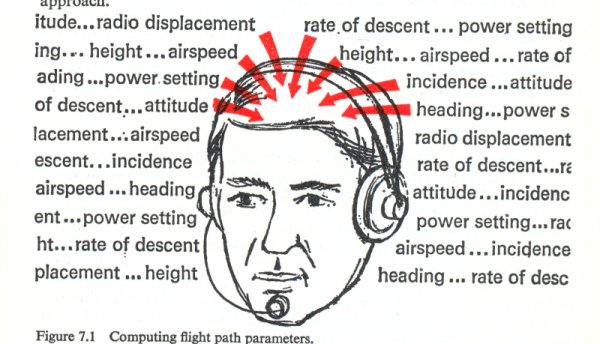
Weight and balance are crucial for safe flying. On an approach to land weight and balance will dictate your stall speeds.  In the real world ATC will issue speed advisories on approach and these MUST be adhered to as they are for a/c separation and traffic flow. FS9 and also as far as I know FSX ATC do not issue speed advisories so you the pilot must assume they have been given. Regardless of your weight the speed profile I have described above WILL get you down safely. But, you as a pilot (armchair or real) will have to take into account wind speed, direction, air temperature, weather conditions, airfield elevation and a/c performance. These all add or subtract to the margin of safety provided by the reference speeds. This illustration below gives a good idea how busy you'll be!!!
Vololiberista
Image
Last edited by vololiberista on Tue Sep 26, 2006 12:27 am, edited 1 time in total.
Andiamo in Italia
Image
User avatar
vololiberista
Major
Major
 
Posts: 1042
Joined: Thu Feb 16, 2006 5:43 pm

Re: autopilot question

Postby Nexus » Mon Sep 25, 2006 4:21 pm

Meh..piece of cake....
Nexus
Major
Major
 
Posts: 3240
Joined: Fri Jul 18, 2003 4:18 pm


Return to FS 2004 - A Century of Flight

Who is online

Users browsing this forum: No registered users and 216 guests