Taxi Light Problem

Forum dedicated to Microsoft FS2004 - "A Century of Flight".

Taxi Light Problem

Postby Jon H » Wed Sep 20, 2006 10:01 am

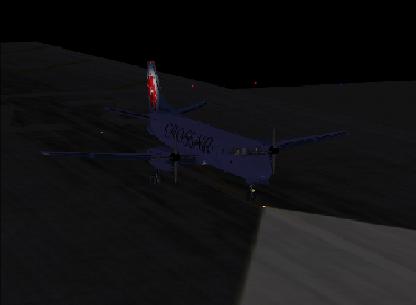
When I switch on the taxi lights on my saab 340 they only show up in the exterior views, and I can't see them from the panel view.
I've seen this discudssed before somewhere, but I can't for the life of me find it.

Is there a known fix for this problem?
Image
User avatar
Jon H
2nd Lieutenant
2nd Lieutenant
 
Posts: 272
Joined: Sat Jan 07, 2006 9:38 am
Location: Bath, UK

Re: Taxi Light Problem

Postby Brett_Henderson » Wed Sep 20, 2006 10:27 am

Do you mean the "beams" that you see out in front of the plane ?

If so.. That's something that has to be modeled into the plane by the designer... Many 3rd-party planes don't have it/them.
Brett_Henderson
Major
Major
 
Posts: 3403
Joined: Fri Oct 08, 2004 7:09 am

Re: Taxi Light Problem

Postby Jon H » Wed Sep 20, 2006 11:02 am

Yes, the light that shines on the ground in front of the plane. I can see it from outside though, just not in the panel view.

Image
Image
User avatar
Jon H
2nd Lieutenant
2nd Lieutenant
 
Posts: 272
Joined: Sat Jan 07, 2006 9:38 am
Location: Bath, UK

Re: Taxi Light Problem

Postby Brett_Henderson » Wed Sep 20, 2006 2:10 pm

I'm sure I'll be corrected if I'm wrong...   :-[


Since that beam is part of the model, it can be seen from outside the plane. But.. to be seen from inside (even in 2D as opposed to V/C panel), it also has to be a part of the V/C model ?
Brett_Henderson
Major
Major
 
Posts: 3403
Joined: Fri Oct 08, 2004 7:09 am

Re: Taxi Light Problem

Postby vololiberista » Wed Sep 20, 2006 3:15 pm

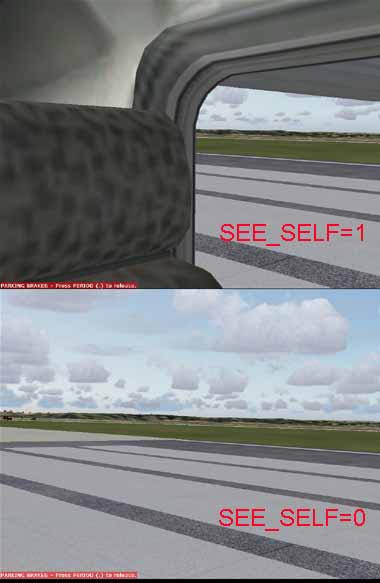
I had a similar problem where a/c that once showed beams from both 2D and 3D cockpits suddenly didn't. One evening i was tweaking the cfg file for sharper terrain and added this line        SEE_SELF=1
and now i can see the lights from the cockpits of all my a/c!!!!!
Vololiberista
Andiamo in Italia
Image
User avatar
vololiberista
Major
Major
 
Posts: 1042
Joined: Thu Feb 16, 2006 5:43 pm

Re: Taxi Light Problem

Postby Jon H » Wed Sep 20, 2006 4:40 pm

This is genius, but:
Where, tell me where. Where do I add the line??

Aircraft.cfg
Panel.cfg
Sound.cfg   ?
Model.cfg
fs9.cfg

(One of these I presume.)
Image
User avatar
Jon H
2nd Lieutenant
2nd Lieutenant
 
Posts: 272
Joined: Sat Jan 07, 2006 9:38 am
Location: Bath, UK

Re: Taxi Light Problem

Postby vololiberista » Thu Sep 21, 2006 12:18 am

fs9.cfg
8)
Andiamo in Italia
Image
User avatar
vololiberista
Major
Major
 
Posts: 1042
Joined: Thu Feb 16, 2006 5:43 pm

Re: Taxi Light Problem

Postby Jon H » Thu Sep 21, 2006 10:26 am

I already have that line in the fs9.cfg file. I tried removing and then replacing it and I still have no taxi lights from the panel.
I suppose there must be another cause.
That's a shame.
Image
User avatar
Jon H
2nd Lieutenant
2nd Lieutenant
 
Posts: 272
Joined: Sat Jan 07, 2006 9:38 am
Location: Bath, UK

Re: Taxi Light Problem

Postby commoner » Fri Sep 22, 2006 8:18 am

..mm...afraid that line has nothing to do with taxi lights but it might help you to see better..........make it SEE_SELF=0 and it removes the side and rear interior views  etc from the cockpit..in other words look to the side or rear and you will just see the scenery nothing else...............

If your plane has no taxi lights from the cockpit you will have to taxi in spot view..........or blunder about in the dark.............commoner. ;)

Image
Last edited by commoner on Fri Sep 22, 2006 8:30 am, edited 1 time in total.
Image"In theory, there is no difference between theory and practice. But, in practice, there is."
User avatar
commoner
Major
Major
 
Posts: 3221
Joined: Sat Aug 28, 2004 2:26 am
Location: Yorkshire. England. UK.

Re: Taxi Light Problem

Postby JBaymore » Fri Sep 22, 2006 8:35 am

My understanding is that the "normal" taxi lights and landing lights are part of the model file.  You need the source code to modifiy it.

However you MIGHT be able to place some of the other modifiable lights effects in the sim to give you some light out there.  

You can add lights to the [LIGHTS] section of the cfg file.  So find a nice bright light, place it in the location you need it using the x,y,z coordinates, associate it with taxi lights for the electrical assignment and you might be able to see that from the cockpit.  Not sure though.

best,

.......john
Image ImageIntel i7 960 quad 3.2G LGA 1366, Asus P6X58D Premium, 750W Corsair, 6 gig 1600 DDR3, Spinpoint 1TB 720

User avatar
JBaymore
Global Moderator
Global Moderator
 
Posts: 10020
Joined: Sat May 24, 2003 9:15 am
Location: New Hampshire


Return to FS 2004 - A Century of Flight

Who is online

Users browsing this forum: No registered users and 161 guests