My Turn

Forum dedicated to Microsoft FS2004 - "A Century of Flight".

My Turn

Postby packercolinl » Fri Mar 10, 2006 4:08 am

FS9.config and where do you find it!

I cannot locate it in a path and search tells me that it does not exist in any of the permutations I use.

Would someone please be so good as to advise me of the correct form to use.

Thanks,
Col.
White on White fly all night.

Red on White you're alright.

Red on Red you'll soon be dead.
User avatar
packercolinl
Captain
Captain
 
Posts: 968
Joined: Sun Feb 09, 2003 3:09 am

http://www.simviation.com/cgi-bin/yabb/Re: My Turn

Postby Zaphod » Fri Mar 10, 2006 4:16 am

What doesn't kill you makes you stronger. But why take the risk?
Windows 10
Intel i7 950 3.06Ghz (8mb Cache)
MSI X58 Pro-E MoBo
MSI GeForce GTX 1050ti oc
Corsair MXS
User avatar
Zaphod
Captain
Captain
 
Posts: 850
Joined: Mon Oct 13, 2003 4:05 pm
Location: U.K.

Re: My Turn

Postby packercolinl » Fri Mar 10, 2006 4:21 am

::)Yeah knew it was something simple-much like me.

Thanks Zaphod for that prompt reply.

Cheers,
Col.
White on White fly all night.

Red on White you're alright.

Red on Red you'll soon be dead.
User avatar
packercolinl
Captain
Captain
 
Posts: 968
Joined: Sun Feb 09, 2003 3:09 am

Re: My Turn

Postby packercolinl » Fri Mar 10, 2006 4:48 am

and it didn't work--hmmm!!

Oh,joy :)

Must be time for a new 'puter 8)

Any excuse--back again soon.

Col.
White on White fly all night.

Red on White you're alright.

Red on Red you'll soon be dead.
User avatar
packercolinl
Captain
Captain
 
Posts: 968
Joined: Sun Feb 09, 2003 3:09 am

Re: My Turn

Postby Delta_ » Fri Mar 10, 2006 6:30 am

and it didn't work--hmmm!!

Have you tried making hidden files and folders visible?  Then try it again.
User avatar
Delta_
Major
Major
 
Posts: 1919
Joined: Fri Nov 21, 2003 6:40 am
Location: London, UK

Re: My Turn

Postby commoner » Fri Mar 10, 2006 7:30 am

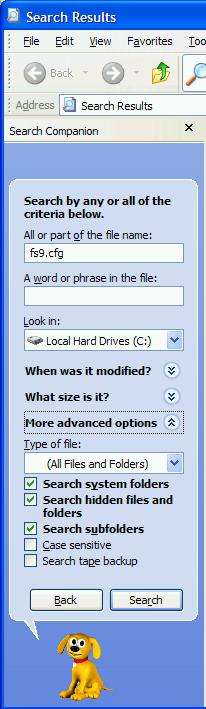
...you won't find it by searching for fs9.config.......... look for fs9.cfg and like delta says Show hidden files ....and make a shortcut to it on your desktop when you do find it.It'll come in handy...commoner. ;)
Image"In theory, there is no difference between theory and practice. But, in practice, there is."
User avatar
commoner
Major
Major
 
Posts: 3221
Joined: Sat Aug 28, 2004 2:26 am
Location: Yorkshire. England. UK.

Re: My Turn

Postby microlight » Fri Mar 10, 2006 8:31 am

Yup - I agree. That's what I did.

;)
User avatar
microlight
Major
Major
 
Posts: 2076
Joined: Mon Aug 19, 2002 6:24 pm
Location: Southern UK

Re: My Turn

Postby Fozzer » Fri Mar 10, 2006 8:42 am

...you won't find it by searching for fs9.config.......... look for fs9.cfg and like delta says Show hidden files ....and make a shortcut to it on your desktop when you do find it.It'll come in handy...commoner. ;)


Definately...!
Always put a "Shortcut" to your fs9.cfg on your desktop... ;)...!
You will always need to get access to it at various times...
...trust me... ;)...!

Paul... ;D...!
Win 8.1 64-bit. DX11. Advent Tower. Intel i7-3770 3.9 GHz 8-core. 8 GB System RAM. AMD Radeon HD 7700 1GB RAM. DVD ROM. 2 Terra Byte SATA Hard Drive. Philips 17" LCD Monitor. Saitek Cyborg X Fly-5 Joystick. ...and a Briggs and Stratton Petrol Lawn Mower.
User avatar
Fozzer
Colonel
Colonel
 
Posts: 27369
Joined: Thu Jan 31, 2002 3:11 pm
Location: Hereford. England. EGBS.

Re: My Turn

Postby Saitek » Fri Mar 10, 2006 8:51 am

Can be tricky. After you have got to Documents and settings try every user there is. It may not be under the one you looked at. I have several on my computer here and there is an application data,microsoft etc etc under every one. But only 1 user has the FS9 in the microsoft folder. ;)
Windows 7 Pro 64bit
Intel Core 2 Duo E2180 2GHz
GA-P35-DS3L Intel P35
Kingston HyperX 4GB (2x2) DDR2 6400C4 800Mhz
GeForce 8800 GT 512MB
2 x 22" monitors
200GB Sata
Be Quiet! Straight Power 650W

Flying FS
Saitek
Lieutenant Colonel
Lieutenant Colonel
 
Posts: 5274
Joined: Thu Jun 19, 2003 3:04 pm
Location: UK

Re: My Turn

Postby Hagar » Fri Mar 10, 2006 10:26 am

...you won't find it by searching for fs9.config..........

You will if you check the Search Hidden Files & Folders advanced search option.

Image

....and make a shortcut to it on your desktop when you do find it.It'll come in handy...commoner. ;)

Good advice.
Last edited by Hagar on Fri Mar 10, 2006 10:27 am, edited 1 time in total.
Image

Founder & Sole Member - Grumpy's Over the Hill Club for Veteran Virtual Aviators
Member of the Fox Four Group
My Google Photos albums
My Flickr albums
User avatar
Hagar
Colonel
Colonel
 
Posts: 30868
Joined: Wed Jun 19, 2002 7:15 am
Location: Costa Geriatrica

Re: My Turn

Postby commoner » Fri Mar 10, 2006 11:23 am

....LOL...you read me wrong there Hagar I said "you wont find it by searching for fs9.config.".....and you won't....you have to type in fs9.cfg, which is what you have in your pic. Try it for yourself. Col's question was actually "FS9.config and where do you find it!"   Which lead me to believe he might be putting the wrong text in his search..........commoner ;)
Image"In theory, there is no difference between theory and practice. But, in practice, there is."
User avatar
commoner
Major
Major
 
Posts: 3221
Joined: Sat Aug 28, 2004 2:26 am
Location: Yorkshire. England. UK.

Re: My Turn

Postby Hagar » Fri Mar 10, 2006 11:53 am

....LOL...you read me wrong there Hagar I said "you wont find it by searching for fs9.config.".....and you won't....you have to type in fs9.cfg, which is what you have in your pic.

Right. Now I see what you're getting at. ;)
Image

Founder & Sole Member - Grumpy's Over the Hill Club for Veteran Virtual Aviators
Member of the Fox Four Group
My Google Photos albums
My Flickr albums
User avatar
Hagar
Colonel
Colonel
 
Posts: 30868
Joined: Wed Jun 19, 2002 7:15 am
Location: Costa Geriatrica

Re: My Turn

Postby packercolinl » Sat Mar 11, 2006 6:44 am

Thanks everyone,I've managed to get back this far with nothing else  installed.

This thing is not doing what it should(even after doing all the 'right ' things.)

I believe I have a serious (well not that serious ;D)problem here.

I'm interested to have a play to see what the deal is.

Basically nothing loads properly and even with all the firewalls etc I was hit with a virus. So two formats later I'm not a happy camper(actually this is interesting and a bit of a challenge :),don't attempt this at home without adult supervision)

I also find that presentation has changed and changes as I use the system. This points to a degradation/collapse.

Am I p!ssed off!!

No way!!

Forget the new 'puter(no I'm not)\but this is FUN!! a toy that has no value that I can TOY with--woohoo!!

Col.
White on White fly all night.

Red on White you're alright.

Red on Red you'll soon be dead.
User avatar
packercolinl
Captain
Captain
 
Posts: 968
Joined: Sun Feb 09, 2003 3:09 am

Re: My Turn

Postby caveman16 » Sat Mar 11, 2006 10:02 am

      Hey Guys - - - - - And I always thought I was by myself with these dumb problems - - ;D

      Always keep a smile,        caveman
My PC's Specks:  Case:  Thermaltake v7000c/ 5 very quiet case fans.  Motherboard: AMD/ASUS-A8N32-Sli Deluxe Socket 939  Processor:  AMD Athion 64x2  4400+/Socket939 Dual Core.  Operating System:  Windows XP Hom
caveman16
1st Lieutenant
1st Lieutenant
 
Posts: 346
Joined: Tue Oct 18, 2005 8:47 am
Location: Murphy, N.C.

Re: My Turn

Postby packercolinl » Sun Mar 12, 2006 12:53 am

Gee,caveman,I'm glad to add a little lightness in your life ;D

Still---after doing another format and etc fs9.cfg does not come up.

I had no problems before even with hidden folders activated. This was the reason for the post because I didn't think I was completely brain dead(Ooohh! Some of you think I AM!! WELLLL!!! ;D)

Doesn't matter,I'll plod along and see what I can sort out.

Cheers to all,
Col.
White on White fly all night.

Red on White you're alright.

Red on Red you'll soon be dead.

User avatar
packercolinl
Captain
Captain
 
Posts: 968
Joined: Sun Feb 09, 2003 3:09 am

Next

Return to FS 2004 - A Century of Flight

Who is online

Users browsing this forum: No registered users and 393 guests