Checking scenery installation

Forum dedicated to Microsoft FS2004 - "A Century of Flight".

Checking scenery installation

Postby caveman16 » Mon Mar 06, 2006 11:02 pm

     Hey Guys and Ladies,   Wishing you all a nice evening.    After I installed a scenery program,  I'm really not sure it's being used in the FS9.    Is there a way to make sure it's being used?       I noticed in the PC  Add/Remove  program it is listed separate just under the FS9.     Am I doing things all wrong ?             [ It was a self install ] program.
                                                   
     Appreciate your help,         caveman

My PC's Specks:  Case:  Thermaltake v7000c/ 5 very quiet case fans.  Motherboard: AMD/ASUS-A8N32-Sli Deluxe Socket 939  Processor:  AMD Athion 64x2  4400+/Socket939 Dual Core.  Operating System:  Windows XP Hom
caveman16
1st Lieutenant
1st Lieutenant
 
Posts: 346
Joined: Tue Oct 18, 2005 8:47 am
Location: Murphy, N.C.

Re: Checking scenery installation

Postby packercolinl » Tue Mar 07, 2006 4:24 am

You will have to start FS9 and go to Settings/Scenery Library/Add Area which will open up all FS9 folders.

Look for it in Addon Scenery,select it and click OK. It should show at the top of the scenery list. Move it to a position below Generic Libraries.

Restart FS9 and you should see it showing adding new files etc.

Col.
White on White fly all night.

Red on White you're alright.

Red on Red you'll soon be dead.
User avatar
packercolinl
Captain
Captain
 
Posts: 968
Joined: Sun Feb 09, 2003 3:09 am

Re: Checking scenery installation

Postby caveman16 » Tue Mar 07, 2006 7:37 am

     Good Morning Col,    I just knew I was doing something wrong as there was no apparent change in my scenery.   I'm not very PC literate  and sure do appreciate your help.  
     I love these forums as they are full of such helpful people such as yourself.        Thanks so much and here's wishing you a nice day.      
                                                   caveman
My PC's Specks:  Case:  Thermaltake v7000c/ 5 very quiet case fans.  Motherboard: AMD/ASUS-A8N32-Sli Deluxe Socket 939  Processor:  AMD Athion 64x2  4400+/Socket939 Dual Core.  Operating System:  Windows XP Hom
caveman16
1st Lieutenant
1st Lieutenant
 
Posts: 346
Joined: Tue Oct 18, 2005 8:47 am
Location: Murphy, N.C.

Re: Checking scenery installation

Postby commoner » Tue Mar 07, 2006 8:47 am

....Hi caveman.....the final proof of the pudding is of course in the eating as they say............I like to go to a spot in the area and either just view the scenery after installing or take a screenie ...then go back to the scenery library and uncheck the area, restart the sim without it and go back to the same spot to see the change..........might sound a bit obvious but if it looks the same then it is not working correctly..........commoner ;)
Image"In theory, there is no difference between theory and practice. But, in practice, there is."
User avatar
commoner
Major
Major
 
Posts: 3221
Joined: Sat Aug 28, 2004 2:26 am
Location: Yorkshire. England. UK.

Re: Checking scenery installation

Postby caveman16 » Tue Mar 07, 2006 9:33 pm

Hi  Commoner,    That's a good / positive way of testing  for sure if  it's  working or not.     When  I "open" the folder in the Sim - - -  it's emty  ???       I think I'm dense as well as confused at times.   Wouldn't it show the files in the folder while in the Sim ?       [ Maby I'm just tired  ]         Appreciate your help.                       caveman  
My PC's Specks:  Case:  Thermaltake v7000c/ 5 very quiet case fans.  Motherboard: AMD/ASUS-A8N32-Sli Deluxe Socket 939  Processor:  AMD Athion 64x2  4400+/Socket939 Dual Core.  Operating System:  Windows XP Hom
caveman16
1st Lieutenant
1st Lieutenant
 
Posts: 346
Joined: Tue Oct 18, 2005 8:47 am
Location: Murphy, N.C.

Re: Checking scenery installation

Postby commoner » Wed Mar 08, 2006 3:09 am

Hi  Commoner,    That's a good / positive way of testing  for sure if  it's  working or not.     When  I "open" the folder in the Sim - - -  it's emty  ???       I think I'm dense as well as confused at times.   Wouldn't it show the files in the folder while in the Sim ?       [ Maby I'm just tired  ]         Appreciate your help.                       caveman  

.mmm...the only way I could really help would be to know exactly what scenery you are having problems with   let us know the exact download then we would have some idea what to do....commoner. ;)
Image"In theory, there is no difference between theory and practice. But, in practice, there is."
User avatar
commoner
Major
Major
 
Posts: 3221
Joined: Sat Aug 28, 2004 2:26 am
Location: Yorkshire. England. UK.

Re: Checking scenery installation

Postby packercolinl » Wed Mar 08, 2006 3:32 am

Yes. Time to look deeper.

Col
White on White fly all night.

Red on White you're alright.

Red on Red you'll soon be dead.
User avatar
packercolinl
Captain
Captain
 
Posts: 968
Joined: Sun Feb 09, 2003 3:09 am

Re: Checking scenery installation

Postby Hagar » Wed Mar 08, 2006 5:49 am

It was a self install program.

In this case read any included instructions carefully so you know where to look for the files when activating the new scenery. I prefer not to use these auto-install files myself.

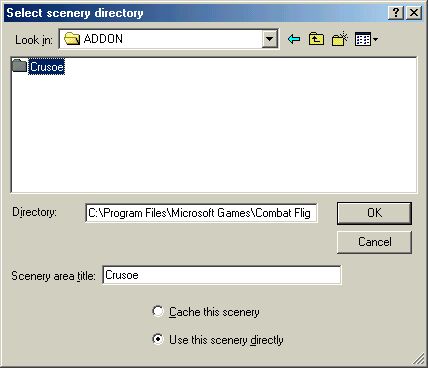
Wouldn't it show the files in the folder while in the Sim ?

No files will show when you select the folder from the Scenery Library. This shot is from CFS2 but it will be much the same in FS9.
Image

My little tute might help. http://www.simviation.com/lair/fs2004sc.htm

Last edited by Hagar on Wed Mar 08, 2006 6:24 am, edited 1 time in total.
Image

Founder & Sole Member - Grumpy's Over the Hill Club for Veteran Virtual Aviators
Member of the Fox Four Group
My Google Photos albums
My Flickr albums
User avatar
Hagar
Colonel
Colonel
 
Posts: 30868
Joined: Wed Jun 19, 2002 7:15 am
Location: Costa Geriatrica

Re: Checking scenery installation

Postby commoner » Wed Mar 08, 2006 6:06 am

..if you don't actually see anything in the folder you have opened when you are browsing from the Add Area screen it is probably that you have gone too far.  Just SELECT(NOT OPEN) the folder with the name of the scenery as in Hagars pic. and if it shows a path as it does there then click ok............commoner ;)
Last edited by commoner on Wed Mar 08, 2006 6:08 am, edited 1 time in total.
Image"In theory, there is no difference between theory and practice. But, in practice, there is."

User avatar
commoner
Major
Major
 
Posts: 3221
Joined: Sat Aug 28, 2004 2:26 am
Location: Yorkshire. England. UK.

Re: Checking scenery installation

Postby thebrelon » Wed Mar 08, 2006 6:08 am

my 2 cents:
If you installed FS somewhere else than the default path (C: blablabla), and didn't show where is installed your addon before clicking "install", then your addon may be instaledl on a different partition than FS.

I installed FS on my D drive, and some scenery auto install will install themself on C if not redirected to D...

don't know if it help you, hope so...

good luck
vince
Image
laptop: kenitec D900TV
Pentium 4 3.4gHz HT
4Gb corsair DDR II 533MHZ
2x 60Gb Hard drive
Nvidia geforce 6800  DDR3 256 Mb
User avatar
thebrelon
Captain
Captain
 
Posts: 838
Joined: Tue Sep 20, 2005 2:50 pm
Location: france

Re: Checking scenery installation

Postby caveman16 » Wed Mar 08, 2006 9:34 am

Last edited by caveman16 on Wed Mar 08, 2006 9:39 am, edited 1 time in total.
My PC's Specks:  Case:  Thermaltake v7000c/ 5 very quiet case fans.  Motherboard: AMD/ASUS-A8N32-Sli Deluxe Socket 939  Processor:  AMD Athion 64x2  4400+/Socket939 Dual Core.  Operating System:  Windows XP Hom
caveman16
1st Lieutenant
1st Lieutenant
 
Posts: 346
Joined: Tue Oct 18, 2005 8:47 am
Location: Murphy, N.C.

Re: Checking scenery installation

Postby Hagar » Wed Mar 08, 2006 12:02 pm

[quote]The Scenery installed is
Image

Founder & Sole Member - Grumpy's Over the Hill Club for Veteran Virtual Aviators
Member of the Fox Four Group
My Google Photos albums
My Flickr albums
User avatar
Hagar
Colonel
Colonel
 
Posts: 30868
Joined: Wed Jun 19, 2002 7:15 am
Location: Costa Geriatrica

Re: Checking scenery installation

Postby caveman16 » Wed Mar 08, 2006 11:52 pm

Hey guys ,     I think I've got it installed right this time. I'll give it a comparison check next .

     Appreciate  all you Guys help.      caveman
My PC's Specks:  Case:  Thermaltake v7000c/ 5 very quiet case fans.  Motherboard: AMD/ASUS-A8N32-Sli Deluxe Socket 939  Processor:  AMD Athion 64x2  4400+/Socket939 Dual Core.  Operating System:  Windows XP Hom
caveman16
1st Lieutenant
1st Lieutenant
 
Posts: 346
Joined: Tue Oct 18, 2005 8:47 am
Location: Murphy, N.C.


Return to FS 2004 - A Century of Flight

Who is online

Users browsing this forum: No registered users and 292 guests