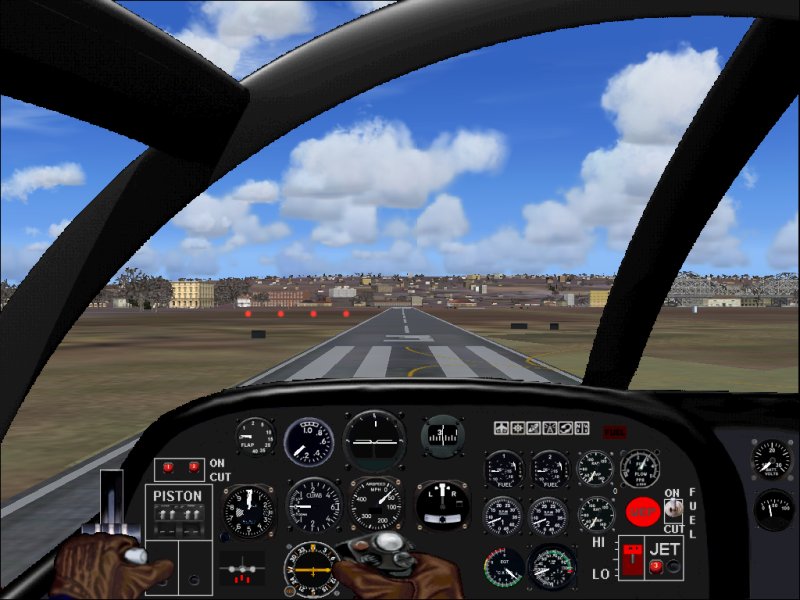
missing savage( scrub) panel

Forum dedicated to Microsoft FS2004 - "A Century of Flight".

missing savage( scrub) panel

Postby osvep » Sat Feb 04, 2006 11:16 am

I find Savage a notable aircraft by his innovative design.So I download recent Scrub remake of jacobson
previous model.Then I follow carefully the instalation instruction of the readme for FS9.But even whith 3 trials
the 2d main panel does not display.I change the name as is indicated of the panel cfg but nothing happens.Does anyone experienced same trouble? Is it possible to avoid aliasing the panel and repair the proper one?I also try with fs2002 file of jacobsen but there the problem is the bomb bay which I cannot close.
It is a  pity because the plane and the model are very good.Thanks a lot.Regards. :(
osvep
Ground hog
Ground hog
 
Posts: 43
Joined: Thu Mar 17, 2005 1:29 am

Re: missing savage( scrub) panel

Postby wji » Sat Feb 04, 2006 12:39 pm

Almost, without exception every time I alias an FS9 panel and it doesn't show it's because of errors I wrote into the alias= part of the panel.cfg file.

One time I even spelt alias incorrectly -- alais . . .

[fltsim]
alias=fsfsconv\dhc6_310
;alias=BEECH_KING_AIR_350\panel

I'd check then re-check the alias coding in panel.cfg file
P.S. Remember, panel.1; panel.2 etc., can be aliased
Image PhotoShop 7 user
User avatar
wji
Major
Major
 
Posts: 1644
Joined: Tue May 04, 2004 11:27 am

Re: missing savage( scrub) panel

Postby Hagar » Sat Feb 04, 2006 12:41 pm

I assume you mean this one here. http://www.simviation.com/fs2004military92.htm

For the included panel to display in FS9 first open the Panel folder & rename the file named Panel_FS8-9.cfg to Panel.cfg. Then open the subfolder named Gauges & paste the folder inside it (named AJ-2) into the Savage\Panel folder (or the FS9\Gauges folder). It should then look like this.

Image
Image

Founder & Sole Member - Grumpy's Over the Hill Club for Veteran Virtual Aviators
Member of the Fox Four Group
My Google Photos albums
My Flickr albums
User avatar
Hagar
Colonel
Colonel
 
Posts: 30868
Joined: Wed Jun 19, 2002 7:15 am
Location: Costa Geriatrica

Re: missing savage( scrub) panel

Postby osvep » Sun Feb 05, 2006 7:56 pm

Thanks  hagar and wji by your cooemnts,but no results
after 2 another trials following carefully hagar and readme procedure.FSImmanager advice missing panel.cfg              
wich is consistent but  I rename panel_fs89.cfg properly!
I also download the same file from fsdome but the error persist... Now I will try with Mr scrub because as hagar shows it is a necesary panel for proper operation of the
jet and piston engines.Anyway I gess that there were no such problems for others simmers and perhaps my pc or the internet local server I used have any . ???
osvep
Ground hog
Ground hog
 
Posts: 43
Joined: Thu Mar 17, 2005 1:29 am

Re: missing savage( scrub) panel

Postby Hagar » Mon Feb 06, 2006 3:59 am

Anyway I gess that there were no such problems for others simmers and perhaps my pc or the internet local server I used have any . ???

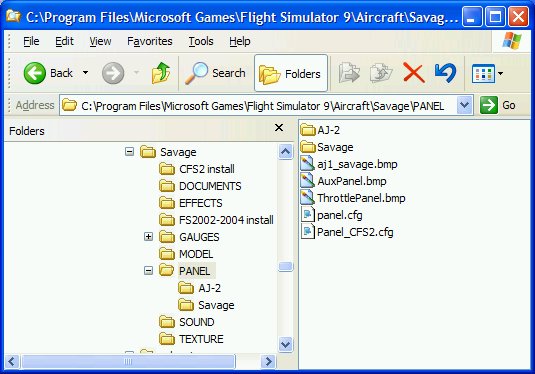
I doubt if the author can tell you any different from me. If you tried this from two different sites it's unlikely to be a problem with the files or your PC. Make sure you follow the instructions carefully & rename that file using the correct file name - Panel.cfg. This should be in the Panel folder along with 3 BMP files.

This is how the Panel folder of my own Savage looks. (The AJ-2 folder is the gauge I mentioned which could be pasted into FS9\Gauges if you prefer.)

Image

PS. [quote]FSImmanager advice missing panel.cfg wich is consistent but
Last edited by Hagar on Mon Feb 06, 2006 4:15 am, edited 1 time in total.
Image

Founder & Sole Member - Grumpy's Over the Hill Club for Veteran Virtual Aviators
Member of the Fox Four Group
My Google Photos albums
My Flickr albums
User avatar
Hagar
Colonel
Colonel
 
Posts: 30868
Joined: Wed Jun 19, 2002 7:15 am
Location: Costa Geriatrica

Re: missing savage( scrub) panel

Postby osvep » Sat Feb 11, 2006 12:39 pm

Hagar: thanks again.Scrubby pc sent me  a folder panel
which I just copy in the savage folder and all OK! He said that probably I rename the panel file and not the FS89_panel _cfg .Even I cannot get the difference that was as you also mentioned, probably, the error .Anyway problem solved! (but not the one of my poor pc expertise .Time and your kindly help may solve this too...) regards . pd  a nice panel   for a notable aircraft. :D
osvep
Ground hog
Ground hog
 
Posts: 43
Joined: Thu Mar 17, 2005 1:29 am


Return to FS 2004 - A Century of Flight

Who is online

Users browsing this forum: No registered users and 330 guests