Any help with a font problem?

Forum dedicated to Microsoft FS2004 - "A Century of Flight".

Any help with a font problem?

Postby Indigojones » Sun Jan 29, 2006 10:39 am

Hi all, if I haven't said hello to you in my other message then you can be greeted here! ;) I'm new, in case you didn't notice.

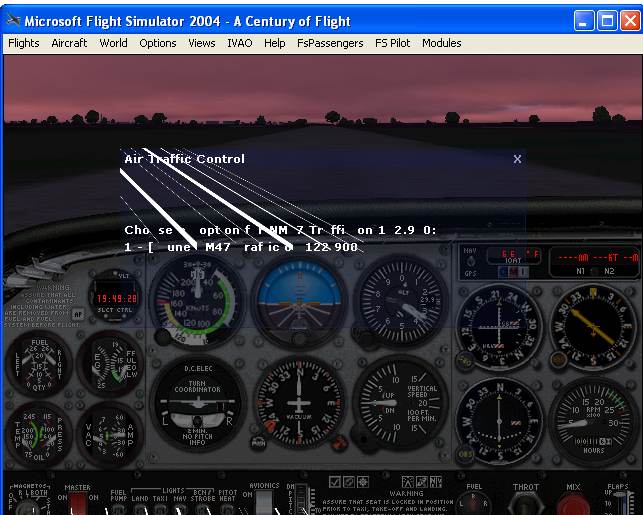
My problem is this - the font in my ATC window is all garbled. Here's a screenshot:
Image

See what I mean? I was wondering if anybody could help me out. For a bit of background, I'm running FS 9.1. My card is an ATI Radeon 9000 with brand new drivers. I'm pretty sure that this is not simply a FS issue, as the last few driver releases have garbled font elsewhere on my system and left an unsightly shadow under my mouse arrow.
Anyone have any ideas, or seen this before? ???
Thanks
User avatar
Indigojones
Ground hog
Ground hog
 
Posts: 40
Joined: Sun Jan 29, 2006 11:10 am

Re: Any help with a font problem?

Postby wji » Sun Jan 29, 2006 11:08 am

It may be a case where the latest video drivers are not the best video drivers for FS9. This is the case with my NVidia Ti4200 card. It works perfectly (after once screwing it up with the latest drivers.

There is an issue with FS9 using small fonts (required setting) which may be clarified here by Microsoft

Good Luck
Image PhotoShop 7 user
User avatar
wji
Major
Major
 
Posts: 1644
Joined: Tue May 04, 2004 11:27 am

Re: Any help with a font problem?

Postby phantomflyer81 » Sun Jan 29, 2006 11:12 am

Hi there,
Wierd!! I would suspect the video card firstly - check in the "known issues" on the manufacturers web site or the owners manual (maybe on the install cd). I'll do some digging around for you, but can you firstly tell me if there are any other applications (Office, Adobe, etc..) that have garbled or blurry fonts? Also, does your card have a utility for font smoothing (or anything else in regards to video quality)? Also, please let me know the exact model and specs of the ATI card. Possibly, you may get rid of this problem by right clicking an empty place on your desk top and in "properties" try to find a way to "smooth edges of screen fonts". Let me know if that does or doesn't help. I agree that this is probably not solely an FS issue.
Cheers,
Bill
SYSTEM SPECS:
P4 3.4Ghz HT; 1GbRAM:
NVidia6600GT256MbDDR3
User avatar
phantomflyer81
Ground hog
Ground hog
 
Posts: 31
Joined: Fri Dec 09, 2005 1:02 am
Location: N.Y.C. born - now in Australia

Re: Any help with a font problem?

Postby phantomflyer81 » Sun Jan 29, 2006 11:19 am

One more thing,

Try rolling back your drivers - right click "My computer" then click "Properties" - "Hardware" -"Device manager" - "Display adapters" - then the ATI's "Properties" - "Driver" - then "Roll Back driver". It may just be that the latest drivers aren't the BEST drivers for FS9 as stated by wji's post previous to mine. Funny enough, I just noticed the link on top of this forum saying "Problems with ATI drivers"!!!!
Good luck!
Bill
Last edited by phantomflyer81 on Sun Jan 29, 2006 11:24 am, edited 1 time in total.
SYSTEM SPECS:
P4 3.4Ghz HT; 1GbRAM:
NVidia6600GT256MbDDR3
User avatar
phantomflyer81
Ground hog
Ground hog
 
Posts: 31
Joined: Fri Dec 09, 2005 1:02 am
Location: N.Y.C. born - now in Australia

Re: Any help with a font problem?

Postby Indigojones » Sun Jan 29, 2006 8:08 pm

Thank you for your help!
WJI, that's a good suggestion that I tried. The early versions of the ATI drivers leave the ATC font as it should be, but FS crashes fairly regularly. It's only with the newer versions of the Catalyst Drivers that font has started to garble in places. With the previous version of my drivers, it was a lot worse - all file and folder names just looked very distorted, which thankfully they don't with the newest release. The entry in the MS knowledge base went a bit over my head!

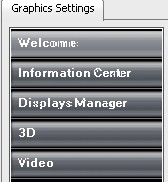
Phantomflyer - thanks for hunting around, I really appreciate it. There's nothing available to me in terms of font smoothing, and I don't get any font irregularites when i write anything in word etc. The only time font appears like this is if it already present in a program, like a File or Edit menu, or something simular. Interestingly enough, while checking around on the graphics card utility, it occured in the menu there -
Image

This made me think that perhaps the issue occurs when this particular font style is used. From what I can see, the fonts in the ATC screenie and the one just above look like they could be the same one.

Last edited by Indigojones on Sun Jan 29, 2006 8:08 pm, edited 1 time in total.
User avatar
Indigojones
Ground hog
Ground hog
 
Posts: 40
Joined: Sun Jan 29, 2006 11:10 am


Return to FS 2004 - A Century of Flight

Who is online

Users browsing this forum: No registered users and 281 guests