Lost my.............

Forum dedicated to Microsoft FS2004 - "A Century of Flight".

Lost my.............

Postby Fly2e » Tue Jan 03, 2006 10:32 pm

Wave textures...

I seam to have these "white squares" washing up on shore instead of my nice waves!!

Where can I get them back?

Thanks,

Dave

COMING SOON!
User avatar
Fly2e
Colonel
Colonel
 
Posts: 198020
Joined: Thu Jan 17, 2002 5:29 pm
Location: KFRG

Re: Lost my.............

Postby Mobius » Wed Jan 04, 2006 12:49 am

You could try downloading new waves, I think there were some over at avsim, but I can't really remember if they were very good.  Search for waves in the FS2004 scenery, I don't really know much about this though, so I would wait for someone else's opinion. ;)

I've often though about this though, is there a way that someone would be able to post all the default texture files or parts so anyone who has little mishaps like this would be able to easily replace their missing or broken textures.  But this shouldn't be necessary if anyone backed up their files, but who does that? ;) :)
Last edited by Mobius on Wed Jan 04, 2006 12:50 am, edited 1 time in total.
Image
User avatar
Mobius
Major
Major
 
Posts: 3653
Joined: Thu Nov 04, 2004 10:44 pm
Location: Wisconsin

Re: Lost my.............

Postby Clipper » Wed Jan 04, 2006 6:05 am

Dave I experienced the exact same problem a couple of months ago. Initially I fixed it by reinstalling FS9. Then I made a back up file with all the "textures" in FS9 and next time it happens I'll just replace the texture files. There may be an easier way to fix, but reinstall will work for certain..Cheers....Clipper
Image
User avatar
Clipper
Global Moderator
Global Moderator
 
Posts: 8420
Joined: Tue Aug 23, 2005 5:40 am

Re: Lost my.............

Postby garymbuska » Wed Jan 04, 2006 10:26 am

You should be able to find the textures on one of the CDS not sure which one but I think it is the first one just look through the .CAB files unzip them to any folder other than FS, then drag the folder over to FS and over write.
If you had any downloaded textures you will loose them. 8)
Gary M Buska
SYSTEM Specs ASUS P8Z68 V/GEN 3 mother board: INTELL I7 2600k 3.48 ghz Quad core CPU with Sandy bridge: 12 Gigs of 1800hz ram:
GTX 950 OVER CLOCKED: 2 Gigs Ram Windows 10 Home 64 bit Operating system. 750W Dedicated modular power supply. Two Internal 1TB hard drives 1 External 1TB 3.2 USB hard drive. SAITEK Cessna flight Yoke with throttles.
CH Rudder Peddles 27 inch Wide screen Monitor
User avatar
garymbuska
Major
Major
 
Posts: 4415
Joined: Tue Dec 30, 2003 11:10 am
Location: Jacksonville, Florida

Re: Lost my.............

Postby wji » Wed Jan 04, 2006 10:34 am

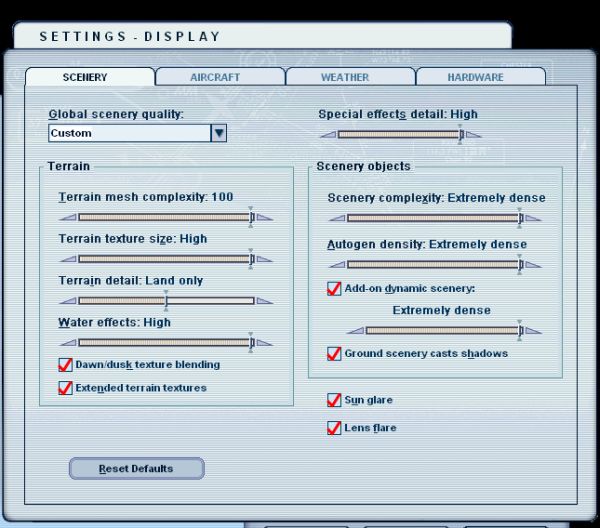
Check FS9 Options/Settings/Display . . . as I recall the choice is between 'Water Effects-High' and 'Terrain Detail-Land Only'

They cannot both be set to maximum at the same time.

Image

I hope this helps . . .
Last edited by wji on Wed Jan 04, 2006 10:47 am, edited 1 time in total.
Image PhotoShop 7 user
User avatar
wji
Major
Major
 
Posts: 1644
Joined: Tue May 04, 2004 11:27 am

Re: Lost my.............

Postby Fly2e » Wed Jan 04, 2006 2:26 pm

Thanks so far.

I have FS9 installed on my other PC so getting the original texture is not a problem.
I just need to know the name of it.  ;)

WJI, I have not checked that and I do remember playing with a setting recently because of some Mega Scenery tweaking.
That is quite possible.

BUT if anybody knows the name of the original WAVE TAEXTURE FILE, that would be great.

Thanks again..
COMING SOON!
User avatar
Fly2e
Colonel
Colonel
 
Posts: 198020
Joined: Thu Jan 17, 2002 5:29 pm
Location: KFRG

Re: Lost my.............

Postby dave3cu » Wed Jan 04, 2006 4:10 pm

Waves are effects so will be controlled by the 'effects' slider.

2 effects files look like they could be involved: fx_lakewaves.fx and fx_waves.fx.

They both call the following textures in the ...effects\texture\ folder: fx_swoosh.bmp and fx_swoosh2.bmp

Dave
At that time [1909] the chief engineer was almost always the chief test pilot as well. That had the fortunate result of eliminating poor engineering early in aviation.
dave3cu
Major
Major
 
Posts: 3141
Joined: Sun May 19, 2002 9:55 am
Location: 3CU, Northern Wisconsin, USA

Re: Lost my.............

Postby Fly2e » Wed Jan 04, 2006 4:29 pm

Yes, the waves are moving like they should, but they are whitish squares so I assume the effect is working but the texture is missing...

Dave
COMING SOON!
User avatar
Fly2e
Colonel
Colonel
 
Posts: 198020
Joined: Thu Jan 17, 2002 5:29 pm
Location: KFRG

Re: Lost my.............

Postby dave3cu » Wed Jan 04, 2006 4:36 pm

Maybe check the file dates on the mentioned .bmps. The originals are from 2001 and 2003.

Maybe they have been modified and alpha channels left out or altered??

Dave
Last edited by dave3cu on Wed Jan 04, 2006 4:39 pm, edited 1 time in total.
At that time [1909] the chief engineer was almost always the chief test pilot as well. That had the fortunate result of eliminating poor engineering early in aviation.
dave3cu
Major
Major
 
Posts: 3141
Joined: Sun May 19, 2002 9:55 am
Location: 3CU, Northern Wisconsin, USA

Re: Lost my.............

Postby Mynameisnemo » Wed Jan 04, 2006 5:48 pm

is it OceanHeightField.bmp
found in this directory C:\Program Files\Microsoft Games\Flight Simulator 9\scenery\world\texture\OceanHeightField.bmp ?

nemo.......
Mynameisnemo
 

Re: Lost my.............

Postby dave3cu » Wed Jan 04, 2006 6:44 pm

Experimented with the 2 .bmps I mentioned above. Removed the alpha and got the effect your speaking of, white rectangles moving onto and off from the shore.

So still guess that restoreing the 2 files will solve the problem.
CD1\MSGame1.cab\
Last edited by dave3cu on Thu Jan 05, 2006 3:17 pm, edited 1 time in total.
At that time [1909] the chief engineer was almost always the chief test pilot as well. That had the fortunate result of eliminating poor engineering early in aviation.
dave3cu
Major
Major
 
Posts: 3141
Joined: Sun May 19, 2002 9:55 am
Location: 3CU, Northern Wisconsin, USA

Re: Lost my.............

Postby Fly2e » Thu Jan 05, 2006 2:39 pm

Thanks allot Dave,
That is exactly what I was looking for!!
Like I said, I have FS9 on another machine.

I will try tonight but I bet that is it!!

I appreciate your time in helping me out on this one!!

Dave
COMING SOON!
User avatar
Fly2e
Colonel
Colonel
 
Posts: 198020
Joined: Thu Jan 17, 2002 5:29 pm
Location: KFRG

Re: Lost my.............

Postby Fly2e » Fri Jan 06, 2006 8:04 am

Thanks again Dave3cu!

Grabbed those two swoosh textures from my other PC and now I have waves!!

Appreciate your help!!  ;)

Dave
COMING SOON!
User avatar
Fly2e
Colonel
Colonel
 
Posts: 198020
Joined: Thu Jan 17, 2002 5:29 pm
Location: KFRG


Return to FS 2004 - A Century of Flight

Who is online

Users browsing this forum: No registered users and 284 guests