
IFR training in FS9- lesson 1

Forum dedicated to Microsoft FS2004 - "A Century of Flight".

IFR training in FS9- lesson 1

Postby beaky » Sun Dec 18, 2005 6:18 pm

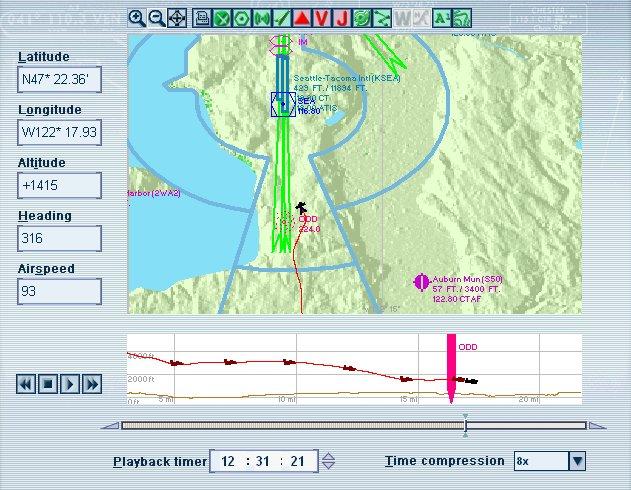
Decided to finally start learning IFR ops in the sim today; the FS9 lessons are not so bad in the IFR portion, and I was actually able to satisfy the usually-insane virtual Rod Machado. Did a few VOR approaches on my own (really the first time I've done so in earnest), and here are the results:

Definitely a tendency start chasing both the OBS and ADF here... LOL.
Image


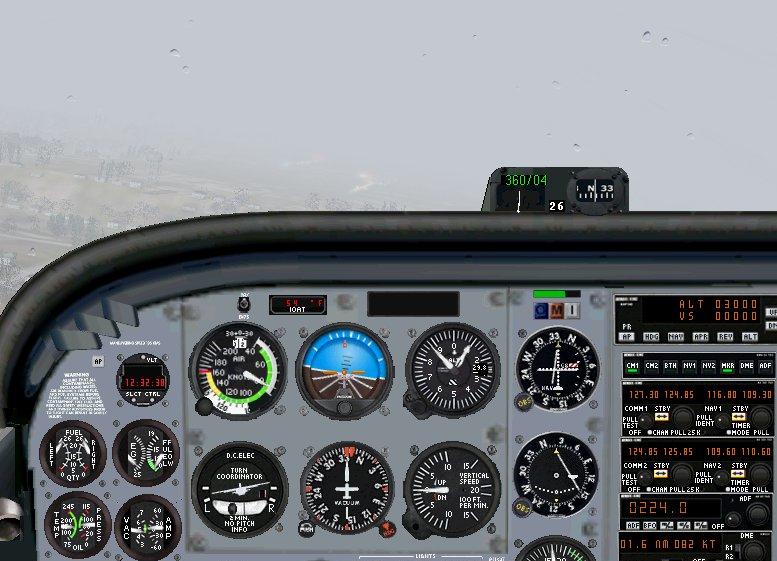
Just a smidge below the 920-foot MDA, I spied the runway. It's very hard to fly even the RealAir C172 like this: just does not behave enough like the real thing to make those small corrections smoothly.
Image


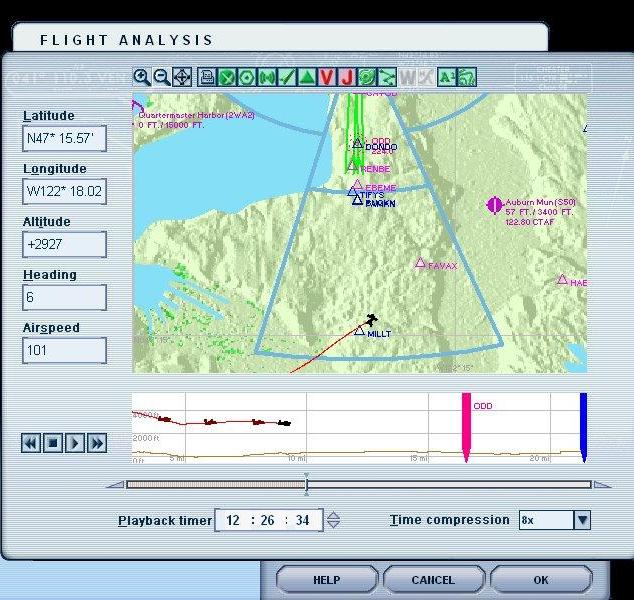
2nd attempt: turned a bit late after crossing the radial:
Image


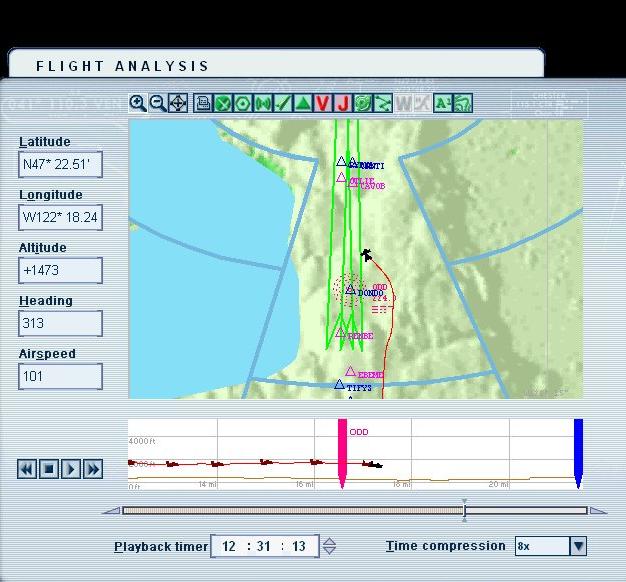
Again, veering around the NDB for some reason: I broke out more in line with the runway on this one, at least...
Image

On the third pass, I tried a missed approach as per the chart. Not great, but not too bad.
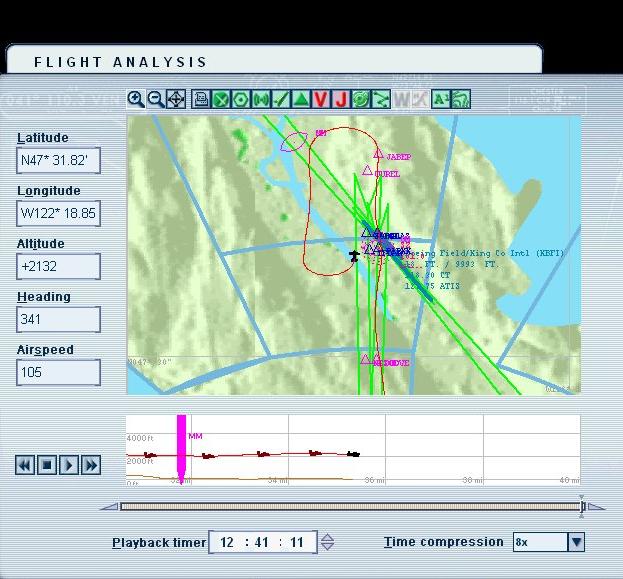
Image

Pretty excited about continuing this, but eventually, to practice until I've acquired the sim equivalent of all the hours needed for the checkride, I'll be creating training flights from scratch...
My question about that is: how can you incorporate the FS9 ATC into this without them constantly trying to vector you? Is the only choice to ignore their commands to do what you're doing anyway,listening only for traffic calls, clearances, etc.? I get the feeling that even if I requested the published VOR approach they'd have me doing something else.
And another question: had I told ATC I was on that missed approach, what would their directions have been? Would they vector me back to the proper radial for the VOR approach to 34R without having me circle?

Image
User avatar
beaky
Global Moderator
Global Moderator
 
Posts: 12877
Joined: Thu Dec 16, 2004 8:00 am
Location: Shenandoah, PA USA

Re: IFR training in FS9- lesson 1

Postby flyboy 28 » Sun Dec 18, 2005 6:29 pm

I need to learn how to do that.. ::)
User avatar
flyboy 28
Colonel
Colonel
 
Posts: 10266
Joined: Thu Jun 12, 2003 4:01 pm
Location: Jacksonville, FL

Re: IFR training in FS9- lesson 1

Postby beaky » Sun Dec 18, 2005 9:11 pm

I need to learn how to do that.. ::)


It is not easy. The CG instructor is a little more sensible than I've experienced trying the PP lessons, but it's annoying. Just started the ILS approach lessons, and "Rod" decided on short final to tell me how to flare... about 50 times. I need to get a dummy to sit next to me so I can hit it in the mouth whenever the sim does that...;D
But I did get a "good job!" comment on my first ILS approach... very satisfying to pull it off, albeit not very smoothly.
Image
User avatar
beaky
Global Moderator
Global Moderator
 
Posts: 12877
Joined: Thu Dec 16, 2004 8:00 am
Location: Shenandoah, PA USA

Re: IFR training in FS9- lesson 1

Postby Nexus » Sun Dec 18, 2005 9:21 pm

Congrats man  :)
I know you've got the flying down pat, so you'll be executing ILS approaches with your eyes shut in no time  :P
Nexus
Major
Major
 
Posts: 3240
Joined: Fri Jul 18, 2003 4:18 pm

Re: IFR training in FS9- lesson 1

Postby Marlin » Sun Dec 18, 2005 10:19 pm

Ya know this is funny, I was just thinking about doing the same set of courses after an entire flight of IFR. Of course no autopilot.

Looks like your close to getting your cert. Good luck.
Marlin
1st Lieutenant
1st Lieutenant
 
Posts: 486
Joined: Thu Dec 30, 2004 1:14 am
Location: NEW Mexico

Re: IFR training in FS9- lesson 1

Postby Nav » Sun Dec 18, 2005 11:31 pm

I'm surprised at you, rottydaddy - all those 'hours' (3,500 posts) rising to Resident status and you've been skipping your homework all this time!  :)

I'll be creating training flights from scratch...
My question about that is: how can you incorporate the FS9 ATC into this without them constantly trying to vector you?


Don't understand the problem? As far as I know, flying IFR, FS9 ATC will only ever give you vectors and heights to final approach - never VOR-to-VOR. But why not plan your flight VFR anyway? That way, they'll only give you a circuit direction and landing runway, not specific vectors? If you want to set up some 'nice' IFR weather, maybe do it after you take off?

For my part, I found Rod Machado very good at first, but very annoying later on. I got the hang of flying IFR mostly by doing the ready-made 'Aerial Chauffeur' scenario in the Flights Menu.

The weather is typical New England (i.e. grey and blustery) throughout - the required skill standard is cleverly planned, scenario by scenario, to rise gradually from 'Huh - piece of cake!' ('Book Signing in Provincetown') through 'This is going to be tricky' (Lecture in Northampton') to 'Oh my Gawd!' ('Home at Last').

For even bigger challenges, try some of the 'Reeve Aleutian Airlines' scenarios. One of the advantages of the ready-made 'scenarios' is that you don't have to use the assigned aircraft (in that case, the DC3 Dakota) - you can substitute any other type.

Highly recommended!  :)
Nav
Captain
Captain
 
Posts: 717
Joined: Thu Sep 30, 2004 11:29 pm

Re: IFR training in FS9- lesson 1

Postby Saitek » Mon Dec 19, 2005 11:33 am

I started the IFR lessons after passing my PPL - but haven't finished them. I just haven't the time for much flying and the lessons require a lot of flying not spanned out over many weeks. When I do get the odd hour I like to fly properly. ;)
Windows 7 Pro 64bit
Intel Core 2 Duo E2180 2GHz
GA-P35-DS3L Intel P35
Kingston HyperX 4GB (2x2) DDR2 6400C4 800Mhz
GeForce 8800 GT 512MB
2 x 22" monitors
200GB Sata
Be Quiet! Straight Power 650W

Flying FS
Saitek
Lieutenant Colonel
Lieutenant Colonel
 
Posts: 5274
Joined: Thu Jun 19, 2003 3:04 pm
Location: UK

Re: IFR training in FS9- lesson 1

Postby garymbuska » Mon Dec 19, 2005 3:28 pm

The problem with FS is you never really know what type of approach ATC will give you. I am not sure if it uses STARS or not but I have had them take me out quite some way before finally vectoring back for a landing. I know in the real world every airport has a unique pattern you fly on a missed approach but not sure if fs uses that or not.
But if you have the plates handy for the airport you are at you can fly the actual missed approach pattern if you are flying VFR. 8)
Gary M Buska
SYSTEM Specs ASUS P8Z68 V/GEN 3 mother board: INTELL I7 2600k 3.48 ghz Quad core CPU with Sandy bridge: 12 Gigs of 1800hz ram:
GTX 950 OVER CLOCKED: 2 Gigs Ram Windows 10 Home 64 bit Operating system. 750W Dedicated modular power supply. Two Internal 1TB hard drives 1 External 1TB 3.2 USB hard drive. SAITEK Cessna flight Yoke with throttles.
CH Rudder Peddles 27 inch Wide screen Monitor
User avatar
garymbuska
Major
Major
 
Posts: 4415
Joined: Tue Dec 30, 2003 11:10 am
Location: Jacksonville, Florida

Re: IFR training in FS9- lesson 1

Postby beaky » Mon Dec 19, 2005 9:25 pm

I'm surprised at you, rottydaddy - all those 'hours' (3,500 posts) rising to Resident status and you've been skipping your homework all this time!  :)


Yes, it's quite possible I've spent more time talking about FS9 than flying it... ;D. But I have occasional  bouts of seriousness about it; this is one of them. I'm actually preparing myself for pursuit of a RL  instrument rating (just as soon as I find a sack of money)... training with this sim won't hurt any. It's  much harder to trim and stabilize the virtual C172 on instruments than the real thing, so I figure if I can pass the checkride despite that (and the crazy virtual instructor), I might have an edge... ;D


Don't understand the problem? As far as I know, flying IFR, FS9 ATC will only ever give you vectors and heights to final approach - never VOR-to-VOR. But why not plan your flight VFR anyway? That way, they'll only give you a circuit direction and landing runway, not specific vectors? If you want to set up some 'nice' IFR weather, maybe do it after you take off?

For my part, I found Rod Machado very good at first, but very annoying later on. I got the hang of flying IFR mostly by doing the ready-made 'Aerial Chauffeur' scenario in the Flights Menu.

The weather is typical New England (i.e. grey and blustery) throughout - the required skill standard is cleverly planned, scenario by scenario, to rise gradually from 'Huh - piece of cake!' ('Book Signing in Provincetown') through 'This is going to be tricky' (Lecture in Northampton') to 'Oh my Gawd!' ('Home at Last').

For even bigger challenges, try some of the 'Reeve Aleutian Airlines' scenarios. One of the advantages of the ready-made 'scenarios' is that you don't have to use the assigned aircraft (in that case, the DC3 Dakota) - you can substitute any other type.

Highly recommended!  :)


Makes sense to file VFR so they'll leave me alone...  ;D
First time i tried a flight from another field to a VORapproach at KSEA, even though I created an IFR plan, when I got cleared they immediately vectored me to a fix I hadn't selected ( >:( !!)
Maybe I should think of flying with ATC vectoring me as "dual"...;D

I've done a couple of ILS approaches now; not too tricky, really. I've been using the Silver Wings "Gray Day" wx for all flights: ceiling @ 1000, and a few bumps here and there. I find it much easier to concentrate on my IFR scan with nothing but gray visible outside. And oh, the FPS!!! ;D
I haven't tried the "Aerial Chaffeur" flights yet, but did some VFR DC3 flying on those "Reeve " flights.
Image
User avatar
beaky
Global Moderator
Global Moderator
 
Posts: 12877
Joined: Thu Dec 16, 2004 8:00 am
Location: Shenandoah, PA USA

Re: IFR training in FS9- lesson 1

Postby Nav » Mon Dec 19, 2005 11:06 pm

Agree entirely about the C172 - almost impossible to trim hands-off. And the default Beech Baron is even worse, downright 'orrible. If you haven't tried the Mooney, maybe give it a go? Broadly similar to the Cessna, just a bit faster -  and much more 'trimmable'.

About filing VFR but wanting to simulate IFR conditions - why not just set your practice flights up at night with a fair bit of low cloud?
Nav
Captain
Captain
 
Posts: 717
Joined: Thu Sep 30, 2004 11:29 pm


Return to FS 2004 - A Century of Flight

Who is online

Users browsing this forum: No registered users and 251 guests
