QNH??

Forum dedicated to Microsoft FS2004 - "A Century of Flight".

QNH??

Postby andrewgeorge60 » Sat Dec 03, 2005 10:33 am

Hi all....

ive got the a340 just flight airbus aircraft.  My altimeter is always incorrect.  This is because of the QNH setting or atmospheric pressure.  

Pressing 'B' just changes the setting from manual input or 'standard' 29.92.  How do you know what setting to set it to when on the ground.  ATC doesnt tell you the QNH Please help,

Thanks

Andy
andrewgeorge60
Ground hog
Ground hog
 
Posts: 44
Joined: Wed May 11, 2005 3:26 pm

Re: QNH??

Postby Hai Perso Coyone? » Sat Dec 03, 2005 10:37 am

Best posting this at the Payware Board way at the bottom of the index... ;)
User avatar
Hai Perso Coyone?
Ground hog
Ground hog
 
Posts: 0
Joined: Fri Jan 12, 2007 7:31 pm
Location: Rome, Italy

Re: QNH??

Postby Nexus » Sat Dec 03, 2005 10:59 am

Listen to the ATIS perhaps?
Nexus
Major
Major
 
Posts: 3240
Joined: Fri Jul 18, 2003 4:18 pm

Re: QNH??

Postby wji » Sat Dec 03, 2005 11:07 am

I guess we can make our simulator experience as easy or complicated as we want.

Pressing the 'b' key will set most FS9 altimeters (but not all) to the current atmospheric pressure. Some FS9 altimeters register both North American and International barometric scales.

Either way, the current atmospheric pressure is set in FS9 by using the 'b' key.

If, on the other hand, one wants to set the altimeter to the current ground elevation as we realworld pilots do (when no atmospheric ATIS pressure is available), simply look at your airport plate or chart, and set the altimeter to read the airport's elavation as recorded on said plate.

References cited: Read QNH and QNE parts
Last edited by wji on Sat Dec 03, 2005 11:10 am, edited 1 time in total.
Image PhotoShop 7 user
User avatar
wji
Major
Major
 
Posts: 1644
Joined: Tue May 04, 2004 11:27 am

Re: QNH??

Postby Graycat » Sat Dec 03, 2005 11:21 am

Heya Andy,

Bill and Nexus have some excellent points.  I agree.
Last edited by Graycat on Sat Dec 03, 2005 11:23 am, edited 1 time in total.
Happy Flying -- And may your main wheels always touch down first!

Dave F.
User avatar
Graycat
2nd Lieutenant
2nd Lieutenant
 
Posts: 114
Joined: Thu Jun 23, 2005 11:31 am
Location: Dallas, TX

Re: QNH??

Postby andrewgeorge60 » Sat Dec 03, 2005 1:38 pm

Thanks all,

cheers greycat... thats a great tip, works good never tried that before thanks,   aahhhh sighh of relief, i can fly again!!!

Andy
andrewgeorge60
Ground hog
Ground hog
 
Posts: 44
Joined: Wed May 11, 2005 3:26 pm

Re: QNH??

Postby TacitBlue » Sat Dec 03, 2005 6:01 pm

[quote]
Image
A&P Mechanic, Rankin Aircraft 78Y

Aircraft are naturally beautiful because form follows function. -TB
User avatar
TacitBlue
Major
Major
 
Posts: 3856
Joined: Mon Nov 08, 2004 12:33 pm
Location: Saint Joseph, Missouri, USA

Re: QNH??

Postby xtp » Sat Dec 03, 2005 6:48 pm

Transition altitude might be 18,000 in US airspace, but it is very much lower in other parts of the world.

In general, national transition altitudes are set so that the minimum flight level is certain to be above the highest ground level.
Last edited by xtp on Sat Dec 03, 2005 6:48 pm, edited 1 time in total.
xtp
2nd Lieutenant
2nd Lieutenant
 
Posts: 62
Joined: Sun Apr 27, 2003 12:59 pm

Re: QNH??

Postby klunk » Sun Dec 04, 2005 4:16 am

The button has quadrant functions: press at the top left and the display will be in Inches of Mercury. Top right displays Barometric pressure in the window. Bottom left decreases and bottom right increases the setting maually.
As for STD settings, click on the centre of the button, although it does have a tendancy to flash a caption asking for STD setting well below the standard 18,000ft.
:)
klunk
Ground hog
Ground hog
 
Posts: 1
Joined: Sun Dec 04, 2005 4:36 am

Re: QNH??

Postby Alphajet_Enthusiast » Sun Dec 04, 2005 5:06 am

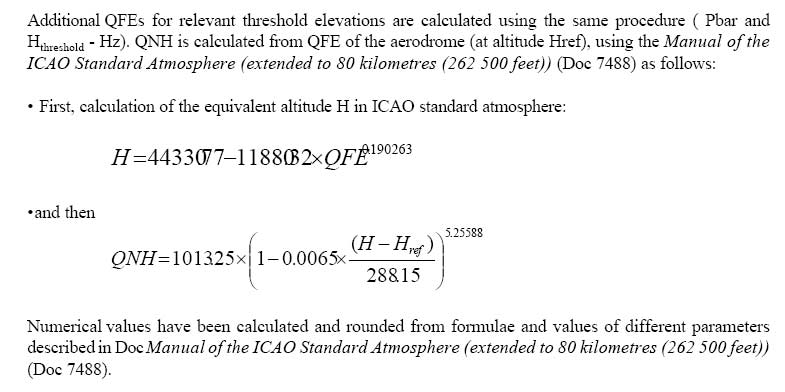
Well, hope that this can help you....

Image
Source: ICAO, Chapter 9: Pressure, http://www.icao.int/anb/SG/AMOSSG/manual/chap9.pdf

The full article is at the source website and is highly useful for these kind of calculations.  :)
Image
Macbook Pro | Nvidia Geforce 8600M GT | 2GB Ram | 2.6GHz Intel Core 2 Duo | Mac OSX 10.5 Leopard
User avatar
Alphajet_Enthusiast
Major
Major
 
Posts: 2858
Joined: Mon Jan 03, 2005 12:49 pm

Re: QNH??

Postby Fozzer » Sun Dec 04, 2005 6:57 am

Best posting this at the Payware Board way at the bottom of the index... ;)


...not really, Woozy..!

This is a very important subject which affects both sim-pilots and real-life pilots...!!

This subject often comes up in the "letter pages" of pilot magazines, and is often a source of confusion even for real pilots...:o...!

Some excellent tips in the thread, lads...
...well done... ;D...!

Paul...safely at zero altitude... 8)...!
LOL...!
Win 8.1 64-bit. DX11. Advent Tower. Intel i7-3770 3.9 GHz 8-core. 8 GB System RAM. AMD Radeon HD 7700 1GB RAM. DVD ROM. 2 Terra Byte SATA Hard Drive. Philips 17" LCD Monitor. Saitek Cyborg X Fly-5 Joystick. ...and a Briggs and Stratton Petrol Lawn Mower.
User avatar
Fozzer
Colonel
Colonel
 
Posts: 27370
Joined: Thu Jan 31, 2002 3:11 pm
Location: Hereford. England. EGBS.

Re: QNH??

Postby RollerBall » Sun Dec 04, 2005 6:15 pm

In the UK, when you approach an airfield to land, ATC gives you the QFE which is the altimeter pressure setting corrected for airfield elevation. This is almost always different from the QNH (as most airfields aren't at sea level) or the Regional setting (in real life you don't have every single little airfield you fly over giving you a different altimeter pressure setting - that would just not be safe - you get a setting covering a large area or region that each en-route radio service will give to aircraft in that region so they can all fly at known safe separations).

When you are approaching to land the QNH or Regional are pretty useless. You want to know the QFE so you get a direct reading of your true altitude with reference to the airfield elevation so you can join with other traffic and fly an accurate, safe circuit at the designated height. This can vary from typically 800ft for smaller airfields to 1000ft or higher, so it is important and you would take the trouble to find out what the joining procedure is, by telephone if necessary, or from Pooley's or Air Pilot before taking off. And it's not a difficult setting to determine - it's just a straight reading from a barometer up on the Tower wall if you will.

Not having flown en route in the US I don't know what the official procedure is but if as in the sim, all you get when approaching to land is QNH, that's pretty useless compared to what happens in Europe. Maybe one of our US real life pilots can enlighten us and explain if they really do use such a system which unnecessarily adds to pilot workload at a time when workload can already be at a pretty high level.
Last edited by RollerBall on Sun Dec 04, 2005 6:17 pm, edited 1 time in total.

RollerBall
 

Re: QNH??

Postby Nexus » Sun Dec 04, 2005 7:33 pm

Rollerball, I rarely use QFE in my IRL flying and I'll tell you exactly WHY:
QFE might  be useful in the traffic pattern because it will obiously show your HEIGHT above the airfield.
But QFE is not a good reference to use in civil aviation (military dudes use it all the time) because BCL-T requires you to determine MEA and Obstacle clearing altitude, and those are in above MSL, which you get if you use QNH.
I prefer to use QNH because I can easily pick cruising altitudes that will have me avoiding obstacles...that's it.
And I dont think it increases the workload at all, as soon I drop below TL, I switch to QNH  :)
Nexus
Major
Major
 
Posts: 3240
Joined: Fri Jul 18, 2003 4:18 pm


Return to FS 2004 - A Century of Flight

Who is online

Users browsing this forum: No registered users and 275 guests