Help - Lost default gauges

Forum dedicated to Microsoft FS2004 - "A Century of Flight".

Re: Help - Lost default gauges

Postby garymbuska » Wed Nov 30, 2005 12:25 pm

Woody Take my advice and trash the gauge cleaner program.
Every one I have seen does not work right they are bad about removing .cab files because the program thinks they are a unused gauge.
I always make a unique folder within the gauge folder for a new plane and put all of the gauges in that folder that way if I do not want it I just remove the folder and the gauges are gone. But it does take a little extra line in your aircraft cfg file to let FS know where to look for the gauges at. If you forget to put this line in your cfg file your cockpit will be void off gauges that are not default gauges. 8)
Gary M Buska
SYSTEM Specs ASUS P8Z68 V/GEN 3 mother board: INTELL I7 2600k 3.48 ghz Quad core CPU with Sandy bridge: 12 Gigs of 1800hz ram:
GTX 950 OVER CLOCKED: 2 Gigs Ram Windows 10 Home 64 bit Operating system. 750W Dedicated modular power supply. Two Internal 1TB hard drives 1 External 1TB 3.2 USB hard drive. SAITEK Cessna flight Yoke with throttles.
CH Rudder Peddles 27 inch Wide screen Monitor
User avatar
garymbuska
Major
Major
 
Posts: 4415
Joined: Tue Dec 30, 2003 11:10 am
Location: Jacksonville, Florida

Re: Help - Lost default gauges

Postby Hagar » Wed Nov 30, 2005 12:49 pm

I always make a unique folder within the gauge folder for a new plane and put all of the gauges in that folder that way if I do not want it I just remove the folder and the gauges are gone. But it does take a little extra line in your aircraft cfg file to let FS know where to look for the gauges at. If you forget to put this line in your cfg file your cockpit will be void off gauges that are not default gauges. 8)

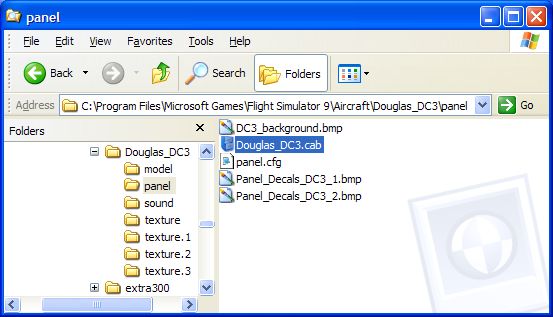
That sounds a tad complicated. There's a much easier & quicker method. Extra 3rd party gauges will display (in FS9 Only) if you paste them into the Panel folder of the aircraft they came with. This way the panel will work so can you check it out in FS9. If you decide to keep the aircraft transfer them to the FS9\Gauges folder. If you decide not to keep it simply delete the aircraft complete with the gauges.

PS. Look what I found in the default DC-3 Panel folder.

Image
Last edited by Hagar on Wed Nov 30, 2005 1:07 pm, edited 1 time in total.
Image

Founder & Sole Member - Grumpy's Over the Hill Club for Veteran Virtual Aviators
Member of the Fox Four Group
My Google Photos albums
My Flickr albums
User avatar
Hagar
Colonel
Colonel
 
Posts: 30869
Joined: Wed Jun 19, 2002 7:15 am
Location: Costa Geriatrica

Re: Help - Lost default gauges

Postby garymbuska » Thu Dec 01, 2005 11:40 am

:P Oops my mistake. What Hagar said is what I meant to say. That is what happens when you are at work and dont have excess to your system I was trying to rember how I did it and thought I was right but after reading Haggars comment I realize I was not correct. Sorry about that ::) :-[
Last edited by garymbuska on Thu Dec 01, 2005 11:41 am, edited 1 time in total.
Gary M Buska
SYSTEM Specs ASUS P8Z68 V/GEN 3 mother board: INTELL I7 2600k 3.48 ghz Quad core CPU with Sandy bridge: 12 Gigs of 1800hz ram:
GTX 950 OVER CLOCKED: 2 Gigs Ram Windows 10 Home 64 bit Operating system. 750W Dedicated modular power supply. Two Internal 1TB hard drives 1 External 1TB 3.2 USB hard drive. SAITEK Cessna flight Yoke with throttles.
CH Rudder Peddles 27 inch Wide screen Monitor
User avatar
garymbuska
Major
Major
 
Posts: 4415
Joined: Tue Dec 30, 2003 11:10 am
Location: Jacksonville, Florida

Previous

Return to FS 2004 - A Century of Flight

Who is online

Users browsing this forum: No registered users and 346 guests