Can anyone suggest why I cannot load up the Chinook helicopter Freeware from PcPilots magazine issue 32 ?
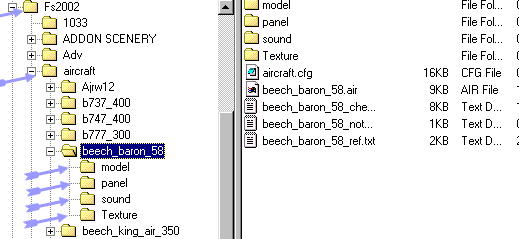
My XP set up puts the filesfrom the magazine CD into folders in My Documents. . All well and good. I thendrop and drag the folders as per the authors instructions into Explorer. When I then checkgo inExplorer via My Programmes and Microsoft Games to FS 9 2004. there is the Chinook Folder happily sitting in the Aircraft folder along with my other original aircraft like the Beechcraft and Cessna and a couple of other downloads. But when I load up the Flight Sim CD to fly the Chinook it isn't in the Aircraft option. For some reason FS9 isn't recognising Chinook. I must be doing something wrong but it is very strange how something can be in Explorer and not the Flight Sim drop down.! Or is it ? I have asked the authors but got no reply.
I notice that in My Documents there is an .cfg. file which I cannot find in the Explorer aircraft folder although whether it should be there I do not know.
Thanks in advance for any replies.

Simviation Forums
Flight Simulator and other chat